
1. Introduction
Thank you for choosing the Rowenta Force Pro 500 Steam Generator Iron. This manual provides essential information for the safe and efficient use of your appliance. Please read all instructions carefully before first use and keep them for future reference.
2. Important Safety Instructions
- Always ensure the voltage indicated on the appliance corresponds to your mains voltage.
- Do not leave the iron unattended while it is switched on or connected to the mains.
- Keep the appliance out of reach of children and persons with reduced physical, sensory, or mental capabilities.
- Never immerse the appliance, power cord, or plug in water or any other liquid.
- Do not operate the appliance if it has been dropped, if there are visible signs of damage, or if it is leaking.
- Always place the iron on a stable, flat, and heat-resistant surface.
- Unplug the appliance from the mains socket before filling the water tank, cleaning, or performing any maintenance.
- The soleplate and steam are extremely hot and can cause burns. Handle with care.
3. Product Components
Familiarize yourself with the main parts of your Rowenta Force Pro 500 steam generator iron:
- Iron Unit: The handheld part with the soleplate.
- Steam Generator Base: Houses the water tank and control panel.
- Water Tank: Removable tank for filling with water.
- Control Panel: Buttons for power, Eco mode, Max mode, and Anti-calc.
- Steam Hose: Connects the iron unit to the steam generator base.
- Calc Collector: Removable part for collecting limescale.
- Locking System: Secures the iron unit to the base for transport and storage.
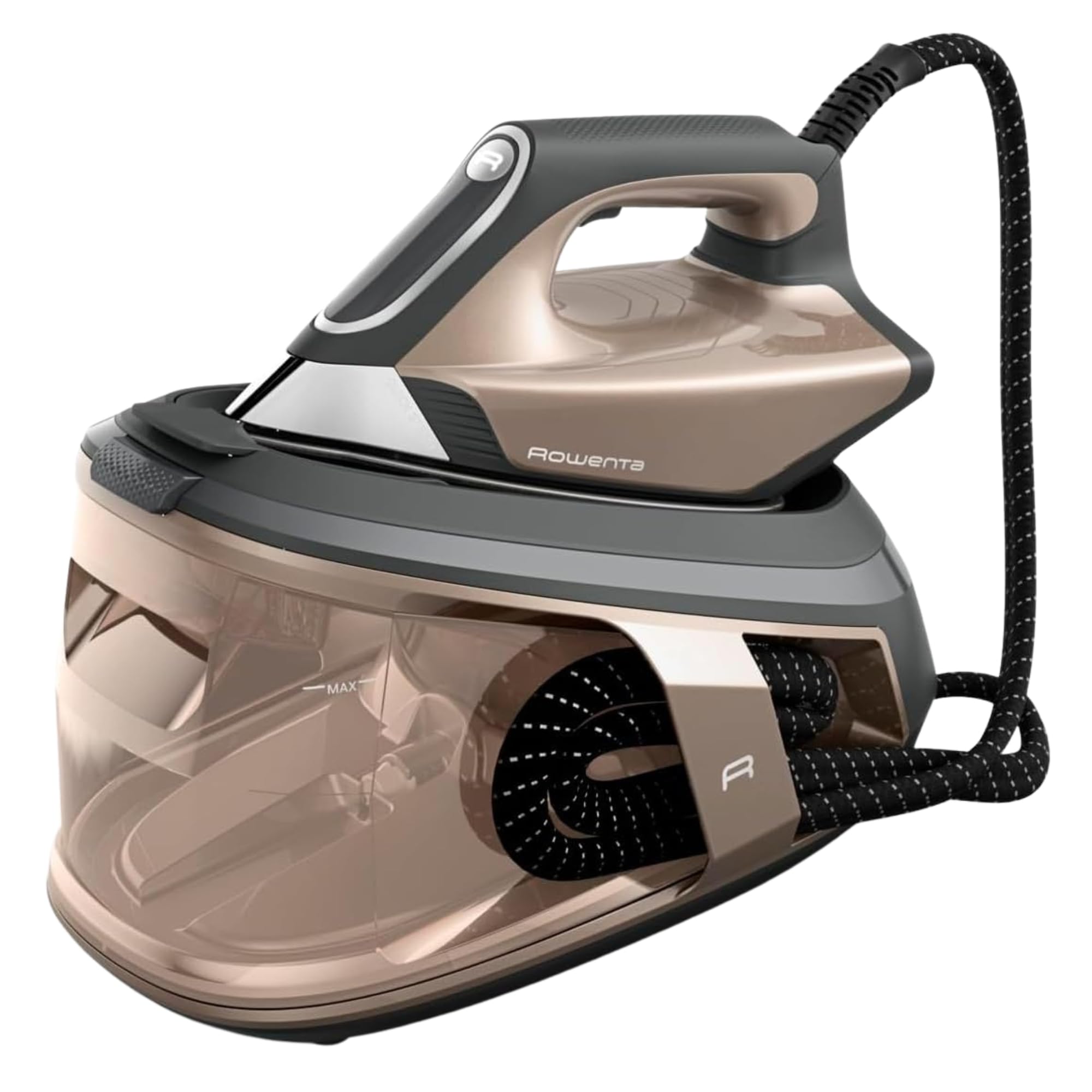
Figure 1: Overview of the Rowenta Force Pro 500 Steam Generator Iron.

Figure 2: Illustration of the removable water tank.
4. Setup and First Use
- Unpacking: Carefully remove all packaging materials and ensure all components are present.
- Positioning: Place the steam generator base on a stable, flat, and heat-resistant surface.
- Filling the Water Tank:
- Remove the water tank from the base.
- Fill the tank with tap water up to the 'MAX' level indicator. Do not use distilled or demineralized water exclusively, as it can affect steam performance.
- Reinsert the water tank firmly into the base until it clicks into place.
- Connecting to Power: Plug the power cord into a grounded electrical outlet.
- First Use Preparation: Before ironing garments, allow the iron to heat up completely. Press the steam trigger a few times to prime the system and release any initial impurities.
5. Operating Instructions
5.1 Powering On and Heating
Press the power button on the control panel. The indicator light will flash while the appliance heats up. Once the light becomes steady, the iron is ready for use.
5.2 Selecting Ironing Modes
The Rowenta Force Pro 500 features two primary ironing modes:
- ECO Mode: For energy-efficient ironing of most fabrics. This mode saves up to 50% energy while still providing effective steam.
- MAX Mode: For stubborn creases and thicker fabrics, providing maximum steam output (550 g/minute steam boost).
Select your desired mode directly from the control panel. The iron automatically adjusts the temperature, eliminating the need for manual temperature settings.

Figure 3: Eco mode for energy saving.

Figure 4: Control panel showing Eco and Max mode selection.
5.3 Steam Generation (Quicksteam Technology)
The Quicksteam technology provides instant steam on demand. Press the steam trigger located under the iron handle to activate continuous steam. For a powerful steam boost, press the trigger firmly.

Figure 5: Iron in use, demonstrating powerful steam output.

Figure 6: Visual representation of instant steam on demand.
5.4 Optimal Steam Distribution
The soleplate features 400 active micro-holes designed for maximum and even steam distribution, ensuring efficient wrinkle removal.

Figure 7: Close-up of the soleplate demonstrating steam distribution.
5.5 Vertical Steaming
The powerful steam output allows for vertical steaming of hanging garments, curtains, and delicate fabrics. Hold the iron a few centimeters away from the fabric and press the steam trigger.
5.6 Storage and Transport
After use, allow the iron to cool down completely. Secure the iron unit to the base using the locking system. The integrated cable management system allows for easy storage of the power cord and steam hose.
6. Maintenance and Cleaning
6.1 Descaling (Calc Collector)
The integrated Calc Collector ensures long-lasting steam performance by capturing limescale. Regularly clean the Calc Collector:
- Ensure the appliance is unplugged and completely cool.
- Locate the Calc Collector on the steam generator base.
- Twist and pull out the collector.
- Rinse the collector under running water to remove any limescale deposits.
- Reinsert the clean Calc Collector firmly until it locks into place.
Figure 8: Location of the Calc Collector on the control panel.
6.2 Cleaning the Soleplate
To maintain optimal glide and performance, clean the soleplate regularly:
- Ensure the iron is unplugged and cool.
- Wipe the soleplate with a damp cloth. For stubborn marks, use a specialized soleplate cleaning stick (available separately) according to its instructions.
- Do not use abrasive cleaners or metallic scouring pads, as these can damage the soleplate.

Figure 9: Example of cleaning the iron's soleplate.
6.3 Emptying the Water Tank
It is recommended to empty the water tank after each use to prevent limescale buildup and ensure hygiene.
7. Troubleshooting
| Problem | Possible Cause | Solution |
|---|---|---|
| No steam is produced. | Water tank is empty. Appliance is not heated up. Steam trigger not pressed. | Fill the water tank. Wait for the indicator light to become steady. Press the steam trigger. |
| Water droplets or brown stains appear on fabric. | Limescale buildup. Iron not hot enough. | Clean the Calc Collector. Allow the iron to heat up completely before use. |
| Iron is not heating. | Not plugged in. Power button not pressed. | Check power connection. Press the power button. |
| Reduced steam output. | Limescale buildup. Water tank low. | Clean the Calc Collector. Refill the water tank. |
If the problem persists after trying these solutions, please contact customer support.
8. Technical Specifications
- Model: VR9033F0
- Pressure: 7.5 Bars
- Steam Boost: Up to 550 g/minute
- Continuous Steam Output: Approx. 120-140 g/minute
- Power (Wattage): 2800 Watts
- Water Tank Capacity: Approx. 1.5-1.8 Liters
- Soleplate Material: Stainless Steel
- Product Dimensions (L x W x H): 38.5 x 29 x 34 cm
- Product Weight: 3.4 kg
- Voltage: 220V
- Special Features: Quicksteam Technology, Eco Mode, Max Mode, Calc Collector.

Figure 10: Product dimensions.
9. Warranty and Customer Support
Rowenta is committed to product quality and durability. This product is designed for long-term use, with a focus on reparability.
- Reparability: Rowenta offers 15 years of reparability at a fair price, supported by a network of 6200 repair centers worldwide. This commitment aims to extend the product's lifespan and reduce waste.
- Customer Service: For any questions, technical assistance, or warranty claims, please refer to the official Rowenta website or contact your local customer service center.
- Online Resources: Visit the official Rowenta Brand Store for additional product information and support.


