
Introduction
Thank you for purchasing the Viaozutis Vanity Desk, Model A. This instruction manual provides essential information for the safe assembly, operation, and maintenance of your new vanity desk. Please read this manual thoroughly before beginning assembly or use, and retain it for future reference.
Product Features
- Integrated Round Mirror with LED Lighting: Features 3 color light options (Cool, Natural, Warm) and adjustable brightness for optimal illumination during use.
- Convenient Power Hub: Equipped with 2 standard outlets and 2 USB ports for charging electronic devices and powering beauty tools. Includes a built-in holder for a hair dryer.
- Ample Storage Solutions: Designed with multiple storage options including 4 open compartments, 1 top shelf, 1 bottom shelf, a detachable desktop drawer, 1 small drawer, and 1 large drawer to keep your essentials organized.
- Included Stool with Storage: A stylish upholstered stool is provided, offering both comfortable seating and additional hidden storage space.
- Durable Construction: Crafted from engineered wood, ensuring stability and longevity.

Image: Overview of the vanity desk highlighting its various storage compartments (open shelves, drawers) and the round LED mirror.
Safety Information
Please adhere to the following safety guidelines to ensure safe use and maintenance of your vanity desk:
- Assembly may require tools and caution. Always follow the assembly instructions carefully.
- Keep electrical components (power hub, mirror wiring) away from water or damp environments to prevent electric shock.
- Ensure all electrical connections are secure and properly grounded.
- Do not overload the power outlets or USB ports. Refer to the power hub's specifications for maximum load.
- Always use the vanity on a stable, level surface to prevent tipping.
- Keep small children and pets away from the vanity during assembly and ensure all small parts are out of reach.
- Avoid placing excessively heavy items on shelves or in drawers to prevent damage or instability.
Setup and Assembly
Assembly of the Viaozutis Vanity Desk requires basic tools and careful attention to the included assembly guide. It is recommended to have two people for assembly to ensure stability and ease of handling larger components.
- Unpack Components: Carefully unpack all parts and hardware. Verify that all items listed in the parts list are present and undamaged.
- Prepare Workspace: Choose a clean, flat, and spacious area for assembly. Lay down a blanket or cardboard to protect the floor and furniture parts.
- Assemble Base Structure: Follow the step-by-step diagrams in the separate assembly manual to construct the main desk frame. Ensure all screws and fasteners are tightened securely.
- Install Drawers and Shelves: Insert the drawers into their respective slides and place the shelves into the designated slots.
- Attach Mirror and Top Unit: Secure the mirror unit and the upper storage compartments to the main desk structure as per the instructions. Connect the LED mirror's power cable to the integrated power hub.
- Install Power Hub: Ensure the power hub is securely fastened to the side of the vanity desk and its power cord is accessible for plugging into a wall outlet.
- Assemble Stool: Follow the instructions to assemble the upholstered stool.
- Final Check: Before use, double-check all connections and ensure the vanity desk is stable.
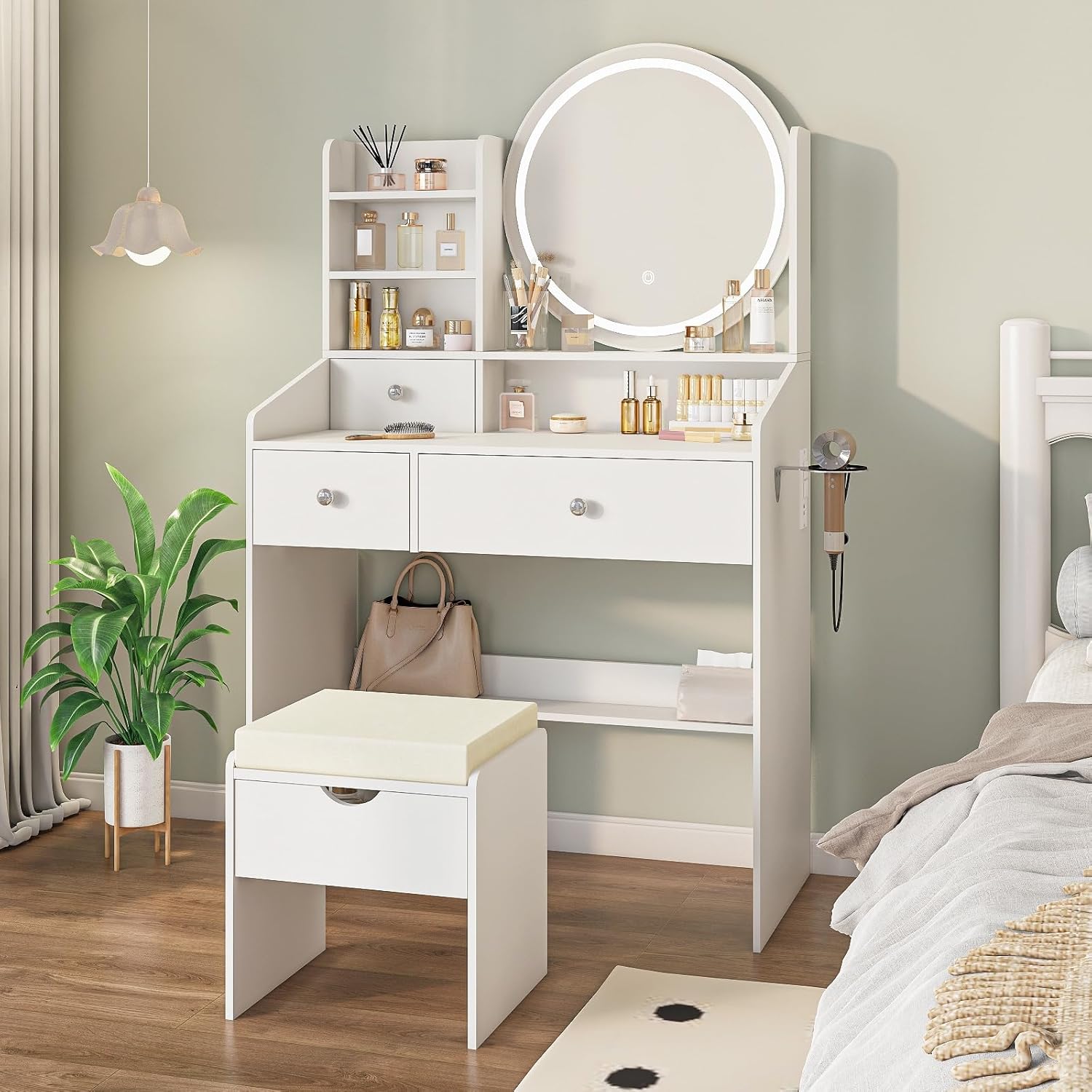
Image: Detailed dimensions of the vanity desk, including height, width, and depth measurements for various sections.
Operating Instructions
LED Mirror Operation:
The integrated LED mirror features touch controls for lighting adjustments:
- Power On/Off: Tap the touch sensor on the mirror surface to turn the LED lights on or off.
- Change Light Color: With the lights on, tap the touch sensor repeatedly to cycle through the 3 color modes: Cool Light (6000K), Natural Light (4000K), and Warm Light (3000K).
- Adjust Brightness: To dim or brighten the lights, press and hold the touch sensor. The brightness will gradually change. Release when the desired brightness is achieved.

Image: Illustration of the LED mirror's touch control and the three available light color temperatures (Cool, Natural, Warm) with adjustable brightness.
Power Outlet and USB Ports:
The vanity desk includes a built-in power hub for your convenience:
- AC Outlets: Use the two 120V/12A AC outlets to power hair dryers, straighteners, or other small appliances.
- USB Ports: Use the two 5V/2A USB ports to charge smartphones, tablets, or other USB-powered devices.
- Hair Dryer Holder: Utilize the integrated holder on the side of the desk to store your hair dryer when not in use.

Image: The integrated power hub with two AC outlets and two USB ports for convenient charging and powering devices.
Maintenance
Proper care and maintenance will extend the life of your vanity desk:
- Cleaning: Wipe surfaces with a soft, damp cloth. Avoid harsh chemicals or abrasive cleaners that may damage the finish.
- Mirror Care: Clean the mirror surface with a glass cleaner and a lint-free cloth. Do not spray cleaner directly onto the mirror to avoid liquid seeping into the LED components.
- Electrical Components: Ensure the power hub and mirror wiring remain dry. If any electrical component appears damaged, discontinue use and contact customer support.
- Tighten Fasteners: Periodically check and tighten all screws and fasteners to maintain stability.
Troubleshooting
| Problem | Possible Cause | Solution |
|---|---|---|
| LED mirror lights not turning on. | Power cord not plugged in; loose connection; power outage. | Ensure the vanity's power cord is securely plugged into a working wall outlet. Check the connection between the mirror and the power hub. Verify the wall outlet has power. |
| Lights are dim or flickering. | Brightness setting too low; unstable power supply. | Press and hold the touch sensor to adjust brightness. Ensure the vanity is plugged into a stable power source. |
| Power outlets/USB ports not working. | Vanity not powered; device not properly connected; overloaded circuit. | Confirm the vanity is plugged in. Ensure devices are correctly inserted. Avoid plugging in too many high-power devices simultaneously. |
| Vanity feels unstable. | Loose fasteners; uneven floor. | Check and tighten all assembly screws. Place the vanity on a level surface or use shims if necessary. |
Specifications
| Attribute | Detail |
|---|---|
| Model Number | A |
| Brand | Viaozutis |
| Material | Engineered Wood |
| Color | White |
| Product Dimensions (L x W x H) | 39"D x 26"W x 8"H |
| Item Weight | 21 pounds |
| Power Hub | 2 AC Outlets (120V/12A), 2 USB Ports (5V/2A) |
| Mirror Lighting | 3 Color Modes (6000K, 4000K, 3000K), Adjustable Brightness |
Product Videos
The following videos provide visual demonstrations of the vanity desk's features and functionality. Please note these videos may feature similar models or general product demonstrations.
Video: Demonstration of a small vanity desk, showcasing storage and mirror features. (Source: BENIX)
Video: Overview of a vanity desk with mirror and lights, highlighting its design. (Source: CYTERNE)
Video: Features of a vanity desk with mirror and LED lights, including storage and charging capabilities. (Source: Korfile-US)
Warranty and Support
For warranty information, technical support, or replacement parts, please contact Viaozutis customer service through the retailer where the product was purchased. Please have your model number (A) and purchase date available when contacting support.