
1. Introduction
This manual provides essential information for the safe operation, assembly, maintenance, and troubleshooting of your ZapRun W8 Electric Scooter. Please read this manual thoroughly before using the scooter to ensure proper function and safety.
2. Safety Information
Always prioritize safety when operating the electric scooter. Failure to follow safety guidelines can result in serious injury or damage to the scooter.
- Wear a helmet and appropriate protective gear (knee pads, elbow pads) at all times.
- Do not ride in wet conditions, heavy rain, or on slippery surfaces.
- Adhere to local traffic laws and regulations.
- Maintain a safe speed and distance from other vehicles and pedestrians.
- Avoid riding under the influence of alcohol or drugs.
- Ensure all components are securely fastened before each ride.
- Do not exceed the maximum weight limit of 264 pounds (120 kg).
3. Package Contents
Upon unboxing, verify that all items listed below are present and undamaged:
- ZapRun W8 Electric Scooter
- Charging Adapter
- User Manual
- Assembly Tools (e.g., Hex wrench)

Video: Unboxing the ZapRun W8 Electric Scooter. This video demonstrates the process of opening the product packaging and identifying the included components.
4. Setup & Assembly
Follow these steps to assemble your ZapRun W8 Electric Scooter:
- Unfold the Scooter: Carefully lift the handlebar stem until it locks into the upright position. Ensure the folding mechanism is securely latched.
- Install Handlebar: Attach the handlebar to the stem. Align the holes and insert the provided screws. Tighten them securely using the hex wrench.
- Adjust Brake Levers: Position the brake levers for comfortable reach and tighten their clamps. Ensure the brakes engage properly.
Video: Assembly and initial setup of the ZapRun W8 Electric Scooter. This video guides you through unfolding the scooter, attaching the handlebars, and adjusting the brake levers.
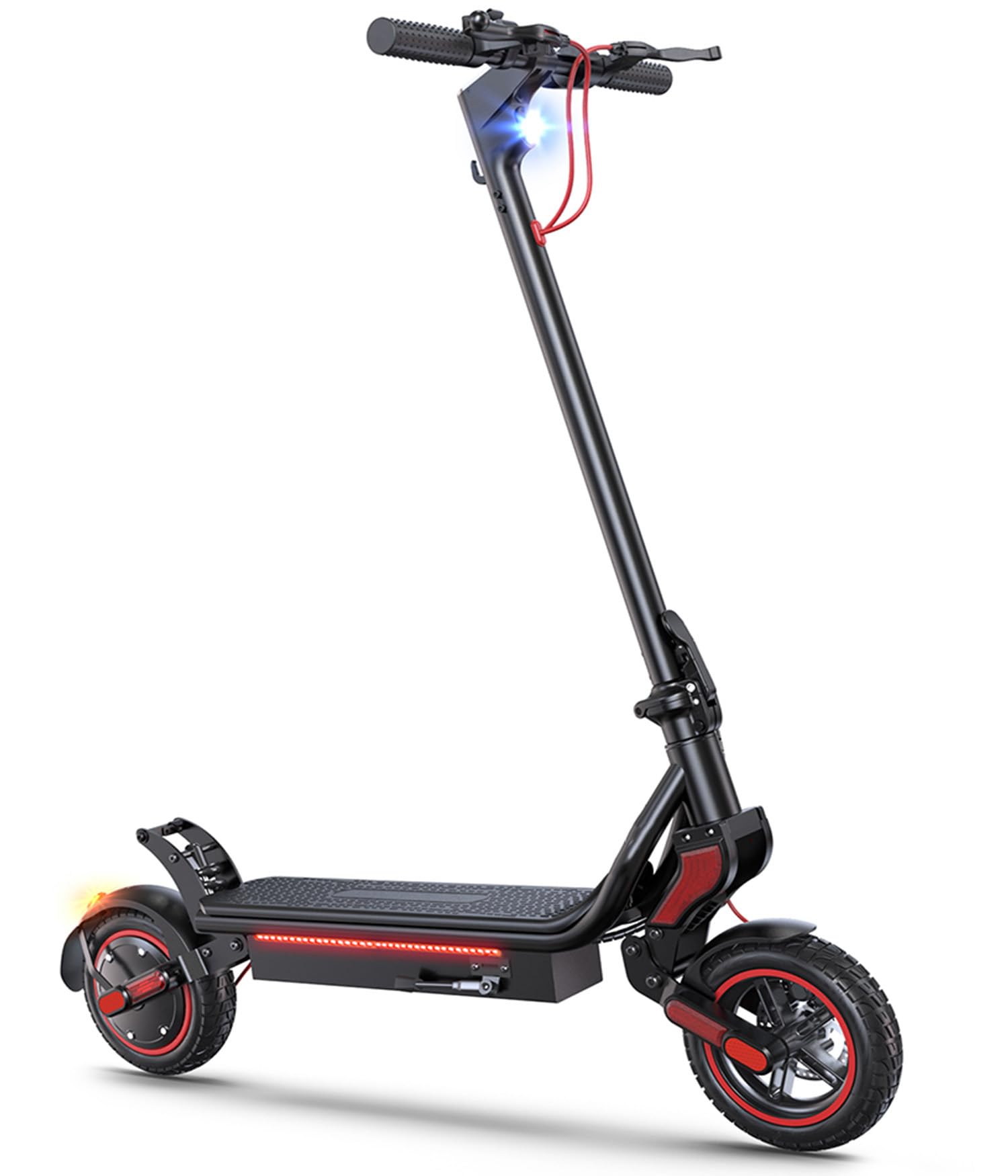
Image: The ZapRun W8 Electric Scooter in its fully assembled, upright position, showcasing its black and red design.
5. Operation
5.1 Power On/Off
- To power on, press and hold the power button on the display for a few seconds.
- To power off, press and hold the power button again until the display turns off.
5.2 Speed Modes
The ZapRun W8 offers four adjustable speed modes:
- Mode 1: Up to 6 MPH
- Mode 2: Up to 12 MPH
- Mode 3: Up to 18 MPH
- Mode 4: Up to 25 MPH
Cycle through speed modes by short-pressing the power button while the scooter is on.

Image: The scooter's display showing different speed modes (6, 12, 18, 25 MPH) and battery level indicators.
5.3 Lighting System
The scooter is equipped with a comprehensive lighting system for enhanced visibility:
- Headlight: Provides illumination for night riding.
- Taillight: Increases visibility from the rear.
- Turn Signals: Located on the handlebars and rear for indicating turns.
- Ambient Lighting: Integrated lights on the deck for additional visibility.

Image: The ZapRun W8 Electric Scooter with its headlight, handlebar turn signals, and taillights illuminated, demonstrating its omni-directional lighting system.
5.4 Braking System
The ZapRun W8 features a triple braking system for controlled stopping:
- Front Disc Brake
- Rear Drum Brake
- Hidden Electronic Brake
Apply both brake levers simultaneously for optimal stopping power. The electronic brake provides additional assistance.

Image: A close-up view of the ZapRun W8 Electric Scooter's triple braking system, highlighting the front disc brake, rear drum brake, and electronic brake components.
5.5 Folding and Unfolding
The scooter features a foldable design for easy storage and transport.
- To fold, disengage the locking mechanism at the base of the handlebar stem and carefully fold the stem downwards until it latches to the rear fender.
- To unfold, release the latch from the rear fender and lift the handlebar stem until it clicks into the upright, locked position.
Video: Demonstration of the ZapRun W8 Electric Scooter's folding mechanism. This video shows how to quickly fold and unfold the scooter for portability.
5.6 Smart App Connection (VoltiX App)
Enhance your riding experience by connecting your scooter to the VoltiX App:
- Download the VoltiX App from your smartphone's app store.
- Ensure your scooter is powered on and Bluetooth is enabled on your phone.
- Open the app and follow the on-screen instructions to pair with your ZapRun W8.
- The app allows you to adjust settings such as brake sensitivity, acceleration parameters, cruising parameters, switch between metric/imperial units, reset mileage, and view car status.

Image: A smartphone screen showing the VoltiX App interface, which allows users to control various settings and view data for the ZapRun W8 Electric Scooter.
6. Battery & Charging
6.1 Charging Instructions
To charge your ZapRun W8 Electric Scooter:
- Ensure the scooter is powered off.
- Locate the charging port on the scooter.
- Connect the charging adapter to the scooter's charging port, then plug the adapter into a power outlet.
- The indicator light on the charger will typically turn red during charging and green when fully charged.
- Charging time is approximately 5-7 hours for a full charge.

Image: A detailed view of the ZapRun W8 Electric Scooter's battery compartment, highlighting its 54.6V 14Ah battery and maximum range of 25 miles.
6.2 Battery Care
- Avoid completely draining the battery before recharging.
- Store the scooter in a cool, dry place when not in use, and ensure the battery is partially charged (around 50-70%) for long-term storage.
- Do not expose the battery to extreme temperatures.
7. Maintenance
7.1 Tire Maintenance
The ZapRun W8 features 9.3-inch pneumatic off-road tires.
- Regularly check tire pressure and inflate to the recommended PSI (refer to tire sidewall for details).
- Inspect tires for wear, punctures, or damage before each ride.

Image: A close-up of the ZapRun W8 Electric Scooter's 9.3-inch anti-skid tire, shown with examples of different terrains it can handle, emphasizing its off-road capability.
7.2 Cleaning
- Wipe down the scooter with a damp cloth after use.
- Avoid using high-pressure water jets or harsh chemicals, as these can damage electronic components.
7.3 Storage
- Store the scooter in a dry, indoor environment to protect it from weather elements.
- If storing for an extended period, ensure the battery is charged to approximately 50-70% and recharge every 30-60 days to prevent deep discharge.
8. Troubleshooting
This section addresses common issues you might encounter with your ZapRun W8 Electric Scooter.
| Problem | Possible Cause | Solution |
|---|---|---|
| Scooter does not power on | Low battery; Loose connections; Faulty power button | Charge the battery; Check all cable connections; Contact support if issue persists. |
| Reduced range or speed | Low tire pressure; Overloaded; Battery degradation; Riding uphill frequently | Inflate tires to correct pressure; Reduce load; Avoid steep inclines; Consider battery replacement if significantly degraded. |
| Brakes not responsive | Loose brake cables; Worn brake pads; Air in hydraulic system (if applicable) | Adjust brake cable tension; Replace worn brake pads; Seek professional service for hydraulic systems. |
| Unusual noises during operation | Loose components; Debris in wheels; Motor issue | Inspect and tighten all visible components; Clear any debris from wheels; Contact support for motor-related issues. |
If you encounter an issue not listed here or if the suggested solutions do not resolve the problem, please contact ZapRun customer support.
9. Specifications
| Feature | Specification |
|---|---|
| Brand | ZapRun |
| Model Name | W8 |
| Motor Power | 750W |
| Battery | 54.6V 14Ah |
| Max Speed | Up to 25 MPH |
| Max Range | Up to 25 Miles |
| Tire Size | 9.3 Inches (Pneumatic Off-Road) |
| Suspension Type | Front and Rear Swingarm Spring Suspension |
| Braking System | Front Disc Brake, Rear Drum Brake, Hidden Electronic Brake |
| Charging Time | 5-7 Hours |
| Weight Limit | 264 Pounds (120 kg) |
| Item Weight | 25 Kilograms (approx 55 lbs) |
| Frame Material | Aluminum |
| Special Features | Foldable design, Smart app control, Multiple speed modes, Full lighting system, Intelligent motor management system |
10. Warranty & Support
ZapRun offers a 365-day or 180-day warranty for different components of the scooter. For specific warranty terms and conditions, please refer to the documentation included with your product or visit the official ZapRun store.
Our professional support team is available to provide fast and reliable service for any inquiries or issues you may have.
For further assistance, please visit the ZapRun Store on Amazon.