1. Introduction
Thank you for choosing the NEWPET NP1322 2L Mini Automatic Pet Feeder. This device is designed to provide convenient and consistent feeding for your pets, ensuring they receive their meals on schedule. Featuring smart app control, dual power options, and an easy-to-clean design, this feeder helps maintain your pet's healthy eating habits. Please read this manual thoroughly before use to ensure proper operation and maintenance.

Image 1.1: The NEWPET NP1322 2L Mini Automatic Pet Feeder shown with a small dog and cat, highlighting its compact design and the accompanying mobile app interface.
2. Product Overview
The NEWPET NP1322 is an intelligent pet feeder designed for reliability and ease of use. Key features include:
- Programmable Feeding: Schedule 1 to 10 meals per day, with 0 to 40 portions per meal (approximately 5g per portion), customizable via the TUYA app.
- Food Freshness: Equipped with triple-lock systems, a soft rubber rotor, and a top lid seal to keep dry food fresh and prevent moisture. A desiccant packet can be placed in the lid for enhanced freshness.
- Dual Power Supply: Operates via a USB power adapter or 3D cell batteries (not included) as a backup, ensuring continuous feeding even during power outages.
- Easy to Clean: Features a removable food tank and a 304 stainless steel feeding bowl, both designed for simple cleaning and hygiene.
- Voice Recording: Record a personalized 10-second voice message to call your pet to meals.
3. Safety Instructions
Please observe the following safety guidelines to prevent injury or damage:
- Do not immerse the main unit in water or any other liquid.
- This device is intended for indoor use only.
- Use only dry pet food with a diameter between 2-10mm (0.07-0.4 inches). Do not use wet, canned, or moist food.
- Keep the feeder out of reach of children and pets to prevent tampering.
- Ensure the power adapter and cable are not damaged. If damaged, discontinue use and contact support.
- Always unplug the feeder before cleaning.
4. Package Contents
Verify that all items are present in the package:
- NEWPET NP1322 Automatic Pet Feeder Main Unit
- Stainless Steel Feeding Bowl
- Bowl Holder
- USB Power Adapter and Cable
- Desiccant Packet (pre-installed or separate)
- User Manual (this document)
5. Setup
5.1. Assembly
- Place the feeder on a flat, stable surface.
- Attach the bowl holder to the main unit.
- Insert the stainless steel bowl into the bowl holder.

Image 5.1: Visual guide for attaching the bowl holder and stainless steel bowl to the feeder unit.
5.2. Power Connection
The feeder can be powered by a USB adapter or 3D cell batteries (not included) for backup.
- USB Power: Connect the USB cable to the feeder and plug the adapter into a wall outlet.
- Battery Backup: Open the battery compartment at the bottom of the feeder and insert three 3D cell batteries, ensuring correct polarity.

Image 5.2: The feeder connected to power via USB, illustrating the internal battery compartment for backup power.
5.3. Filling the Food Tank
Ensure the feeder is clean before filling.
- Open the top lid of the feeder.
- Pour dry pet food into the tank. Ensure the food size is between 2-10mm (0.07-0.4 inches).
- Close the lid securely. The lid is designed to create an airtight seal.
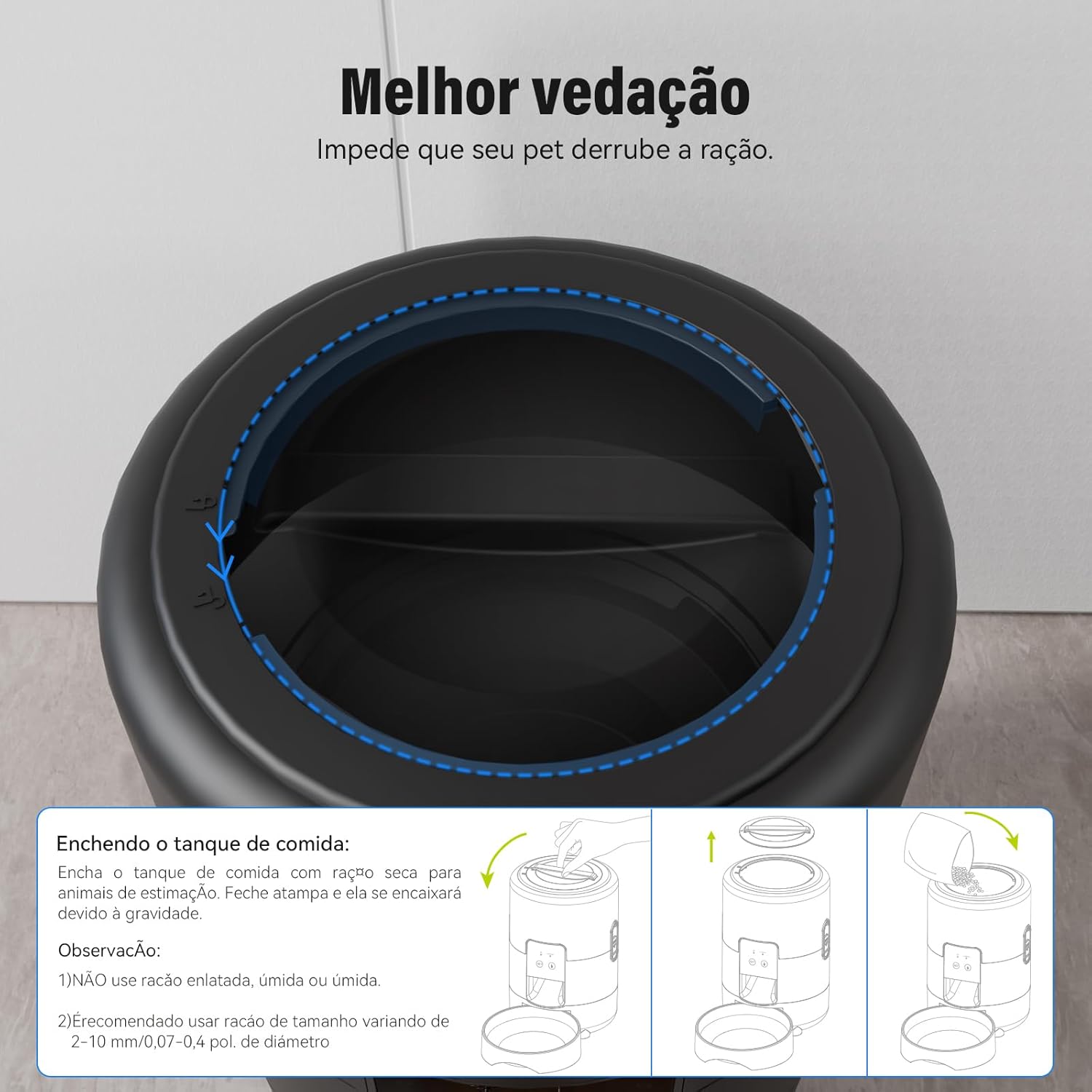
Image 5.3: Steps for filling the food tank and ensuring the lid is properly sealed for freshness.
5.4. App Download and Wi-Fi Connection
- Download the TUYA Smart app from your smartphone's app store (iOS or Android).
- Register or log in to your TUYA account.
- Follow the in-app instructions to add the NEWPET NP1322 feeder to your device list. This typically involves putting the feeder into pairing mode (refer to the feeder's indicator lights for status) and connecting it to your home 2.4GHz Wi-Fi network.
6. Operating Instructions
6.1. Scheduling Meals via TUYA App
Once connected, use the TUYA Smart app to customize your pet's feeding schedule:
- Open the TUYA Smart app and select your NEWPET feeder.
- Navigate to the 'Meal Plan' or 'Schedule' section.
- Set desired feeding times (up to 10 meals per day).
- For each meal, select the number of portions (0-40 portions, approximately 5g each).
- Save your settings. The feeder will dispense food automatically according to your schedule.
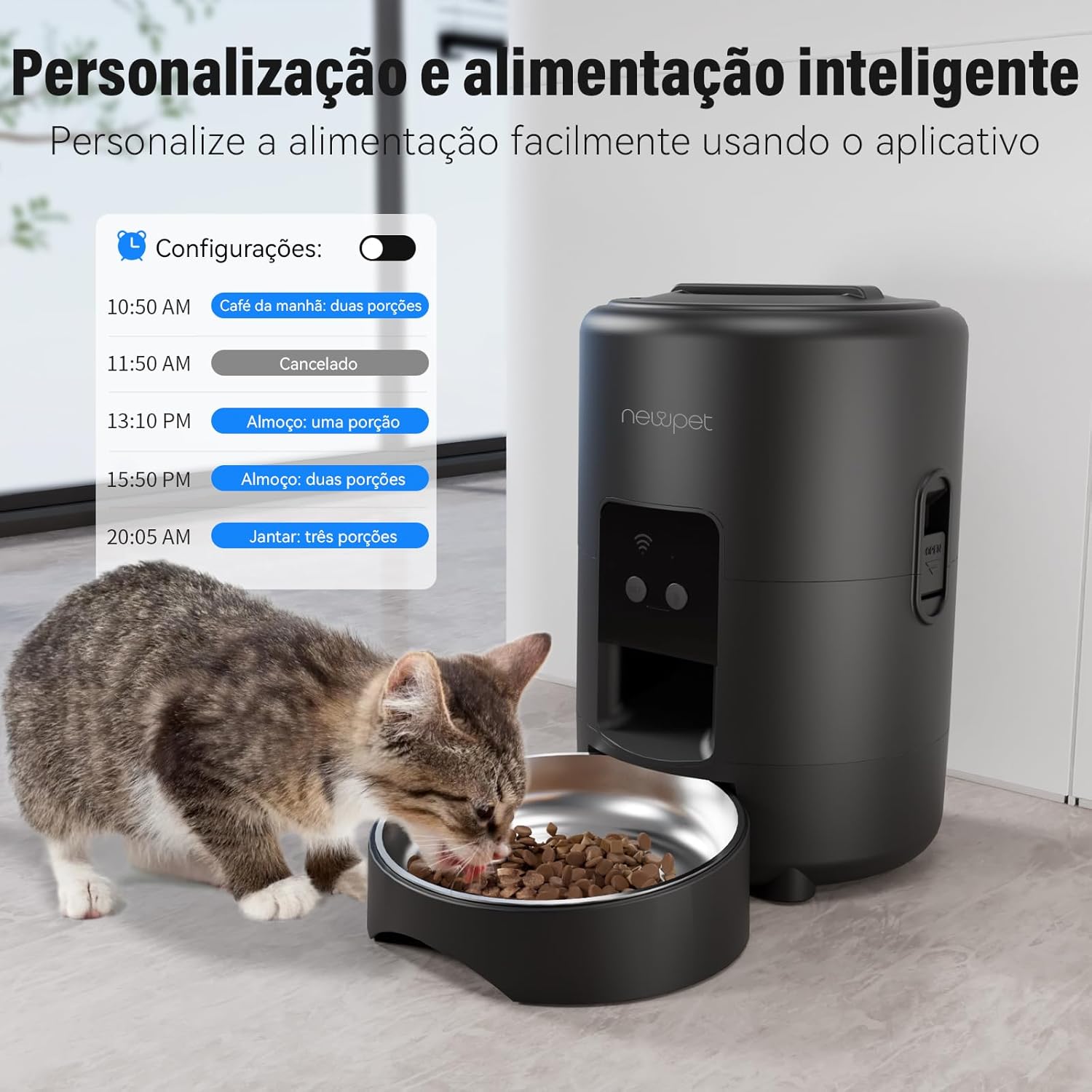
Image 6.1: The TUYA app interface demonstrating how to personalize feeding schedules with specific times and portion sizes.
6.2. Manual Feeding
To dispense food manually, press the manual feed button on the feeder. Each press will dispense one portion. You can also initiate manual feeding through the TUYA app.
6.3. Voice Recording
Record a 10-second voice message to play during meal times, attracting your pet to the feeder.
- Ensure the feeder is powered on.
- Press and hold the record button (usually indicated by a microphone icon) on the feeder.
- Speak your message clearly within 10 seconds.
- Release the button to save the recording. The recorded message will play automatically at each scheduled feeding time.

Image 6.2: The feeder's voice recording function, illustrating how to record a personalized message to call pets for meals.
7. Maintenance and Cleaning
Regular cleaning ensures hygiene and extends the life of your feeder.
- Disassembly: Unplug the feeder. Remove the food tank, bowl holder, and stainless steel bowl.
- Cleaning: The food tank, bowl holder, and stainless steel bowl are removable and can be washed with mild soap and water. Rinse thoroughly and dry completely before reassembly. The main unit should be wiped clean with a damp cloth; do not immerse it in water.
- Desiccant Replacement: Replace the desiccant packet in the lid every 1-2 months to maintain food freshness.
- Reassembly: Ensure all parts are dry before reassembling the feeder.
8. Troubleshooting
| Problem | Possible Cause | Solution |
|---|---|---|
| Feeder not powering on | Power adapter unplugged; batteries depleted or incorrectly inserted. | Check power connection; replace batteries or ensure correct polarity. |
| Food not dispensing | Food tank empty; food jammed; dispenser blocked. | Refill food tank; clear any food jams; ensure food size is appropriate (2-10mm). |
| App not connecting to feeder | Incorrect Wi-Fi password; feeder not in pairing mode; 5GHz Wi-Fi network. | Verify Wi-Fi password; reset feeder to pairing mode; ensure connection to a 2.4GHz Wi-Fi network. |
| Voice recording not playing | No recording saved; volume too low. | Re-record the message; check app settings for volume control (if available). |
9. Specifications
| Model Number | NP1322 |
| Dimensions | 18 x 18 x 20 cm (7.1 x 7.1 x 7.9 inches) |
| Weight | 1.17 kg (2.58 lbs) |
| Capacity | 2 Liters |
| Color | Black |
| Material | Stainless Steel (bowl), BPA-free components |
| Target Species | Cat, Small Dog |
| Power Supply | USB Power Adapter (included), 3x D-cell Batteries (not included) |
| Connectivity | Wi-Fi (2.4GHz only) |
| Special Features | Adjustable, Automatic, Programmable, Voice Recording |
10. Warranty and Support
For warranty information and customer support, please refer to the product packaging or contact NEWPET customer service directly. Keep your purchase receipt as proof of purchase.
NEWPET Customer Service: Visit the NEWPET Store on Amazon