
Introduction
Thank you for purchasing the Haewon White Vanity Desk with Mirror and Power Outlet. This manual provides essential information for the safe assembly, operation, and maintenance of your new vanity desk. Please read these instructions thoroughly before use and retain them for future reference.
Safety Information
- Always follow assembly instructions carefully to prevent injury or damage.
- Ensure all screws and fasteners are securely tightened before use. Periodically check and re-tighten as needed.
- Do not overload drawers or shelves. Distribute weight evenly.
- Keep electrical components (power outlet, USB ports, mirror lighting) away from water or excessive moisture.
- Unplug the vanity from the power source before cleaning or performing any maintenance.
- This product is intended for indoor use only.
- Keep small parts out of reach of children during assembly to avoid choking hazards.
Components Overview
Familiarize yourself with the main components of your Haewon Vanity Desk.
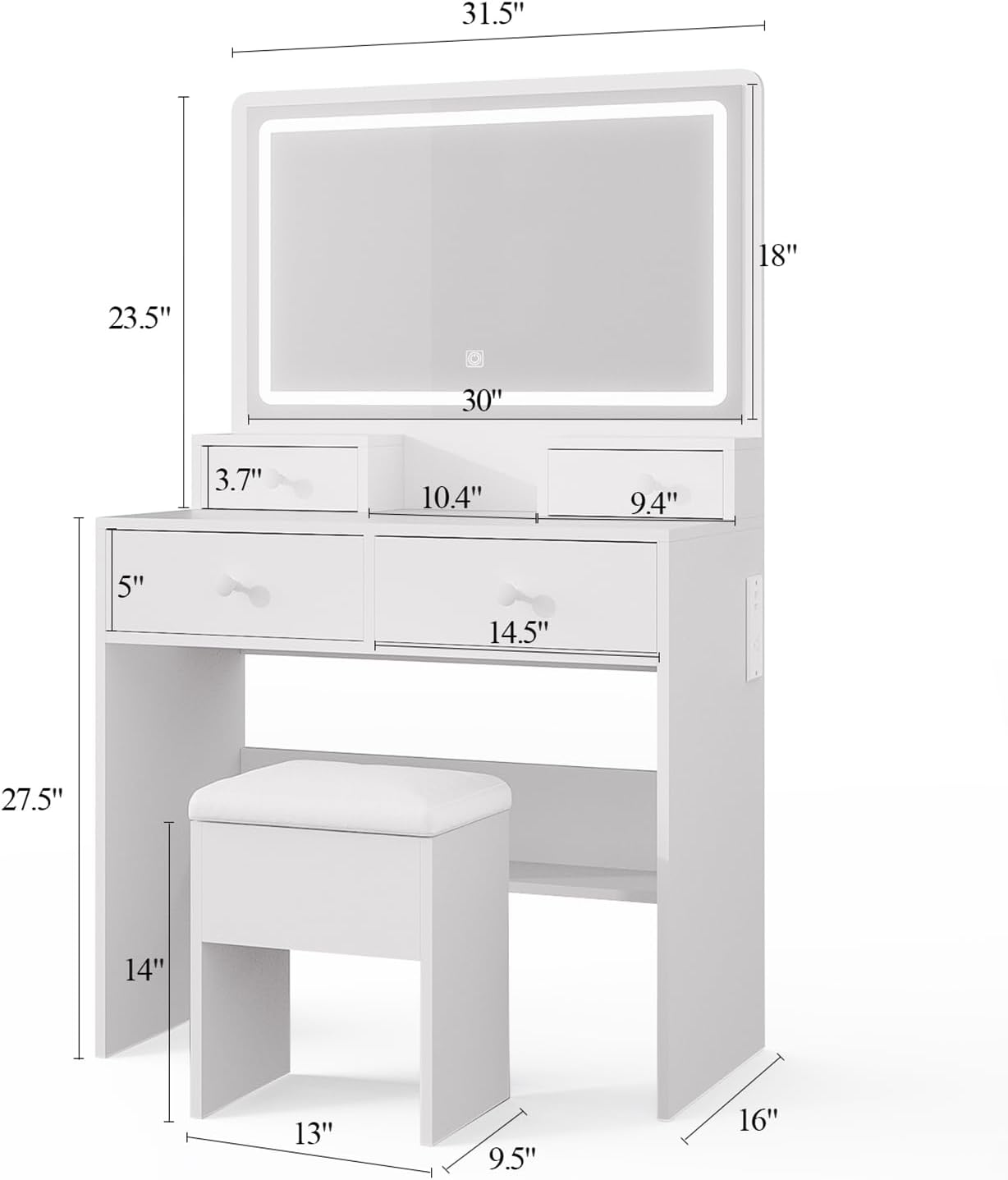
Figure 1: Overall Dimensions and Key Parts. This image illustrates the vanity desk's height, width, and depth, along with the mirror, drawers, and accompanying stool dimensions.

Figure 2: Storage Features and Power Outlet. This image highlights the two main drawers, two smaller tabletop drawers, open shelves, the storage compartment within the stool, and the integrated AC and USB power outlets.
- LED Mirror: Integrated mirror with adjustable lighting.
- Tabletop Drawers: Two small drawers on the tabletop for accessories.
- Main Drawers: Two larger drawers below the tabletop for cosmetics and tools.
- Open Shelves: Storage areas below the main drawers.
- Power Outlet: Built-in AC outlet and two USB ports for charging devices and powering tools.
- Storage Chair: A matching stool with an internal storage compartment.
Setup and Assembly
Assembly is required for this vanity desk. Please follow the detailed instructions provided in the separate assembly guide included with your product. Ensure all parts are present before beginning assembly.
General Assembly Tips:
- Clear a spacious area for assembly.
- Identify all parts and hardware using the provided list.
- Use the appropriate tools as specified in the assembly guide.
- Do not overtighten screws to avoid damaging the engineered wood.
- Seek assistance for lifting heavy components, especially the mirror section.
Video 1: Haewon White Vanity Desk Overview. This video provides a general overview of the Haewon White Vanity Desk, showcasing its features and design, which can be helpful during assembly and understanding its functionality.
Operation
LED Mirror Lighting:
- Power On/Off: Touch the power icon on the mirror surface to turn the lights on or off.
- Change Lighting Mode: With the lights on, touch the mode icon (often represented by a sun or color palette) to cycle through the three lighting modes: Cold White, Warm White, and Warm Yellow.
- Adjust Brightness: Press and hold the power icon to adjust the brightness. Release when the desired brightness level is reached.
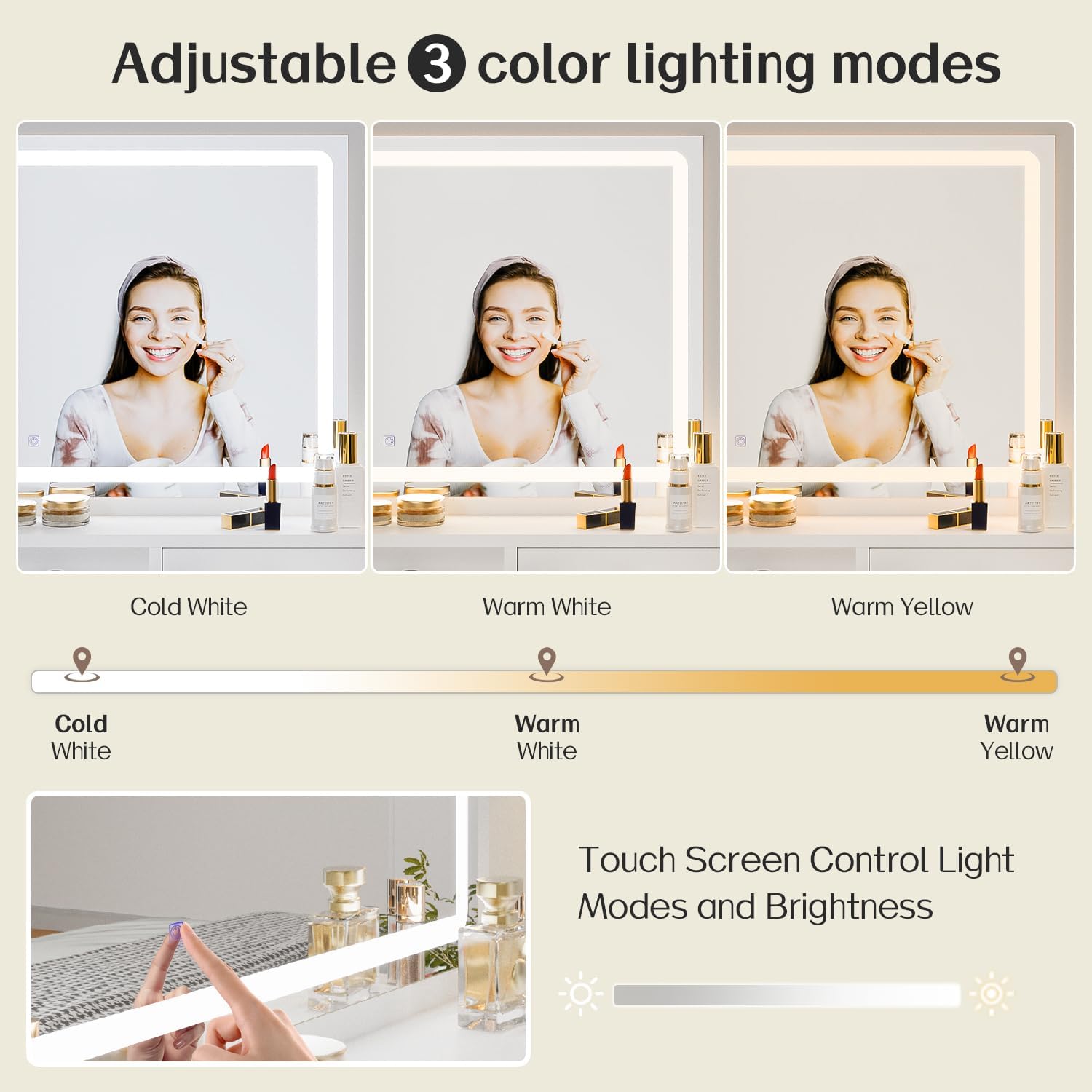
Figure 3: Adjustable 3 Color Lighting Modes. This image demonstrates the three distinct lighting modes (Cold White, Warm White, Warm Yellow) and the touch control for adjusting brightness on the LED mirror.
Integrated Charging Station:
- Plug the vanity desk's main power cord into a standard wall outlet.
- Use the built-in AC outlet to power hair tools or other small appliances.
- Use the two USB ports to charge mobile phones, tablets, or other USB-powered devices.

Figure 4: Integrated AC and USB Power Outlets. This image details the location and function of the 1 AC outlet and 2 USB ports, demonstrating how devices can be connected.
Storage Features:
- Utilize the two spacious main drawers for larger items like makeup palettes or hair accessories.
- The two smaller tabletop drawers are ideal for jewelry, small cosmetics, or hair ties.
- The open shelf provides easy access storage for frequently used items.
- The storage chair offers a hidden compartment for books, headphones, or other personal items.
Maintenance and Care
- Cleaning the Surface: Wipe the engineered wood surfaces with a dry, soft cloth. For stubborn marks, a slightly damp cloth can be used, followed immediately by a dry cloth. Avoid harsh chemicals or abrasive cleaners.
- Cleaning the Mirror: Use a glass cleaner and a microfiber cloth to clean the mirror surface. Spray cleaner onto the cloth, not directly onto the mirror, to prevent liquid from seeping into the electrical components.
- Electrical Components: Ensure the vanity is unplugged before cleaning around the power outlet or mirror. Do not attempt to disassemble or repair electrical components yourself.
- Drawer Slides: Periodically check drawer slides for smooth operation. If they become stiff, a small amount of silicone lubricant can be applied.
- Fasteners: Over time, screws and fasteners may loosen. Periodically check and re-tighten all connections to maintain stability.
Troubleshooting
| Problem | Possible Cause | Solution |
|---|---|---|
| Mirror lights do not turn on. |
|
|
| Power outlet/USB ports not working. |
|
|
| Drawers are stiff or difficult to open/close. |
|
|
| Vanity feels wobbly. |
|
|
Specifications
| Feature | Detail |
|---|---|
| Model Number | B0FSLC1CSG |
| Brand | Haewon |
| Color | White |
| Material | Engineered Wood |
| Product Dimensions (D x W x H) | 14.96" x 31.5" x 55.12" |
| Item Weight | 42 Pounds |
| Number of Drawers | 4 |
| Mirror Lighting | LED, 3 Color Modes (Natural, Warm, Cool), Adjustable Brightness |
| Power Outlet | 1 AC Outlet, 2 USB Ports |
| Included Components | Vanity Desk, LED Mirror, Storage Chair, Assembly Hardware |
| Care Instructions | Wipe with Dry Cloth |
Warranty and Customer Support
Haewon products are designed for quality and durability. For specific warranty details regarding your vanity desk, please refer to the warranty card included in your packaging or visit the official Haewon website.
Customer Support:
If you have any questions, require assistance with assembly, or encounter any issues with your product, please contact our customer support team. Our team is available to provide prompt and helpful solutions.
- Online Support: Visit Haewon's Amazon Storefront for product information and contact options.
- Email Support: Refer to your product packaging for the dedicated customer service email address.
- Phone Support: Refer to your product packaging for the dedicated customer service phone number.
When contacting support, please have your model number (B0FSLC1CSG) and purchase date ready.