
Introduction
The DuneVoyager CORE 68C is a compact 68-key mechanical gaming keyboard designed for high performance and versatility. Featuring magnetic Hall Effect switches, customizable actuation, and vibrant RGB lighting, it offers a responsive and personalized experience for PC and console gaming. This manual provides detailed instructions for setting up, operating, maintaining, and troubleshooting your keyboard.
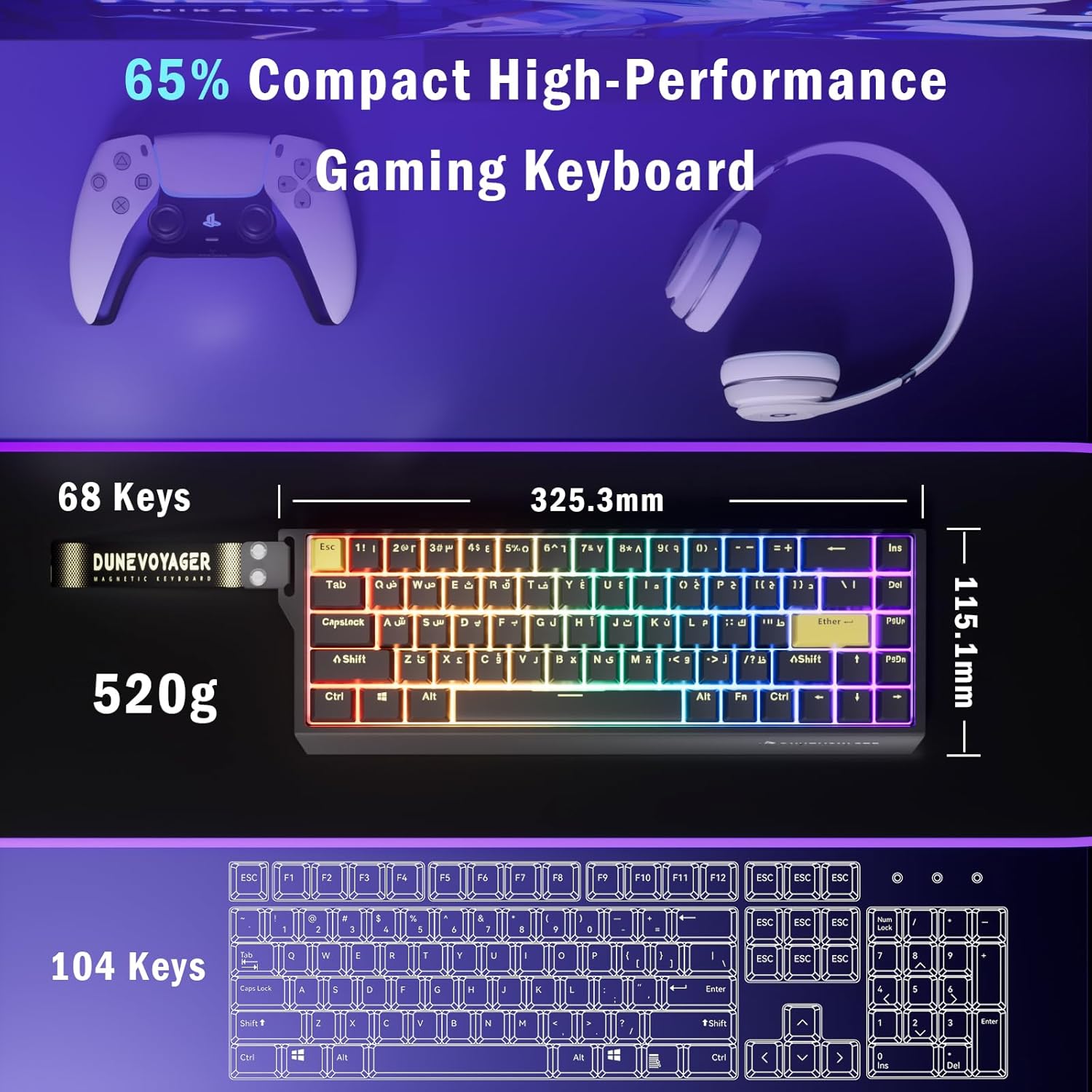
Image: The DuneVoyager CORE 68C keyboard, showcasing its compact 65% layout alongside a game controller and headphones, highlighting its gaming focus.
Setup
Connecting the Keyboard
- Locate the USB-C port on your DuneVoyager CORE 68C keyboard.
- Connect the provided USB-C cable to the keyboard's port.
- Plug the other end of the USB-C cable into an available USB port on your computer (PC), PlayStation 4, PlayStation 5, or Xbox console.
- The keyboard should be automatically recognized by your system.
Software Installation (Windows Only)
For advanced customization, including programmable keys, macro recording, and detailed RGB settings, download the DuneVoyager HUB application from the official DuneVoyager website. Please note that the driver currently only supports Windows operating systems.

Image: Screenshot of the DuneVoyager HUB software interface, demonstrating options for trigger travel, RGB backlight settings, custom shortcut keys, macro recording, and magnetic switch performance customization. The software supports Arabic language.
Operating Instructions
Magnetic Hall Effect Switches
The CORE 68C features magnetic Hall Effect switches, offering precise control and rapid response. Key characteristics include:
- Adjustable Actuation Travel: Customize the keypress distance required to register an input, ranging from 0.1mm to 3.4mm. This allows for fine-tuning sensitivity to your preference.
- Rapid Trigger: This feature allows keys to reset instantly upon release, enabling faster repeated inputs. The rapid trigger range is 0.01mm to 1.7mm.

Image: A close-up view of a magnetic switch and Hall Effect sensor, illustrating the adjustable actuation travel and rapid trigger capabilities. Technical specifications for initial pressure, bottom pressure, full stroke, and service life are also displayed.
Programmable Keys and Macros
Utilize the DuneVoyager HUB software to program individual keys and create complex macros. This allows you to assign custom functions, shortcuts, or sequences of commands to any key, enhancing productivity and gaming performance.
RGB Backlighting Control
The keyboard features a 16.8 million RGB color system with various lighting effects. You can control the backlighting directly from the keyboard using the following key combinations:
- Fn + Del: Switch Backlight Color
- Fn + Ins: Switch Lighting Effect
- Fn + ↑: Increase Brightness
- Fn + ↓: Decrease Brightness
- Fn + ←: Decrease Backlight Speed
- Fn + →: Increase Backlight Speed
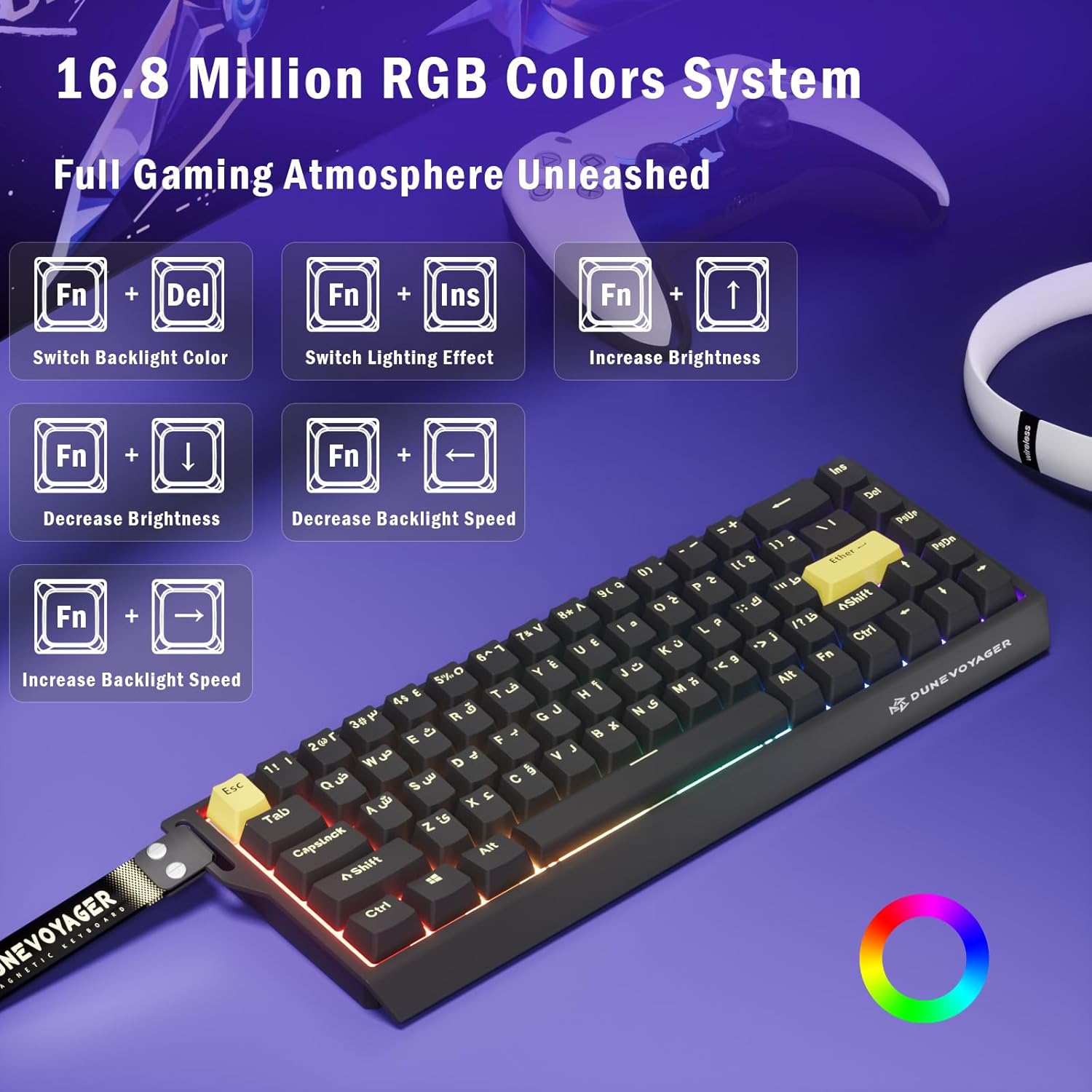
Image: Visual guide demonstrating the keyboard shortcuts (Fn + Del, Fn + Ins, Fn + Arrow keys) for controlling the 16.8 million RGB backlight colors and effects.
High Performance Features
The CORE 68C is engineered for competitive gaming with:
- 8000Hz Polling Rate: Provides ultra-fast communication between the keyboard and your device, registering inputs 8 times faster than standard keyboards.
- 128Hz Key Scanning Rate: Ensures every keypress is detected with high precision.
- 0.1ms Ultra-Low Latency: Minimizes input delay for immediate in-game response.
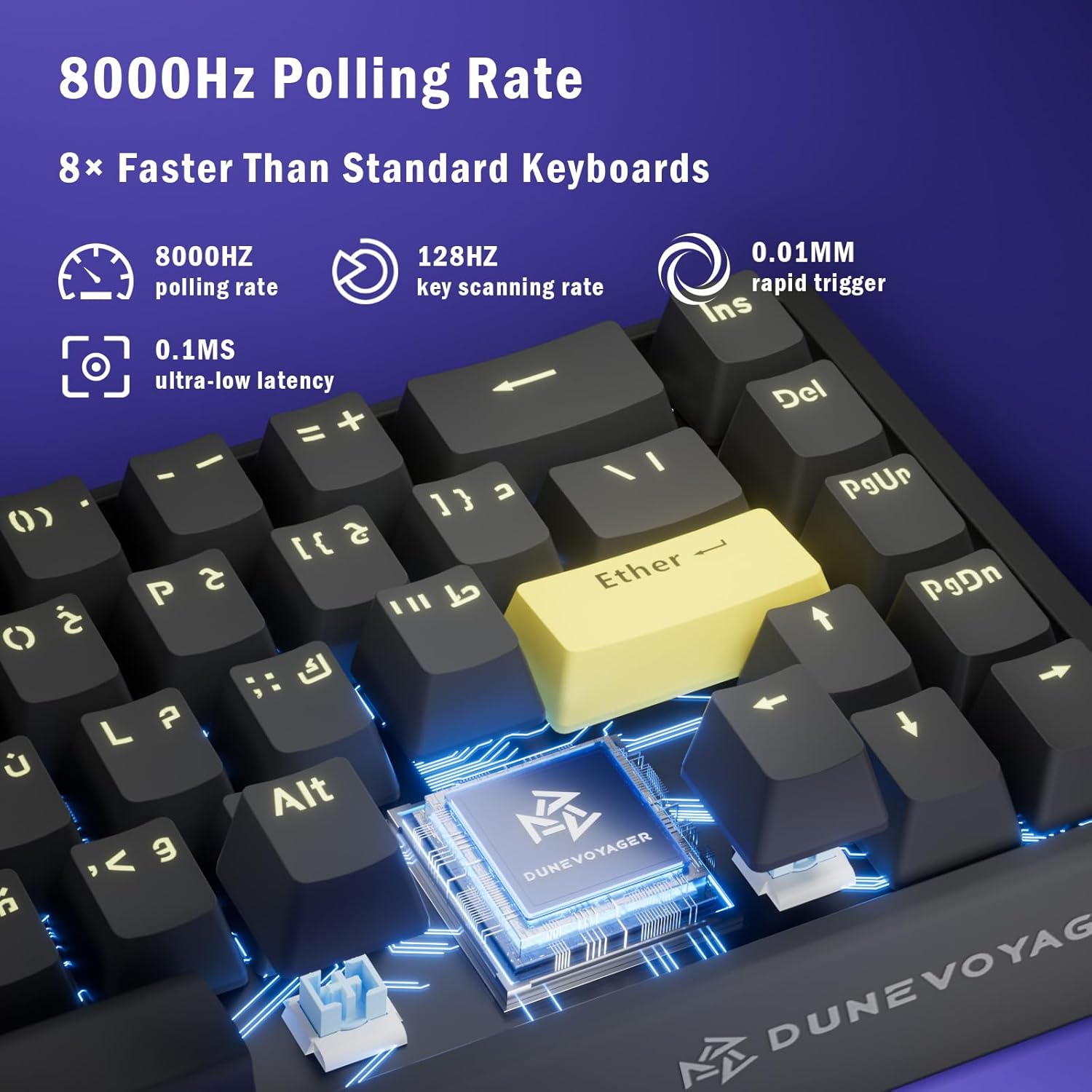
Image: Diagram illustrating the 8000Hz polling rate, 128Hz key scanning rate, and 0.1ms ultra-low latency features of the keyboard, emphasizing its speed and responsiveness.

Image: Visual comparison of a regular switch versus a rapid trigger switch, demonstrating how rapid trigger allows for faster activation and reset. Examples of improved performance in games like Fortnite, Valorant, Overwatch, and CS:GO 2 are shown.
Maintenance
Cleaning
To maintain your keyboard's performance and appearance:
- Disconnect the keyboard from your device before cleaning.
- Use a soft, lint-free cloth slightly dampened with water or a mild cleaning solution to wipe the keycaps and chassis.
- For dust and debris between keys, use compressed air.
- Avoid spraying liquids directly onto the keyboard.
Keycap Replacement
The CORE 68C comes with durable PBT keycaps. If you wish to replace them, use the included keycap puller. Gently pull the keycap straight up to remove it. When installing new keycaps, align them properly and press down firmly until they click into place.
Troubleshooting
Keyboard Not Responding
- Ensure the USB-C cable is securely connected to both the keyboard and your device.
- Try connecting the keyboard to a different USB port on your device.
- Test the keyboard on another computer or console to rule out device-specific issues.
- Restart your computer or console.
RGB Lighting Not Working or Incorrect
- Check if the lighting is turned off using the keyboard shortcuts (Fn + ↓ to increase brightness).
- Ensure the DuneVoyager HUB software (if installed) is not overriding manual settings. Close and reopen the software.
- Update the keyboard firmware via the DuneVoyager HUB software if an update is available.
Keys Not Registering or Double-Typing
- Clean around the affected key with compressed air to remove any debris.
- If using the DuneVoyager HUB software, check the actuation settings for the affected key. Reset to default if necessary.
- Ensure the rapid trigger setting is not causing unintended inputs. Adjust or disable it temporarily to test.
Specifications
| Model Number | CORE 68C |
| Key Count | 68 Keys |
| Switch Type | Magnetic Hall Effect Switches |
| Actuation Travel | Adjustable 0.1mm - 3.4mm |
| Rapid Trigger | 0.01mm - 1.7mm |
| Polling Rate | 8000Hz |
| Key Scanning Rate | 128Hz |
| Latency | 0.1ms |
| Keycap Material | PBT (Polybutylene Terephthalate) |
| Construction | Double-layered Gasket Structure, Aluminum Positioning Plate |
| Connectivity | Wired USB-C |
| Compatibility | PC, PS4, PS5, Xbox |
| Backlight | RGB (16.8 Million Colors) |
| Weight | 810g |
| Dimensions | 36 x 16 x 4.5 cm |
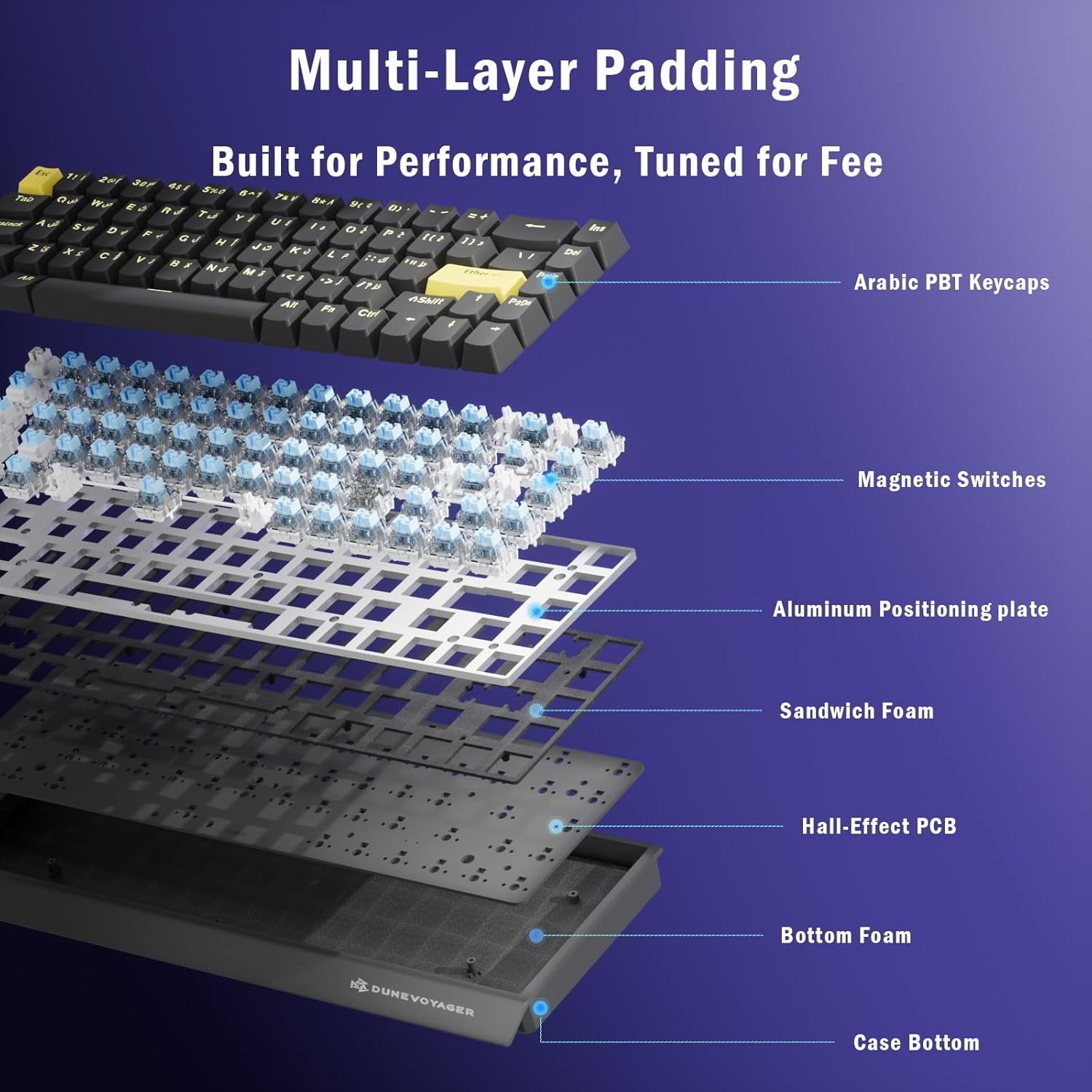
Image: Exploded view of the keyboard's internal structure, detailing components such as Arabic PBT keycaps, magnetic switches, aluminum positioning plate, sandwich foam, Hall-Effect PCB, bottom foam, and the case bottom, highlighting its multi-layer padding design.
Warranty and Support
DuneVoyager products are designed for durability and performance. For warranty information, please refer to the warranty card included with your product or visit the official DuneVoyager website. If you encounter any issues not covered in this manual or require further assistance, please contact DuneVoyager customer support through their official channels.
For the latest drivers, firmware updates, and support resources, please visit the DuneVoyager Brand Store.