
1. Introduction
This manual provides instructions for the safe and efficient operation, installation, and maintenance of your hygger HG268 Water Pump with Controller. This versatile pump is designed for use in various aquatic environments, including aquariums, ponds, and fountains. It can function as a submersible or inline pump and features an external controller for adjustable flow rates and multiple operation modes.
Please read this manual thoroughly before using the product and retain it for future reference.

Image 1.1: The hygger HG268 Water Pump with Controller in an aquarium environment.
2. Product Components
Carefully unpack the product and ensure all components are present and undamaged. If any parts are missing or damaged, contact customer support immediately.
- Water Pump Unit
- External Controller
- Power Adapter
- Inlet Mesh Covers (2 types: side suction and bottom suction)
- Nozzles (3 sizes: 0.75", 0.98", 1.25")
- Suction Cups (pre-attached to pump base)
- User Manual (this document)

Image 2.1: Overview of all included components for the hygger HG268 Water Pump.
3. Specifications
| Feature | Detail |
|---|---|
| Brand | hygger |
| Model Number | HG268 |
| Power | 15W |
| Maximum Flow Rate | 580 GPH (2200 L/H) |
| Maximum Lift Height | 9.8 ft (3m) |
| Product Dimensions (L x W x H) | 5.7" x 2.7" x 3.6" (14.5 x 6.9 x 9.3 cm) |
| Voltage | AC 110-120V / 60Hz |
| Material | Plastic |
| Amphibious Use | Yes (Submersible or Inline) |
| Controller Features | 10 Adjustable Flow Levels, 3 Operation Modes (Constant, Wave, Feeding), LCD Display |
| Safety Features | Anti-dry protection, automatic shut-off |
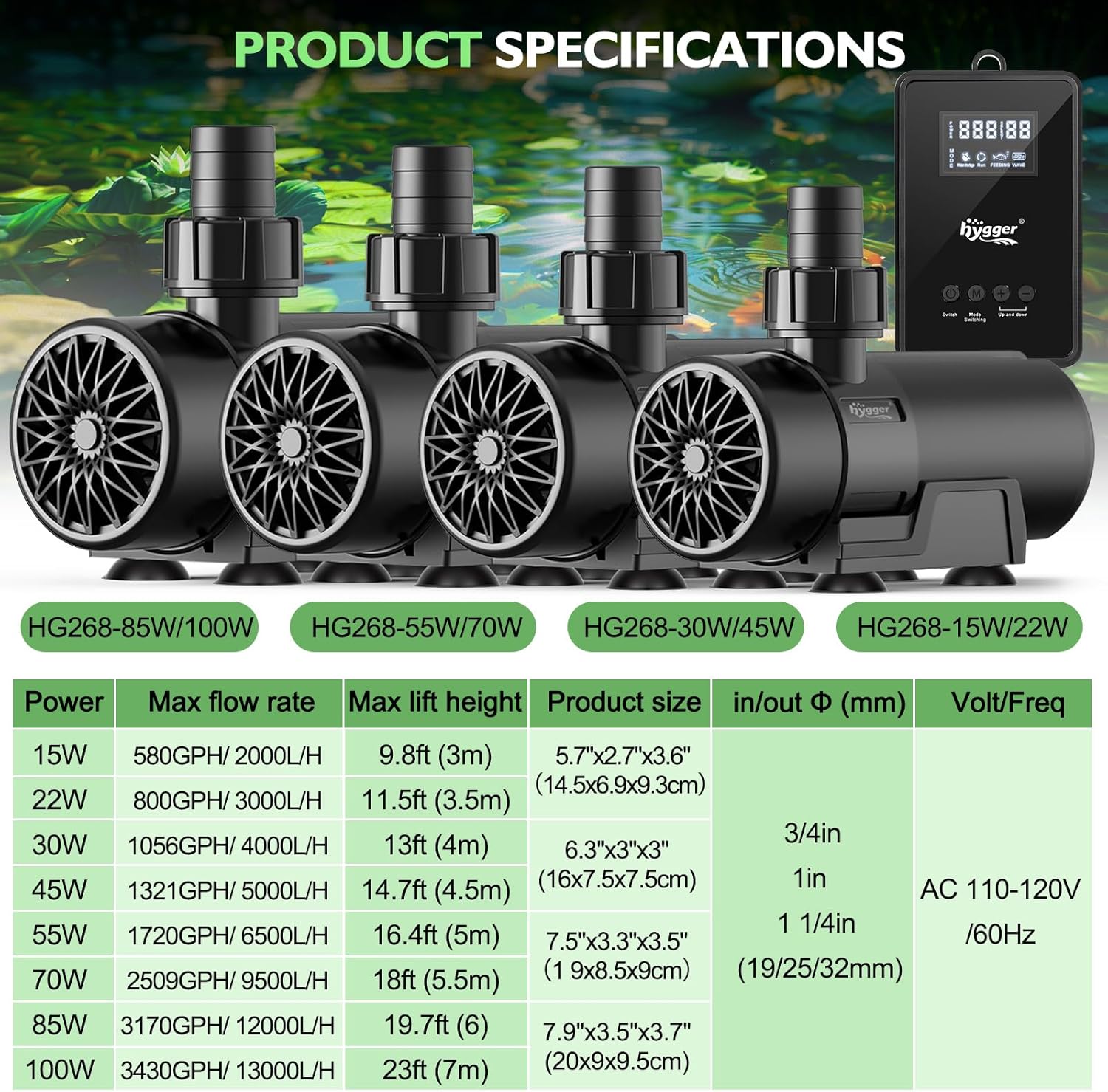
Image 3.1: Detailed specifications for the hygger water pump series, including the HG268 model.
4. Setup Instructions
4.1. Choosing Installation Method
The hygger HG268 pump can be used in two primary configurations: submersible or inline (external).
Submersible Use:
For submersible use, the pump is placed directly into the water. You can choose between side suction or bottom suction inlet covers depending on your water level requirements.
- Side Suction: Attach the side suction cover to the pump. This is suitable for standard water levels.
- Bottom Suction: Attach the bottom suction cover for operation in lower water levels.
Inline (External) Use:
For inline use, the pump is placed outside the water, and water is fed to it via an inlet pipe. Ensure the pump is filled with water before starting operation to prevent dry running.
- Remove the protective inlet cover.
- Connect rigid or soft pipes to both the inlet and outlet ports.
- Ensure the pump is primed (filled with water) before connecting power.
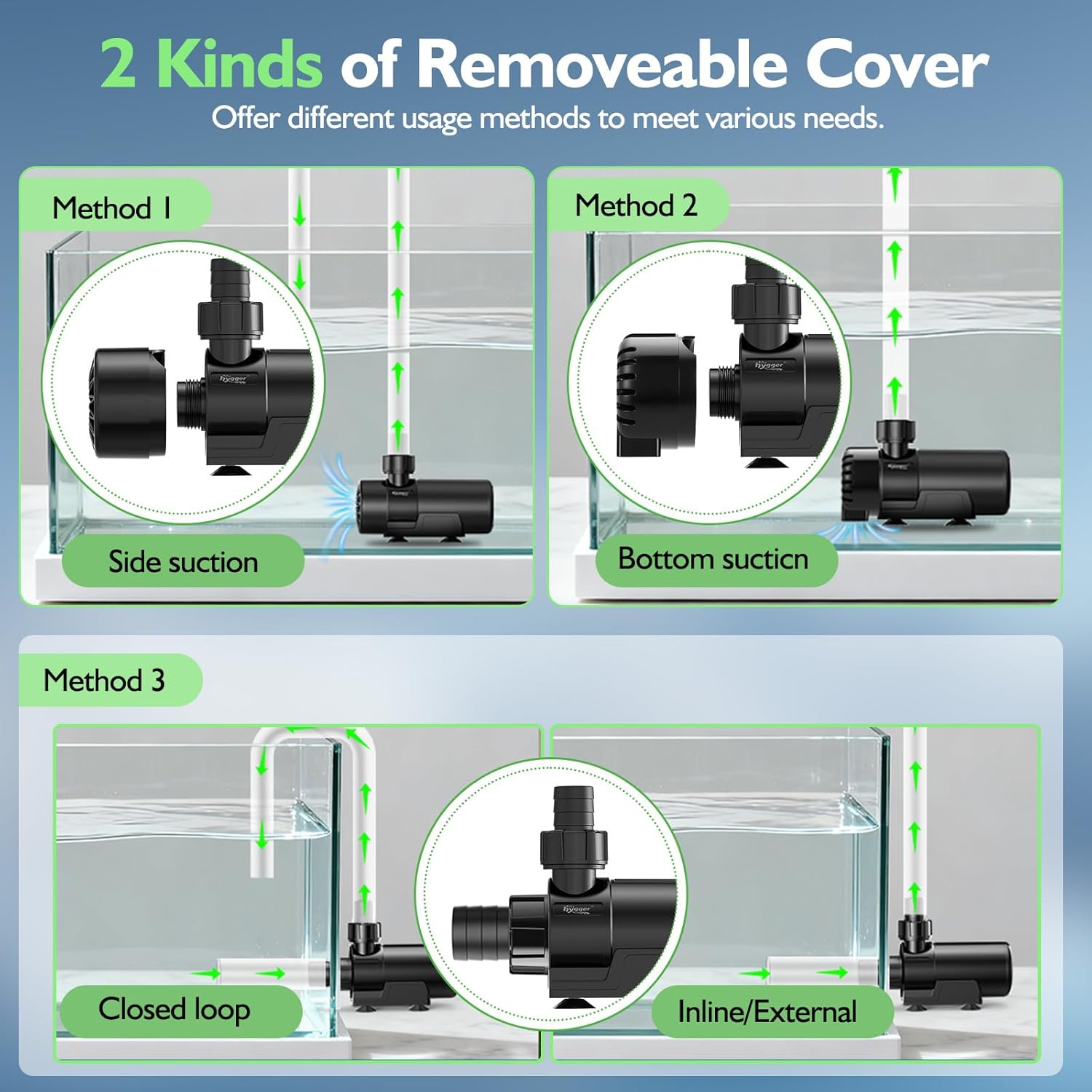
Image 4.1: Various installation methods for the hygger water pump, including submersible with side/bottom suction and inline/external configurations.
4.2. Attaching Nozzles
The pump comes with three different sized nozzles (0.75", 0.98", 1.25") to accommodate various hose diameters and flow requirements.
- Select the appropriate nozzle size for your hose.
- Screw the chosen nozzle onto the pump's outlet port until secure.

Image 4.2: Different water flow options provided by the three included nozzle sizes.
4.3. Securing the Pump
The pump is equipped with four strong suction cups on its base for secure placement. Ensure the surface is clean and smooth before pressing the pump firmly into place.
5. Operating Instructions
5.1. Connecting the Controller
Connect the pump unit to the external controller, and then connect the controller to a standard AC 110-120V / 60Hz power outlet. The LCD display on the controller will illuminate.

Image 5.1: Instructions for the external controller, detailing button functions and display information.
5.2. Power On/Off
Press the "Switch" button on the controller to turn the pump on or off.
5.3. Adjusting Flow Rate
The pump offers 10 adjustable flow rate levels. Use the "+" and "-" buttons on the controller to increase or decrease the water flow speed. The current level will be displayed on the LCD screen.

Image 5.2: The adjustable flow rate feature of the hygger water pump, controlled externally.
5.4. Operation Modes
The controller features three distinct operation modes: Constant Flow, Wave Mode, and Feeding Mode.
- Press the "M" (Mode Switching) button to cycle through the available modes.
- Constant Flow Mode: Provides a continuous, steady water flow at the set speed.
- Wave Mode: Creates a pulsating flow to simulate natural wave action. Use the "+" and "-" buttons to adjust the wave bands.
- Feeding Mode: Pauses pump operation for 10 minutes to allow for feeding without disturbing food or fish. The pump will automatically restart after 10 minutes.

Image 5.3: Visual representation of the three adjustable operation modes.
6. Maintenance
Regular maintenance ensures optimal performance and extends the lifespan of your pump.
6.1. Cleaning the Pump
The pump features a detachable design for easy cleaning without tools.
- Disconnect the pump from the power source before any cleaning or maintenance.
- Remove the front cover and impeller cover.
- Carefully remove the impeller/rotor assembly.
- Clean all components, including the impeller, impeller housing, and inlet covers, with a soft brush and clean water to remove any debris, algae, or mineral buildup.
- Inspect the ceramic shaft for wear or damage.
- Reassemble all parts securely.

Image 6.1: Detachable design for easy cleaning of the pump components.
6.2. Preventing Clogging
Regularly check the inlet mesh covers for debris accumulation. Clogging can reduce pump efficiency and potentially lead to motor strain.
7. Troubleshooting
If you encounter issues with your hygger water pump, refer to the following table for common problems and solutions.
| Problem | Possible Cause | Solution |
|---|---|---|
| Pump does not start | No power supply | Check power connection, ensure outlet is functional. |
| Controller is off | Press the "Switch" button on the controller to turn on. | |
| Anti-dry protection activated | Ensure pump is fully submerged or primed for inline use. Check for blockages. | |
| Low flow rate | Inlet/outlet clogged | Clean inlet covers, impeller, and hoses. |
| Flow rate set too low | Increase flow rate using the "+" button on the controller. | |
| Air in pump (inline use) | Ensure pump is fully primed with water before starting. | |
| Excessive noise/vibration | Debris in impeller | Clean impeller and housing. |
| Pump not securely placed | Ensure suction cups are firmly attached to a clean, smooth surface. | |
| Air trapped in pump/hoses | Gently shake the pump or adjust its position to release trapped air. |
8. Safety Information
- Always disconnect the power supply before performing any maintenance, installation, or cleaning.
- Do not operate the pump dry (without water) for extended periods, as this can damage the motor. The pump has anti-dry protection, but continuous dry running should be avoided.
- Ensure the power cord and controller are kept away from water to prevent electrical hazards.
- This pump is designed for fresh and marine water use. Do not use with flammable or corrosive liquids.
- Keep out of reach of children.
- If the power cord is damaged, it must be replaced by the manufacturer, service agent, or similarly qualified persons to avoid a hazard.
9. Warranty and Support
hygger products are designed for durability and performance. This pump features a pure copper brushless motor and anti-corrosion ceramic shaft for efficient and quiet operation, energy-saving, and a longer service life.
If you experience any issues with your hygger water pump, please contact hygger customer support for assistance. Refer to the product packaging or the official hygger website for specific warranty details and contact information.


