
1. Introduction
The Tressify G20 Car HUD (Head-Up Display) Speedometer is designed to enhance driving safety and convenience by projecting essential vehicle speed information directly into the driver's line of sight. This universal digital display offers clear speed readouts in both miles per hour (MPH) and kilometers per hour (KM/H), along with directional indicators for navigation assistance. Its compact design and easy installation make it a practical addition to any vehicle.
2. Package Contents
Please verify that all items listed below are included in your package:
- Tressify G20 Car HUD Speedometer Display (1 unit)
- Suction Bracket (1 unit)
- Micro USB Cable (1 unit)
- Anti-slip Pad (1 unit)
- Instruction Manual (1 unit)

Image: Contents of the Tressify G20 Car HUD package.
3. Setup and Installation
Follow these steps to properly set up and install your Tressify G20 Car HUD Speedometer:
- Choose a Location: Select a suitable flat surface on your dashboard where the HUD display will be clearly visible without obstructing your view of the road.
- Attach Suction Bracket: Secure the suction bracket to the bottom of the HUD unit.
- Mount the Unit: Place the suction cup of the bracket firmly onto the chosen dashboard location. Ensure a strong, stable hold. The 360° adjustable mount allows for optimal positioning. Alternatively, use the provided anti-slip pad for placement without the suction bracket.
- Connect Power: Connect one end of the Micro USB cable to the HUD unit and the other end to a suitable USB power source in your vehicle (e.g., a car charger, USB port).
- Power On: The unit will automatically power on when connected to power and the vehicle is started.
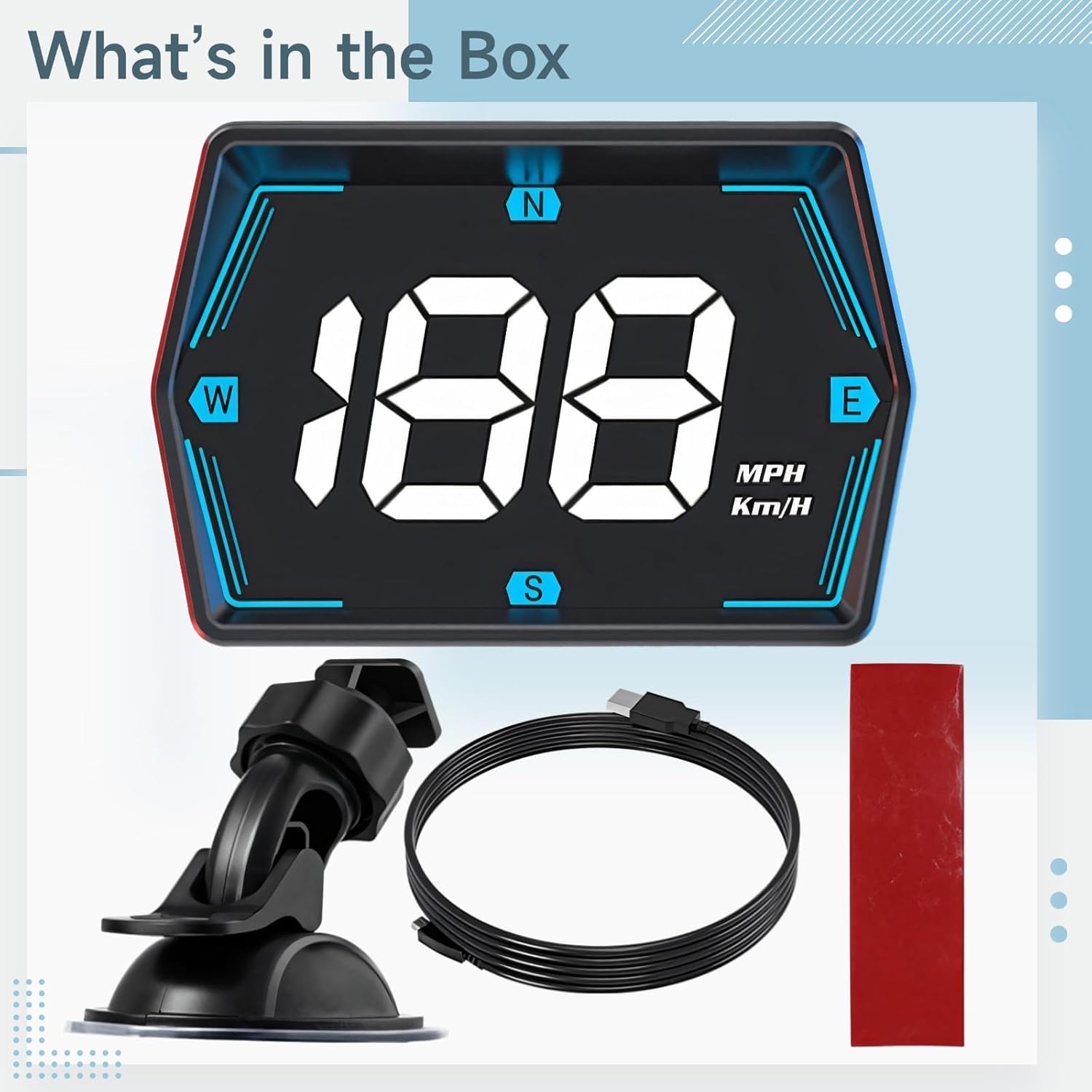
Image: Tressify G20 Car HUD installed on a car dashboard.
4. Operating Instructions
The Tressify G20 HUD is designed for straightforward operation:
- Automatic Power On/Off: The device powers on automatically when your vehicle starts and powers off when the vehicle is turned off, provided it is connected to a switched power source.
- Speed Display: The large digital display shows your current driving speed. The unit supports both MPH (miles per hour) and KM/H (kilometers per hour) readouts, accommodating diverse driver preferences.
- Directional Indicators: The display includes indicators for North (N), South (S), East (E), and West (W) to assist with basic navigation awareness during your trips.
- Brightness Adjustment: The display brightness may adjust automatically based on ambient light conditions for optimal visibility day and night.

Image: Close-up of the G20 Car HUD display.
5. Maintenance
To ensure the longevity and optimal performance of your Tressify G20 HUD Speedometer, follow these maintenance guidelines:
- Cleaning: Use a soft, dry, lint-free cloth to clean the display screen and the unit's exterior. Avoid using abrasive cleaners, solvents, or harsh chemicals, as these can damage the surface.
- Storage: If storing the device for an extended period, disconnect it from power and store it in a cool, dry place away from direct sunlight and extreme temperatures.
- Cable Care: Handle the Micro USB cable gently. Avoid bending or crimping it excessively, which can damage the internal wires.
6. Troubleshooting
If you encounter issues with your Tressify G20 HUD, refer to the following common problems and solutions:
- No Display/Unit Not Powering On:
- Ensure the Micro USB cable is securely connected to both the HUD unit and a functioning power source in your vehicle.
- Check if the vehicle's power outlet (e.g., cigarette lighter port) is active.
- Try a different USB power source or cable to rule out a faulty component.
- Inaccurate Speed Reading:
- Ensure the unit has a clear view of the sky for optimal GPS signal reception (if GPS-based).
- Verify that the unit is set to the correct speed unit (MPH or KM/H) if an adjustment option is available (the G20 displays both).
- Compare the HUD speed with your vehicle's dashboard speedometer. Small discrepancies can occur due to tire size or vehicle calibration.
- Display Not Clear/Flickering:
- Clean the display screen with a soft, dry cloth.
- Ensure the unit is securely mounted and not vibrating excessively.
- Check for any obstructions or strong light sources directly hitting the display.
If these steps do not resolve the issue, please contact Tressify customer support for further assistance.
7. Specifications
| Feature | Detail |
|---|---|
| Model | G20 |
| Brand | Tressify |
| Material | Acrylonitrile Butadiene Styrene (ABS), Polycarbonate (PC) |
| Product Dimensions (L x W x H) | 5.91 x 4.13 x 3.35 inches |
| Item Weight | 7.05 ounces |
| Speed Units | MPH / KM/H (Dual Unit) |
| Mounting Type | 360° Suction Mount |

Image: Tressify G20 Car HUD Product Dimensions.
8. Warranty and Support
For warranty information and customer support regarding your Tressify G20 Car HUD Speedometer, please refer to the documentation provided with your purchase or contact the seller directly. The manufacturer is Tressify.