1. Introduction
Thank you for choosing the VUEBEE VB-Y002 20W Solar Panel Kit. This kit is designed to provide continuous power to your 5V security cameras and 12V cellular trail cameras, eliminating the need for frequent battery changes. Featuring a high-efficiency 20W monocrystalline solar panel and a 24000mAh backup battery, it ensures reliable performance in various outdoor conditions. This manual will guide you through the installation, operation, and maintenance of your solar panel kit.
2. Package Contents
Please verify that all components are present in your package:
- 1 × 20W Solar Panel
- 1 × 24000mAh Battery Pack
- 3 × Adapter Cables (DC 5.5x2.1mm, 4.0x1.7mm, 3.5x1.35mm, and USB-C)
- 2 × Metal Hose Clamps
- 1 × Nylon Strap
- 1 × Wall Mount Kit (screws and anchors)

Image: All components included in the VUEBEE 20W Solar Panel Kit package.
3. Product Features
- Wide Compatibility: Supports most 5V security cameras and 12V cellular trail cameras with included USB-C and DC output options (5.5x2.1mm, 4.0x1.7mm, 3.5x1.35mm plugs). Note: Only one output can be used at a time.
- Adjustable Voltage: Features a slide switch on the battery to select between 5V and 12V output for optimal device compatibility.
- High-Efficiency Solar Panel: 20W monocrystalline solar panel with excellent light transmittance and high conversion efficiency.
- Backup Power: Integrated 24000mAh energy storage battery provides continuous and stable power, reducing the need for frequent recharging.
- All-Weather Performance: IP66 waterproof rating and an operating temperature range of 0°C to 45°C (32°F to 113°F) ensure durability against rain, snow, and harsh outdoor conditions.
- Easy Installation: Offers versatile mounting options including a wall bracket and post brackets with adjustable metal rings, straps, and screws for optimal sunlight exposure.

Image: The 24000mAh high-capacity battery with 5V/12V adjustable voltage switch.
4. Setup & Installation
Follow these steps to properly install your VUEBEE solar panel kit:
- Choose an Optimal Location: Select a location that receives direct sunlight for most of the day. Avoid areas with significant shade from trees, buildings, or other obstructions.
- Mount the Solar Panel:
- Wall Mount: Use the provided wall bracket, screws, and anchors. Drill pilot holes, insert anchors, and secure the bracket to the wall. Attach the solar panel to the bracket.
- Pole/Tree Mount: Use the metal hose clamps or nylon strap to secure the solar panel bracket to a pole or tree. Ensure it is tightly fastened to prevent movement.
Adjust the angle of the solar panel to face the sun directly for maximum charging efficiency. The adjustable mount allows for 360° rotation.
- Mount the Battery Pack: Secure the battery pack near the solar panel and your camera. It can be mounted on a wall using screws or attached to a pole/tree using the provided strap.
- Connect the Solar Panel to the Battery: Plug the solar panel's output cable into the input port of the 24000mAh battery pack.
- Select Output Voltage: Before connecting your camera, use the slide switch on the battery pack to select either 5V or 12V, matching the voltage requirement of your camera.
- Connect the Camera: Use the appropriate adapter cable (USB-C, DC 5.5x2.1mm, 4.0x1.7mm, or 3.5x1.35mm) to connect the battery pack's output to your security or trail camera. Ensure a secure connection.

Image: Example of easy installation on a wall, powering a security camera.
Video: An official video demonstrating the VUEBEE Solar Panel's features and compatibility with 5V cameras, highlighting continuous power and weather resistance.
5. Operating Instructions
Once installed, the VUEBEE solar panel kit operates automatically to charge the internal battery and power your connected device.
- Automatic Charging: The solar panel will convert sunlight into electrical energy to charge the 24000mAh internal battery. Ensure the panel is clean and free from obstructions for optimal charging.
- Power Output: The battery pack provides a stable power supply to your connected camera. The selected voltage (5V or 12V) will be maintained.
- Battery Level Indicator: The battery pack may feature LED indicators to show the current charge level. Refer to the product diagram for specific indicator locations.
- Voltage Selection: Always ensure the correct voltage (5V or 12V) is selected on the battery pack to match your camera's requirements. Incorrect voltage can damage your device.

Image: Illustrates the wide compatibility with 5V security cameras and 12V trail cameras.
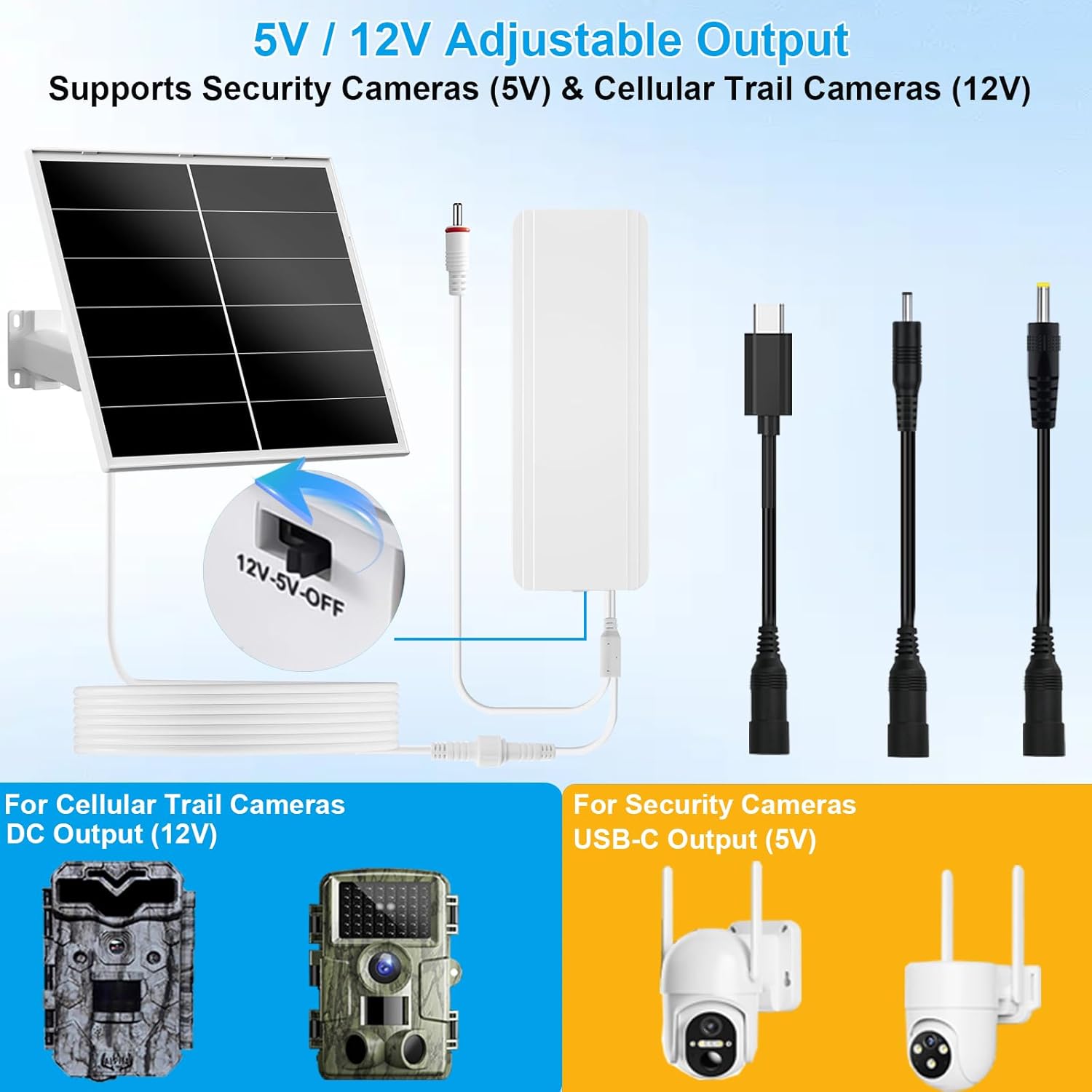
Image: Shows the 5V/12V adjustable output and the different adapter cables for various devices.
6. Maintenance
Regular maintenance ensures optimal performance and longevity of your solar panel kit.
- Clean the Solar Panel: Periodically wipe the surface of the solar panel with a soft, damp cloth to remove dust, dirt, leaves, or snow. A clean panel ensures maximum sunlight absorption.
- Check Connections: Regularly inspect all cable connections to ensure they are secure and free from corrosion or damage.
- Inspect Mounting: Verify that the solar panel and battery pack are still securely mounted and that the panel's angle is still optimized for sunlight exposure.
- Environmental Considerations: While IP66 waterproof, avoid submerging the unit in water. In extreme weather conditions (e.g., severe hail, hurricanes), consider temporarily relocating the unit if possible.
7. Troubleshooting
If you encounter issues with your VUEBEE solar panel kit, refer to the following common problems and solutions:
| Problem | Possible Cause | Solution |
|---|---|---|
| Camera not receiving power. |
|
|
| Battery not charging. |
|
|
| Intermittent power supply. |
|
|
8. Specifications
| Feature | Detail |
|---|---|
| Brand | VUEBEE |
| Model Number | VB-Y002 |
| Material | Aluminum, Monocrystalline Silicon, Tempered Glass |
| Product Dimensions | 9.84"L x 3.34"W x 1.37"H |
| Item Weight | 4.8 Pounds |
| Solar Panel Power | 20 Watts |
| Battery Capacity | 24000mAh |
| Output Voltage | 5V / 12V (Adjustable) |
| Output Ports | USB-C, DC 5.5x2.1mm, 4.0x1.7mm, 3.5x1.35mm |
| Waterproof Rating | IP66 |
| Operating Temperature | 0°C to 45°C (32°F to 113°F) |
9. Warranty & Support
VUEBEE products are designed for reliability and performance. For specific warranty information, please refer to the warranty card included with your purchase or visit the official VUEBEE website. If you require technical assistance, troubleshooting, or have any questions regarding your solar panel kit, please contact VUEBEE customer support through the contact information provided on our website or your purchase documentation.