
Introduction and Overview
The RYQIF ERF3M90H is a replacement remote control designed for various tower fan models. It offers an ergonomic design for comfortable use and straightforward operation.
- Compatible with FTS006R, PNTCK FTS005R, PNTCK FTS018R, PNTCK HF003, JRD FTS005R, and GRIDR FTS006R tower fan models.
- Features a compact and lightweight design.
- Operates via infrared technology.

This image displays the RYQIF ERF3M90H remote control positioned near a compatible tower fan, indicating an effective operational range. While the image shows 8 meters, the remote is designed for an optimal control distance of 5 meters and a maximum distance of 10 meters.
1. Setup
1.1 Battery Installation
The remote control requires one CR2025 button battery (not included).
- Locate the battery compartment on the back of the remote control.
- Gently push the release tab and slide the battery cover open.
- Insert one CR2025 button battery, ensuring the positive (+) side faces upwards.
- Slide the battery cover back into place until it clicks securely.
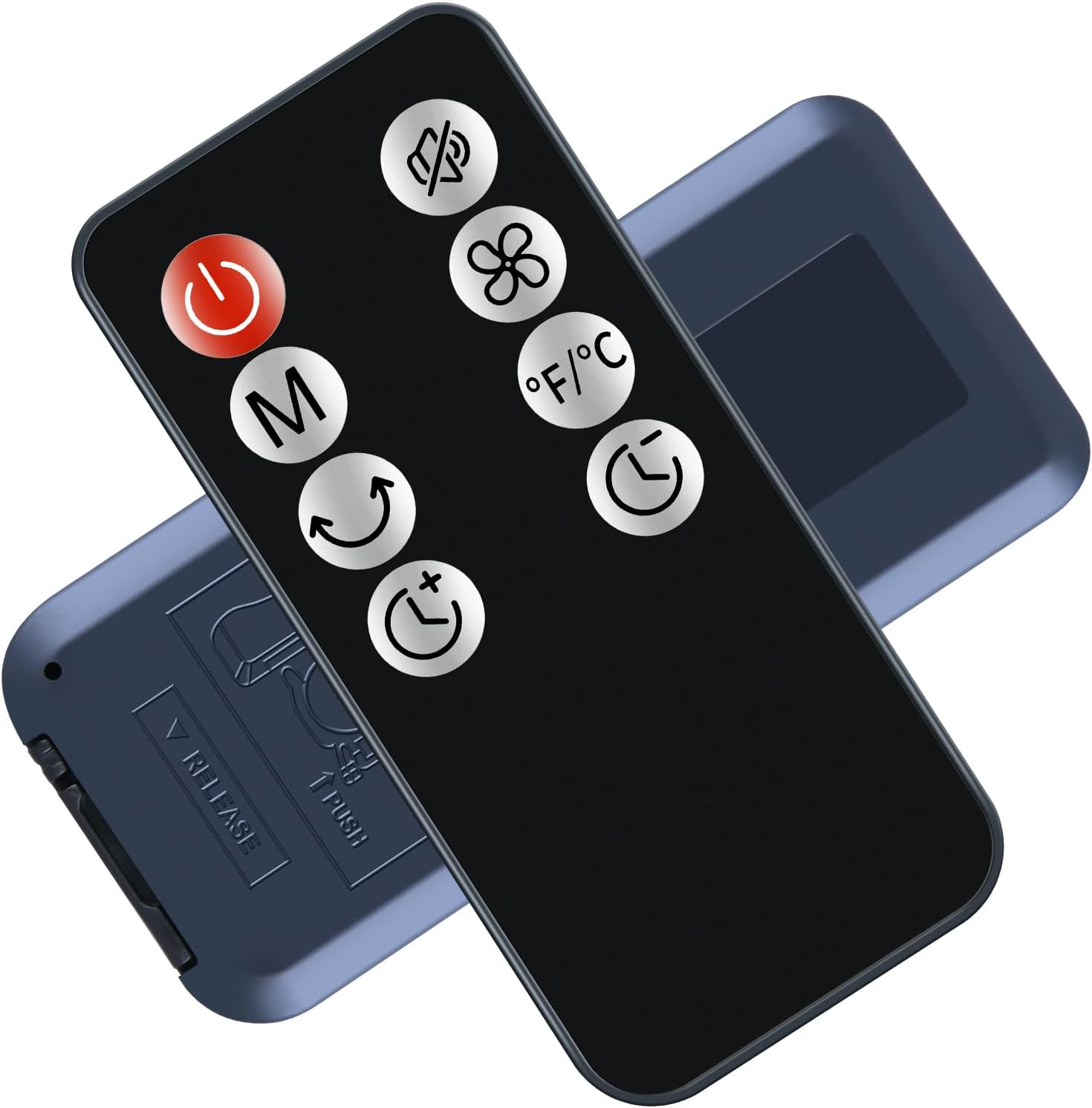
This image shows the rear view of the remote control, highlighting the battery compartment. Instructions for opening the compartment are visible, indicating to push and slide to release the cover.

This image provides a detailed view of the battery compartment, illustrating the correct orientation for inserting a CR2025 button battery with the positive (+) terminal facing up, as indicated by the markings.
1.2 Initial Use
No setup or pairing is required. Once batteries are correctly installed, the remote control is ready for immediate use with compatible tower fan models.
2. Operating Instructions
The RYQIF ERF3M90H remote control operates your tower fan using infrared signals. Ensure there is a clear line of sight between the remote control and the fan's receiver for optimal performance.
2.1 Button Functions
The remote control features several buttons for controlling your tower fan. Refer to the image below for button identification.

This image provides a detailed view of the remote control's buttons, including Power, Mode (M), Oscillation, Speed, Timer, and Temperature unit (°F/°C). It emphasizes the importance of distinguishing between similar-looking buttons for correct operation.
- Power Button (Red Circle with Line): Turns the fan On or Off.
- Mode Button (M): Cycles through different fan modes (e.g., Normal, Natural, Sleep).
- Oscillation Button (Curved Arrows): Activates or deactivates the fan's oscillation function.
- Speed Button (+/- or Fan Icon): Adjusts the fan speed.
- Timer Button (Clock Icon): Sets the fan's operating timer.
- Temperature Unit Button (°F/°C): Switches the temperature display between Fahrenheit and Celsius, if supported by the fan.
2.2 Operational Range
For best performance, operate the remote control within an optimal distance of 5 meters (16 feet) from the tower fan. The maximum effective range is approximately 10 meters (33 feet). Obstructions between the remote and the fan may reduce the operational range.
3. Maintenance
3.1 Cleaning
To clean the remote control, wipe it with a soft, dry cloth. Do not use abrasive cleaners, solvents, or chemical agents, as these can damage the surface or internal components.
3.2 Battery Replacement
Replace the CR2025 button battery when the remote control's response becomes inconsistent or stops working. Follow the battery installation steps in Section 1.1. Dispose of used batteries according to local regulations.
3.3 Storage
When not in use for extended periods, remove the battery to prevent leakage and store the remote control in a cool, dry place away from direct sunlight and extreme temperatures.
4. Troubleshooting
4.1 Remote Control Not Responding
- Check Batteries: Ensure the CR2025 battery is correctly installed with the positive (+) side facing up. Replace the battery if it is depleted.
- Line of Sight: Verify there are no obstructions between the remote control and the tower fan.
- Distance: Ensure you are within the operational range (up to 10 meters). Move closer to the fan if necessary.
- Fan Power: Confirm that the tower fan is powered on and functioning correctly.
4.2 Inconsistent Response
- Battery Level: A weak battery can cause inconsistent responses. Replace the battery.
- Interference: Other infrared devices or strong light sources might interfere with the signal. Try operating the remote in a different location or away from potential interference.
5. Specifications
| Feature | Detail |
|---|---|
| Model | ERF3M90H |
| Brand | RYQIF |
| Connectivity | Infrared |
| Compatible Devices | Tower Fans (FTS006R, PNTCK FTS005R, FTS018R, HF003, JRD FTS005R, GRIDR FTS006R) |
| Battery Type | 1 x CR2025 Button Battery (not included) |
| Max. Operational Range | 10 meters (33 feet) |
| Optimal Operational Range | 5 meters (16 feet) |
| Controller Type | Button Control |
| Special Feature | Ergonomic Design |
6. Warranty and Support
For any questions regarding product features, order details, or assistance, please contact the dedicated customer service team. A response is typically provided within 12 hours on working days.
This product is covered by standard consumer warranty as per local regulations. Please retain your proof of purchase for warranty claims.