Introduction
The DREAME L40 Ultra Gen 2 is an advanced robot vacuum and mop designed to provide comprehensive floor cleaning. Featuring 25,000Pa suction power, an extendable side brush and mop, and an all-in-one self-emptying and cleaning dock, this device offers automated cleaning for various floor types. This manual provides essential information for safe operation, setup, maintenance, and troubleshooting.
Package Contents
Carefully unpack the box and ensure all items are present and in good condition. If any items are missing or damaged, contact customer support.

Image: All components included in the DREAME L40 Ultra Gen 2 package. This includes the robot vacuum, base station, pre-installed main brush, pre-installed brush guard, pre-installed side brush, pre-installed dust box with filter, two pre-installed mop pads, two mop pad holders, two pre-installed dust bags, a base station ramp extension, a quick start guide, and the user manual.
- Robot Vacuum (x1)
- Base Station (x1)
- Main Brush (pre-installed) (x1)
- Brush Guard (pre-installed) (x1)
- Side Brush (pre-installed) (x1)
- Dust Box (pre-installed, including filter) (x1)
- Mop Pads (pre-installed) (x2)
- Mop Pad Holders (x2)
- Dust Bags (pre-installed) (x2)
- Base Station Ramp Extension (x1)
- Quick Start Guide (x1)
- User Manual (x1)
Setup
1. Base Station Placement
Place the all-in-one base station on a hard, flat surface against a wall. Ensure there is at least 0.5 meters (1.6 feet) of clear space on both sides and 1.5 meters (4.9 feet) in front of the base station for optimal robot navigation and docking. Connect the power cord to the base station and plug it into a power outlet.
2. Initial Charging
Place the robot vacuum onto the base station. Ensure the charging contacts on the robot align with those on the base station. The robot will automatically begin charging. For first-time use, fully charge the robot before operation, which typically takes approximately 6 hours.
3. App Connection
Download the DreameHome app from your mobile device's app store. Follow the in-app instructions to add your DREAME L40 Ultra Gen 2. This involves connecting the robot to your 2.4GHz Wi-Fi network. The app allows for advanced control, mapping, scheduling, and customization of cleaning preferences.
Operation
Cleaning Modes
The robot offers various cleaning modes accessible via the DreameHome app. These include vacuum-only, mop-only, and vacuum & mop combined modes. You can adjust suction power and water flow levels to suit different floor types and cleaning needs.

Image: The robot vacuum demonstrating its powerful 25,000Pa suction, capable of 100% particle pickup and 99% hair removal, effectively cleaning various debris like hair, paper scraps, and cat litter.
Advanced Mopping System
The DuoScrub Mopping System utilizes two high-speed rotary mops with 32-level moisture control for precise cleaning. The robot can adjust the mop's moisture level from slightly dry to wet, ensuring effective stain removal and quick drying.
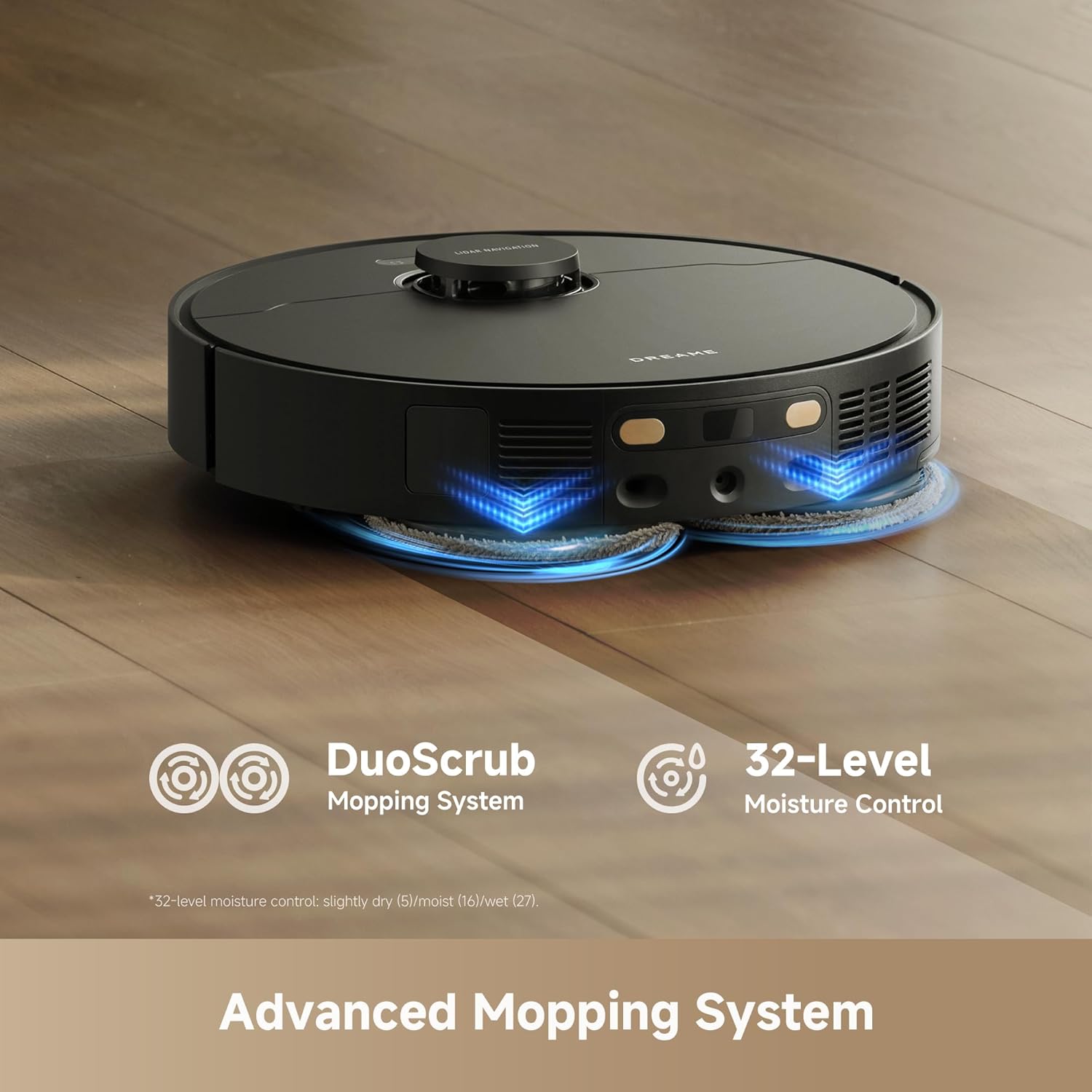
Image: The robot vacuum actively mopping a hard floor, showcasing its DuoScrub Mopping System and the precision of its 32-level moisture control for optimal cleaning.
Corner and Edge Cleaning
The L40 Ultra Gen 2 features an extendable side brush and mop that reaches into corners and along edges, ensuring thorough cleaning where traditional robot vacuums might miss. This design allows for 100% corner coverage and 99% edge coverage.

Image: The robot vacuum's extendable side brush and mop mechanism, illustrating its ability to clean deep into corners and along wall edges for comprehensive coverage.
Carpet Cleaning
The robot is equipped with intelligent carpet detection. When a carpet is detected, the mops automatically lift up to 10.5mm to prevent wetting the carpet during mopping cycles. For vacuuming, the suction power can be boosted on carpets for deeper cleaning. You can also set carpet avoidance zones in the app.
Navigation and Obstacle Avoidance
Utilizing Smart Pathfinder and 3DAdapt technologies, the L40 Ultra Gen 2 maps your home with precision and avoids obstacles such as shoes, cables, and pet waste. This ensures efficient cleaning paths and reduces the risk of getting stuck or damaging items.

Image: The robot vacuum intelligently navigating a room, demonstrating its ability to detect and avoid obstacles using advanced sensors and mapping technology.
App and Voice Control
Control the robot through the DreameHome app for scheduling, zone cleaning, no-go zones, and real-time monitoring. The robot also supports voice control via Alexa, Siri, and Google Home for convenient hands-free operation. Ensure your Wi-Fi is 2.4GHz for connectivity.
Video: An overview of the DREAME L40 Ultra Gen 2 robot vacuum and mop in action, showcasing its various cleaning features and capabilities.
Maintenance
All-in-One Self-Cleaning Dock
The base station is designed for minimal manual maintenance. It performs several automated functions:
- Auto-Emptying: The robot automatically empties its dustbin into a 3.2L dust bag in the dock, providing up to 100 days of hands-free dust disposal.
- Mop Washing: The dock washes the mop pads during and after cleaning cycles using 20 spray nozzles and a flat integrated washboard design, ensuring mops stay clean.
- Hot Air Drying: After washing, the mop pads are dried with hot air to prevent mildew and odors.
- Auto Water Refilling: The dock refills the robot's water tank for mopping operations.
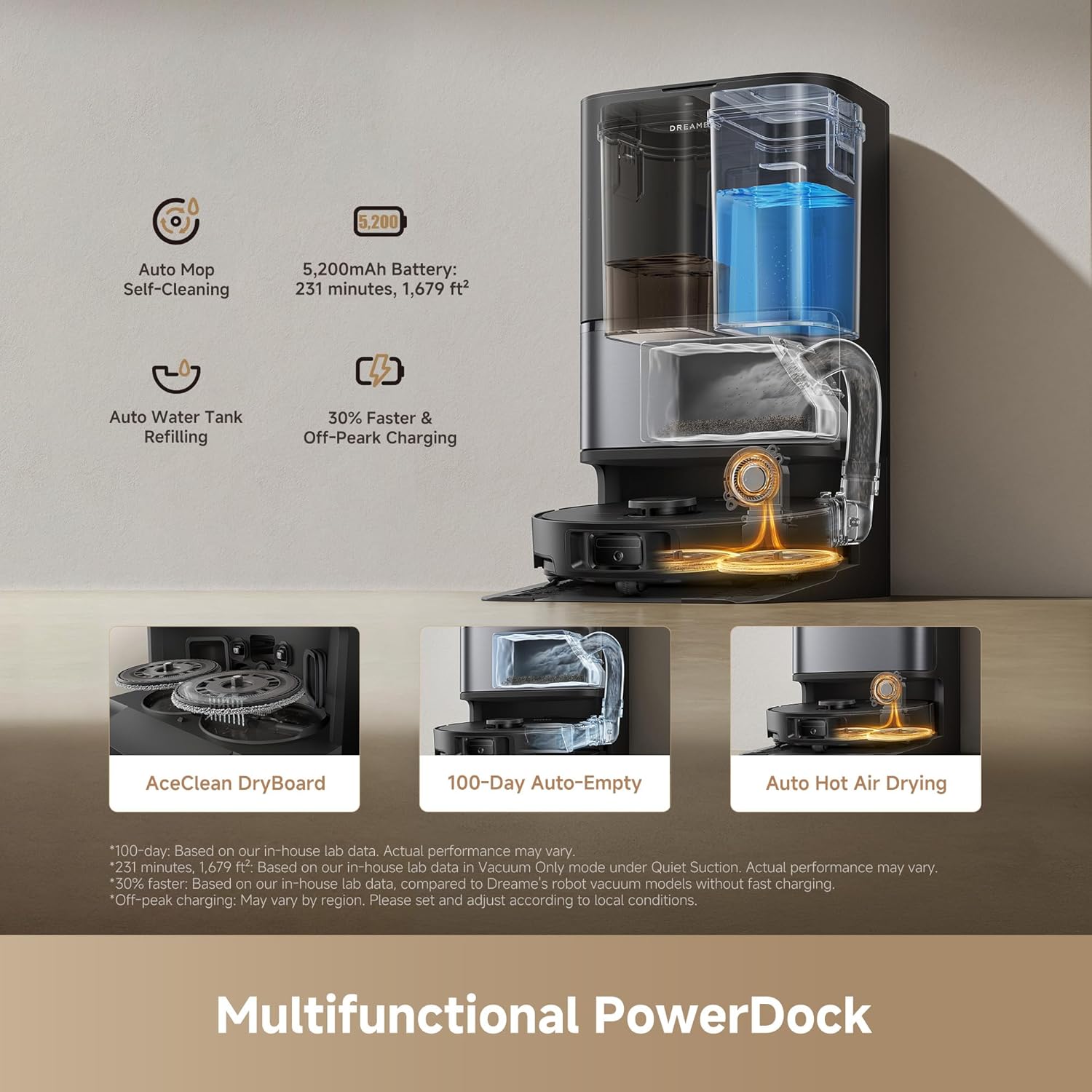
Image: The multifunctional PowerDock, illustrating its capabilities including automatic mop self-cleaning, water tank refilling, 100-day auto-empty, and hot air drying for the mop pads.

Image: The self-cleaning mechanism of the mop pads within the dock, demonstrating how water is sprayed to clean the pads and dirty water is collected, ensuring 99% mop stain removal.
Robot Component Cleaning
- Main Brush: Regularly remove hair and debris tangled around the main brush. Use the cleaning tool provided.
- Side Brush: Check the side brush for tangled hair or debris and clean as needed. Replace if worn.
- Dust Box and Filter: Although the dock auto-empties, periodically remove the dust box and clean the filter. The filter is washable; allow it to air dry completely before reinstallation.
- Mop Pads: While the dock cleans them, inspect mop pads for excessive wear or stubborn stains. Replace if necessary.
- Sensors: Wipe all sensors on the robot and base station with a clean, dry cloth to ensure optimal navigation and performance.
Optional Auto-Detergent Dispenser
An optional auto-detergent dispenser module is available for separate purchase. Once installed, this module enables the base station to automatically dispense cleaning solution for mop washing, which can be activated and managed through the DreameHome app.
Troubleshooting
| Problem | Possible Cause | Solution |
|---|---|---|
| Robot does not turn on | Low battery; Power button not pressed correctly | Place robot on charging dock; Press and hold power button for 3 seconds |
| Robot cannot charge | Charging contacts dirty; Base station not powered | Clean charging contacts on robot and dock; Ensure base station is plugged in and powered |
| Robot gets stuck frequently | Obstacles in path; Sensors dirty | Clear obstacles; Clean all sensors; Set no-go zones in app |
| Poor cleaning performance | Dustbin full; Brushes tangled; Filter clogged; Mop pads dirty | Check dust bag in dock; Clean main/side brushes; Clean/replace filter; Ensure mop pads are clean |
| Mop pads not wet enough | Water tank empty; Water flow setting too low | Check water tank in dock; Adjust water flow in DreameHome app |
| App connection issues | Incorrect Wi-Fi band; Router issues | Ensure 2.4GHz Wi-Fi; Restart router and robot; Re-pair device in app |
Specifications
| Feature | Detail |
|---|---|
| Brand | DREAME |
| Model Name | L40 Ultra Gen2 |
| Item Model Number | RLL53SE |
| Suction Power | 25,000Pa |
| Special Features | DuoScrub Mopping System, Auto-empty, Hot Air Drying, Mop Washing, Precise Obstacle Avoidance, Smart Carpet Cleaning |
| Color | Black |
| Product Dimensions | 13.8"L x 13.4"W x 23.3"H |
| Included Components | Filter, Mop Pad, Side Brush |
| Filter Type | Foam |
| Battery Life | 200 minutes (up to 231 minutes in Quiet Mode) |
| Battery Capacity | 5,200mAh |
| Voltage | 110 Volts |
| Power Source | Corded Electric |
| Control Method | App, Voice (Alexa, Siri, Google Home) |
| Form Factor | Robotic |
| Smart Home Compatibility | Smart Home Compatible |
| Item Weight | 38 pounds |
| Surface Recommendation | Wood, Marble, Tile |
| UPC | 810142562744 |
Warranty and Support
Warranty Information
DREAME products typically come with a standard product warranty. The DREAME L40 Ultra Gen 2 includes up to a 3-year product warranty. Please refer to the warranty card included in your package or visit the official DREAME website for detailed terms and conditions regarding warranty coverage, including specific durations and what is covered.
Customer Support
For technical assistance, troubleshooting, or warranty claims, please contact DREAME customer support. You can find contact information (phone, email, or live chat) on the official DREAME website. Have your product model number (L40 Ultra Gen 2 or RLL53SE) and proof of purchase ready when contacting support.
DREAME offers dedicated customer support and a 30-day hassle-free return policy. Trusted, fast, and local warranty repair services are also available.


