
1. Introduction
The Tiumtec FST-18H is a professional fiber optic fusion splicer designed for precise and reliable splicing of single-mode and multi-mode fiber optic cables. This manual provides essential information for the safe and efficient operation, maintenance, and troubleshooting of your FST-18H splicer. Please read this manual thoroughly before using the device.
2. Safety Information
WARNING: Improper use can lead to serious injury or damage to the device.
- Always wear appropriate personal protective equipment, including safety glasses, when handling fiber optic cables and operating the splicer.
- Do not look directly into the fiber ends or the arc discharge area, as this can cause severe eye damage.
- Ensure the work area is clean, well-lit, and free from flammable materials.
- Handle fiber optic cables with care; glass fibers are fragile and can cause splinters.
- Use only the provided power adapter and accessories.
- Keep the device away from water and high humidity.
- Do not attempt to disassemble or repair the splicer yourself. Refer to qualified service personnel.
- Dispose of fiber scraps and used cleaning materials properly.
3. Package Contents
Verify that all items listed below are present in your package. If any items are missing or damaged, contact your supplier.

Image: The Tiumtec FST-18H Fusion Splicer, along with its complete set of accessories, neatly organized within a durable yellow carrying case. This image displays the splicer unit, fiber cleaver, fiber strippers, power adapter, and other essential tools.
- Tiumtec FST-18H Fiber Splicer (x1)
- Fiber Cleaver (x1)
- Battery (x1)
- Power Adapter (x1)
- AC Power Line (x1)
- Back-up Electrode (x1 pair)
- Cooling Tray (x1)
- Carrying Case (x1)
- Carrying Strap (x1)
- User Manual (x1)
- Splicing Test Report (x1)
- Fiber Stripper (x1)
- Drop Cable Stripper (x1)
- Alcohol Bottle (x1)
4. Product Overview
The Tiumtec FST-18H is an active cladding alignment fusion splicer. It features a robust design, a 4.3-inch high-resolution color LCD touch screen, and intuitive controls for efficient operation.
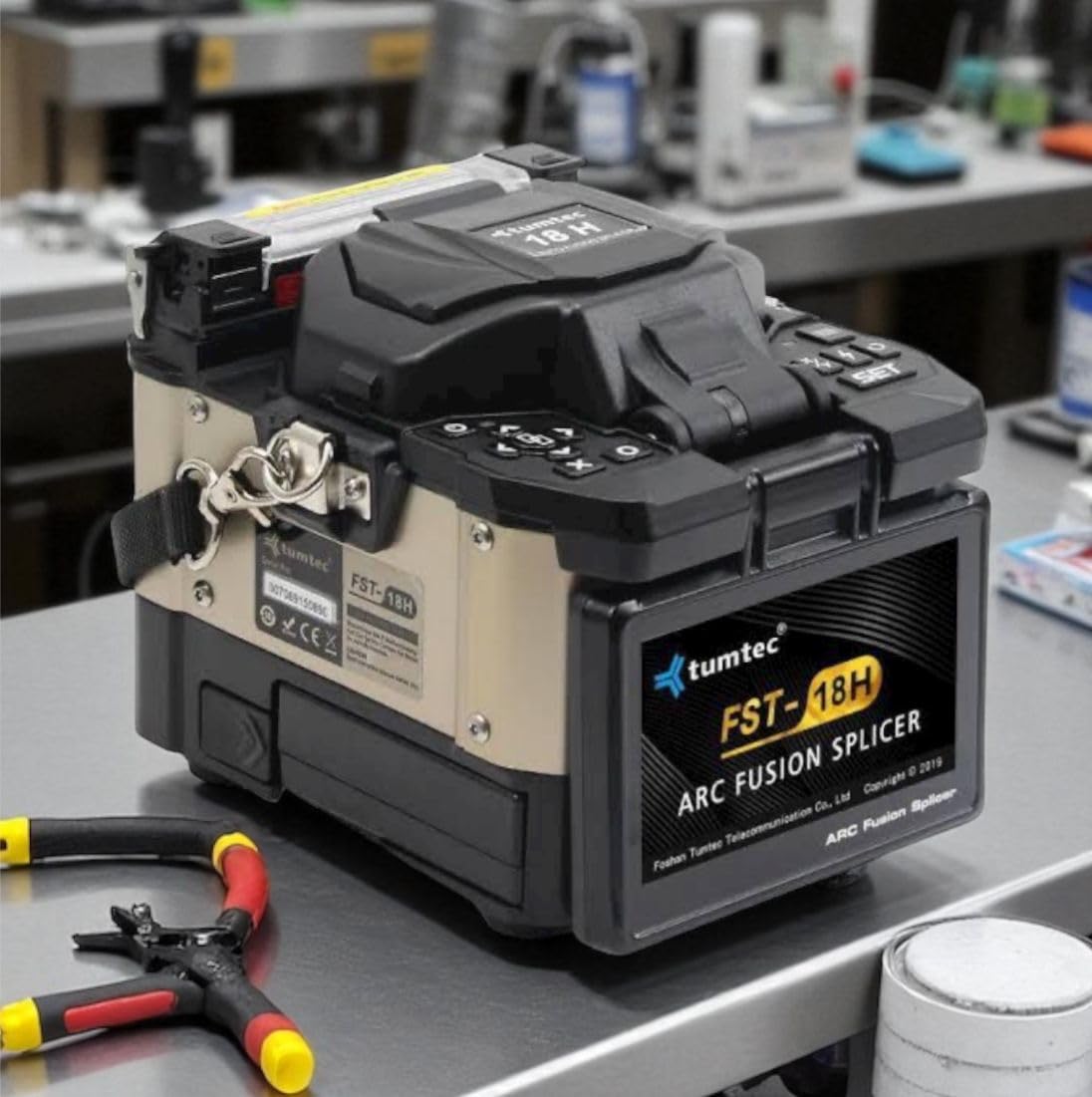
Image: A detailed front view of the Tiumtec FST-18H Fiber Optic Fusion Splicer, showcasing its compact design, control panel, and fiber placement area. The display screen and various buttons are visible.
Key Features:
- Professional-grade fusion splicer for single-mode and multi-mode fibers.
- Integrated design with a professional cleaver and two fiber strippers.
- Durable black casing with a user-friendly control interface.
- 4.3-inch high-resolution color LCD touch screen (380X magnification).
- Dust-proof, water-proof, high-temperature resistance.
- Detachable 4800mAh battery, supporting over 230 splicing and heating cycles.
- Three high-power white LEDs and illuminated keypads for low-light conditions.
- Detachable multifunction fixture suitable for various fiber types.
5. Setup
- Unpacking: Carefully remove the splicer and all accessories from the carrying case.
- Battery Installation/Charging:
- Ensure the battery is securely installed.
- Connect the power adapter to the splicer and a power outlet to charge the battery before first use. The charging indicator will show the status.
- Power On: Press and hold the power button until the display screen illuminates. The device typically turns on in 3 seconds.
- Initial Inspection: Check the electrodes for cleanliness and proper alignment. Ensure the V-grooves and objective lenses are clean.
6. Operating Instructions
Follow these steps for a successful fiber optic fusion splice.
6.1 Fiber Preparation
- Stripping: Use the fiber stripper to remove the outer jacket and coating of the fiber to the required length (typically 30-40mm).
- Cleaning: Clean the stripped fiber thoroughly with an alcohol wipe (99% isopropyl alcohol) to remove any residue. Allow it to air dry completely.
- Cleaving: Place the cleaned fiber into the fiber cleaver. Ensure the fiber is positioned correctly and cleave it to the precise length specified by the splicer (usually 10-16mm). A good cleave is crucial for low splice loss.
6.2 Splicing Process
- Loading Fibers: Open the splicer's wind cover and place the prepared fibers into the V-grooves. Ensure the fiber ends are positioned correctly in front of the electrodes.
- Closing Cover: Close the wind cover. The splicer will automatically begin the alignment process.
- Arc Fusion: Once aligned, the splicer will initiate the arc discharge to fuse the fiber ends. This typically takes about 6 seconds for fast splicing.
- Splice Loss Estimation: After fusion, the splicer will display an estimated splice loss. Inspect the splice visually on the screen for any defects.
6.3 Heat Shrinking
- Positioning Sleeve: Slide a heat shrink protection sleeve over the spliced area.
- Heating: Place the fiber with the protection sleeve into the heating oven of the splicer. Close the oven cover. The heating process typically takes about 13 seconds.
- Cooling: Once heating is complete, carefully remove the fiber and place it in the cooling tray to allow the sleeve to cool and harden.
7. Maintenance
Regular maintenance ensures optimal performance and extends the lifespan of your splicer.
- Cleaning V-Grooves and Lenses: Use a cotton swab moistened with alcohol to gently clean the V-grooves and objective lenses regularly. Ensure no dust or fiber particles remain.
- Electrode Cleaning/Replacement:
- Clean electrodes with a soft brush or alcohol swab if they appear dirty.
- Replace electrodes when the splicer indicates replacement is due, or if splicing performance degrades significantly. The FST-18H is rated for 20000 arc discharges before electrode replacement.
- Battery Care: Charge the battery regularly, even if not in use, to maintain its capacity. Avoid fully discharging the battery frequently.
- Storage: When not in use, store the splicer and accessories in the provided carrying case in a clean, dry environment.
8. Troubleshooting
This section addresses common issues you might encounter.
| Problem | Possible Cause | Solution |
|---|---|---|
| High Splice Loss | Dirty fiber ends, poor cleave, dirty V-grooves/lenses, worn electrodes. | Reclean and recleave fibers. Clean V-grooves and lenses. Replace electrodes if necessary. |
| Fiber Not Aligning | Dirty V-grooves, incorrect fiber placement, damaged fiber. | Clean V-grooves. Re-position fibers carefully. Inspect fiber for damage. |
| Splicer Not Powering On | Low battery, faulty power adapter, power button issue. | Charge battery. Check power adapter connection. Contact support if issue persists. |
| Heating Oven Not Working | Heating element issue, sensor malfunction. | Ensure fiber is correctly placed. Contact support. |
9. Specifications
Detailed technical specifications for the Tiumtec FST-18H Fusion Splicer.

Image: An infographic displaying the key features, standard accessories, and a comprehensive table of equipment parameters for the Tiumtec FST-18H Fusion Splicer.
| Parameter | Value |
|---|---|
| Model | FST-18H |
| Dimensions (LWH) | 115W*160L*135H (excluding rubber bumper) / 120W*165L*135H (including rubber bumper) |
| Weight | 1735g (with battery) / 1355g (without battery) |
| Number of Fiber | Single |
| Applicable Fibers | SM(ITU-T G.652&G.657A), MM(ITU-T G.651), DS(ITU-T G.653), NZDS(ITU-T G.655) |
| Compatible Fiber/Cable | 0.25 - 3.0mm/Indoor Cable/ drop cable (flat type) |
| Cladding Diameter | Diameter: 100 - 1000µm / Cleave Length: 8-16mm |
| Coating Diameter | 80 - 150 µm |
| Splicing Mode | Pre-set 41 splicing modes, max 100 modes (editable by user) |
| Heating Mode | Pre-set 5 heating modes (20/30/40/50/60mm), max 100 modes (editable by user) |
| Typical Splice Loss | SM: 0.03dB / MM: 0.02dB / DS: 0.05dB / NZDS: 0.05 dB / G.657: 0.03dB (ITU-T Standard) |
| Return Loss | >60dB |
| Lighting | 3 White LEDs |
| Splicing Time | Quick Mode: 6s |
| Estimated Splice Loss | Available |
| Heating Time | Typical heating time: 13s, Typical heating time: 30s, adjustable for protection sleeve size 20 - 60mm |
| Results Storage | 20000 latest records & 200 images |
| Tension Test | 1.8N - 2.25N |
| Operating Condition | Operating Altitude: 0 - 5000m above sea level, 0 - 95% relative humidity, -20 ~ +55 °C. Max Wind 15m/s |
| Storage Condition | 0 - 95% relative humidity, -40 ~ 80 °C |
| Display | 90° bi-directional view, 4.3" Color High Resolution LCD monitor |
| Fiber View & Magnification | X, Y, XY: 380X Magnification |
| AC Power Supply | AC Input 100 - 240V, 50/60Hz; DC Input 12 - 15V |
| No. of Splice/Heating with Battery | 4800mAh Battery Capacity: Typical 230 times (Splice + Heat) |
| Operating Methods | Button/Touch Screen |
| Automatic Calibration | Automatic arc calibration by air pressure and temperature |
| Electrode Life | 20000 arc |
| Terminal | Mini USB 2.0 |
10. Warranty and Support
For warranty information, technical support, or service inquiries, please contact your authorized Tiumtec dealer or visit the official Tiumtec website. Keep your purchase receipt as proof of purchase.
Manufacturer: Tiumtec (Foshan Tumtec Telecommunication Co., Ltd)
Address: RM 302-1, A5 building Hantian Hi-tech Zone, 17th Shenhai Road, Guicheng Avenue, Nanhai district, Foshan, Guangdong, China.