
1. Introduction
The CHNADKS RM-66 Radon Detector is a portable device designed for continuous monitoring of radon gas levels in indoor environments. It features a high-precision semiconductor sensor, a 2.0-inch TFT color display, and provides both audible and visual alarms when radon levels exceed user-defined thresholds. This manual provides essential information for the safe and effective operation, maintenance, and troubleshooting of your RM-66 Radon Detector.
2. Safety Information
- Read all instructions carefully before using the device.
- Do not attempt to open or modify the device. This may void the warranty and pose safety risks.
- Keep the device away from water and excessive humidity.
- Avoid exposing the device to extreme temperatures or direct sunlight for prolonged periods.
- Use only the provided Type-C charging cable or a certified equivalent.
- Keep out of reach of children.
- Ensure proper ventilation when charging to prevent overheating.
3. Package Contents
Verify that all items are present in the package:
- 1 × CHNADKS RM-66 Radon Detector
- 1 × Type-C Charging Cable
- 1 × User Manual (this document)

4. Product Overview
The RM-66 Radon Detector is equipped with advanced features for accurate and convenient radon monitoring.
4.1 Key Features
- High-Precision Semiconductor Sensor: Ensures accurate radon detection with a measurement range of 0.09–1000 pCi/L (3.3 Bq/m³ – 37 kBq/m³).
- TFT Color Display: A 2.0-inch screen with a graphical interface for clear and easy reading of radon levels.
- Audible & Visual Alarms: Provides instant alerts when radon levels exceed user-defined safe thresholds.
- Portable Design: Compact and includes an adjustable rear kickstand for flexible placement.
- Long-Term Monitoring: Stores up to 504 days of historical radon data, recording every 6 hours.
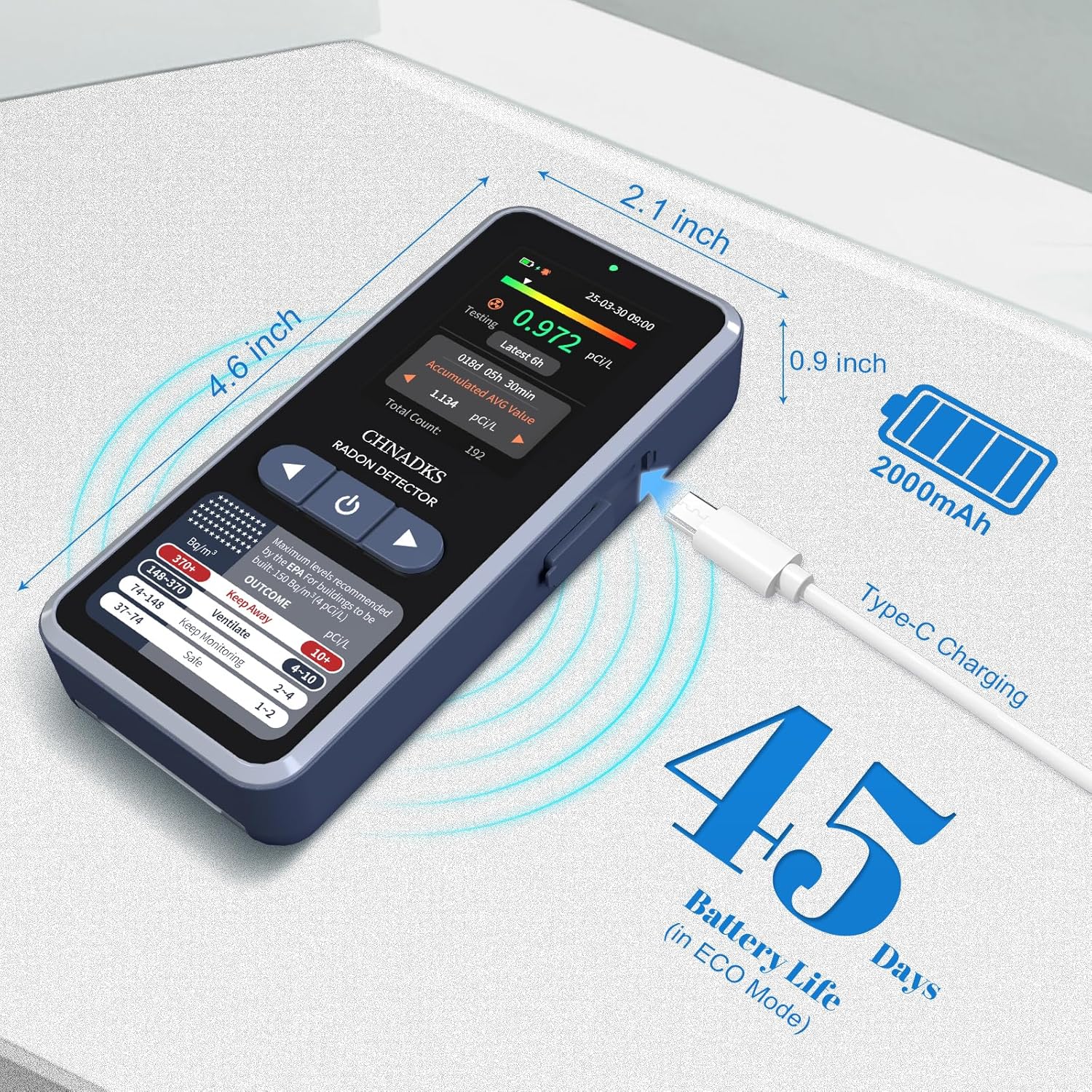
- Rechargeable Battery: Max 45 days of battery life in screen-off mode, with fast Type-C charging.
- Customizable Settings: Adjustable measurement units (pCi/L/Bq/m³), alarm thresholds, and screen sleep time.
4.2 Device Components

The device features scientifically designed air vents to enable efficient radon diffusion into the detector, ensuring fast and reliable readings.

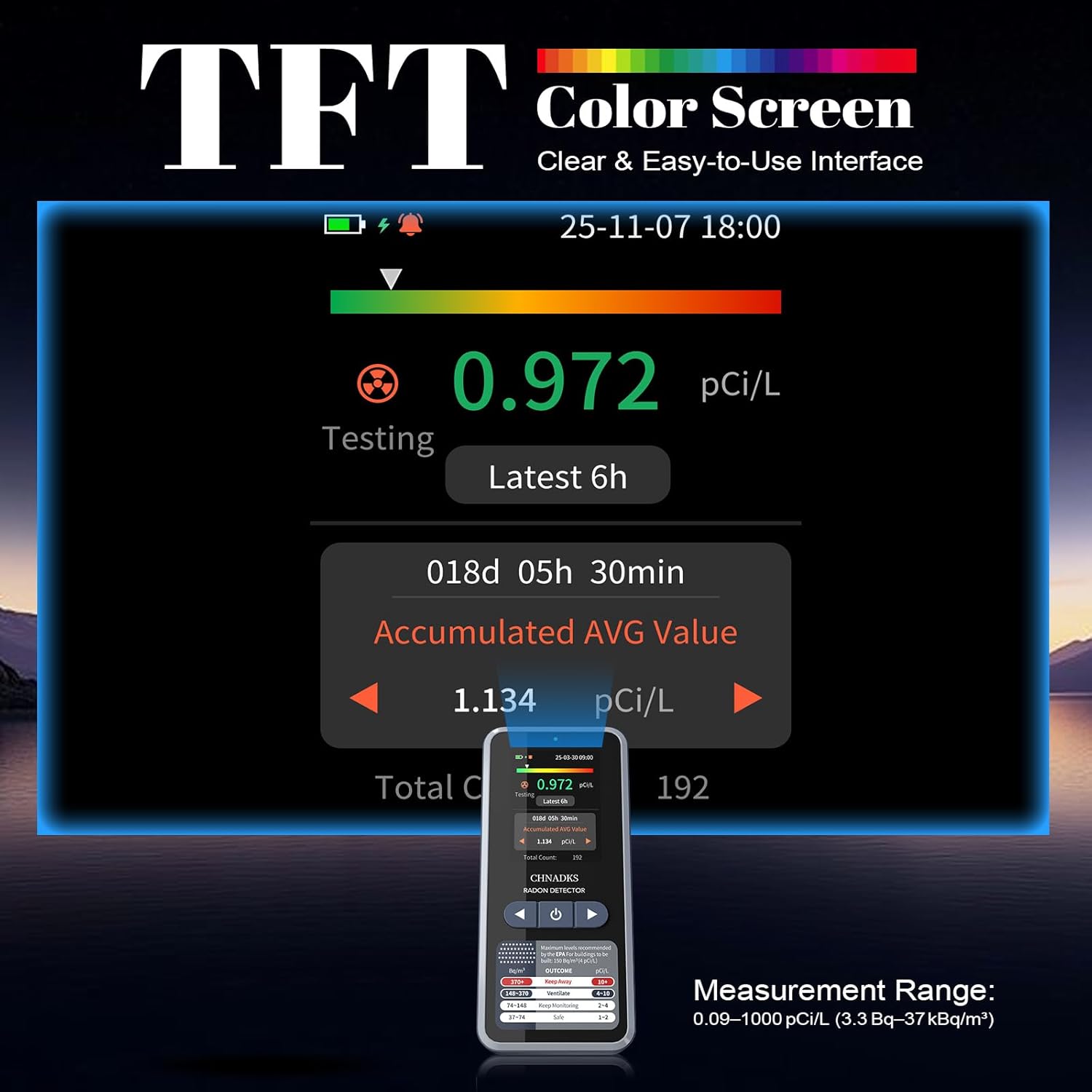
The color TFT screen provides a clear graphical interface, including current radon levels, accumulated average, and a color progress bar for quick interpretation. Dual alerts (red indicator light and beep) activate when levels exceed thresholds.
5. Setup
5.1 Initial Charging
Before first use, fully charge the RM-66 Radon Detector. Connect the provided Type-C charging cable to the device's charging port and plug the other end into a standard USB power adapter (DC 5V 1A, not included). A full charge takes approximately 3.5 hours when the device is off.
5.2 Powering On/Off
- To Power On: Press and hold the power button (usually located on the front panel below the screen) for a few seconds until the display illuminates.
- To Power Off: Press and hold the power button until the device prompts you to confirm shutdown, then select 'Yes'.
5.3 Placement for Monitoring
For accurate readings, place the detector in the lowest lived-in area of your home, such as a basement or ground floor. Ensure it is:
- At least 20 inches (50 cm) from the floor and ceiling.
- At least 8 inches (20 cm) from other objects.
- Away from direct drafts, vents, windows, and doors.
- Not in areas of high humidity (e.g., bathrooms) or extreme temperatures.

6. Operating Instructions
6.1 Initial Measurement
Once powered on, the device will automatically begin monitoring. The first data display will appear after 6 hours, and readings will update every 60 minutes thereafter. For reliable results, continuous monitoring for at least 48 hours is recommended, with longer periods (e.g., 30 days) providing more accurate long-term averages.
6.2 Navigating the Display
The 2.0-inch TFT color screen displays various information:
- Current Radon Level: Real-time measurement.
- Latest 6h Average: Average radon level over the last 6 hours.
- Accumulated Average Value: Long-term average since the device was last reset or powered on.
- Battery Indicator: Shows current battery status.
- Alarm Indicator: Appears when radon levels exceed the set threshold.
6.3 Customizing Settings
Access the device's menu to adjust settings:
- Measurement Units: Switch between pCi/L and Bq/m³.
- Alarm Thresholds: Set the desired radon level at which the audible and visual alarms will activate.
- Screen Sleep Time: Adjust the duration before the screen automatically turns off to conserve battery.
- Particle Sound: The particle sound can be turned off if desired.
Refer to the on-screen prompts and navigation buttons for specific steps to change these settings.
7. Understanding Radon Readings and Alarms
Radon levels are typically measured in picocuries per liter (pCi/L) in the United States and becquerels per cubic meter (Bq/m³) internationally. The RM-66 allows you to select your preferred unit.
- 1 pCi/L ≈ 37 Bq/m³
The EPA (Environmental Protection Agency) recommends taking action to reduce radon levels if they are 4 pCi/L (148 Bq/m³) or higher. The device's display provides a color-coded guide for interpreting radon levels:
- Dual Alerts: When radon levels exceed the set threshold, the device will emit an audible beep and activate a red indicator light. You can adjust the alarm threshold in the settings.
8. Long-Term Monitoring
The RM-66 Radon Detector is designed for long-term monitoring, storing up to 504 days of historical radon data. Data is recorded every 6 hours, allowing you to track trends and identify potential issues over time. This feature is crucial for understanding seasonal variations and the effectiveness of mitigation efforts.
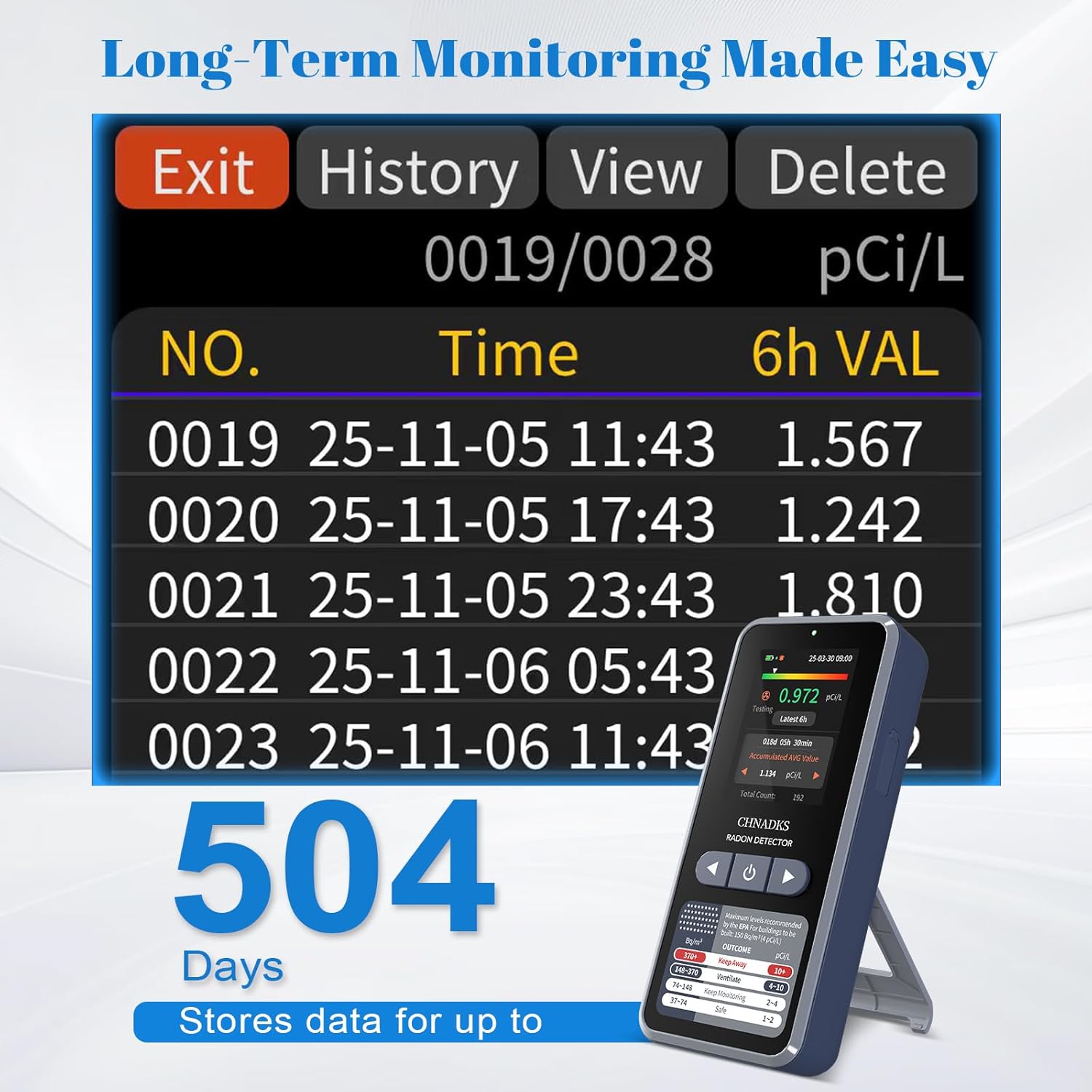
To view historical data, navigate to the "History" section in the device menu. You can scroll through past readings to analyze trends.
9. Maintenance
- Cleaning: Wipe the device with a soft, dry cloth. Do not use abrasive cleaners or solvents. Ensure no liquid enters the air vents or charging port.
- Battery Care: For optimal battery life, avoid fully discharging the device frequently. Charge it regularly, especially if storing for extended periods.
- Storage: Store the device in a cool, dry place away from direct sunlight and extreme temperatures when not in use.
10. Troubleshooting
| Problem | Possible Cause | Solution |
|---|---|---|
| Device does not power on. | Low battery or device malfunction. | Charge the device for at least 30 minutes. If it still doesn't power on, contact support. |
| Inaccurate or fluctuating readings. | Improper placement, environmental factors, or initial measurement period. | Ensure proper placement (refer to Section 5.3). Allow at least 48 hours for stable readings. Avoid placing near drafts or vents. |
| Alarm sounds frequently. | High radon levels or alarm threshold set too low. | Check current radon levels. Consider adjusting the alarm threshold in settings if appropriate, or take action to mitigate radon. |
| Screen is blank or unresponsive. | Screen sleep mode, low battery, or software issue. | Press any button to wake the screen. Charge the device. If unresponsive, try a soft reset (power off and on). |
11. Specifications
| Model | RM-66 |
| Brand | CHNADKS |
| Measurement Range | 0.09–1000 pCi/L (3.3 Bq/m³ – 37 kBq/m³) |
| Sensor Type | High-precision semiconductor sensor |
| Display | 2.0-inch TFT Color Screen |
| Data Update Interval | First data in 6 hours, then every 60 minutes |
| Historical Data Storage | Up to 504 days (recorded every 6 hours) |
| Power Source | Rechargeable Battery (Type-C) |
| Battery Life | Max 45 days (screen-off mode) |
| Charging Time | Approx. 3.5 hours (shutdown mode) |
| Product Dimensions | 2.3D x 5.3W x 11.7H Centimeters |
| Item Weight | 0.11 Kilograms (110 g) |
| Material | ABS |
| Country of Origin | China |
12. Warranty and Support
The CHNADKS RM-66 Radon Detector comes with a standard manufacturer's warranty. Please refer to the warranty card included in your package or contact CHNADKS customer support for detailed warranty terms and conditions.
For technical assistance, troubleshooting, or any questions regarding your device, please contact CHNADKS customer support through their official website or the contact information provided with your purchase.
13. Disposal Information
Do not dispose of this device with general household waste. Electronic products contain materials that can be harmful to the environment if not disposed of properly. Please recycle the device at an authorized collection point for electronic waste or return it to your retailer for proper disposal. The internal battery should also be disposed of according to local regulations.