Introduction
This manual provides detailed instructions for the setup, operation, and maintenance of your PONGBOT PACE S Tennis Ball Machine. Please read this manual thoroughly before using the machine to ensure proper function and longevity.
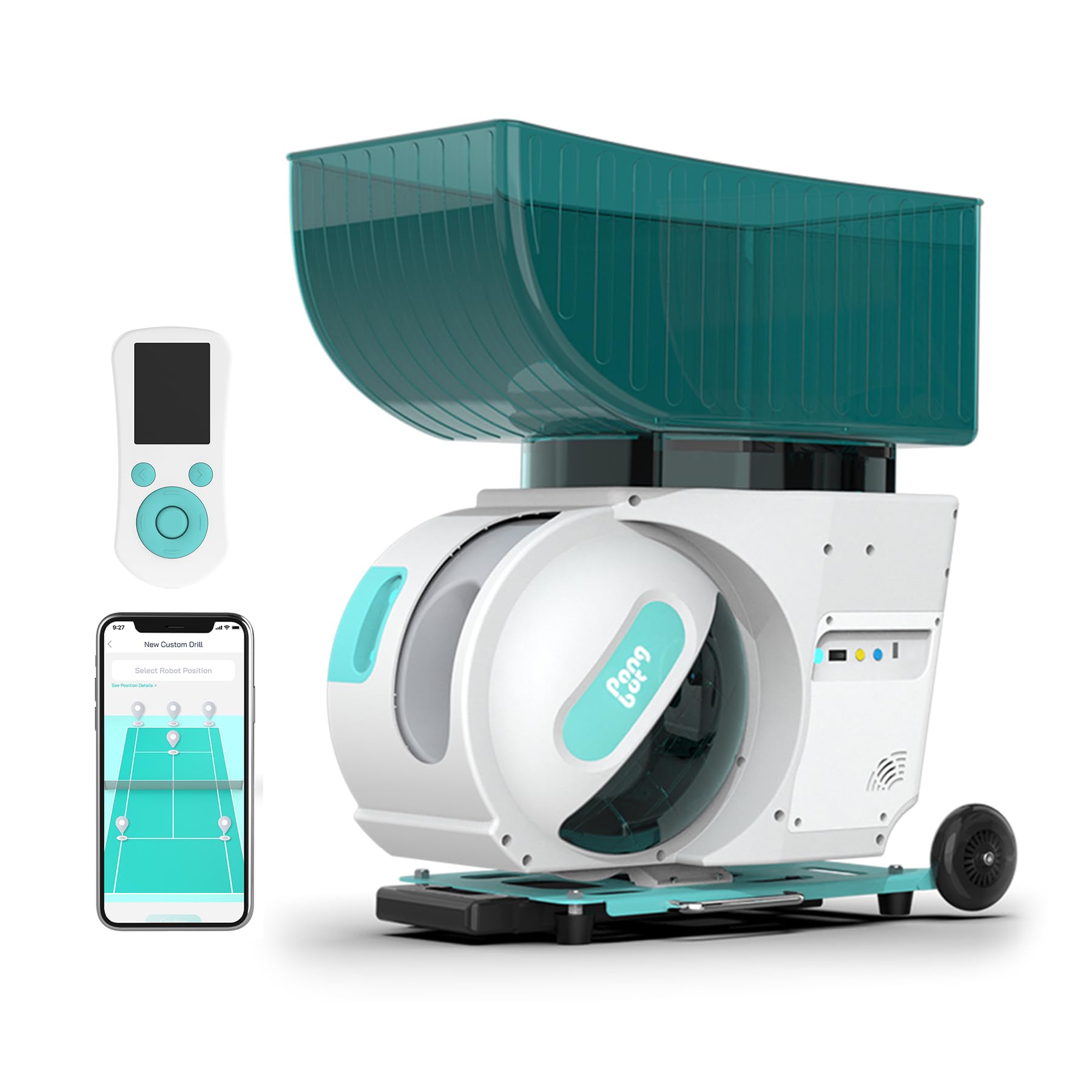
Image: The PONGBOT PACE S Tennis Ball Machine, a compact and portable device designed for tennis training.
1. Setup
1.1 Unpacking and Initial Inspection
- Carefully remove all components from the packaging.
- Verify that all included components are present: PACE S machine, power adapter, remote control.
- Inspect the machine for any signs of damage during transit. Contact customer support immediately if any damage is found.
1.2 Charging the Battery
The PACE S machine is equipped with a long-life removable battery. For optimal performance, fully charge the battery before first use. Connect the power adapter to the machine and a standard electrical outlet. The charging indicator will show the charging status.
A full charge provides over 8 hours of runtime.
1.3 Placement on Court
The machine is designed for use on various court surfaces including clay, hard, and grass courts, as well as for padel. Utilize the wheels and pull handle for easy transport. Position the machine according to your desired drill or training scenario. The machine supports six different placement positions on the court for varied training.

Image: Diagram illustrating six different placement positions for the tennis ball machine on a court, including Deuce Baseline, Center, Ad Baseline, Service Box T, Left Toss, and Right Toss.
1.4 Loading Tennis Balls
Open the ball hopper and load up to 150 standard tennis balls. Ensure balls are clean and dry to prevent machine malfunction.
2. Operation
2.1 Powering On/Off
Locate the power button on the machine. Press and hold to power on or off. The machine can also be controlled via the mobile application.
2.2 App and Remote Control
The PONGBOT PACE S can be controlled using a dedicated mobile application or the included remote control. The app allows for advanced customization and drill management, while the remote provides convenient on-court adjustments.

Image: A smartphone showing the PONGBOT app interface next to a physical remote control, illustrating the dual control capability. Custom drills created in the app can be synced to the remote.
2.2.1 Mobile Application Features
- Custom Drills: Create and save unlimited personalized training drills.
- Pre-loaded Drills: Access hundreds of built-in drills (396 sets) designed for various skill levels and shot types.
- Drill Library: Share and download drills from a user community.
- OTA Updates: Supports Over-The-Air updates for new features and improvements.

Image: An infographic illustrating the 396 sets of built-in drills available with the PACE S machine, categorized by shot type and training focus.

Image: Several smartphone screens displaying the PONGBOT app, highlighting the drill library, custom drill creation, and various training exercises.
2.2.2 Remote Control Functions
The remote control allows for quick adjustments during play. Up to 30 custom drills can be synced from the app to the remote for easy access.
2.3 Adjusting Ball Launch Settings
The PACE S offers precise control over ball speed, spin, and oscillation to simulate various shot types and training scenarios.
- Speed: Adjustable up to 80 mph (130 km/h).
- Spin: Dual motor system supports topspin and backspin with a spin rate of up to 60 rps. Features 1.5-second switching between topspin and backspin.
- Oscillation: Provides 6 oscillation spots for varied ball placement across the court.
- Shot Path: Recreates any shot path from real matches, offering half-court full coverage with no dead zones.

Image: An infographic detailing the extreme performance capabilities of the machine, including 60 rps spin rate, 130 km/h ball speed, overhead shots reaching 8.1m, 1.5s spin switching, instant ball launch, and half-court full coverage.

Image: A tennis player on court returning a ball, with a smartphone overlay showing the app's custom drill creation interface, demonstrating the machine's ability to recreate various shot paths.
3. Maintenance
3.1 Cleaning the Cabin Door
Regular cleaning of the machine's interior, especially the cabin door area, is essential to prevent dust, dirt, or wet ball residue from affecting performance. This is particularly important when playing on clay courts or in damp conditions.
Video: A demonstration on how to open the cabin door of the PONGBOT PACE S machine for maintenance and cleaning. The video shows a user accessing the "Open Cabin Door" option in the app's preferences to initiate the opening mechanism, followed by manually opening the door to clean the interior.
- Ensure the machine is powered on and connected to the mobile app.
- Navigate to Settings > Preferences > Open Cabin Door within the app.
- Tap the "Open" button at the bottom of the screen. The cabin door will begin to open automatically.
- Once open, you can access the interior to clean any accumulated dust or debris.
- After cleaning, ensure the cabin door is securely closed. The app will prompt you to shut the door.
Note: Do not attempt to force open the cabin door manually. Always use the app to initiate the opening process.
3.2 Battery Care
- Charge the battery fully after each use or before long periods of storage.
- Store the machine and battery in a cool, dry place.
- Avoid completely draining the battery to prolong its lifespan.
3.3 General Cleaning
Wipe the exterior of the machine with a damp cloth as needed. Avoid using harsh chemicals or abrasive cleaners.
4. Troubleshooting
If you encounter issues with your PONGBOT PACE S, refer to the following common solutions:
- Machine not powering on: Ensure the battery is charged and properly inserted. Check the power button.
- Balls not launching: Verify that the ball hopper is loaded correctly and there are no obstructions in the ball feeding mechanism. Check for any error messages in the app.
- App connectivity issues: Ensure Bluetooth is enabled on your device and the machine is within range. Restart both the app and the machine.
- Inconsistent ball delivery: Check that the tennis balls are clean and dry. Wet or dirty balls can affect spin and speed consistency.
For persistent issues, please contact customer support.
5. Specifications
| Feature | Detail |
|---|---|
| Model Name | PACE S |
| Brand | PONGBOT |
| Ball Capacity | 150 balls |
| Max Ball Speed | 80 mph (130 km/h) |
| Max Spin Rate | 60 rps |
| Battery Life | Over 8 hours |
| Oscillation Spots | 6 |
| Control Methods | Mobile App, Remote Control |
| Material | ABS+Metal |
| Item Weight | 45 Pounds |
| Package Weight | 54 Pounds |
| Item Package Dimensions (L x W x H) | 27.56 x 22.83 x 17.33 inches |
| Country of Origin | China |
| Manufacturer | Shanghai Future Mind Co., Ltd. |
| Included Components | PACE S*1 |
6. Warranty & Support
6.1 Warranty Information
The PONGBOT PACE S Tennis Ball Machine comes with a 1 Year Warranty from the date of purchase. This warranty covers manufacturing defects and malfunctions under normal use. Please retain your proof of purchase for warranty claims.
For detailed warranty terms and conditions, please refer to the official PONGBOT website or contact customer support.
6.2 Customer Support
For technical assistance, troubleshooting, or warranty inquiries, please contact Shanghai Future Mind Co., Ltd., the manufacturer of PONGBOT products. You can also visit the official PONGBOT store on Amazon for additional resources and contact information.
- Manufacturer: Shanghai Future Mind Co., Ltd.
- Amazon Store: Visit the PONGBOT Store


