Introduction
Thank you for choosing the Vitalwalk Apollo 11 Max Walking Pad Treadmill. This manual provides essential information for the safe and efficient use of your new fitness equipment. Please read all instructions carefully before operation and retain this manual for future reference.

Image: The Vitalwalk Apollo 11 Max Walking Pad Treadmill shown in both operational and vertically stored positions, highlighting its compact design and versatility.
Important Safety Information
To reduce the risk of serious injury, read all important precautions and instructions in this manual before using the treadmill. Vitalwalk assumes no responsibility for personal injury or property damage sustained by or through the use of this product.
- Consult a physician before beginning any exercise program.
- Keep children and pets away from the treadmill during operation.
- Place the treadmill on a flat, stable surface with adequate clearance around it.
- Do not operate the treadmill if it has a damaged cord or plug, or if it is not working properly.
- Wear appropriate exercise clothing and athletic shoes.
- Do not use the treadmill outdoors or in damp areas.
- Always ensure the safety key is properly engaged before starting the treadmill.
Setup and Initial Use
Unpacking
- Carefully remove the treadmill from its packaging.
- Inspect the unit for any signs of damage. If damaged, contact customer support immediately.
- Remove all packing materials and ensure no components are left inside the packaging.
Placement
Place the treadmill on a firm, level surface. Ensure there is at least 2 feet of clearance on all sides and 6 feet behind the treadmill for safe operation. The treadmill is designed for use in a home or office environment.

Image: The Vitalwalk Apollo 11 Max Walking Pad Treadmill showcasing its 43-inch deck length and 18-inch deck width, designed for a spacious walking area.
Power Connection
- Plug the power cord into a grounded electrical outlet.
- Turn on the main power switch, usually located near the front of the treadmill.
Vertical Storage (Space Saving)
The Apollo 11 Max can be stored vertically to save space. Gently lift the rear of the treadmill until it stands upright on its integrated wheels. Ensure it is stable before leaving it in the vertical position.

Image: The Vitalwalk Apollo 11 Max Walking Pad Treadmill shown in its vertical storage position, demonstrating its space-saving design with a minimal 2.1 sq. ft. footprint.
Operating Instructions
Remote Control Functions
The treadmill is operated primarily via the included remote control. Familiarize yourself with the buttons:
- Power Button: Turns the treadmill on/off.
- Speed +/-: Adjusts walking speed.
- Incline +/-: Adjusts the incline level.
- Mode Button: Cycles through display modes or preset programs.
- Mute Button: Silences operational beeps.

Image: A user operating the Vitalwalk Apollo 11 Max Walking Pad Treadmill under a standing desk, with the remote control visible, illustrating its quiet operation (35dB) suitable for a home office.
Speed and Incline Adjustment
- Speed: The treadmill offers a speed range from 0.6 MPH to 5 MPH. Use the Speed +/- buttons on the remote to adjust.
- Auto Incline: The treadmill features a 20-level (0-20%) auto incline. Use the Incline +/- buttons to simulate varied terrain and increase workout intensity.

Image: A person walking on the Vitalwalk Apollo 11 Max, illustrating the 20% auto incline feature which enhances calorie burning during home workouts.
Smart Features: Ambient Light and APP Connectivity
- Ambient Light: The integrated LED lights change color (Green/Orange/Red) based on your speed, providing real-time intensity feedback and an engaging visual experience.
- APP Connectivity: Connect your treadmill to the Fitshow App via Bluetooth. The app allows you to track calories, distance, and engage with virtual worlds. It also syncs with Apple Health/Strava.
- 15-Second Auto-Pause: For safety, the treadmill can be configured to auto-pause after 15 seconds of absence.
- Default Setting: Auto-Pause is disabled.
- Manual Activation: Long-press both the Speed Up (^) and Speed Down (v) buttons on the remote for 5 seconds. The display will show "APA1".
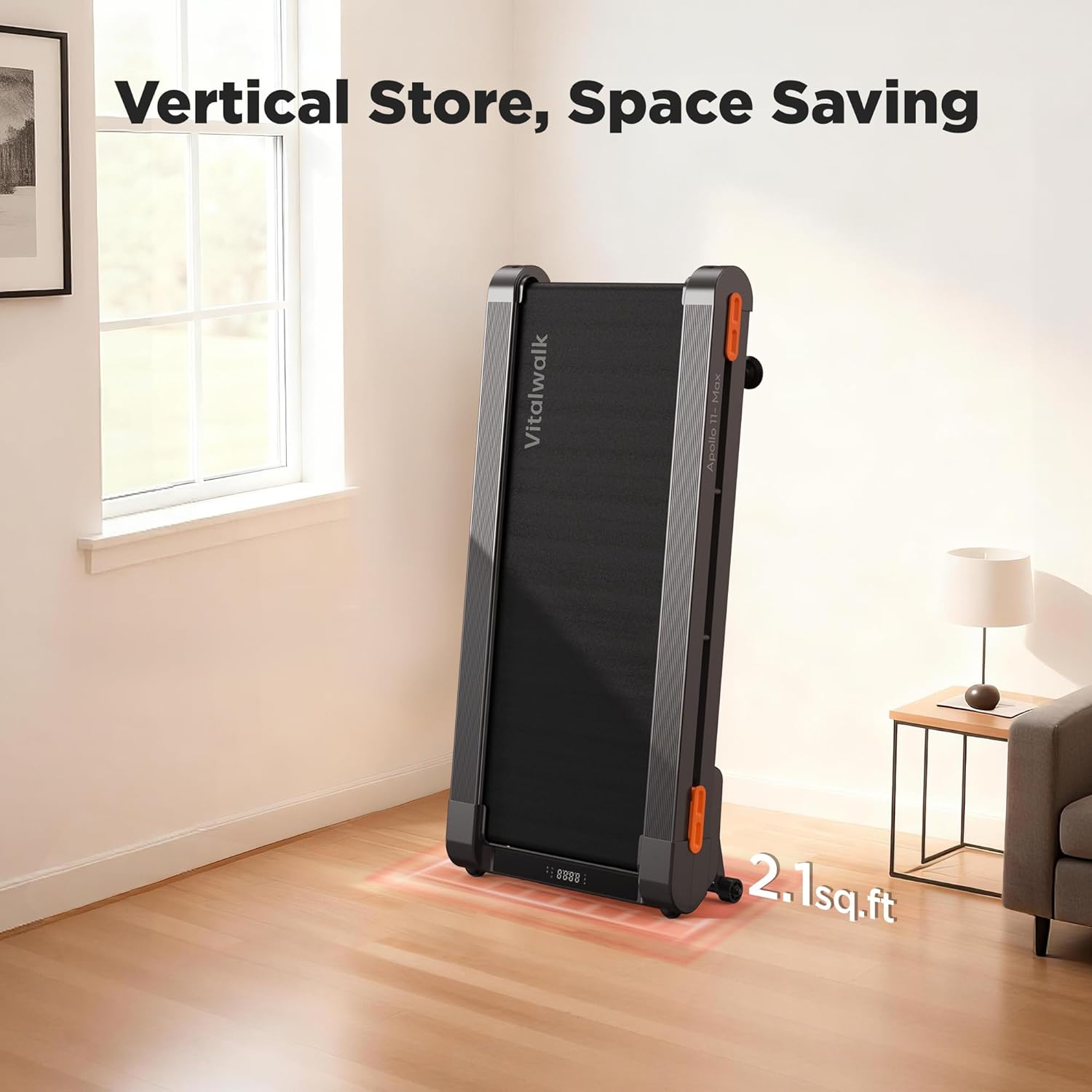
Image: The Vitalwalk Apollo 11 Max Walking Pad Treadmill displaying its smart speed-sensing LED ambient lights, which change color to indicate workout intensity.

Image: A visual representation of the Vitalwalk Apollo 11 Max's app integration, showing various workout tracking and virtual scenic routes available through connected applications.
Maintenance
Lubrication
Regular lubrication of the running belt is crucial for optimal performance and longevity. Use only 100% silicone lubricant. The frequency of lubrication depends on usage:
- Light Use (less than 3 hours/week): Every 5-6 months.
- Moderate Use (3-5 hours/week): Every 3-4 months.
- Heavy Use (more than 5 hours/week): Every 1-2 months.
Procedure:
- Turn off and unplug the treadmill.
- Loosen the rear roller bolts slightly to lift the belt.
- Apply a small amount of silicone lubricant evenly under the center of the running belt, about 6 inches from the front.
- Tighten the rear roller bolts.
- Plug in the treadmill and run it at a low speed (e.g., 1 MPH) for 5 minutes to distribute the lubricant.
Cleaning
- Wipe down the treadmill surface with a damp cloth after each use.
- Avoid using abrasive cleaners or solvents.
- Periodically vacuum dust from around the motor cover.
Troubleshooting
| Problem | Possible Cause | Solution |
|---|---|---|
| Treadmill does not power on. | Power cord not plugged in; main power switch off; circuit breaker tripped. | Check power cord connection; ensure main power switch is ON; reset circuit breaker. |
| Running belt slips or hesitates. | Belt not lubricated; belt too loose. | Lubricate the running belt (see Maintenance section); adjust belt tension (refer to detailed manual or contact support). |
| Unusual noise during operation. | Loose components; lack of lubrication; foreign object under belt. | Inspect for loose parts and tighten; lubricate belt; carefully check for and remove any foreign objects. |
| Remote control not responding. | Low battery in remote; remote not paired. | Replace remote battery; refer to the full user manual for remote pairing instructions. |
If you encounter issues not listed here or if solutions do not resolve the problem, please contact Vitalwalk customer support.
Specifications
| Feature | Detail |
|---|---|
| Brand | VITALWALK |
| Model Name | Apollo 11 Max (TM11GY) |
| Product Dimensions (LxWxH) | 48"D x 24"W x 7.6"H |
| Item Weight | 74 Pounds |
| Material | Alloy Steel |
| Motor Horsepower | 3.5 HP Brushless |
| Speed Range | 0.6 - 5 Miles per Hour |
| Maximum Incline Percentage | 20% (20 levels) |
| Running Deck Length | 43 Inches |
| Running Deck Width | 18 Inches |
| Maximum Weight Recommendation | 400 Pounds |
| Noise Level | Approximately 35dB |
| Connectivity | Bluetooth (Fitshow App compatible) |
| Special Features | 3-Color Ambient Light, Auto Incline, Full Deck Design, Upright Storage, 15-Sec Auto-Pause |
| Assembly Required | No |
| Included Components | Treadmill, Remote Control, Wrench, Manual & Warranty Card, Power Cord |
Warranty and Customer Support
Warranty Information
Vitalwalk provides a one-year warranty for the Apollo 11 Max treadmill, with lifetime technical assistance. The frame is covered for 5 years and the motor for 2 years. For detailed warranty terms and conditions, please refer to the included warranty card.
Contacting Customer Support
For any questions, technical assistance, or warranty claims, please contact Vitalwalk customer service. The recommended method is through your Amazon account:
- Log in to your Amazon account.
- Navigate to "Your Orders".
- Find the order ID for your Vitalwalk Apollo 11 Max treadmill.
- Click on "Contact Seller".
This ensures direct communication with the seller for prompt assistance.

Image: Visual guide demonstrating how to contact customer support through the Amazon platform, showing steps to locate the order and initiate contact with the seller.