
Introduction
This manual provides essential information for the safe and effective operation of your YPMart AS-88C Digital Professional Multimeter. Please read this manual thoroughly before use and retain it for future reference.
Safety Information
General Safety Precautions
- Read Instructions: Always read and understand all instructions and safety warnings before using the multimeter.
- Proper Use: Use the multimeter only as specified in this manual. Improper use can lead to electric shock or damage to the meter.
- Inspect Before Use: Before each use, inspect the meter and test leads for any damage. Do not use if damaged.
- Avoid Live Circuits: Do not measure voltage on circuits exceeding the specified maximum input limits.
- Maintain Dryness: Keep the meter dry. Do not operate in wet or damp conditions.
- Battery Safety: Ensure correct battery polarity when installing. Replace batteries when the low battery indicator appears.
Product Overview
Components and Display
The YPMart AS-88C is a manual range digital multimeter designed for various electrical measurements. It features a clear digital display and a rotary switch for function selection. The device is not a smart device and operates in a manual range mode, providing direct control over measurement settings.
Product Image
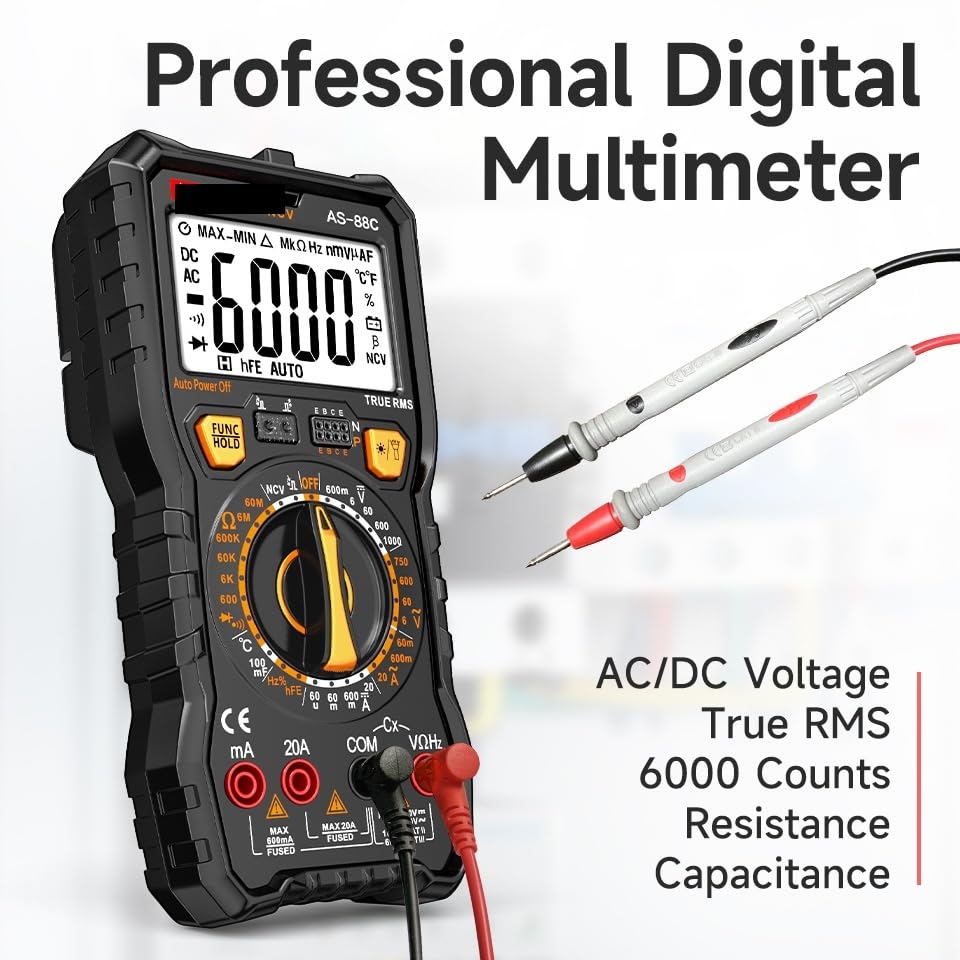
Figure 1: Front view of the YPMart AS-88C Digital Professional Multimeter, highlighting the display, rotary switch, and input jacks.
Setup
Battery Installation
The AS-88C multimeter requires 4 x AAA 1.5V batteries for operation. Batteries are not included with the device.
- Locate the battery compartment cover on the back of the multimeter.
- Use a screwdriver to remove the screw securing the battery compartment cover.
- Carefully remove the cover.
- Insert 4 x AAA 1.5V batteries, ensuring correct polarity as indicated inside the compartment.
- Replace the battery compartment cover and secure it with the screw.
Note: Always replace all batteries at the same time. Do not mix old and new batteries or different types of batteries.
Operating Modes
The AS-88C multimeter operates in manual range mode, requiring the user to select the appropriate range for accurate measurements.
DC/AC Voltage Measurement
To measure DC or AC voltage:
- Turn the rotary switch to the desired DCV (DC Voltage) or ACV (AC Voltage) range.
- Insert the red test lead into the "VΩmA" input jack and the black test lead into the "COM" input jack.
- Connect the test leads in parallel to the circuit or component being measured.
- Read the voltage value on the digital display.
Maximum DC Voltage: 1000V. Maximum AC Voltage: 750V.
DC/AC Current Measurement
To measure DC or AC current:
- Turn the rotary switch to the desired DCA (DC Current) or ACA (AC Current) range. For currents up to 20A, use the "20A" jack. For lower currents, use the "VΩmA" jack.
- Insert the red test lead into the appropriate current input jack (e.g., "20A" or "VΩmA") and the black test lead into the "COM" input jack.
- Connect the test leads in series with the circuit being measured.
- Read the current value on the digital display.
Maximum DC Current: 20A. Maximum AC Current: 20A.
Resistance Measurement (Ohm Meter)
To measure resistance:
- Turn the rotary switch to the desired Ω (Ohm) range.
- Insert the red test lead into the "VΩmA" input jack and the black test lead into the "COM" input jack.
- Ensure the circuit or component is de-energized before connecting the test leads across it.
- Read the resistance value on the digital display.
Measuring Resistance Range: 0-60MΩ.
Capacitance Measurement
To measure capacitance:
- Turn the rotary switch to the "F" (Farad) range.
- Insert the red test lead into the "VΩmA" input jack and the black test lead into the "COM" input jack.
- Discharge the capacitor completely before connecting the test leads.
- Connect the test leads across the capacitor terminals.
- Read the capacitance value on the digital display.
Measuring Capacitance Range: 0-100mF.
Non-Contact Voltage (NCV) Detection
The AS-88C features a Non-Contact Voltage (NCV) indicator for detecting AC voltage without direct contact.
- Turn the rotary switch to the NCV function.
- Move the top part of the multimeter near the conductor or outlet.
- The NCV indicator will illuminate and/or an audible beep will sound if AC voltage is detected.
This feature is for indication only and should not be used as a substitute for direct voltage measurement.
True RMS (TRMS)
The AS-88C is a True RMS multimeter, which means it can accurately measure AC voltage and current for both sinusoidal and non-sinusoidal waveforms. This provides more accurate readings in complex electrical environments compared to average-responding meters.
Data Hold Function
Press the "HOLD" button to freeze the current reading on the display. Press it again to release the hold function.
Backlight/Lighting
The multimeter includes a backlight for the display and a lighting function for improved visibility in dimly lit environments. Refer to the device's buttons for activation.
Auto Power Off
The multimeter is equipped with an auto power-off feature to conserve battery life. If no operation is performed for a certain period, the device will automatically shut down. Press any button or turn the rotary switch to power it back on.
Maintenance
Cleaning
Wipe the meter with a dry, soft cloth. Do not use abrasives or solvents.
Battery Replacement
Replace batteries when the low battery indicator appears on the display. Refer to the "Battery Installation" section for detailed steps.
Storage
If the meter is not to be used for an extended period, remove the batteries to prevent leakage and damage. Store the multimeter in a cool, dry place, away from direct sunlight and extreme temperatures.
Troubleshooting
| Problem | Possible Cause | Solution |
|---|---|---|
| No display or faint display | Dead or low batteries; Incorrect battery installation | Replace batteries; Check battery polarity |
| "OL" or "OVER" displayed | Measurement range exceeded; Open circuit | Select a higher range; Check for continuity in the circuit |
| Inaccurate readings | Incorrect function/range selected; Damaged test leads; External interference | Verify function and range; Inspect test leads; Move away from strong electromagnetic fields |
| Meter does not turn on | Batteries are dead; Auto power-off activated | Replace batteries; Turn the rotary switch or press a button |
Specifications
The following table outlines the key specifications for the AS-88C model.
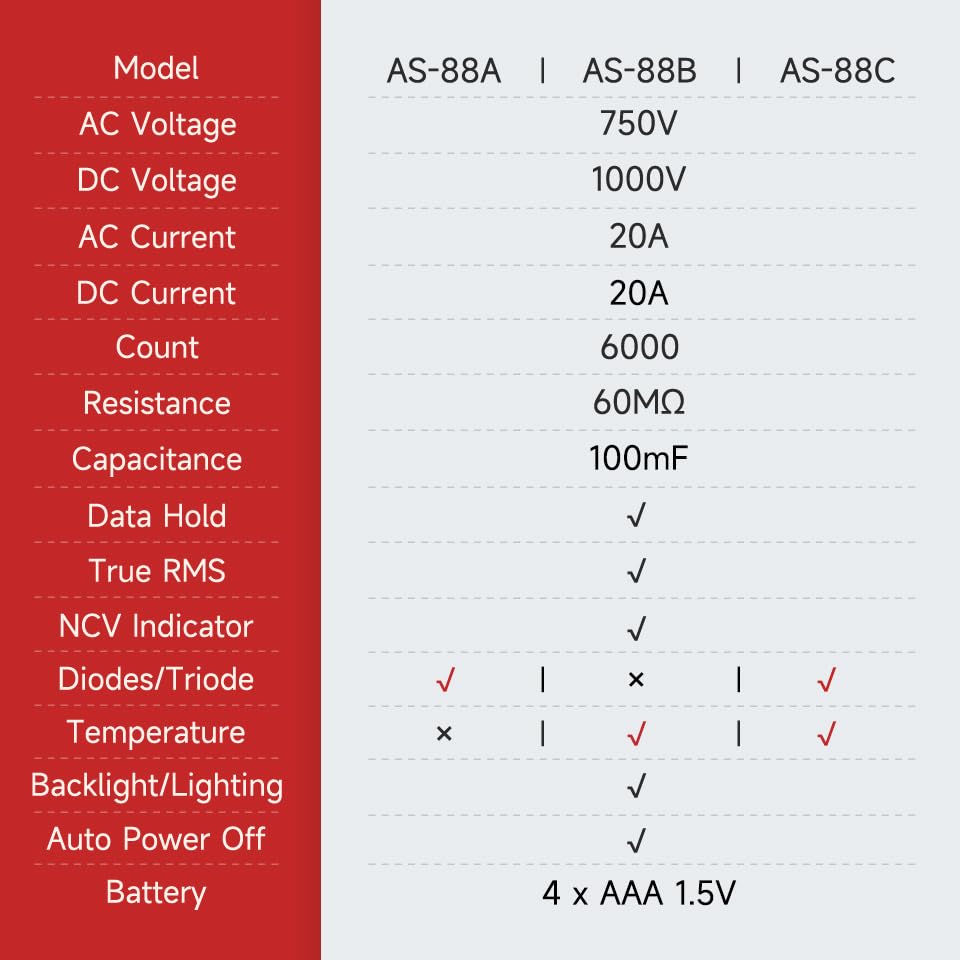
Figure 2: Specification comparison for AS-88A, AS-88B, and AS-88C models.
| Parameter | Specification (AS-88C) |
|---|---|
| Display Type | Digital Display, 6000 Counts |
| Operating Mode | Manual Range |
| True RMS | Yes |
| DC Voltage | 0-1000V |
| AC Voltage | 0-750V |
| DC Current | 0-20A |
| AC Current | 0-20A |
| Resistance Range | 0-60MΩ |
| Capacitance Range | 0-100mF |
| NCV Indicator | Yes |
| Diodes/Triode Test | Yes |
| Temperature Measurement | Yes |
| Backlight/Lighting | Yes |
| Auto Power Off | Yes |
| Battery Type | 4 x AAA 1.5V (Not Included) |
| Dimensions | 19.5 x 9.2 x 5.2 cm |
| Item Weight | 300 g |
| Manufacturer | YPMart |
| Country of Origin | China |
Warranty and Support
For warranty information and technical support, please refer to the documentation provided with your purchase or contact the retailer. Keep your purchase receipt as proof of purchase.
Contact Information
For further assistance, please contact your point of purchase or visit the YPMart official website (if available).