
1. Introduction
This manual provides detailed instructions for the installation, operation, and maintenance of your ANFEL WiFi Programmable Thermostat. This device allows for precise temperature control in your home, offering both heating and cooling functions. It features remote access via smartphone applications (Smart Life or Tuya) and voice control compatibility with Amazon Alexa and Google Assistant. The thermostat supports weekly programming to optimize comfort and energy savings.
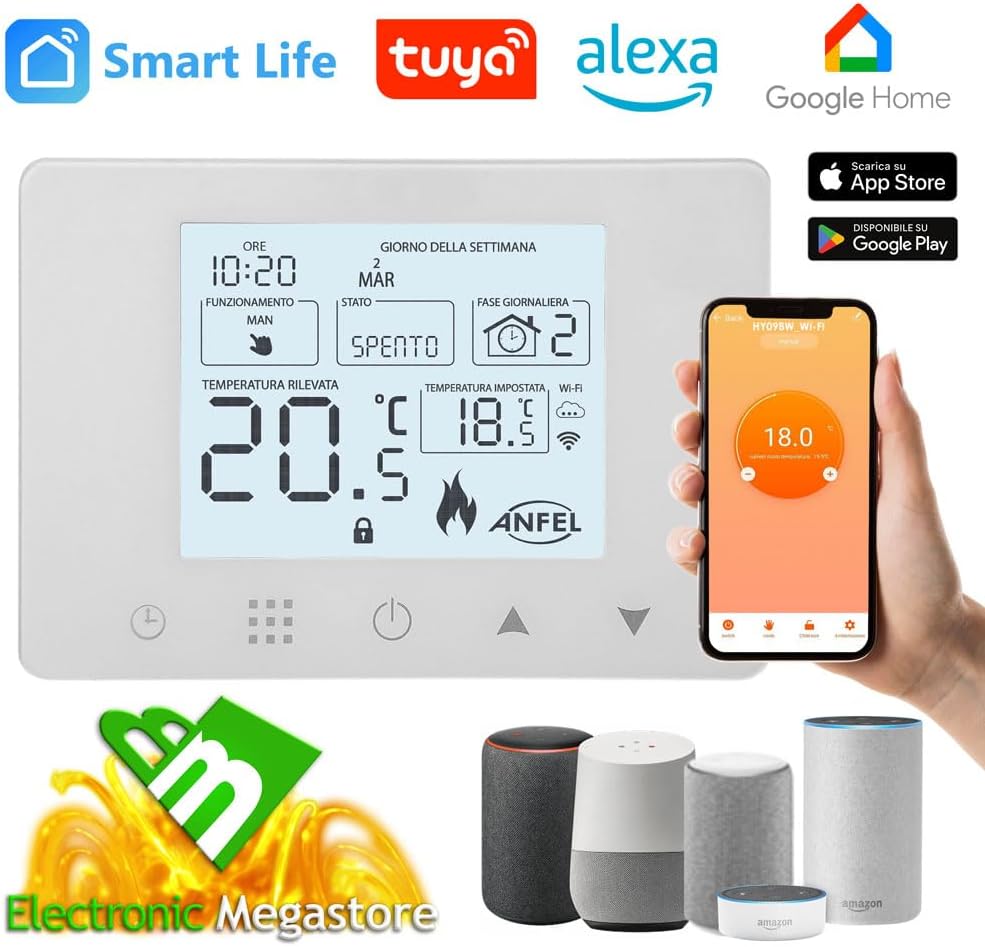
Image: The ANFEL WiFi Programmable Thermostat display, shown alongside a smartphone displaying the control app and various voice assistant devices, illustrating its smart home integration capabilities.
2. Safety Information
- Electrical Installation: Installation must be performed by a qualified electrician or a competent person in accordance with local electrical codes. Ensure the main power supply is disconnected before any wiring work.
- Voltage: This thermostat operates on 90-240 Vac. Verify your home's electrical system compatibility before installation.
- Water and Moisture: Do not install the thermostat in areas with high humidity or where it may come into contact with water.
- Children: Keep the device out of reach of children. The child lock function should be enabled to prevent accidental changes to settings.
- Intended Use: Use this thermostat only for its intended purpose of controlling heating and cooling systems.
3. Package Contents
Upon opening the package, please verify that all items listed below are present and in good condition:
- ANFEL WiFi Programmable Thermostat with digital display
- Mounting bracket
- Mounting screws
- Instruction manual (in Italian, but this document serves as the English version)
4. Product Overview
The ANFEL WiFi Programmable Thermostat features a clear digital display and intuitive controls. It is designed for both wall mounting and installation in a 503 box.
4.1. Display and Controls

Image: A detailed diagram labeling each element on the thermostat's digital display, including time, day, operating mode, current temperature, set temperature, Wi-Fi signal, and various function icons.
- Time and Day: Displays current time and day of the week.
- Operating Mode: Indicates current mode (e.g., Manual, Automatic, Holiday).
- Current Temperature: Shows the ambient temperature detected by the thermostat.
- Set Temperature: Displays the target temperature.
- Wi-Fi Signal: Indicates Wi-Fi connection status.
- Heating/Cooling Indicator: Shows if the system is actively heating or cooling.
- Child Lock: Icon indicates if the child lock is active.
- Buttons: Touch-sensitive buttons for power, mode selection, and temperature adjustment.
4.2. Key Features

Image: A visual representation of the thermostat's main features, including app control, voice control, program creation, heating/cooling, backlight settings, child lock, open window detection, and temperature calibration.
- App Control: Remote management via "Smart Life" or "Tuya" applications.
- Voice Control: Compatible with Amazon Alexa and Google Assistant.
- Weekly Programming: Customizable schedules (5+2, 6+1, or 7 days) with 6 time periods per day.
- Dual Function: Supports both heating and cooling systems.
- Backlight Setting: Adjustable display backlight.
- Child Lock: Prevents unauthorized changes to settings.
- Open Window Detection: Automatically pauses heating/cooling when an open window is detected.
- Temperature Calibration: Allows for fine-tuning of temperature readings.
5. Specifications
| Feature | Detail |
|---|---|
| Brand | ANFEL |
| Model Name | ANFEL-ITA-NEW |
| Color | White |
| Product Dimensions | 2.5P x 13L x 9H cm (2.5 x 13 x 9 cm) |
| Weight | 220 grams |
| Voltage | 90-240 Vac |
| Controller Type | Amazon Alexa, Google Assistant, Manual Control |
| Special Features | Display, Programmable Functions, Remote Management, Smart System Control, Temperature Display, Energy Consumption Reduction |

Image: A diagram showing the physical dimensions of the ANFEL thermostat, including its width (13cm), height (9cm), and depth (2.9cm for the back unit, 8.7cm total depth).
6. Setup
6.1. Electrical Installation
WARNING: Ensure the main power supply is turned off at the circuit breaker before beginning any electrical work. Incorrect wiring can cause damage to the thermostat, the heating/cooling system, or lead to electrical shock.
- Mounting: The thermostat can be mounted directly on a wall or installed in a standard 503 electrical box (without recessing). Use the provided mounting bracket and screws.
- Power Supply: The thermostat requires a phase wire (L) and a neutral wire (N) for power (90-240 Vac). This thermostat cannot replace a battery-powered unit without providing a direct power supply.
- Boiler Connection: The NO (Normally Open) and COM (Common) terminals connect to your boiler. These are clean contacts. Before connecting, verify that your boiler has a passive output for thermostat connection.

Image: A schematic diagram illustrating how to connect the ANFEL thermostat to a boiler using the NO and COM terminals, and how to provide 220V power to the L and N terminals.

Image: A schematic diagram showing two wiring options for connecting the thermostat to either a Normally Closed (NC) or Normally Open (NO) actuator, with 220V power supply connections.
6.2. App and Wi-Fi Configuration
After physical installation and power-up, configure the thermostat with your smartphone:
- Download App: Download the "Smart Life" or "Tuya" app from your smartphone's app store (available on App Store and Google Play).
- Register/Login: Create an account or log in to the app.
- Add Device: Follow the in-app instructions to add a new device. The process typically involves putting the thermostat into pairing mode (refer to the thermostat's display for pairing indicators) and connecting it to your home's 2.4GHz Wi-Fi network.
- Quick Configuration: The configuration process usually takes less than 2 minutes.
7. Operation
7.1. Manual Control
You can adjust the temperature directly on the thermostat's display using the up and down arrow buttons. Press the mode button to switch between manual and automatic modes.

Image: A hand gently touching the ANFEL thermostat mounted on a wall, demonstrating direct manual interaction with the device.
7.2. Weekly Programming
The thermostat supports flexible weekly programming to match your lifestyle and save energy. You can set up to 6 time periods per day with different temperatures.
- Program Modes: Choose from 5+2 (weekdays + weekend), 6+1 (Monday-Saturday + Sunday), or 7-day (each day individually) programming.
- Setting Programs: Use the app to easily set and modify your weekly schedules.

Image: A smartphone screen displaying the weekly programming interface within the control app, showing different time periods and set temperatures for a workday.
7.3. Smart Control (App & Voice)
Control your thermostat remotely and integrate it with your smart home ecosystem.
- Remote App Control: Use the "Smart Life" or "Tuya" app to adjust temperature, change modes, and view current status from anywhere.
- Voice Commands: Connect your thermostat to Amazon Alexa or Google Assistant. Examples:
- "Alexa, set living room temperature to 22 degrees."
- "Hey Google, what's the temperature in the bedroom?"

Image: A woman smiling while interacting with a small voice assistant device on a kitchen counter, demonstrating the ease of voice control for the thermostat.
7.4. Dual Function (Heating/Cooling)
The thermostat supports both heating and cooling systems. You can switch between modes via the thermostat's interface or the mobile app.

Image: An illustrative diagram of a house showing both a heating radiator and an air conditioning unit, with arrows indicating hot and cold air flow, representing the thermostat's dual heating and cooling functionality.
7.5. Holiday Mode
Activate holiday mode when you are away to maintain a specific temperature, preventing pipes from freezing in winter or excessive heat in summer, while saving energy.
7.6. Child Lock
Enable the child lock feature through the app or directly on the thermostat to prevent children or unauthorized users from changing settings.

Image: A green circular icon featuring a white padlock, symbolizing the child lock function of the thermostat.
7.7. Open Window Detection
This feature automatically detects open windows and temporarily pauses heating or cooling to prevent energy waste. The system will resume normal operation once the window is closed or after a set period.

Image: A woman opening a window in a brightly lit room, visually representing the thermostat's open window detection feature designed to save energy.
7.8. Temperature Calibration
If you find the thermostat's temperature reading differs from another reliable thermometer, you can calibrate it through the app settings to ensure accurate temperature display and control.
8. Maintenance
- Cleaning: Wipe the thermostat's display and casing with a soft, dry cloth. Do not use abrasive cleaners, solvents, or spray directly onto the device.
- Firmware Updates: Periodically check the "Smart Life" or "Tuya" app for available firmware updates to ensure optimal performance and access to new features.
- Power Cycle: If the thermostat becomes unresponsive, try turning off the power at the circuit breaker for a few minutes, then restore power.
9. Troubleshooting
| Problem | Possible Cause | Solution |
|---|---|---|
| Thermostat not powering on. | No power supply; incorrect wiring. | Check circuit breaker. Verify L and N wiring connections are secure and correct (refer to Section 6.1). |
| Cannot connect to Wi-Fi. | Incorrect Wi-Fi password; 5GHz network; thermostat too far from router. | Ensure correct 2.4GHz Wi-Fi network and password. Move thermostat closer to router or use a Wi-Fi extender. Restart router and thermostat. |
| Heating/Cooling not activating. | Incorrect wiring to boiler/actuator; system in wrong mode; temperature differential not met. | Verify NO/COM wiring to boiler (Section 6.1). Ensure thermostat is in heating/cooling mode. Check if set temperature is sufficiently different from ambient temperature. |
| Inaccurate temperature reading. | Sensor calibration needed; thermostat exposed to direct sunlight or drafts. | Calibrate the temperature sensor via the app (Section 7.8). Relocate thermostat if it's in an unsuitable position. |
| App not responding or showing incorrect status. | App glitch; internet connectivity issue; thermostat offline. | Close and reopen the app. Check your phone's internet connection. Verify the thermostat's Wi-Fi connection. Power cycle the thermostat. |
10. Support
For further assistance, technical support, or warranty inquiries, please contact ANFEL customer service. ANFEL is committed to providing high-quality products and reliable support.
This product is from a small or medium-sized enterprise registered with the Amazon Brand Registry or an artisan part of Amazon Handmade based in Italy. Your purchase supports small and medium-sized businesses.

Image: A banner displaying the ANFEL logo and the question "NEED SUPPORT? DO NOT HESITATE TO CONTACT US", emphasizing customer assistance.
You can visit the ANFEL store on Amazon for more information: ANFEL Store