
1. Introduction
This manual provides detailed instructions for the safe operation, installation, and maintenance of your Yespick 2 Piece LED RGBW Wallwasher Stage Light. Please read this manual thoroughly before use and retain it for future reference.
2. Safety Instructions
- Ensure the power supply voltage matches the product's requirements.
- Do not open the casing; there are no user-serviceable parts inside. Refer all servicing to qualified personnel.
- Keep the device away from water, moisture, and extreme temperatures.
- Avoid direct eye exposure to the light source.
- Ensure proper ventilation to prevent overheating. Do not block ventilation openings.
- Always disconnect from the power supply before cleaning or maintenance.
- Use only the provided power cable and accessories.
3. Package Contents
Verify that all items are present and in good condition upon unpacking:
- 2 x LED RGBW Wallwasher Stage Lights
- 2 x Remote Controls
- 2 x Power Cables
- 2 x Mounting Brackets (pre-attached or included)
- 1 x User Manual

Image: Contents of the product package, showing the two LED light bars, remote controls, and power cords.
4. Product Features
- Light Source: 9 x 6W RGBW 4-in-1 LED beads for rich color mixing.
- Beam Angle: 25° wide spread for extensive wash effects.
- Control Modes: DMX512 (4/8 channels, RDM compatible), Automatic, Sound-activated, Master-Slave, Remote Control.
- Dynamic Effects: Strobe (1-25 Hz), Jump, Gradual Change, Pulse Change, Chase Effect, 0-100% Dimming, Soft Light Effect, Unlimited Color Mixing.
- Construction: Full metal body with excellent thermal conductivity for silent operation.
- Dimensions: Approximately 45 cm (17.7 inches) length, 7 cm (2.7 inches) width, 6 cm (2.4 inches) height.
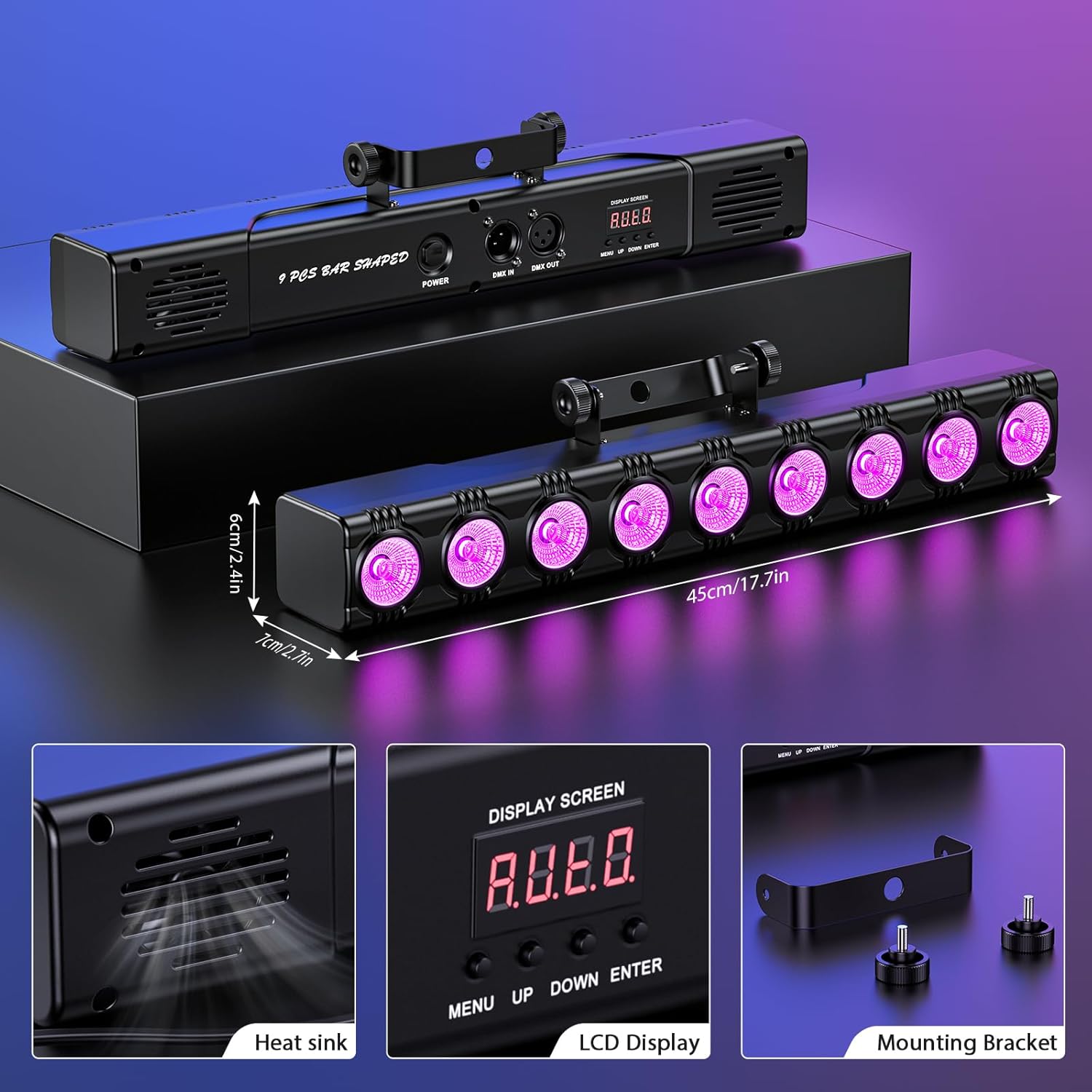
Image: Product details including dimensions, heat sink, LCD display, and mounting bracket.
5. Setup and Installation
5.1 Mounting
The wallwasher light comes with a pre-attached mounting bracket for versatile installation. It can be:
- Floor Standing: Place the light on a stable, flat surface.
- Wall Mounted: Secure the bracket to a wall using appropriate screws (not included).
- Truss Mounted: Attach the bracket to a lighting truss using a suitable clamp (not included).
Ensure the mounting surface or structure can support the weight of the fixture and that it is securely fastened to prevent accidental falls.
5.2 Power Connection
Connect the provided power cable to the power input on the rear of the fixture and then to a suitable power outlet. Ensure the power supply matches the fixture's voltage requirements.
5.3 DMX Connection (Optional)
For DMX control, connect a DMX cable from your DMX controller's output to the DMX IN port on the first fixture. For multiple fixtures, daisy-chain them by connecting the DMX OUT of the first fixture to the DMX IN of the next, and so on.

Image: Rear panel connections including LCD display, DMX input/output, and power link.
6. Operating Instructions
The fixture can be operated using the onboard LCD display and buttons, the included remote control, or an external DMX controller.
6.1 Onboard Control Panel
Use the MENU, UP, DOWN, and ENTER buttons on the rear panel to navigate through the settings and select operating modes.
- MENU: Accesses the main menu and cycles through options.
- UP/DOWN: Navigates through menu options or adjusts parameter values.
- ENTER: Confirms selection or saves changes.
6.2 Remote Control Operation
The included remote control provides convenient access to various functions:

Image: Remote control layout and button functions.
- ON/OFF: Powers the unit on or off.
- Strobe: Activates the strobe effect.
- DMX: Sets the unit to DMX mode (A001 menu).
- Auto: Activates automatic program mode.
- Jump: Activates jump mode (color changing).
- MENU: Selects menu options.
- Flash: Activates pulse mode.
- Sound: Activates sound-activated mode.
- RED, GREEN, BLUE, AMBER, CYAN, ROSEO (Purple), WHITE: Direct color selection.
- UP/DOWN Arrows: Numerical increase/decrease for settings.

Image: Remote control button functions and corresponding actions.
6.3 Control Modes Overview
- DMX512 Mode: Allows professional control over individual light parameters (color, dimming, strobe, etc.) using a DMX controller. Supports 4 or 8 channel modes and RDM compatibility.
- Automatic Mode: The fixture cycles through pre-programmed light shows and color changes automatically.
- Sound-Activated Mode: The light reacts to ambient sound or music, changing patterns and colors in sync with the beat.
- Master-Slave Mode: Connect multiple fixtures via DMX cables. Set one unit as the "Master" and others as "Slaves." The slave units will mimic the master's operation, ensuring synchronized lighting effects.

Image: Visual representation of the various control modes available for the light fixture.

Image: Another illustration showing the five primary control modes.
7. Maintenance
- Cleaning: Regularly clean the lens and housing with a soft, lint-free cloth. Do not use abrasive cleaners or solvents. Ensure the unit is unplugged before cleaning.
- Inspection: Periodically check power cables, DMX cables, and mounting hardware for any signs of wear or damage. Replace damaged components immediately.
- Storage: When not in use for extended periods, store the fixture in a dry, dust-free environment.
8. Troubleshooting
| Problem | Possible Cause | Solution |
|---|---|---|
| No power | Power cable disconnected; no power from outlet; faulty fuse. | Check power cable connection; test outlet with another device; check/replace fuse if accessible. |
| No light output | Unit is off; incorrect mode selected; dimming set to 0%. | Ensure unit is powered on; select desired operating mode; increase dimming level. |
| Remote control not working | Battery depleted; remote not pointed at sensor; obstruction. | Replace remote battery; ensure clear line of sight to the fixture's IR sensor. |
| DMX control issues | Incorrect DMX address; faulty DMX cable; DMX terminator missing (for long chains). | Verify DMX address setting; check DMX cable connections; use a DMX terminator on the last fixture in a chain. |
9. Specifications
| Feature | Detail |
|---|---|
| Brand | Yespick |
| Model Number | ZQ06136EU |
| Light Source | 9 x 6W RGBW 4-in-1 LED |
| Power | 6 Watts (per LED) |
| Beam Angle | 25 Degrees |
| Control Modes | DMX512 (4/8 channels, RDM), Automatic, Sound-activated, Master-Slave, Remote Control |
| Dynamic Effects | RGBW color change, Strobe (1-25 Hz), Jump, Gradual change, Pulse change, Chase effect, 0-100% dimming, Soft light, Unlimited color mixing |
| Material | Metal |
| Dimensions (L x W x H) | Approx. 45 x 7 x 6 cm (17.7 x 2.7 x 2.4 inches) |
| Power Source | Electric Cable |
| Installation Type | Rack Mount (versatile mounting bracket included) |
10. Application Examples
The Yespick LED Wallwasher is suitable for a wide range of applications, including:
- Stage lighting for concerts and performances
- Architectural lighting for buildings and facades
- Event lighting for parties, weddings, and discos
- Ambiance lighting for KTV, bars, and clubs
- Home entertainment and festive decorations (Christmas, Halloween)

Image: Examples of the LED wallwasher used in different settings like architecture, parties, weddings, bars, auditoriums, and DJ shows.

Image: Further examples of the LED wallwasher's versatile applications.

Image: Illustration of the 25-degree beam angle and its effect in various indoor environments.

Image: Demonstrations of the diverse RGBW color effects achievable with the wallwasher light.

Image: A comprehensive display of the various color and lighting effects produced by the LED wallwasher.