1. Introduction
Thank you for choosing the OLIXIS 50-Inch L-Shaped Desk. This versatile desk is designed to maximize your workspace, offering a spacious and functional surface for office work, gaming, or studying. Its robust construction and thoughtful features ensure durability and convenience. Please read this manual carefully before assembly and use to ensure proper setup and longevity of your desk.
2. Product Features
- Ample Workspace: Configure the desk in an L-shaped layout to create a large surface area, accommodating multiple monitors and various equipment.
- Sturdy & Durable Construction: Built with a robust metal frame for excellent stability. The desktop features a waterproof surface for easy cleaning and long-term use.
- Reversible Design: The L-shape can be assembled with the longer side on either the left or right, adapting to your room layout. The CPU shelf can also be installed on either side.
- Smart Storage Solutions: Includes a side storage bag for accessories and a built-in CPU stand to keep your computer tower elevated for better ventilation and off the floor.
- Easy Installation: Designed for straightforward assembly with clear instructions and a helpful video guide.
3. Package Contents
Please verify that all components listed below are present before beginning assembly. If any parts are missing or damaged, please contact customer support.

Figure 3.1: All components included in the package.
Components:
- A, B, C: Desktop Panels (x1 each)
- D, E, F: Leg Frames (x1 each)
- G: Crossbars (x2)
- H, I, J: Support Bars (x1, x1, x2 respectively)
- K, L: X-shaped Stabilizer Bars (x1 each)
- M: Side Storage Bag (x1)
Hardware:
- 1: Screws (x21)
- 2: Screws (x8)
- 3: Screws (x1)
- 4: Screws (x2)
- 5: Screws (x2)
- 6: Screws (x1)
- 8: Allen Wrench (x1)
4. Setup and Assembly Instructions
Assembly typically requires 2 people. Please follow the steps carefully. It is recommended to tighten screws by 50% initially, then fully tighten all screws once the desk is assembled.
Assembly Video Guide:
Video 4.1: Official OLIXIS 50-Inch L-Shaped Desk Assembly Guide.
Step-by-Step Assembly:
- Assemble Desktop Panels: Connect panels A, B, and C using the provided screws. Ensure they form the L-shape correctly.
- Attach Crossbars: Secure Crossbars G to the underside of the desktop panels. Pay attention to the orientation of the holes. Tighten screws by 50%.
- Install Leg Frames: Attach Leg Frames D, E, and F to the desktop panels. Ensure the holes align for proper attachment. Tighten screws by 50%.
- Connect Stabilizer Bars: Attach the X-shaped Stabilizer Bars K and L to the leg frames. These provide additional stability. Tighten screws by 50%.
- Install CPU Shelf: Attach the CPU shelf to the desired side (left or right) of the desk. This shelf is reversible. Tighten screws by 50%.
- Attach Side Storage Bag: Secure the Side Storage Bag M to the side of the desk using the designated attachment points.
- Final Tightening: Once all components are in place and aligned, fully tighten all screws to ensure maximum stability.

Figure 4.1: The CPU stand provides elevated storage for your computer tower.

Figure 4.2: The desk's reversible design allows for flexible placement in any corner.
5. Operating Instructions
The OLIXIS L-Shaped Desk is designed for straightforward use. Place your computer, monitors, and other equipment on the spacious desktop. Utilize the side storage bag for documents, notebooks, or small accessories, and the CPU stand for your computer tower.
Weight Capacity:
The desk has a maximum weight recommendation of 264 Pounds. Avoid exceeding this limit to prevent damage or instability.

Figure 5.1: The desk provides ample space for gaming setups and multiple monitors.
6. Maintenance
To maintain the appearance and longevity of your OLIXIS L-Shaped Desk, follow these simple care instructions:
- Cleaning: Wipe the desktop and metal frame with a damp cloth. Avoid harsh chemicals or abrasive cleaners that may damage the finish.
- Spills: Promptly clean any spills to prevent staining, especially on the wooden surfaces.
- Inspection: Periodically check all screws and connections to ensure they remain tight. Retighten if necessary to maintain stability.
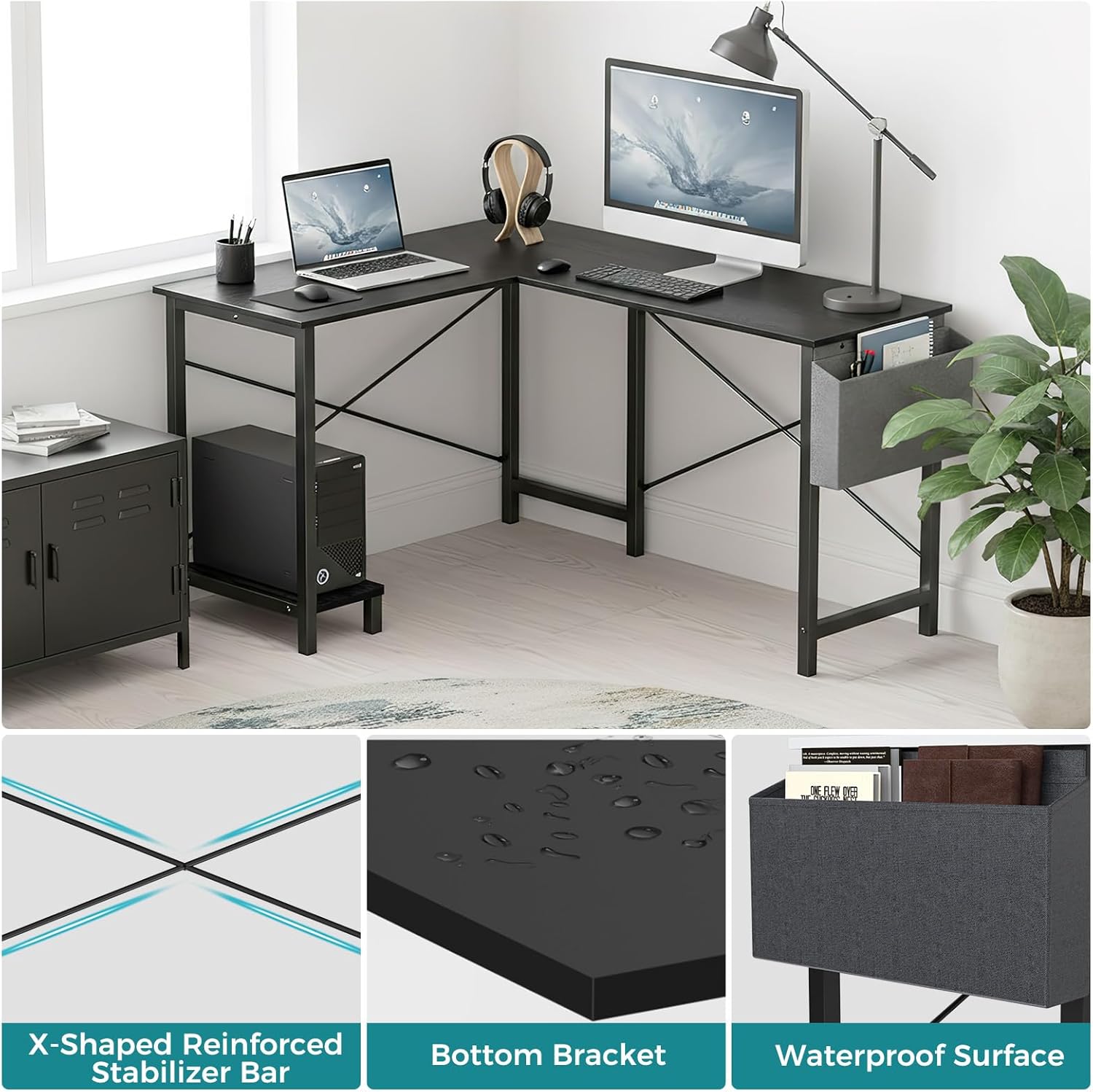
Figure 6.1: Key features like the waterproof surface simplify maintenance.
7. Troubleshooting
If you encounter any issues with your OLIXIS L-Shaped Desk, please refer to the following common solutions:
- Wobbling Desk: Ensure all screws are fully tightened. Check that the desk is placed on a level surface. Adjust the foot pads if available.
- Difficulty Assembling: Re-check the assembly video and instructions. Ensure all parts are oriented correctly, especially the crossbars and leg frames. Do not force parts together.
- Missing Parts: Refer to the 'Package Contents' section. If any parts are missing, contact OLIXIS customer support for assistance.
8. Specifications
| Brand | OLIXIS |
| Model Number | OLYMHJ3-DL02-49IN-BK |
| Product Dimensions | 50"D x 43.3"W x 29.53"H |
| Item Weight | 32.85 Pounds |
| Maximum Weight Recommendation | 264 Pounds |
| Material Type | Metal, Wood |
| Color | Black |
| Special Feature | Reversible, Side Storage Bag, Built-in CPU Stand |
| Required Assembly | Yes |
| Recommended Number of People for Assembly | 2 |
| Product Care Instructions | Wipe with Damp Cloth |

Figure 8.1: Detailed dimensions of the OLIXIS L-Shaped Desk.
9. Warranty & Support
The OLIXIS L-Shaped Desk comes with a Limited Warranty. For specific details regarding warranty coverage, terms, and conditions, please refer to the warranty card included in your package or contact OLIXIS customer support.
For any questions, technical assistance, or to report missing/damaged parts, please visit the official OLIXIS store on Amazon or contact their customer service directly.
OLIXIS Store: Visit OLIXIS Store


