
1. Introduction
Thank you for choosing the FAMAPY Compact Makeup Vanity Desk with Flip Mirror and Light. This manual provides essential information for the safe assembly, operation, and maintenance of your new vanity desk. Please read these instructions carefully before use and retain them for future reference.

Image 1.1: The FAMAPY Compact Makeup Vanity Desk with Flip Mirror and Light, featuring its compact design and integrated stool.
2. Safety Information
- Always assemble the product on a soft, clean surface to prevent scratches.
- Ensure all parts are securely fastened before use. Periodically check and tighten all connections.
- Do not overload drawers or shelves. Distribute weight evenly.
- Keep small parts and packaging materials away from children to prevent choking hazards.
- Avoid placing hot items directly on the surface. Use protective pads if necessary.
- Do not stand or sit on the vanity desk itself, other than the provided stool.
3. Package Contents
Before beginning assembly, verify that all components and hardware are present and undamaged. Refer to the assembly instruction diagram for a complete list of parts. If any parts are missing or damaged, please contact FAMAPY customer support.

Image 3.1: Exploded view and dimensions of the vanity desk and stool components.
4. Assembly Instructions
Assembly is required for this vanity desk. Please follow the step-by-step instructions provided in the included assembly manual. Ensure you have the necessary tools (typically a screwdriver and hammer, not included) and sufficient space for assembly. It is recommended to have two people for certain assembly steps.
- Unpack all components and lay them out on a clean, soft surface.
- Identify each part using the provided diagram (refer to Image 3.1).
- Follow the numerical sequence in the assembly manual to connect the panels and install hardware.
- Attach the drawer slides and assemble the drawers.
- Install the flip mirror mechanism and the LED light strip.
- Assemble the cushion stool.
- Once assembled, gently move the vanity to its desired location.
5. Operating Instructions
5.1 Flip Mirror with Adjustable Lighting
The vanity desk features a flip-top mirror with integrated LED lighting. To access the mirror, gently lift the top panel. The mirror is equipped with a touch-sensitive switch to control the lights.
- Power On/Off: Touch the switch once to turn the lights on or off.
- Adjust Color Temperature: With the lights on, touch and hold the switch to cycle through three color options: cool white, natural white, and warm yellow. Release the switch when the desired color is displayed.
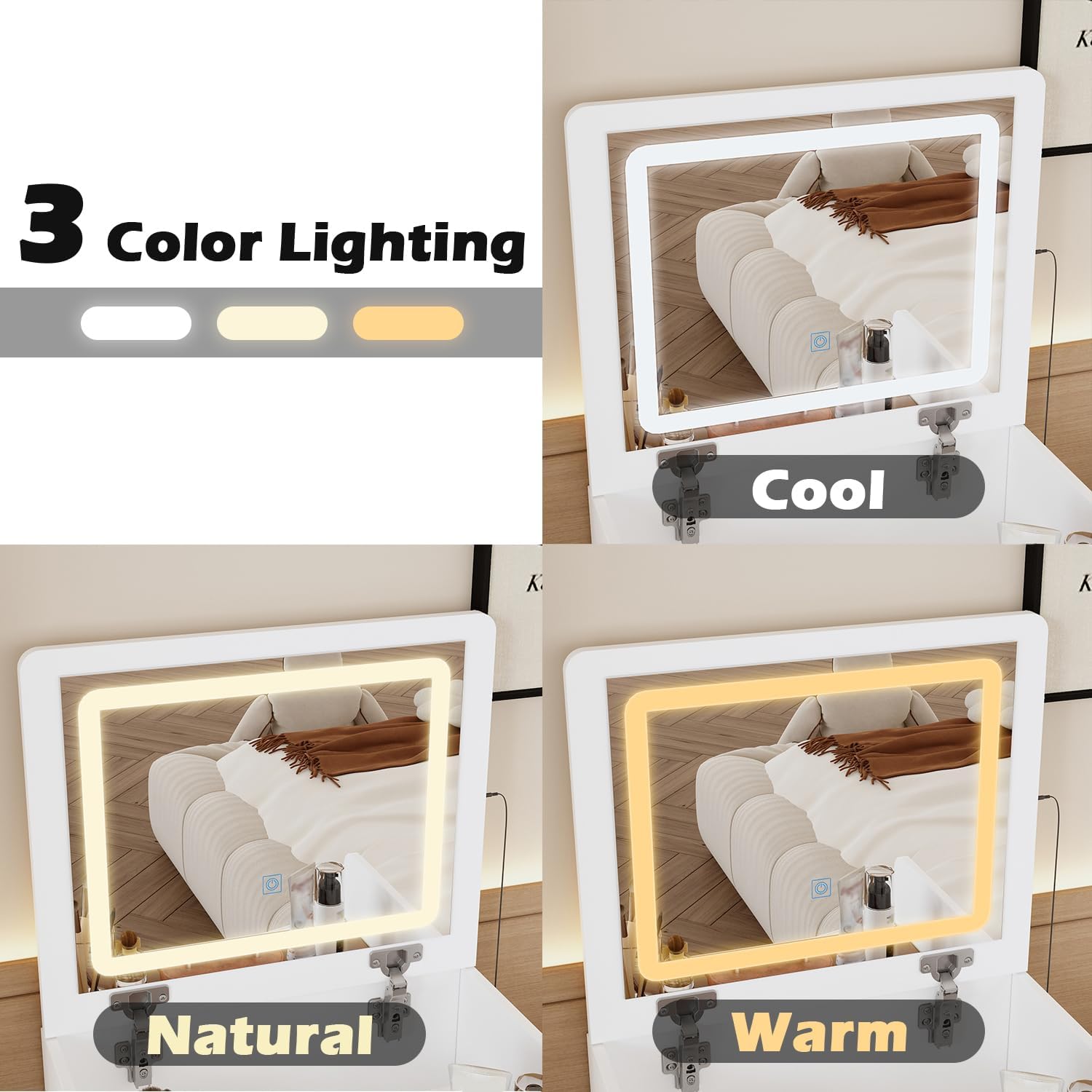
Image 5.1: The three adjustable color lighting options for the flip mirror.
5.2 Storage Space Utilization
This vanity desk offers multiple storage solutions to keep your cosmetics and accessories organized.
- Hidden Storage under Mirror: When the mirror is flipped down, a hidden compartment is revealed, ideal for storing frequently used items.
- Glass Shelf: A brown glass shelf provides stable and visible storage for cosmetics, allowing for quick access.
- Drawers: Three main drawers offer ample space for various items. The top drawer includes a jewelry organizer for smaller accessories.

Image 5.2: The glass shelf providing accessible storage for cosmetics.

Image 5.3: The top drawer with its integrated jewelry organizer.
5.3 Space-Saving Design
The compact design of this vanity desk is optimized for smaller spaces.
- Dual Functionality: When the mirror is flipped down, the vanity desk can function as a regular writing or dressing desk.
- Stool Storage: The included cushion stool is designed to fit neatly under the vanity desk when not in use, maximizing floor space.

Image 5.4: The vanity desk with the mirror closed, serving as a compact desk.

Image 5.5: The cushion stool with its integrated drawer, stored beneath the vanity.
6. Maintenance
- Cleaning: Wipe surfaces with a soft, damp cloth. Avoid harsh chemicals or abrasive cleaners that may damage the finish.
- Mirror Care: Clean the mirror with a glass cleaner and a lint-free cloth.
- Hardware: Periodically check all screws and fasteners to ensure they remain tight. Tighten as needed.
- Avoid Direct Sunlight: Prolonged exposure to direct sunlight may cause fading or damage to the finish.
7. Troubleshooting
| Problem | Possible Cause | Solution |
|---|---|---|
| Lights on mirror not working | Power cable not connected; faulty switch; LED strip issue | Ensure power cable is securely plugged in. Check for damage to the switch. If issues persist, contact customer support. |
| Drawers are stiff or do not slide smoothly | Improper assembly of drawer slides; obstruction; loose screws | Recheck drawer slide installation according to the manual. Ensure no items are obstructing the slides. Tighten any loose screws on the slides or drawer. |
| Vanity feels unstable | Loose connections; uneven floor | Ensure all assembly screws are tightened. Place the vanity on a level surface. If necessary, use furniture levelers (not included). |
8. Specifications
- Brand: FAMAPY
- Model: Vanity with Flip Mirror
- Product Dimensions: 15.7"D x 18.7"W x 47.2"H
- Material: Engineered Wood, Glass
- Color: White
- Style: Modern
- Features: Flip Mirror, Adjustable LED Lights (3 colors), Glass Shelf, 3 Drawers, Cushion Stool with storage
9. Warranty and Support
FAMAPY products are designed for quality and durability. While specific warranty details are not provided in this manual, please retain your proof of purchase for any warranty claims. For assistance with assembly, missing parts, or any other product-related inquiries, please contact FAMAPY customer support through the retailer where the product was purchased or visit the official FAMAPY website.
FAMAPY Customer Service: Please refer to your purchase documentation for contact information.

