
1. Introduction
The Vapcell BL4 is an intelligent 4-bay universal battery charger and analyzer designed for various rechargeable battery types, including Li-ion, Ni-Mh, Ni-Cd, and LiFePO4. It features independent charging slots, internal resistance measurement, capacity testing, and repair functions. This manual provides detailed instructions for safe and effective operation of your BL4 charger.
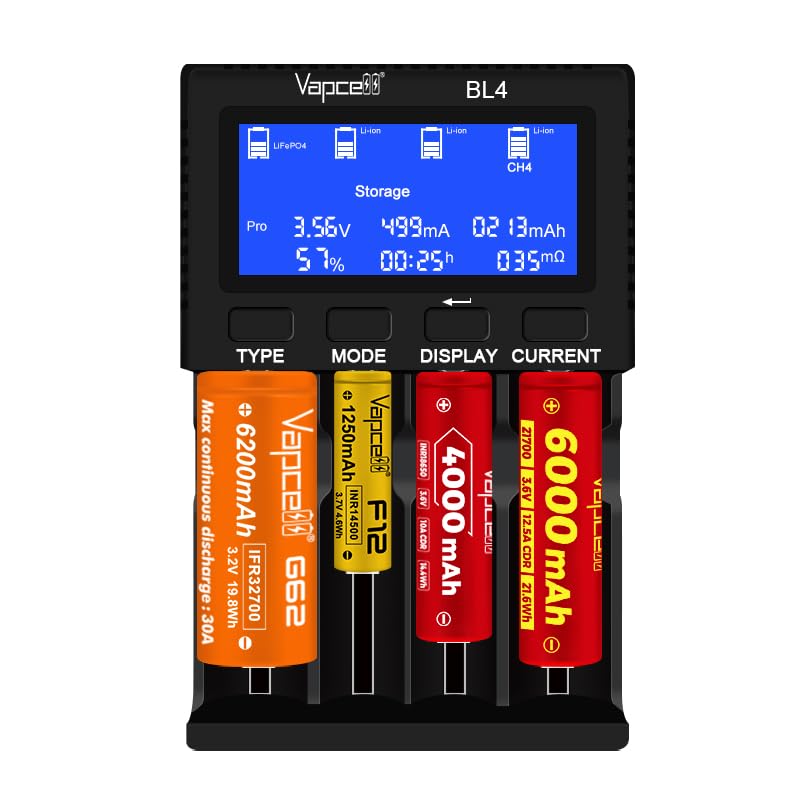
Figure 1: Vapcell BL4 Charger Overview. This image shows the front of the Vapcell BL4 charger, highlighting its LCD screen, control buttons (TYPE, MODE, DISPLAY, CURRENT), and four independent battery charging bays.
2. Key Features
- 4 Independent Bays: Each bay operates independently, allowing simultaneous charging of different battery types and sizes.
- Multi-Chemistry Support: Compatible with Li-ion, Ni-Mh, Ni-Cd, and LiFePO4 batteries.
- Fast Charging: Up to 3A charging current for a single slot (slot 1), with intelligent distribution for multiple batteries.
- Battery Analysis: Measures internal resistance and performs real capacity tests.
- Repair Function: Activates low-voltage Li-ion batteries and repairs memory effect in Ni-Mh/Ni-Cd batteries.
- Storage Function: Charges Li-ion batteries to 3.7V for extended storage life.
- Adjustable Charge Currents: Selectable currents from 0.25A to 3.0A.
- USB Output: DC 5V 2A Max for charging external devices.
- Informative LCD Screen: Displays real-time data including battery type, voltage, current, capacity, time, and internal resistance.
3. Package Contents
Verify that all items are present in your package:
- Vapcell BL4 Charger
- USB-C Cable
- Instruction Manual

Figure 2: Package Contents. This image displays the Vapcell BL4 charger, a USB-C charging cable, and the instruction manual, as typically included in the product package.
Note: A QC3.0 9V 2A USB power adapter is required for operation and is sold separately. Ensure you use a compatible adapter for optimal performance.
4. Setup
- Connect Power: Connect the provided USB-C cable to the Vapcell BL4 charger. Plug the other end of the USB-C cable into a compatible QC3.0 9V 2A USB power adapter (not included).
- Power On: Once connected to power, the charger's LCD screen will illuminate, indicating it is ready for use.
- Insert Batteries: Carefully insert rechargeable batteries into the desired charging slots. Ensure correct polarity (+ and -) as indicated on the charger and battery. The charger will automatically detect the battery type (Li-ion, Ni-Mh, Ni-Cd) and display initial information.
5. Operating Instructions
5.1 Control Buttons
The Vapcell BL4 features four control buttons below the LCD screen:
- TYPE: Selects the battery chemistry (Li-ion, LiFePO4, Ni-Mh/Ni-Cd).
- MODE: Selects the operating mode (Charge, Test, Storage, Repair).
- DISPLAY: Cycles through displayed information for the selected slot. Long press to enter program mode.
- CURRENT: Adjusts the charging current.
5.2 Battery Type Selection (TYPE Button)
After inserting a battery, the charger will attempt to auto-detect its type. If incorrect or for LiFePO4/Li-ion 4.35V/Li-ion 1.5V batteries, press the TYPE button to cycle through the available battery chemistries:
- Li-ion 4.2V
- LiFePO4 3.2V
- Ni-Mh Ni-Cd 1.48V
- Li-ion 4.35V
- Li-ion 1.5V (for specific 1.5V Li-ion batteries)

Figure 3: Type Button Function. This image illustrates the function of the 'TYPE' button, used to manually select the battery chemistry for charging, such as Li-ion, LiFePO4, or Ni-Mh/Ni-Cd.
5.3 Operating Modes (MODE Button)
Press the MODE button to select one of the following operating modes:
- Charge: Standard charging mode. The charger will charge the battery until full and automatically cut off the current.
- Test: Measures the real capacity of the battery. This involves a full discharge followed by a full charge, with capacity measured during the discharge phase.
- Storage: Charges or discharges Li-ion batteries to a nominal voltage of 3.7V, which is ideal for long-term storage to preserve battery health.
- Repair: Designed to activate deeply discharged Li-ion batteries or to reduce the memory effect in Ni-Mh/Ni-Cd batteries.

Figure 4: Mode Button Function. This image demonstrates the 'MODE' button, which allows users to choose between Charge, Test, Storage, and Repair functions for their batteries.
5.4 Display Information (DISPLAY Button)
Press the DISPLAY button to cycle through various real-time parameters for the selected battery slot on the LCD screen. Information includes:
- Battery Type
- Internal Resistance (mΩ)
- Voltage (V)
- Charging Current (mA)
- Elapsed Time (h:m)
- Charged/Discharged Capacity (mAh/Wh)
- Battery Percentage (%)
A long press on the DISPLAY button will enter program mode, allowing for advanced settings (refer to specific program mode instructions if applicable, not detailed in this basic manual).

Figure 5: Display Button Function. This image shows the 'DISPLAY' button and the various battery parameters it cycles through on the LCD screen, such as voltage, current, capacity, and internal resistance.
5.5 Current Selection (CURRENT Button)
Press the CURRENT button to adjust the charging current for the selected slot. Available charge currents are:
- 0.25A x 4 slots
- 0.5A x 4 slots
- 1.0A x 4 slots
- 1.5A x 2 slots (e.g., slot 1 & 2)
- 2.0A x 2 slots (e.g., slot 1 & 2)
- 2.5A x 1 slot (e.g., slot 1)
- 3.0A x 1 slot (e.g., slot 1)
The charger intelligently distributes current. If multiple batteries are inserted, the maximum current per slot may be limited. Slot 1 supports the highest individual current (up to 3A).

Figure 6: Fast Charge Capability. This image highlights the Vapcell BL4's ability to deliver a 3A fast charge to a single Li-ion or LiFePO4 battery in the first slot, with intelligent current distribution when multiple batteries are present.
6. Specifications
| Input Power | QC3.0 9V 2A (USB Adapter Required) |
| Cut-off Voltage (Li-ion) | 4.2V +/- 1% |
| Cut-off Voltage (Ni-MH/NiCD) | 1.48V +/- 1% |
| USB Output Function | DC 5V 2A Max |
| Max Charge Current (Li-ion) | 4 x 1A (total), 1 x 3A (single slot) |
| Max Charge Current (Ni-Mh/Ni-Cd) | 4 x 1A |
| Compatible Battery Diameter | 10-32mm |
| Compatible Battery Length | 34-82mm |
| Compatible Li-ion & LiFePO4 Batteries | 10440, 14500, 14650, 16340, 16650, 17500, 17670, 18350, 18490, 18500, 18650, 18700, 20700, 21700, 22650, 25500, 26650, 26700, 26800, 32650, 32700 |
| Compatible Ni-MH/Ni-CD Batteries | AAA, AA, SC, C, D |
| Product Dimensions | 5 x 6 x 3 inches (approximate) |
7. Maintenance
- Cleaning: Use a soft, dry cloth to clean the charger. Do not use abrasive cleaners or solvents.
- Storage: Store the charger in a cool, dry place away from direct sunlight and extreme temperatures when not in use.
- Avoid Liquids: Do not expose the charger to water or other liquids.
- Inspect Regularly: Periodically check the USB-C cable and charger for any signs of damage.
8. Troubleshooting
| Problem | Possible Cause / Solution |
|---|---|
| Charger does not power on. |
|
| Battery not charging or recognized. |
|
| Slow charging speed. |
|
| Charger or battery gets warm during operation. |
|
9. Warranty and Support
This Vapcell BL4 charger comes with a standard manufacturer's warranty. Please refer to the warranty card included with your product or contact Vapcell customer support for specific warranty terms and conditions.
For technical support, troubleshooting assistance, or warranty claims, please contact your retailer or the manufacturer directly. Keep your purchase receipt as proof of purchase.