
1. Introduction
This manual provides instructions for the Smtcsl 3-in-1 Wireless Charging Station, Model W16. This device is designed to simultaneously charge your compatible smartphone, Apple Watch, and AirPods. It features a detachable 5000mAh magnetic power bank for portable charging. Please read this manual thoroughly before use to ensure proper operation and safety.
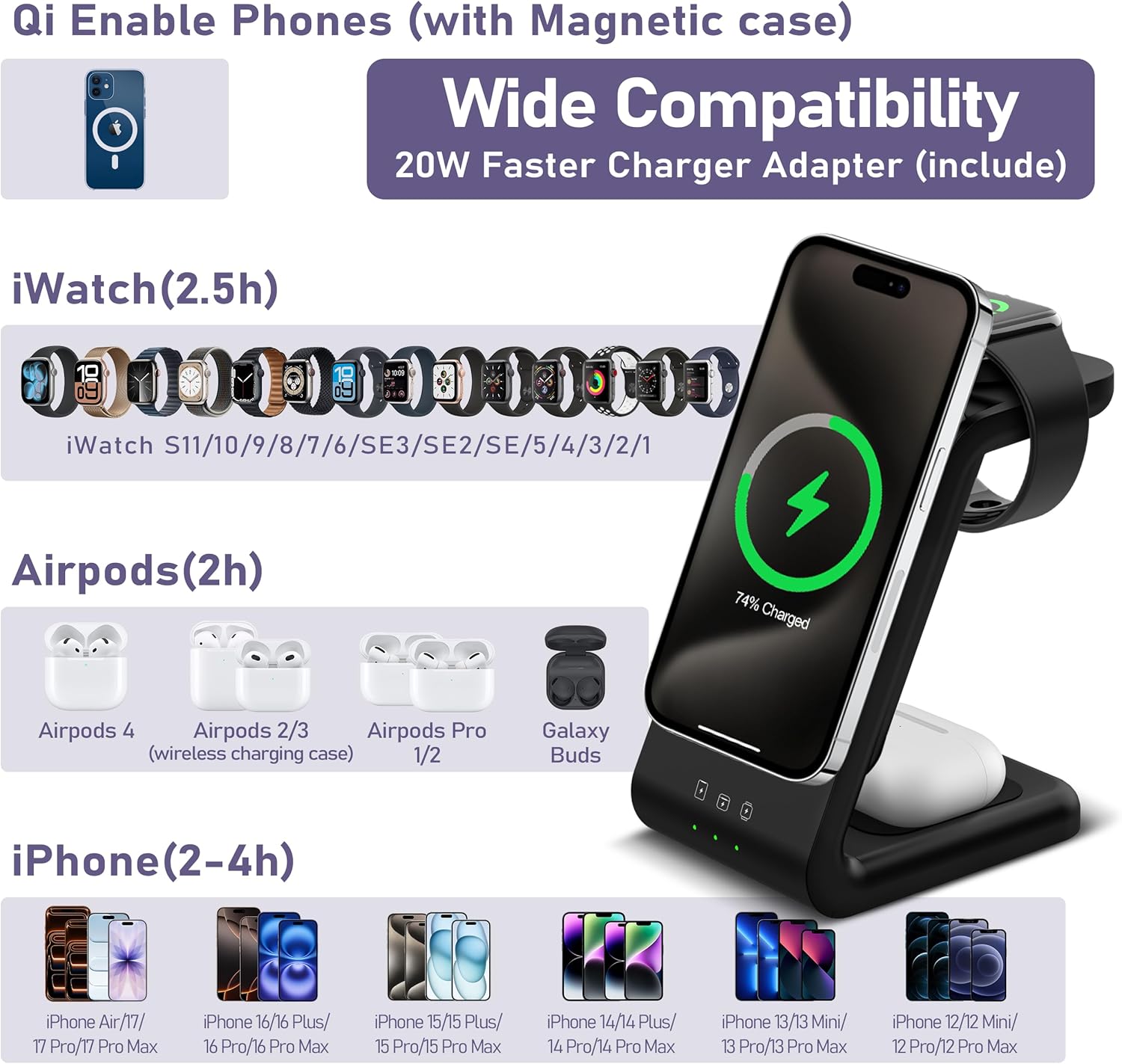
Image 1.1: Smtcsl 3-in-1 Wireless Charging Station with devices.
2. Package Contents
Verify that all items are present in the package:
- 3-in-1 Magnetic Charger Stand
- 5000mAh Removable Power Bank
- USB-C to USB-C Cable
- 20W PD Adapter
- User Manual (this document)
3. Product Overview
The Smtcsl 3-in-1 Wireless Charging Station offers a versatile charging solution for multiple devices. Key features include:
- 3-in-1 Charging: Simultaneously charges compatible smartphones, Apple Watches, and AirPods.
- Detachable Power Bank: Includes a 5000mAh magnetic power bank for portable use.
- Wide Compatibility: Supports iPhone Air/17/16/15/14/13/12 series, Apple Watch 11/10/9/8/7/6/5/4/3/2/SE2/SE3, and AirPods (wireless charging case).
- Strong Magnetic Connection: Ensures secure placement and reliable wireless charging for compatible devices.
- Compact Design: Designed for portability and to reduce cable clutter.

Image 3.1: Product features and dimensions.
Video 3.1: Official product overview of the Smtcsl 3-in-1 Wireless Charging Station, demonstrating its features and functionality.
4. Setup Instructions
- Connect to Power:
Connect the provided USB-C to USB-C cable to the charging station's USB-C port and the 20W PD adapter. Plug the adapter into a wall outlet. The charging indicators on the base will illuminate briefly.

Image 4.1: Connecting the charging station to power.
- Initial Power Bank Charge:
Ensure the detachable 5000mAh power bank is securely seated in its designated slot on the charging stand. It will begin charging automatically if not fully charged. The power bank's indicator lights will show its charging status.

Image 4.2: Power bank integrated into the charging station.
5. Operating Instructions
5.1 Charging Your Smartphone
- Ensure your smartphone is compatible with wireless charging and has a magnetic case if not natively magnetic.
- Place your smartphone onto the magnetic charging pad of the stand. The magnets will align the phone for optimal charging.
- The charging indicator light on the base for the phone will illuminate to confirm charging.

Image 5.1: Wide compatibility for various devices.
5.2 Charging Your Apple Watch
- Place your Apple Watch onto the dedicated watch charging module at the top of the stand.
- Ensure the watch is correctly positioned for the magnetic charger to engage.
- The watch display will indicate charging status.
5.3 Charging Your AirPods
- Place your AirPods (with wireless charging case) onto the designated charging area at the base of the stand.
- The AirPods case indicator light will show charging status.
5.4 Using the Detachable Power Bank
- To remove the power bank, gently pull it away from the main charging stand.
- To charge your phone using the power bank:
- Press the power bank button to activate it. The indicator lights will show the remaining charge.
- Align your compatible smartphone (with magnetic case) to the magnetic surface of the power bank.
- The phone will begin charging wirelessly.
- The power bank can also charge devices via its USB-C port using a cable.

Image 5.2: How to charge your phone using the power bank.
5.5 Phone Case Compatibility
For optimal magnetic connection and charging efficiency, use a magnetic-compatible phone case. Cases without magnetic properties or those thicker than 2mm may weaken the magnetic connection and reduce charging performance. Avoid metal cases, cases with magnets, or cases storing credit cards, as these can interfere with wireless charging.

Image 5.3: Recommended phone cases for magnetic charging.
6. Maintenance
- Keep the charging station and power bank clean and dry. Use a soft, dry cloth to wipe surfaces.
- Avoid exposing the device to extreme temperatures, direct sunlight, or humid environments.
- Do not disassemble or attempt to repair the device yourself. This will void the warranty.
- Ensure proper ventilation around the charging station during use.
7. Troubleshooting
| Problem | Possible Cause | Solution |
|---|---|---|
| Device not charging or charging slowly. |
|
|
| Magnetic connection is weak. |
|
|
| Charging frequently stops and restarts. |
|
|
| Power bank not charging. |
|
|
8. Specifications
| Brand | Smtcsl |
| Model Number | W16 |
| Connector Type | USB Type C |
| Input Voltage | 9 Volts |
| Output Current | 1 Amps |
| Material | Plastic |
| Special Feature | Wireless Charging, Detachable Power Bank |
| Power Bank Capacity | 5000mAh |
| Included Components | 3-in-1 Magnetic Charger Stand, 5000mAh Removable Power Bank, USB-C to USB-C Cable, 20W PD Adapter, User Manual |
| Compatible Devices | iPhone 12/13/14/15/16/17 Series, Apple Watch 1/2/3/4/5/6/7/8/9/10/11/SE2/SE3, AirPods (wireless charging case) |
9. Warranty and Support
9.1 Warranty Information
Smtcsl products are manufactured to high-quality standards. For specific warranty details, please refer to the warranty card included in your package or contact Smtcsl customer support. Keep your purchase receipt as proof of purchase for warranty claims.
9.2 Customer Support
If you encounter any issues or have questions regarding your Smtcsl 3-in-1 Wireless Charging Station, please contact our customer support team. Contact information can typically be found on the product packaging or the official Smtcsl website.