
1. Introduction
Thank you for choosing the SOFTSEA Full Over Twin Bunk Bed with integrated desk, LED lights, and USB charging station. This manual provides essential information for the safe assembly, operation, and maintenance of your new bunk bed. Please read all instructions carefully before beginning assembly and retain this manual for future reference.

Image 1.1: Overview of the SOFTSEA Full Over Twin Bunk Bed, showcasing the integrated desk, upper bunk with mesh shelf, lower twin bed with headboard, and the USB charging station detail.
2. Safety Information
Your safety is paramount. Adhere to the following guidelines to prevent injury and ensure proper use of the bunk bed:
- Weight Capacity: The upper bed has a maximum weight capacity of 300 lbs. The lower bed has a maximum weight capacity of 250 lbs. Do not exceed these limits.
- Upper Bunk Use: The upper bunk is not suitable for children under 6 years of age.
- Guardrails: Always use the guardrails on the upper bunk. Ensure they are properly installed and secured.
- Ladder Safety: Use the ladder for entry and exit from the upper bunk. Do not use the bed as a climbing frame.
- Assembly: This product requires full assembly by at least two adults. Ensure all hardware is securely tightened before use. Periodically check and re-tighten all connections.
- Mattress Size: Use only mattresses of the specified size to ensure proper fit and safety.
- Ventilation: Ensure adequate ventilation around the bed, especially for the lower bunk.
- Electrical Safety: When using the USB charging station and LED lights, ensure all connections are secure and avoid overloading electrical outlets. Do not expose electrical components to water.
3. Setup and Assembly
This bunk bed requires full assembly. It is recommended that two individuals perform the assembly process. All necessary tools are included in the packaging.
3.1 Before You Begin
- Unpack all components and verify against the parts list provided in your separate assembly guide.
- Clear a spacious area for assembly.
- Note that the product may arrive in two separate packages and potentially on different days.
3.2 Assembly Steps
Refer to the detailed step-by-step assembly instructions and diagrams included in your product packaging. Follow the sequence carefully to ensure correct and safe construction. Ensure all bolts, screws, and connectors are tightened securely at each stage.
4. Operating Instructions
4.1 Integrated Desk and Storage
The bunk bed features a built-in study desk and bookcase. Use the desk for activities such as homework, reading, or using a computer. The bookcase shelves are designed to store books, stationery, and other essentials. The upper bunk also includes a mesh shelf for small items like tissues, phones, or snacks.

Image 4.1: Detailed view of the integrated desk, lower bed with padded headboard, and the accessible USB charging station.
4.2 LED Lights and USB Charging Station
The lower twin platform includes a storage shelf with an integrated charging station (2 outlets + 2 USB ports) and a built-in RGB LED strip. To operate:
- Charging Station: Plug the charging station into a wall outlet. Use the standard outlets for AC devices and the USB ports for charging compatible electronic devices.
- LED Lights: The RGB LED strip is controlled via an included controller. Use the controller to adjust brightness, speed, and various timing modes to customize the lighting ambiance.
4.3 Detachable Feature
This bunk bed is designed to be detachable, allowing it to be separated into a full loft bed and a separate twin bed. This provides versatility for different room layouts or as needs change over time. Refer to your assembly guide for specific instructions on how to safely detach and reconfigure the bed components.
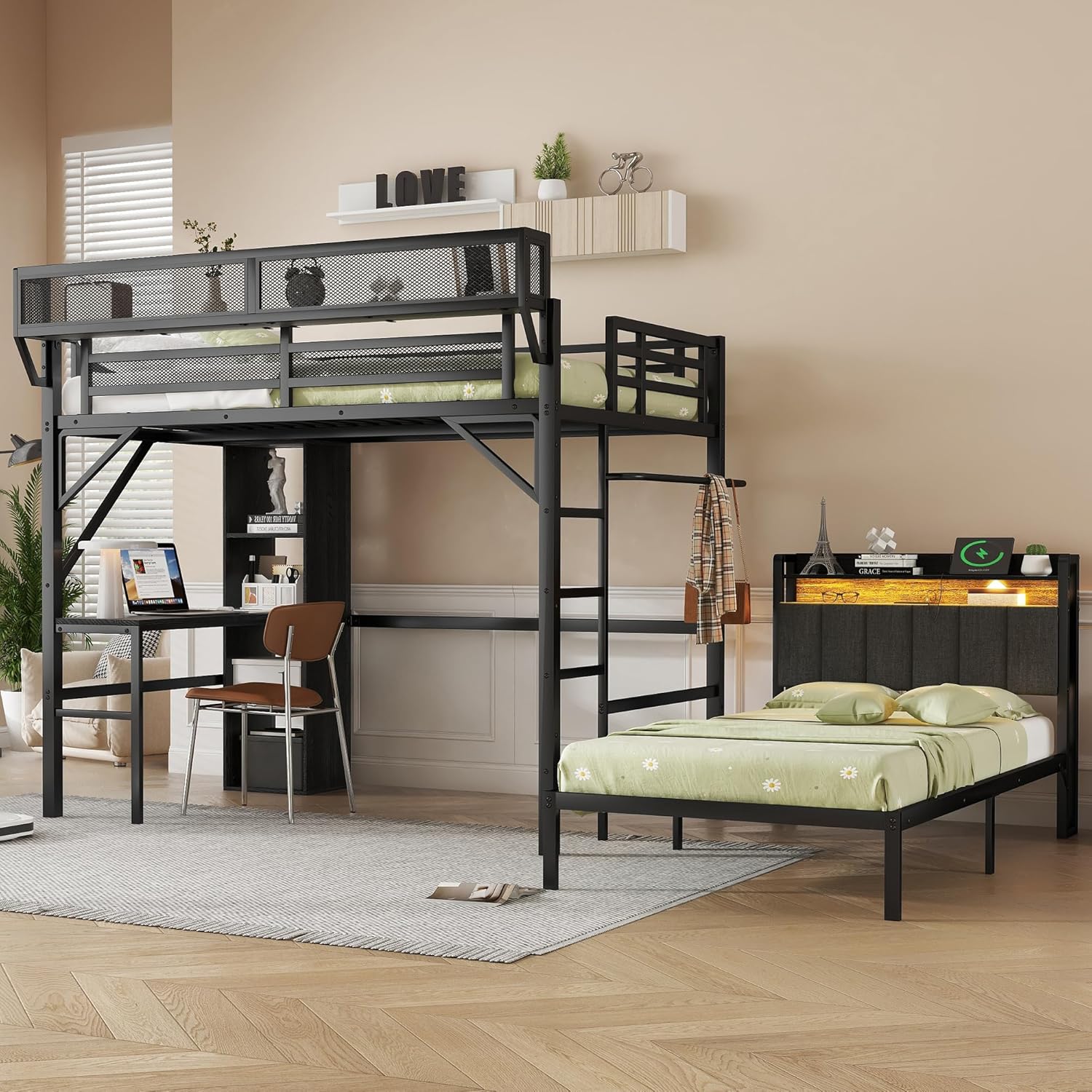
Image 4.2: The SOFTSEA bunk bed reconfigured as a separate loft bed with desk and a standalone twin bed.
5. Maintenance
Regular maintenance will help prolong the life and appearance of your bunk bed:
- Cleaning: Wipe surfaces with a soft, damp cloth. Avoid harsh chemicals or abrasive cleaners that may damage the finish.
- Hardware Check: Periodically inspect all bolts, screws, and connections to ensure they remain tight. Re-tighten as necessary to maintain structural integrity.
- Electrical Components: Keep the USB charging station and LED light components free from dust and moisture.
6. Troubleshooting
If you encounter any issues with your SOFTSEA bunk bed, consider the following:
- Loose Parts: If the bed feels unstable, check all assembly hardware and tighten any loose connections.
- LED Lights Not Working: Ensure the LED strip is properly connected to its power source and controller. Check the controller's battery if applicable.
- USB Charging Station Not Functioning: Verify that the charging station is securely plugged into a working wall outlet. Test with different devices and cables.
- Missing Parts: If any parts were missing during assembly, refer to your assembly guide for contact information to request replacements.
For issues not resolved by the above steps, please contact SOFTSEA customer support.
7. Specifications
| Feature | Specification |
|---|---|
| Overall Dimensions | 88.6"L x 56.7"W x 64.3"H |
| Upper Bed Inner Space | Full |
| Down Bed Inner Space | Twin |
| Upper Bed Weight Capacity | 300 lbs |
| Down Bed Weight Capacity | 250 lbs |
| Overall Product Weight | 162.14 lbs |
| Material | Metal |
| Color | Black |
| Assembly Required | Yes (Full Assembly Needed) |
| Suggested Number of People for Assembly | 2 |
| Special Features | Desk, Detachable, Hanging Rod, LED Lighting, USB Port |
| Included Components | Bookcase, Slat |
| Model Number | x40 |
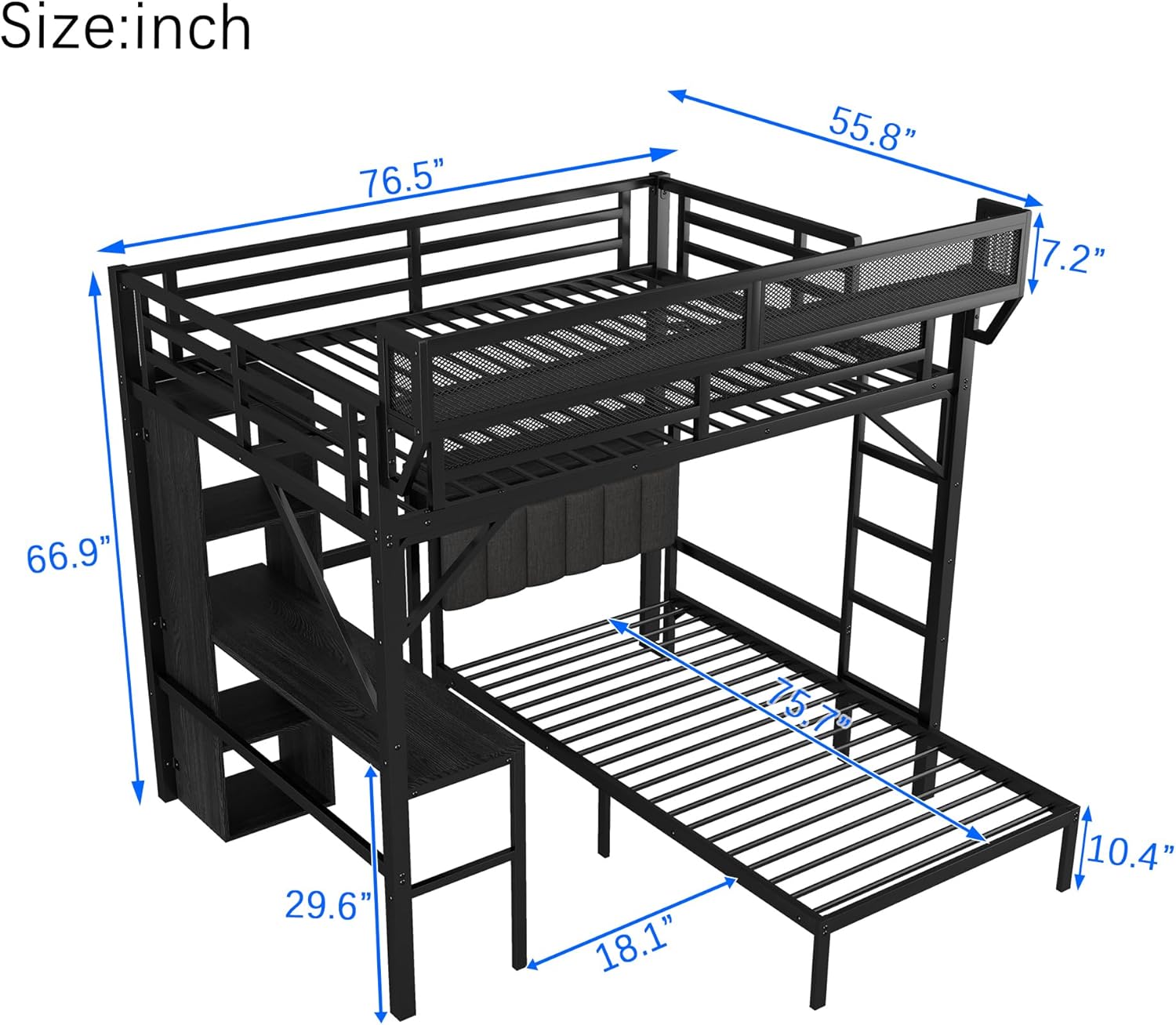
Image 7.1: Diagram illustrating the key dimensions of the SOFTSEA Full Over Twin Bunk Bed.
8. Warranty and Support
For information regarding product warranty, please refer to the documentation provided at the time of purchase or contact your retailer. If you have any questions, concerns, or require assistance with your SOFTSEA bunk bed, please contact SOFTSEA customer support through the retailer's platform or the official SOFTSEA website.