1. Introduction
This manual provides comprehensive instructions for the assembly, operation, and maintenance of your MAHANCRIS ETNA18E01 Modern End Table. Designed for small spaces, this versatile table features a built-in charging station and an integrated sensor light, making it ideal for living rooms, bedrooms, or guest rooms.
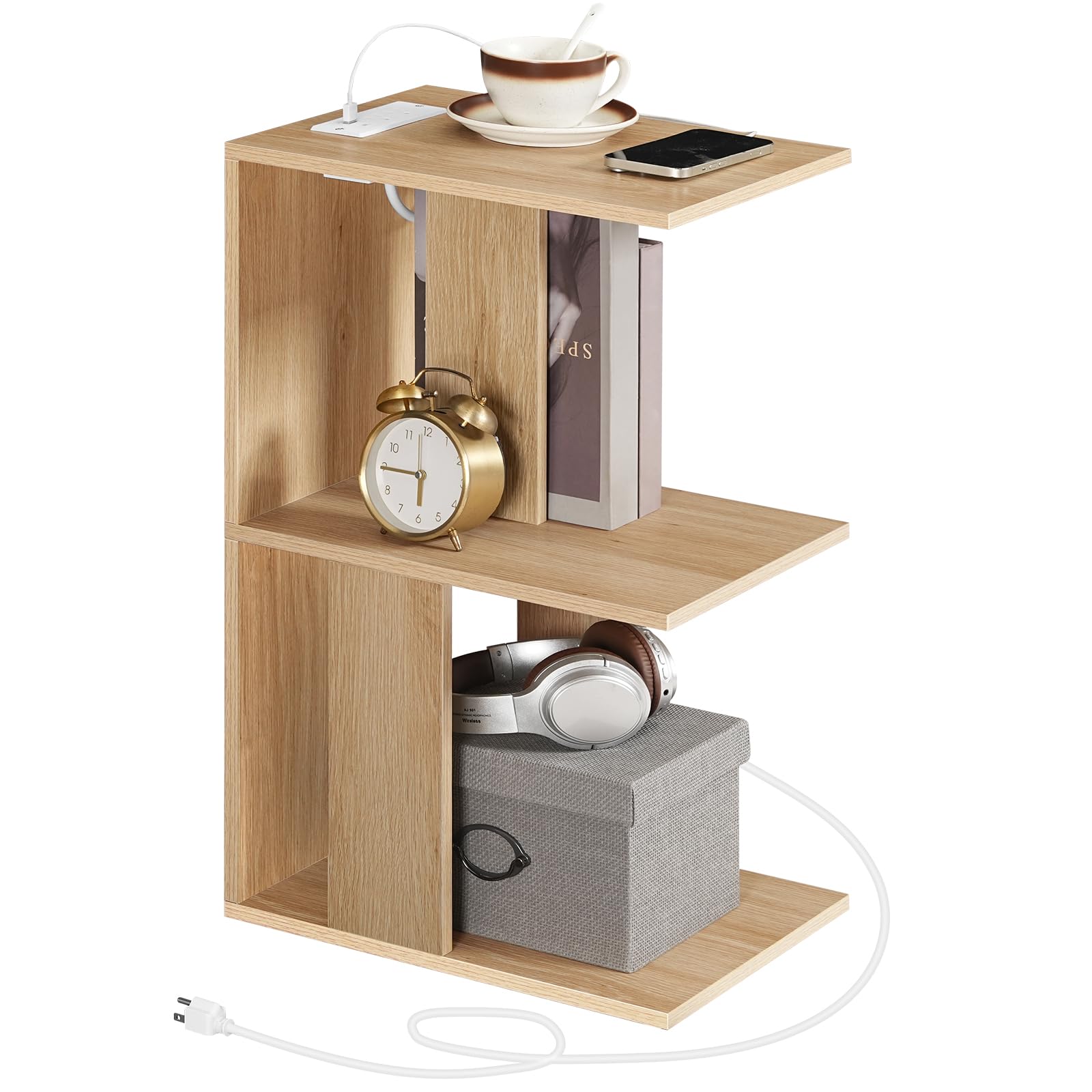
Figure 1.1: MAHANCRIS ETNA18E01 Modern End Table in use.
2. Safety Information
- Always follow the assembly instructions carefully to ensure proper construction and stability.
- Do not exceed the maximum weight recommendations: Top shelf: 33 lb (15 kg), Middle shelf: 22 lb (10 kg), Bottom shelf: 33 lb (15 kg). Exceeding these limits can lead to instability and potential damage or injury.
- Ensure the power cord for the charging station is not pinched or damaged during assembly or use.
- Plug the charging station into a properly grounded electrical outlet. Do not overload the outlets.
- Keep liquids away from the charging station to prevent electrical hazards.
- Periodically check all connections and fasteners to ensure they remain tight.
3. Setup and Assembly
Your MAHANCRIS ETNA18E01 End Table requires assembly. Please ensure all parts are present before beginning. A detailed assembly guide is included in the packaging. Recommended tools for assembly include a hammer, screwdriver, and wrench.
3.1. Unpacking and Part Identification
- Carefully unpack all components from the box.
- Refer to the included parts list in your assembly guide to identify each piece of hardware and furniture panel.
- Place all components on a soft, clean surface to prevent scratches during assembly.
3.2. Assembly Steps
Follow the step-by-step instructions provided in the separate assembly guide. Ensure all screws and fasteners are tightened securely but do not overtighten.
3.3. Adjustable Feet Installation
The table includes adjustable feet to ensure stability on uneven surfaces. Install these feet as per the assembly guide. Once assembled, you can rotate the feet to level the table.

Figure 3.1: Adjustable feet for stability.
4. Operating Instructions
4.1. Charging Station
The integrated charging station provides convenient power access for your electronic devices.
- Power Connection: Plug the 59-inch power cord from the charging station into a standard wall outlet.
- AC Outlets: Two 3-hole AC sockets (120V/12A) are available for larger electronics.
- USB Ports: One USB-A port (5V/2A) and one Type-C port (5V/2A) are provided for charging smartphones, tablets, and other compatible devices.
- Usage: Simply connect your device's charging cable to the appropriate port.

Figure 4.1: Charging station with AC, USB, and Type-C ports.
4.2. Sensor Light
The round LED sensor light offers adjustable illumination for your convenience.
- Installation: The sensor light comes with installation accessories. Choose a suitable location on the table's shelves or frame and attach it securely.
- Modes: The light features two modes: Induction Mode (motion-activated) and Long Light Mode (constantly on). Switch between modes as needed.
- Charging: The sensor light is rechargeable. Refer to its specific charging instructions if provided separately.
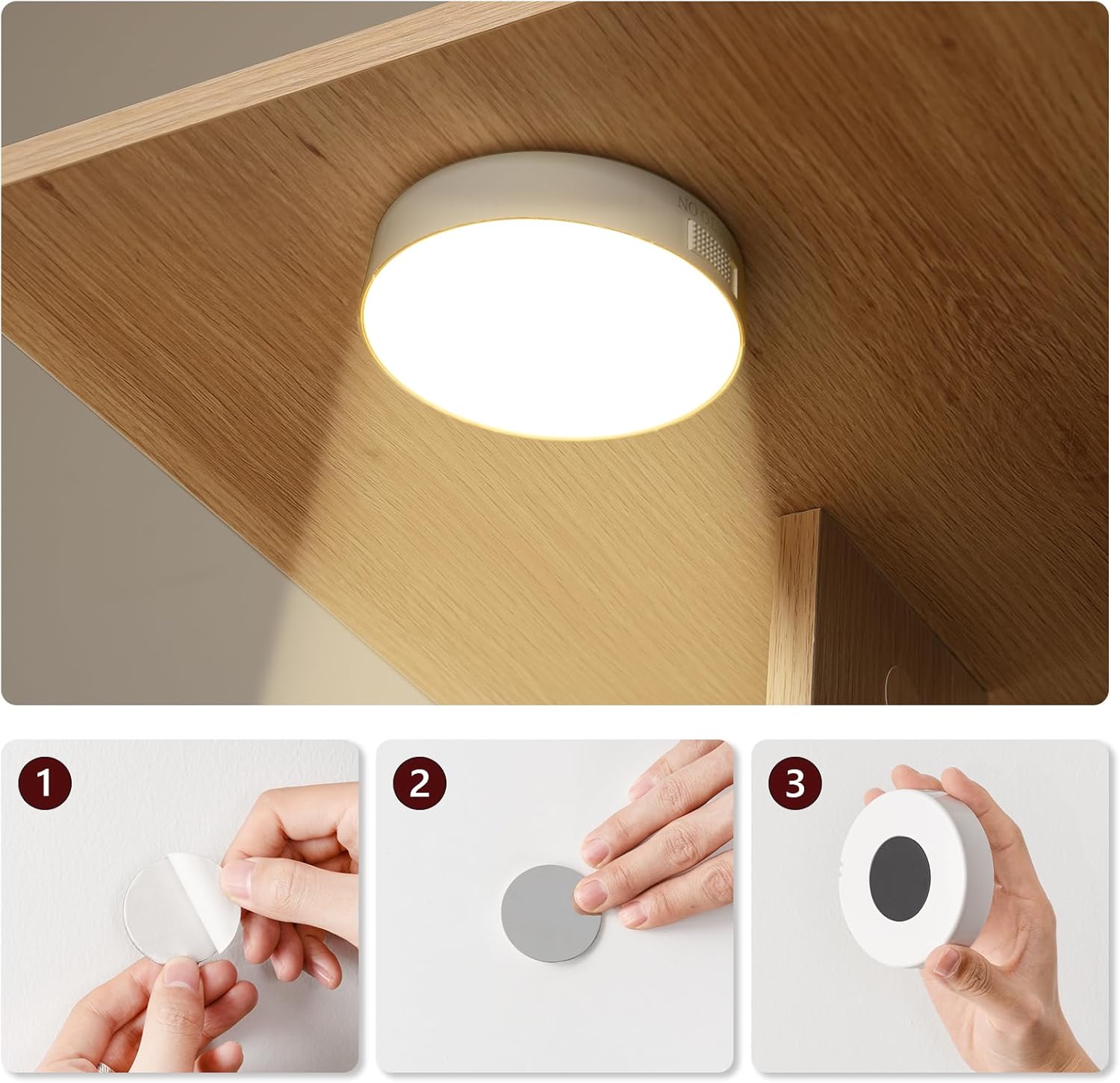
Figure 4.2: Sensor light installation steps.
4.3. General Use
Utilize the three tiers of open storage for books, magazines, decorative items, or other essentials. The compact design allows it to fit snugly next to a sofa, bed, or recliner.
5. Maintenance
- Cleaning: Wipe the surface of the table with a damp cloth. Avoid harsh chemicals or abrasive cleaners that could damage the finish.
- Stability Check: Periodically check the adjustable feet and all assembly hardware to ensure they are tight and the table remains stable. Adjust the feet as necessary to maintain a level surface.
- Electrical Safety: Inspect the power cord and charging station for any signs of wear or damage. Discontinue use and replace if any damage is found.
6. Troubleshooting
- Table is wobbly: Ensure all assembly screws are tightened. Adjust the leveling feet on the bottom of the table to compensate for uneven floors.
- Charging station not working: Check if the power cord is securely plugged into both the charging station and a functional wall outlet. Test the outlet with another device. Ensure devices are properly connected to the USB/Type-C ports or AC outlets.
- Sensor light not working: Ensure the sensor light is charged. Check its mode setting (induction vs. long light). If in induction mode, ensure there is sufficient motion or darkness to trigger it.
7. Specifications
Refer to the following specifications for your MAHANCRIS ETNA18E01 End Table:

Figure 7.1: Product Dimensions.
| Feature | Detail |
|---|---|
| Brand | MAHANCRIS |
| Model Number | ETNA18E01 |
| Product Dimensions (D x W x H) | 11"D x 15"W x 24.4"H (28 x 38 x 62 cm) |
| Item Weight | 4.7 Kilograms |
| Maximum Weight Recommendation (Top) | 33 Pounds (15 kg) |
| Maximum Weight Recommendation (Middle) | 22 Pounds (10 kg) |
| Maximum Weight Recommendation (Bottom) | 33 Pounds (15 kg) |
| Frame Material | Engineered Wood |
| Furniture Finish | Particleboard |
| Color | Natural |
| Charging Station | 2 AC Outlets (120V/12A), 1 USB Port (5V/2A), 1 Type-C Port (5V/2A) |
| Power Cord Length | 59 inches |
| Sensor Light | Round LED, Rechargeable, Induction & Long Light Modes |
| Required Assembly | Yes |
| Tools Recommended For Assembly | Hammer, Screw Driver, Wrench |
| Product Care Instructions | Wipe with Damp Cloth |
8. Product Overview Video
Watch this official video for a visual overview of the MAHANCRIS End Table's features and functionality.
Video 8.1: MAHANCRIS End Table with Charging Station, USB, Light. This video highlights the multi-functional design, stability, charging capabilities, and sensor light feature of the end table.
9. Warranty Information
Specific warranty details for the MAHANCRIS ETNA18E01 Modern End Table are not provided in this manual. Please refer to the product packaging, the retailer's website, or contact the manufacturer directly for warranty terms and conditions.
10. Customer Support
For further assistance, technical support, or inquiries regarding your MAHANCRIS ETNA18E01 Modern End Table, please contact the retailer where you purchased the product or visit the official MAHANCRIS website for contact information.


