
chufa XK0017
chufa 110V Tankless Electric Water Heater User Manual
Model: XK0017
1. Introduction
This manual provides essential instructions for the safe installation, operation, and maintenance of your chufa 110V Tankless Electric Water Heater, Model XK0017. Please read this manual thoroughly before installation and retain it for future reference.

Image 1.1: The chufa 110V Tankless Electric Water Heater, Model XK0017, shown with its power cord and included mounting screws.
2. Safety Information
Read all safety warnings and instructions carefully before installing or operating this appliance. Failure to follow these instructions may result in electric shock, fire, property damage, or personal injury.
- This appliance must be installed by a qualified electrician or plumber in accordance with all local electrical and plumbing codes.
- Ensure the electrical supply matches the specifications of the heater (110V, 3000W). A dedicated 32A circuit and 13AWG wire are required.
- Do not operate the heater if it is damaged or malfunctioning.
- The unit is designed for point-of-use heating for sinks and handwashing; it is not intended for whole-home showers or high-flow applications.
- Features Dry Combustion Protection and Overvoltage Protection for enhanced safety.
- Do not block the water inlet or outlet.
- Ensure proper grounding to prevent electric shock.
3. Package Contents
Verify that all components are present and undamaged before proceeding with installation.
- chufa Tankless Electric Water Heater Unit (Model XK0017)
- Mounting Screws and Anchors
- User Manual
4. Specifications

Image 4.1: Dimensions and installation requirements for the chufa water heater.
| Feature | Specification |
|---|---|
| Model | XK0017 |
| Voltage | 110 Volts |
| Wattage | 3000 Watts |
| Product Dimensions (W x H) | 4.53" x 7.87" (11.5 cm x 20 cm) |
| Item Weight | 2.4 pounds |
| Special Features | Dry Combustion Protection, LED Display, Overheat Protection, Rustproof, Temperature Lock |
| Waterproof Rating | IPX4 |
| Flow Rate (Hot Water) | 2 L/min |
| Required Circuit Breaker | ≥32A |
| Required Wire Gauge | ≥2.5mm² (approx. 13AWG) |
| Pipe Connection | 1/2" NPT |
5. Setup and Installation
This appliance must be installed by a qualified professional. Ensure all local plumbing and electrical codes are followed.
5.1 Site Selection
- Install the unit under a sink or in a similar compact space.
- Ensure the location is protected from freezing temperatures.
- Provide adequate clearance around the unit for maintenance and ventilation.
- The unit is IPX4 waterproof, suitable for damp environments but not direct water spray.
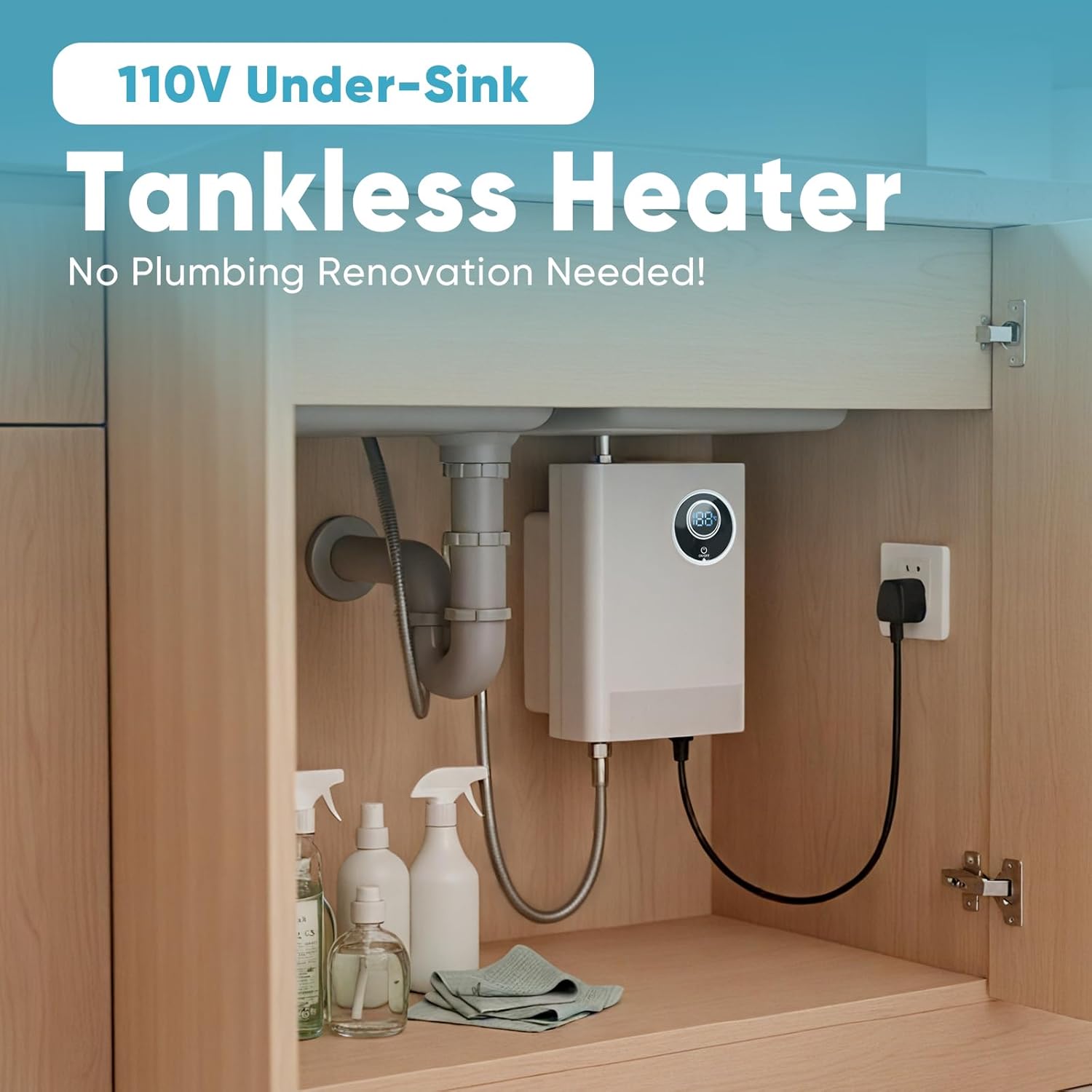
Image 5.1: Example of under-sink installation, demonstrating the compact design.
5.2 Plumbing Connection
- Turn off the main water supply.
- Connect the cold water inlet (marked blue or with a 'C') to the cold water supply line using 1/2" NPT fittings.
- Connect the hot water outlet (marked red or with an 'H') to the hot water faucet line using 1/2" NPT fittings.
- Ensure all connections are tight and leak-free.
- Open the hot water faucet to purge air from the system before turning on the heater.
5.3 Electrical Connection
- Ensure the power supply is OFF at the circuit breaker.
- Connect the heater to a dedicated 110V, 32A circuit.
- Use 13AWG or thicker wire for the electrical connection.
- Ensure proper grounding.
- Once connections are secure, turn on the circuit breaker.
6. Operating Instructions
6.1 Power On/Off
- Press the ON/OFF button on the unit's display to turn the heater on or off.
- The LED display will illuminate when the unit is powered on.
6.2 Temperature Adjustment

Image 6.1: The LED display with touch controls for temperature adjustment and unit switching.
- Use the touch controls on the LED display to increase or decrease the desired water temperature.
- The display shows the current temperature setting.
- The unit features a Temperature Lock to maintain your preferred setting.
6.3 Switching Temperature Units (°C/°F)
- To switch between Fahrenheit (°F) and Celsius (°C), long-press the designated button on the display (refer to Image 6.1).
6.4 Intended Use
- This heater is designed for point-of-use applications such as handwashing, dishwashing, or small sink tasks.
- It is not suitable for continuous high-flow applications like showering or supplying multiple fixtures simultaneously.
7. Maintenance
Regular maintenance ensures optimal performance and extends the lifespan of your water heater.
- Cleaning: Wipe the exterior of the unit with a soft, damp cloth. Do not use abrasive cleaners or solvents.
- Descaling: In areas with hard water, mineral deposits can accumulate. Consult a qualified plumber for periodic descaling to maintain efficiency.
- Inspection: Periodically check water connections for leaks and electrical connections for signs of wear or damage.
- Winterization: If the unit is in an area prone to freezing and will not be used for an extended period, drain the water from the unit to prevent damage.
8. Troubleshooting
Before contacting customer support, review the following common issues and solutions.
| Problem | Possible Cause | Solution |
|---|---|---|
| No hot water / Unit not turning on | No power; Circuit breaker tripped; Unit is off. | Check power supply; Reset circuit breaker; Press ON/OFF button. |
| Water not hot enough | Temperature setting too low; High incoming water temperature; Excessive flow rate. | Increase temperature setting; Reduce water flow at the faucet. |
| Water flow is low | Clogged aerator; Mineral buildup in pipes/unit. | Clean faucet aerator; Consult a plumber for descaling. |
| Leakage from connections | Loose plumbing connections. | Tighten connections; Use plumber's tape if necessary. |
| Error code on display | Internal fault or safety activation. | Turn off power, wait 5 minutes, then restart. If error persists, contact customer support. |
9. Warranty and Support
For warranty information or technical support, please contact chufa customer service. Keep your purchase receipt as proof of purchase.
Contact information can typically be found on the product packaging or the official chufa website.
Ask a question about this manual
Ask about setup, troubleshooting, compatibility, parts, safety, or missing instructions. Manuals+ will review the question and use this page’s manual context to help answer it.