
BOSSIN 70-inch Fireplace TV Stand
BOSSIN 70-inch Fireplace TV Stand User Manual
Model: 70-inch Fireplace TV Stand (B0FS6Y7QK8)
1. Introduction
Thank you for purchasing the BOSSIN 70-inch Fireplace TV Stand. This manual provides essential information for the safe assembly, operation, and maintenance of your new entertainment center. Please read these instructions thoroughly before use and retain them for future reference.

Image 1.1: The BOSSIN 70-inch Fireplace TV Stand in a living room setting, featuring the integrated electric fireplace and LED lighting.
2. Important Safety Information
- Read all instructions before assembling or operating this product.
- This TV stand is designed to support TVs up to 80 inches. Ensure the weight of your television does not exceed the stand's capacity.
- Always plug the electric fireplace directly into a grounded 120V AC outlet. Do not use extension cords or power strips.
- Keep combustible materials, such as furniture, pillows, bedding, papers, clothes, and curtains, at least 3 feet (0.9 m) from the front of the heater.
- Do not block air intakes or exhaust openings.
- Supervise children and pets when the fireplace is in operation.
- For best results and safety, assembly should be performed by two adults.
3. Product Overview
The BOSSIN Fireplace TV Stand is a versatile entertainment unit combining a 70-inch TV console with a 36-inch electric fireplace. It is designed to accommodate televisions up to 80 inches. Key features include:
- Integrated Electric Fireplace: A 36-inch electric fireplace with two heating modes (750W & 1500W), 12 realistic 3D flame effects, and a programmable 1-8 hour timer.
- LED Lighting: Features 20 LED color combinations to enhance ambiance.
- Ample Storage: Equipped with storage cabinets featuring mirrored doors and adjustable shelves for media devices, gaming consoles, and other items.
- Sturdy Construction: Eight stainless steel pillar columns provide enhanced durability and stability.
- Cable Management: Integrated cable holes help maintain a tidy appearance by concealing wires.

Image 3.1: Detailed view highlighting the adjustable shelf, high-gloss cabinet doors, and the eight stainless steel supports for structural integrity.

Image 3.2: Illustration demonstrating the compatibility of the TV stand with televisions up to 80 inches in size.
4. Package Contents
Your BOSSIN Fireplace TV Stand is shipped in two packages. Please ensure all components are present before beginning assembly. Refer to the included assembly guide for a detailed list of parts and hardware.
- TV Stand Panels (various sizes)
- 36-inch Electric Fireplace Unit
- Stainless Steel Support Columns
- Cabinet Doors (mirrored)
- Adjustable Shelves
- Assembly Hardware (screws, dowels, cam locks, etc.)
- Remote Control for Fireplace
- Instruction Manual (this document)

Image 4.1: Product dimensions for the 70-inch TV stand and the 36-inch electric fireplace, illustrating how the product is shipped in two separate packages.
5. Assembly Instructions
The TV stand is designed for user-friendly assembly. We recommend two people for the assembly process to ensure safety and ease. Follow the detailed, step-by-step instructions provided in the separate assembly guide included with your product. All parts are labeled, and pre-drilled holes are provided.
- Unpack all components and verify against the parts list.
- Identify and separate all hardware.
- Assemble the main frame of the TV stand according to the diagrams.
- Install the stainless steel support columns.
- Attach the cabinet doors and adjustable shelves.
- Carefully insert the 36-inch electric fireplace unit into its designated opening.
- Connect any necessary LED lighting components.
Ensure all connections are secure before placing a television or other items on the stand.
6. Operating Instructions
6.1 Electric Fireplace Operation
The electric fireplace can be operated using the control panel on the unit or the included remote control.

Image 6.1: Overview of the electric fireplace's display, heater settings, flame speed, dimmer, timer, color options, and power controls.
- Power (ON/OFF): Press the power button to turn the fireplace on or off.
- Heater: Select between 750W (low heat) and 1500W (high heat) modes. The heater can be turned off while flame effects remain active.
- Flame Speed: Adjust the speed of the flame effect (5 levels).
- Dimmer: Control the brightness of the flame effect (5 levels).
- Timer: Set a programmable timer for 1 to 8 hours. The fireplace will automatically shut off after the set time.
- Flame Color: Choose from 12 realistic 3D flame effects to customize the ambiance.

Image 6.2: Visual representation of the 12 distinct flame color options available for the electric fireplace, including mixable colors.
6.2 LED Light Strip Operation
The integrated LED light strips offer 20 color combinations to complement your room's decor or mood. These lights are typically controlled via a separate switch or remote, as detailed in the assembly guide.
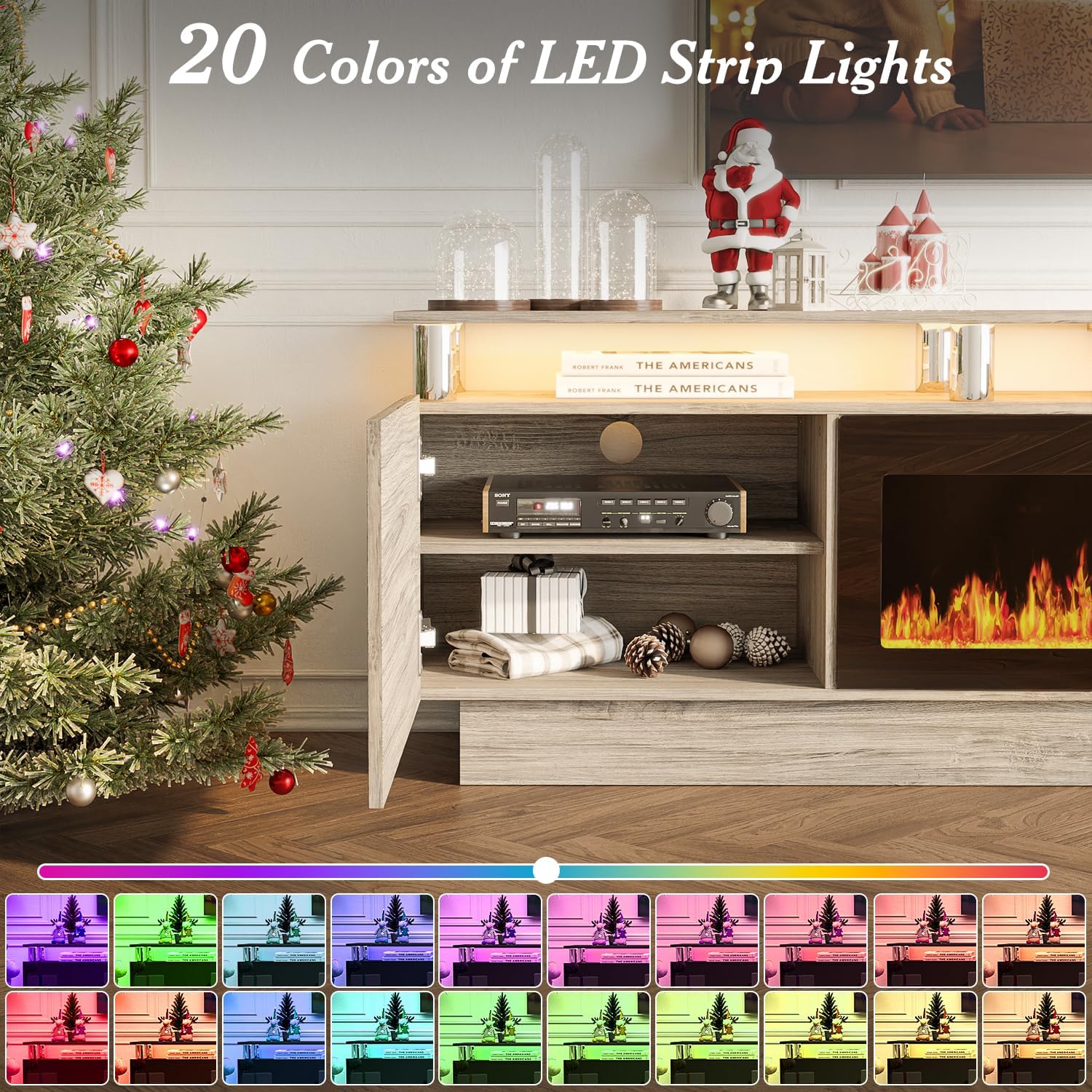
Image 6.3: An array of 20 different LED strip light colors illuminating the TV stand, showcasing the customizable ambiance options.
7. Maintenance
- Cleaning: Dust the TV stand and fireplace exterior regularly with a soft, dry cloth. For stubborn marks, use a slightly damp cloth and mild detergent, then wipe dry immediately. Do not use abrasive cleaners or solvents.
- Fireplace Unit: Ensure the air intake and exhaust vents of the electric fireplace are kept clear of dust and debris to maintain proper airflow and prevent overheating.
- Electrical Components: Periodically check the power cord for any signs of damage. If damaged, discontinue use and contact customer support.
8. Troubleshooting
- Fireplace not turning on: Ensure the power cord is securely plugged into a grounded outlet. Check if the circuit breaker has tripped.
- No heat output: Verify that the heater function is activated and set to 750W or 1500W. Ensure air vents are not blocked.
- Remote control not working: Check and replace the batteries in the remote control. Ensure there are no obstructions between the remote and the fireplace unit's sensor.
- LED lights not functioning: Check all connections for the LED strip lights. Ensure the power source for the lights is active.
- Unusual noises or odors: Immediately turn off the unit and unplug it. Contact customer support for assistance.
9. Specifications
| Feature | Specification |
|---|---|
| Brand | BOSSIN |
| Model | 70-inch Fireplace TV Stand |
| Overall Dimensions (Approx.) | 70"W x 24"H x 14"D |
| Material | Stainless Steel (supports), Wood Composite (panels) |
| Finish Type | Painted |
| Color | Gray |
| Power Source (Fireplace) | Corded Electric |
| Heater Output | 750W / 1500W |
| Fireplace Insert Size | 36 inches |
| TV Compatibility | Up to 80 inches |
10. Warranty and Customer Support
BOSSIN products are manufactured to high-quality standards. For information regarding warranty coverage, please refer to the warranty card included with your purchase or visit the official BOSSIN website. If you encounter any issues or require assistance, our customer support team is available 24/7 to help you. Please have your model number (B0FS6Y7QK8) ready when contacting support.
You can visit the BOSSIN Store for more information: BOSSIN Store
Related Documents - 70-inch Fireplace TV Stand
 |
Wrought Studio LED TV Stand with Mount Installation and Assembly Guide Comprehensive installation and assembly instructions for the Wrought Studio LED TV Stand with Mount. This guide provides a detailed parts list, hardware identification, and step-by-step instructions to help you assemble your TV stand safely and correctly. |
 |
Latitude Run 70" Fluted Fireplace TV Stand Assembly Instructions Comprehensive assembly guide for the Latitude Run 70" Fluted Fireplace TV Stand, detailing parts, hardware, and step-by-step instructions for building the media console and installing the electric fireplace. |
 |
Ivy Bronx 70" Fireplace TV Stand Assembly Instructions Comprehensive assembly guide for the Ivy Bronx 70" Fireplace TV Stand, including parts list, step-by-step instructions, and helpful hints for installation. Features a 36" electric fireplace and LED lighting. |
 |
KMC Global Fireplace TV Stand Assembly Instructions (H21423-03A-RS) for 70" TVs Detailed assembly instructions and parts list for the KMC Global Fireplace TV Stand (Model H21423-03A-RS), designed for up to 70-inch televisions. This guide includes safety warnings, a comprehensive parts and hardware inventory, step-by-step assembly procedures, door adjustment tips, wall mounting instructions, and fireplace installation details. |
 |
Amerlife 70-Inch Fireplace TV Stand Assembly Instructions Detailed assembly guide for the Amerlife 70-inch TV Stand with LED fireplace. Includes component lists, tools required, step-by-step instructions, safety advice, and wall mounting recommendations for optimal setup and use. |
 |
Sizzim Fireplace TV Stand for 70" TV Assembly Instructions Comprehensive assembly instructions for the Sizzim Fireplace TV Stand for 70" TV (Model: SM-H21022WH08A, H21430-02A-MB). This guide includes a detailed parts list, hardware inventory, and step-by-step assembly instructions for creating a TV & Media Furniture unit. |
Ask a question about this manual
Ask about setup, troubleshooting, compatibility, parts, safety, or missing instructions. Manuals+ will review the question and use this page’s manual context to help answer it.