
1. Introduction
This manual provides essential instructions for the safe and effective use of your ACODO A70 Language Translator Device. Please read this manual thoroughly before operating the device and retain it for future reference.
The ACODO A70 is an advanced AI-powered language translator designed for real-time voice, offline voice, and photo translation across numerous languages. It features a 5-inch HD touch screen, an 8-megapixel camera, and integrates modern AI capabilities for enhanced functionality.
2. Safety Information
- Do not expose the device to extreme temperatures, direct sunlight, or moisture.
- Avoid dropping or subjecting the device to strong impacts.
- Use only the provided charging cable and adapter to prevent damage.
- Keep the device out of reach of children.
- Do not attempt to disassemble or repair the device yourself. Contact customer support for assistance.
- Clean the device with a soft, dry cloth. Do not use liquid cleaners.
3. Package Contents
Verify that all items are present in your package:
- ACODO A70 Language Translator Device
- USB Charging Cable
- User Manual (this document)
4. Device Overview
Familiarize yourself with the physical components of your ACODO A70 translator.
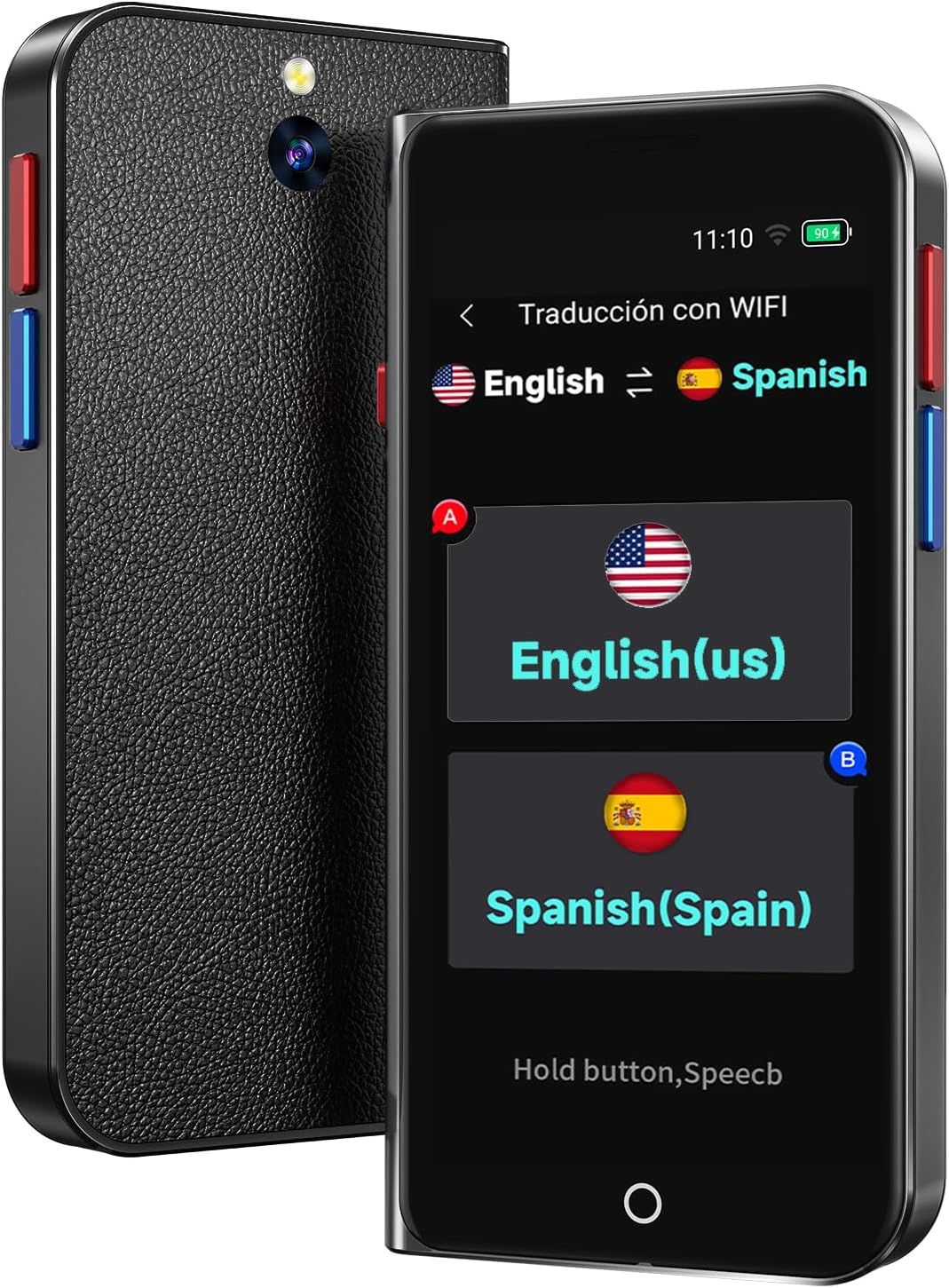
Image: Front and back view of the ACODO A70 Language Translator Device, showing the screen, camera, and side buttons.

Image: The ACODO A70 translator displaying its 5-inch HD IPS screen with various application icons, positioned next to a laptop and notebook.
4.1. Key Features
- AI Translator: Supports 138 languages online with 0.5-second response time and 98% accuracy.
- Offline Translation: Supports 17 commonly used languages for voice translation without internet.
- Photo Translation: 8-megapixel camera with OCR technology for translating text in up to 74 languages online and 40 languages offline.
- ChatGPT Integration: Access to ChatGPT for smarter interactions.
- Unit & Currency Conversion: Built-in tools for practical calculations.
- Portable Design: Compact and lightweight (100 grams) with a 5-inch HD touch screen.
- Long Battery Life: 1500mAh battery provides 6-8 hours continuous use, 7 days standby.

Image: The ACODO A70 translator displaying its main interface with icons for online, offline, and photo translation, ChatGPT, group translation, smart recording, real-time translation, phone translation, and input translation. Text highlights features like 138 online voice languages, 17 offline voice languages, 74 online photo languages, 40 offline photo languages, 4 online recording recognition languages, 11 V-OS11, 98% translation accuracy, 2000mAh battery, and 5-inch high-definition large screen.
5. Setup
5.1. Charging the Device
- Connect the USB charging cable to the device's charging port.
- Plug the other end of the cable into a compatible USB power adapter (not included) or a computer's USB port.
- The battery indicator on the screen will show charging status. A full charge typically takes 1-2 hours.
5.2. Powering On/Off
- To Power On: Press and hold the Power button (usually on the side) until the screen lights up.
- To Power Off: Press and hold the Power button, then select 'Power Off' on the screen.
5.3. Initial Setup and Wi-Fi Connection
- Upon first power-on, follow the on-screen prompts to select your preferred system language.
- Navigate to 'Settings' and then 'Wi-Fi'.
- Select your desired Wi-Fi network and enter the password if required. A stable Wi-Fi connection is recommended for online translation features and software updates.
6. Operating Instructions
6.1. Online Voice Translation
The device supports online voice translation for 138 languages and accents.
- Ensure the device is connected to Wi-Fi.
- From the main screen, tap the 'Online Translation' icon.
- Select the source language (your language) and target language (the language you want to translate to).
- Press and hold the designated voice input button (often marked with a microphone icon) and speak clearly into the device.
- Release the button, and the translated text will appear on the screen and be spoken aloud.

Image: The ACODO A70 translator screen displaying a list of languages for selection, highlighting its 98% accuracy and 0.5s response time for 138 languages and accents.
6.2. Offline Voice Translation
The device supports offline voice translation for 17 commonly used languages.
- From the main screen, tap the 'Offline Translation' icon.
- Select the desired offline language pair.
- Press and hold the voice input button and speak.
- Release the button to hear and see the translation.

Image: The ACODO A70 translator screen displaying the offline voice translation interface, listing 17 supported languages including Arabic, German, Russian, French, Korean, Japanese, Thai, Spanish, English, Uighur, Traditional Chinese, Simplified Chinese, Italian, Portuguese, Dutch, Hindi, and Indonesian.
6.3. Photo Translation
Translate text from images using the built-in camera.
- Tap the 'Photo Translation' icon on the main screen.
- Point the device's camera at the text you wish to translate. Ensure good lighting.
- Tap the capture button. The device will process the image using OCR technology.
- Select the source and target languages. The translated text will be displayed.

Image: A hand holding the ACODO A70 translator over a document, demonstrating the photo translation feature. The screen shows the original text and its translation, indicating support for 75 online and 40 offline languages.
6.4. ChatGPT Integration
Access the ChatGPT application for intelligent assistance.
- Tap the 'ChatGPT' icon on the main screen.
- Input your queries or commands using voice or text.
- Receive intelligent responses and assistance.
6.5. Unit and Currency Conversion
Utilize the built-in conversion tools for practical use.
- Locate and tap the 'Unit Conversion' or 'Currency Conversion' icon.
- Follow the on-screen instructions to input values and select units/currencies for conversion.
6.6. Recording Recognition
The device supports recording recognition for certain languages.
- Tap the 'Smart Recording' or 'Recording Recognition' icon.
- Start recording audio.
- The device will transcribe and translate the recorded speech.
7. Maintenance
7.1. Cleaning
To maintain the device's performance and appearance:
- Wipe the screen and body with a soft, lint-free cloth.
- Do not use abrasive cleaners, alcohol, or solvents.
7.2. Software Updates (OTA)
The device supports Over-The-Air (OTA) updates to ensure you have the latest features and improvements.
- Connect the device to Wi-Fi.
- Navigate to 'Settings' > 'About Device' > 'Software Update'.
- Follow the on-screen instructions to check for and install updates.
7.3. Battery Care
To prolong battery life:
- Avoid fully discharging the battery frequently.
- Charge the device regularly, even if not in constant use.
- Store the device in a cool, dry place when not in use for extended periods.

Image: The ACODO A70 translator with text indicating a 2000mAh battery, 8 hours of continuous translation, 7 days of standby, and 90 minutes for a full charge.
8. Troubleshooting
If you encounter issues with your ACODO A70, refer to the following common problems and solutions:
| Problem | Possible Solution |
|---|---|
| Device does not power on. | Ensure the battery is charged. Connect to a power source and try again. If unresponsive, perform a hard reset (refer to device specific instructions or contact support). |
| Translation is inaccurate or slow. | Check Wi-Fi connection for online translation. Speak clearly and at a moderate pace. Ensure correct source and target languages are selected. Update device software. |
| Wi-Fi connection issues. | Restart the device and your Wi-Fi router. Ensure you are within range of the Wi-Fi signal. Verify the Wi-Fi password. |
| Photo translation not working. | Ensure good lighting and that the text is clear and in focus. The device's camera lens should be clean. |
| Battery drains quickly. | Reduce screen brightness. Close unused applications. Limit continuous online usage. Ensure background processes are minimized. |
9. Specifications
| Feature | Detail |
|---|---|
| Model | A70 |
| ASIN | B0FS6QWYBX |
| Manufacturer | ACODO |
| Online Translation Languages | 138 |
| Offline Voice Translation Languages | 17 |
| Online Photo Translation Languages | 74 |
| Offline Photo Translation Languages | 40 |
| Screen Size | 5-inch HD IPS |
| Camera | 8 Megapixel with flash |
| Battery | 1500mAh Lithium Ion (included) |
| Continuous Working Time | 6-8 hours |
| Standby Time | 7 days |
| Charging Time | 1-2 hours |
| Item Weight | 7.4 ounces |
| Package Dimensions | 6.38 x 3.43 x 1.34 inches |
10. Warranty and Support
The ACODO A70 Language Translator Device is manufactured by ACODO. For specific warranty details, please refer to the warranty card included with your purchase or contact the manufacturer directly.
For technical support, troubleshooting assistance, or any inquiries regarding your device, please contact ACODO customer service through their official channels. Keep your purchase receipt and device model number (B0FS6QWYBX) handy when contacting support.

