
1. Product Overview
The EnhanBili HD-K08 is an advanced LED display receiving card designed for both synchronous and asynchronous control systems. This card simplifies installation by not requiring an adapter board. It features 8 standard HUB75E interfaces, ensuring stable performance and supporting 16 sets of RGB parallel data for vibrant LED display output.
2. Specifications
- Model Number: HD-K08
- Brand: EnhanBili
- Working Voltage: DC 5.5V
- Operating Temperature: -25℃ to 75℃
- Overall Consumption: 3W
- Net Weight: 0.08 Kilograms
- Hardware Interface: HDMI
- Video Capture Resolution: 1080p
- Compatible Platform: Mac (as per product data)
- Compatible Devices: Laptop (as per product data)
- Item Dimensions (L x W x H): 3.98 x 3.6 x 0.79 inches
3. Setup Instructions
- Power Off System: Before installation, ensure the entire LED display system and power supply are completely turned off.
- Mounting: Securely mount the HD-K08 receiving card within the designated slot or area inside the LED display cabinet.
- Power Connection: Connect the DC 5.5V power supply to the appropriate power input on the HD-K08 card. Verify polarity.
- Data Input Connection: Connect the data cable from your LED sending card or control system to the data input port on the HD-K08.
- LED Module Connections: Connect the HUB75E interfaces on the HD-K08 to the corresponding LED display modules using ribbon cables. Ensure correct sequence and orientation.
- Final Check: Double-check all power and data connections to ensure they are firm and correctly seated.
- System Power On: Power on the LED display system.
- Software Configuration: Use the appropriate LED control software (e.g., Huidu software) to configure the display parameters, screen mapping, and content. Refer to the software's user manual for detailed configuration steps.
4. Operating the HD-K08 Card
The HD-K08 receiving card operates as an integral part of your LED display system, processing data from the sending card and distributing it to the LED modules. Its operation is largely managed through the LED control software connected to your sending card.
- Content Management: Use the LED control software to upload, schedule, and manage the content displayed on your LED screen.
- Display Settings: Adjust brightness, color correction, and other display parameters via the control software.
- System Monitoring: The control software typically provides tools to monitor the status of the receiving cards and LED modules.
For specific operational details related to content display and advanced settings, consult the user manual for your LED sending card and the associated control software.
5. Maintenance
Proper maintenance ensures the longevity and optimal performance of your HD-K08 receiving card.
- Keep Clean: Regularly inspect the card for dust accumulation. Use a soft brush or compressed air to gently clean the surface and connectors. Ensure power is off before cleaning.
- Ventilation: Ensure the LED display cabinet has adequate ventilation to prevent overheating, which can damage electronic components.
- Connection Integrity: Periodically check all cable connections (power, data, HUB75E) to ensure they are secure and free from corrosion or damage.
- Environmental Conditions: Operate the card within its specified temperature (-25℃ to 75℃) and humidity ranges to avoid performance issues or damage.
6. Troubleshooting
This section addresses common issues you might encounter with the HD-K08 receiving card.
- No Display on LED Screen:
- Verify the DC 5.5V power supply is connected and functioning correctly.
- Check the data cable connection between the sending card and the HD-K08.
- Ensure the LED control software is properly configured and sending data.
- Partial Display or Incorrect Colors:
- Inspect the HUB75E ribbon cable connections from the HD-K08 to the LED modules for proper seating and orientation.
- Review the screen mapping and configuration settings in the LED control software.
- Check for any damaged LED modules.
- Screen Flickering or Instability:
- Ensure a stable and sufficient power supply to the entire LED display system.
- Check for electromagnetic interference (EMI) from nearby equipment.
- Consider updating the firmware of the sending card or receiving card if available.
- HD-K08 Not Detected by Control Software:
- Confirm the HD-K08 is correctly installed and powered.
- Verify the data connection from the sending card.
- Ensure the sending card's drivers and software are correctly installed and updated on the control computer.
7. Technical Drawing and Dimensions
The following diagram provides a detailed view of the HD-K08 receiving card, including its physical dimensions and component layout.
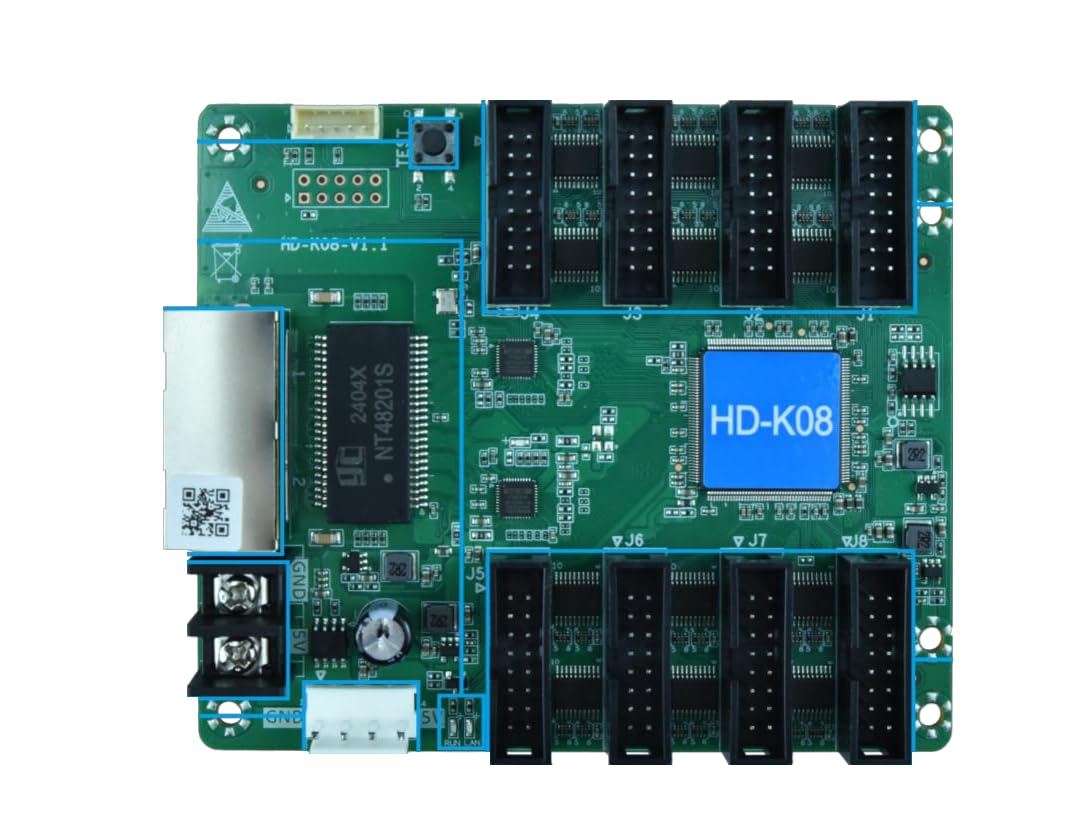
This diagram illustrates the physical dimensions and layout of the HD-K08 receiving card. Key dimensions include a length of approximately 107.40 mm and a width of approximately 91.50 mm. Various connection points and components are shown with their respective measurements.
8. Warranty and Support
Warranty: According to product information, there is no explicit warranty provided for this item.
Technical Support: For any technical assistance, troubleshooting beyond this manual, or inquiries regarding the HD-K08 receiving card, please contact the seller, EnhanBili, directly through your purchase platform.