
Introduction
The Daffypop Y401 Gas Leak Detector is designed to provide continuous monitoring for combustible gases such as natural gas, propane, methane, butane, and LPG. This plug-in device features an advanced semiconductor sensor for rapid detection and a clear LED display for real-time concentration levels. Its compact design makes it suitable for various environments, including kitchens, homes, apartments, and RVs, ensuring enhanced safety for occupants.

Image: The detector features a high-quality sensor for reliable and stable gas detection.
Important Safety Information
Please read all instructions carefully before using the device. Failure to follow these instructions may result in property damage, injury, or death.
- This device is intended for detecting combustible gases only. It is not designed to detect carbon monoxide or smoke.
- Do not install the detector in areas with high humidity, excessive dust, or near ventilation openings that could interfere with gas detection.
- Ensure the device is plugged into a functional wall outlet providing continuous power. It does not have a battery backup.
- Do not paint the device or block its ventilation holes.
- Test the detector regularly as described in the "Maintenance" section.
- In case of an alarm, immediately ventilate the area, turn off gas sources, and evacuate if necessary. Contact emergency services if the leak persists or is severe.
Setup
Unpacking
- Carefully remove the gas leak detector from its packaging.
- Inspect the device for any signs of damage. If damaged, do not use and contact customer support.
- Ensure all components, including the user manual, are present.
Placement
Proper placement is crucial for effective gas detection. Consider the density of the gases you wish to detect:
- Natural Gas (Methane): Lighter than air. Install the detector 12-30 inches (30-75 cm) below the ceiling, within 4-12 inches (10-30 cm) horizontally from the gas source.
- LPG (Propane, Butane): Heavier than air. Install the detector 4-12 inches (10-30 cm) above the floor, within 4-12 inches (10-30 cm) horizontally from the gas source.
- Avoid placing the detector near windows, doors, exhaust fans, or areas with high humidity or extreme temperatures.
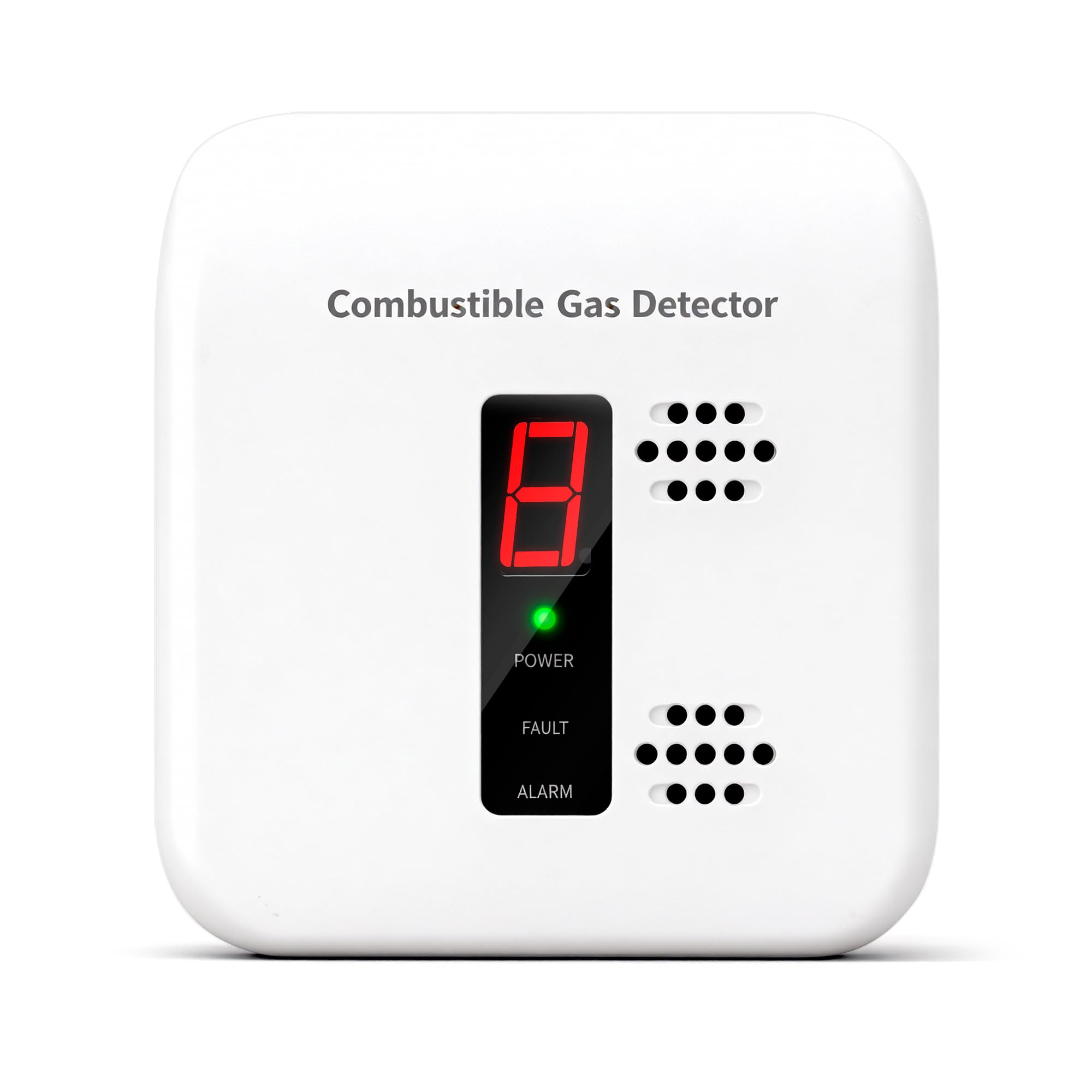
Image: The Daffypop Y401 features a convenient plug-in design for easy installation into any standard wall outlet.

Image: Recommended installation locations for the gas leak detector, such as kitchens, basements, RVs, and apartments.
Powering On
- Plug the detector directly into a standard 120V AC wall outlet.
- Upon plugging in, the device will initiate a self-test and warm-up period, typically lasting 3-5 minutes. During this time, the LED display may show a countdown or flashing lights.
- Once the warm-up is complete, the display will show '0' and the green 'POWER' light will be steady, indicating normal operation.
Operating Instructions
Understanding the Display and Indicators
The Daffypop Y401 features a digital LED display and indicator lights to communicate its status:

Image: The bright LED display provides instant status indication, showing a digital '0' and green power indicator during normal operation.
- Digital Display: Shows the real-time concentration level of detected gas. '0' indicates no gas detected. Higher numbers indicate increasing gas concentration.
- POWER (Green LED): Illuminates steadily when the device is powered on and operating normally.
- FAULT (Yellow LED): Illuminates or flashes to indicate a malfunction or end-of-life condition. Refer to the troubleshooting section.
- ALARM (Red LED): Flashes and the buzzer sounds when a gas leak is detected.
LED Display and Indicator Meanings
| LED Display | Buzzer Alarm Sound | LED Lights | Notes |
|---|---|---|---|
| 0 | None | Green: On | Normal operation |
| 1, 2, 3, 4 | None | Green: On | Re-calibration process |
| 5, 6, 7, 8, 9, A | "Di" (intermittent) | Green: On, Red: Flash | Gas leak detected (Abbreviation of "Alarm") |
| E | None | Green: On, Yellow: Flash | End of life, need new replacement |
Alarm Conditions and Actions
When the detector senses a gas leak, it will activate an audible alarm and visual indicators. The alarm is designed to be loud (85 dB) to alert you effectively.

Image: The detector provides a fast alarm response with an 85 dB loud alert to ensure timely notification.
If the alarm sounds:
- Do not panic.
- Open windows and doors to ventilate the area.
- Turn off all gas appliances and the main gas supply valve if safe to do so.
- Evacuate the premises if the alarm continues or the gas smell is strong.
- Do not operate electrical switches or use phones inside the affected area.
- Contact your gas provider or emergency services from a safe location.
Gas Types Detected
The Daffypop Y401 is designed to detect a range of combustible gases:
- Natural Gas (Methane)
- Propane
- Butane
- Liquefied Petroleum Gas (LPG)

Image: The detector is capable of detecting various combustible gases, including Methane, Propane, Butane, and LPG.
Maintenance
Regular Testing
It is recommended to test your gas leak detector monthly to ensure it is functioning correctly:
- Ensure the detector is plugged in and the green 'POWER' light is on.
- Carefully expose the sensor area to a small amount of test gas (e.g., from an unlit lighter or a gas appliance burner). Do not ignite the gas.
- The alarm should sound, and the red 'ALARM' light should flash. The digital display will show a gas concentration reading.
- Remove the test gas. The alarm should stop, and the display should return to '0' after the air clears.
- If the detector fails to alarm, check the power connection and repeat the test. If it still fails, refer to the troubleshooting section or contact customer support.
Cleaning
Keep the detector clean to maintain optimal performance:
- Wipe the exterior of the detector with a soft, damp cloth.
- Do not use cleaning sprays, solvents, or abrasive cleaners, as these can damage the sensor or casing.
- Do not block the ventilation holes during cleaning.
Troubleshooting
| Problem | Possible Cause | Solution |
|---|---|---|
| No power/Display off | No power from outlet; device unplugged | Ensure the detector is securely plugged into a live outlet. Check the circuit breaker. |
| 'FAULT' (Yellow LED) on/flashing | Device malfunction; sensor error; end of life | Unplug and re-plug the device. If the fault persists, the device may need replacement. Contact customer support. |
| Alarm sounds without gas presence | False alarm; interference; residual gas | Ventilate the area. Ensure no strong odors or chemicals are near the detector. If false alarms persist, consider repositioning the unit. |
| Alarm does not sound during test | Sensor malfunction; insufficient test gas | Ensure adequate test gas is applied directly to the sensor area. If still unresponsive, the device may be faulty and require replacement. |
| LED Display shows 'E' | End of life indication | The detector has reached the end of its operational lifespan and needs to be replaced. |
Specifications
| Feature | Detail |
|---|---|
| Model Number | Y401 |
| Detected Gases | Natural Gas (Methane), Propane, Butane, LPG |
| Power Source | AC 120V |
| Alarm Volume | 85 dB (at 1 meter) |
| Sensor Type | Advanced Semiconductor |
| Display | Digital LED for real-time concentration |
| Product Dimensions | 1.57"D x 3.35"W x 3.57"H |
| Item Weight | 5.3 ounces |
| Material | Plastic |
| Color | White |
Warranty and Support
Daffypop provides a limited warranty for this product against defects in materials and workmanship under normal use. The specific terms and duration of the warranty may vary. Please retain your proof of purchase for warranty claims.
For technical assistance, troubleshooting, or warranty inquiries, please contact Daffypop customer support. Contact information can typically be found on the product packaging or the official Daffypop website.