1. Introduction
Thank you for choosing the Generic NE20 Bluetooth 5.4 Wireless Earbuds. These earbuds feature a 2-inch colorful smart screen, AI translation capabilities, and a long-lasting battery, designed for an enhanced audio and communication experience. This manual provides essential information for setup, operation, and maintenance to ensure optimal performance.
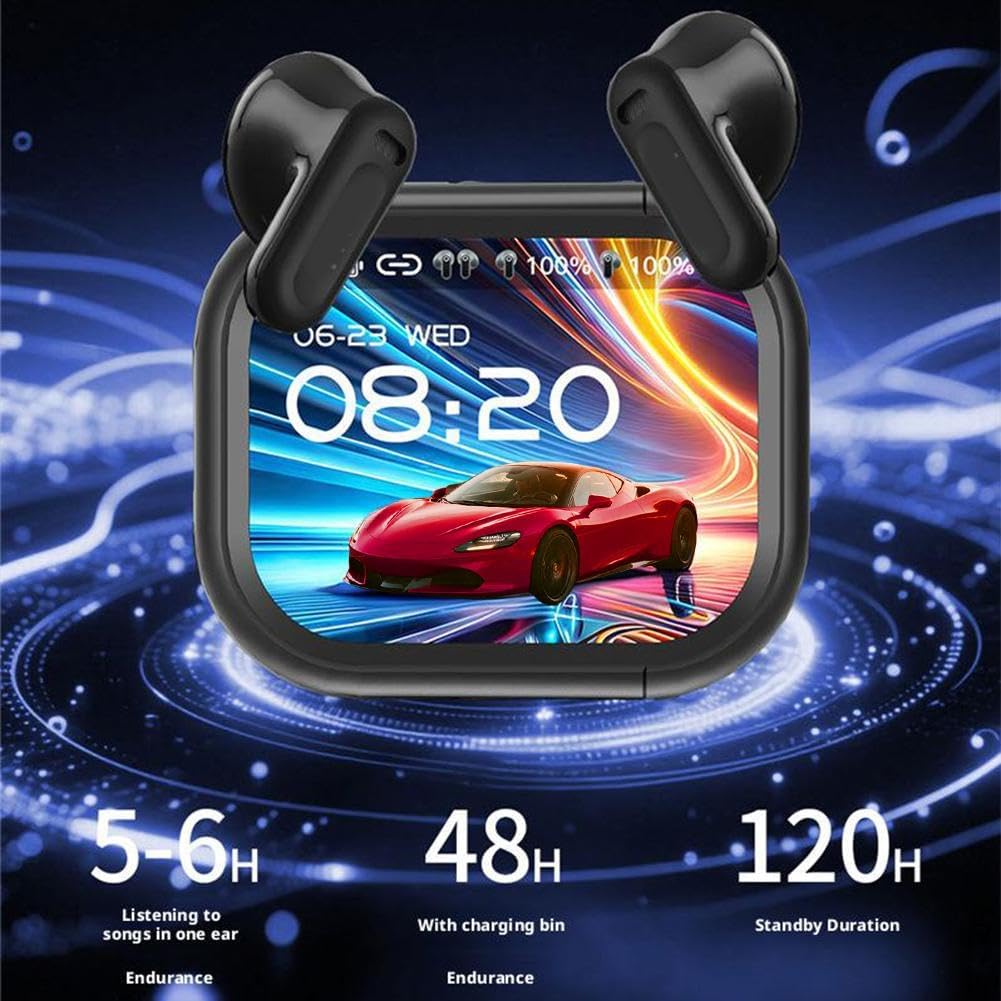
Image 1.1: NE20 Earbuds and Charging Case with LED Display and Battery Life Overview.
2. Safety Information
- Do not expose the earbuds or charging case to extreme temperatures, direct sunlight, or high humidity.
- Avoid dropping, hitting, or disassembling the device.
- Keep the device away from children and pets.
- Use only the provided charging cable and a certified power adapter.
- Prolonged exposure to loud sounds may cause hearing damage. Adjust volume to a moderate level.
- Do not use the earbuds in situations where inability to hear ambient sounds could be dangerous (e.g., driving, cycling, walking in traffic).
3. Package Contents
Verify that all items are present in the package:
- Quick Start Guide x1
- Charging Case x1
- USB-C Cable x1
- Lanyard x1
- Earbuds x2 (Left and Right)

Image 3.1: NE20 Package Contents.
4. Product Overview
The NE20 earbuds are designed for comfort and functionality, featuring a compact charging case with an integrated 2-inch colorful smart screen. The earbuds are in-ear type and offer touch controls for various functions.
Key Features:
- 2-inch Colorful Smart Screen: Integrated into the charging case for intuitive control of music, calls, and translation features.
- AI Translation: Real-time face-to-face translation in up to 140 languages.
- Touchscreen Controls: Manage settings, alarms, noise modes, and games directly from the case.
- Environmental Noise Cancellation (ENC): For clear calls and immersive audio.
- Long Battery Life: Up to 6 hours of playback per charge, with a total of 48 hours using the charging case, and 120 hours of standby time.
- IP55 Waterproof Rating: Life-grade waterproof for protection against sweat and light splashes.

Image 4.1: NE20 Earbuds Key Features.
5. Setup
5.1 Charging the Earbuds and Case
- Connect the provided USB-C cable to the charging port on the case and to a power source.
- The LED display on the charging case will indicate the charging status.
- A full charge for the charging case takes approximately 1.5 hours.
- Place the earbuds into the charging case. They will automatically begin charging.
5.2 Bluetooth Pairing
- Ensure the earbuds are charged.
- Open the charging case. The earbuds will automatically enter pairing mode.
- On your mobile device, enable Bluetooth and search for available devices.
- Select "NE20" from the list of devices to connect.
- Once connected, a confirmation sound or message will be heard/displayed.
5.3 AI App Installation
For AI translation and advanced features, download the dedicated AI app:
- Locate the QR code in the Quick Start Guide or on the charging case.
- Scan the QR code with your smartphone to download the AI application.
- Install the app and follow the on-screen instructions to complete the setup.
- Ensure your earbuds are connected via Bluetooth to your phone before using the app's features.
6. Operating Instructions
6.1 Basic Touch Controls
The NE20 earbuds feature intuitive touch controls. Specific gestures may vary; refer to the Quick Start Guide for a detailed list of commands.
- Play/Pause: Single tap on either earbud.
- Next Track: Double tap on the right earbud.
- Previous Track: Double tap on the left earbud.
- Answer/End Call: Single tap on either earbud.
- Reject Call: Long press on either earbud.
- Activate Voice Assistant: Triple tap on either earbud.
6.2 Using the Smart Screen
The 2-inch colorful smart screen on the charging case allows for direct control and access to various functions without needing your phone.
- Music/Call Control: Navigate through menus to control playback, volume, and calls.
- AI Translation: Access translation modes directly.
- Noise Modes: Switch between different noise cancellation or transparency modes.
- Alarms & Utilities: Set alarms or access other utility functions.
6.3 AI Translation Features
The NE20 earbuds offer advanced AI translation capabilities, ideal for travel, business, or multicultural interactions.
- Face-to-Face Translation: Real-time translation in 140 languages.
- Natural Interpretation: The earbuds automatically segment speech into logical phrases for seamless conversation flow.
- Recording to Text Translation: Achieve up to 98% accuracy in transcribing recordings.
- AI Dialogue Helper: Use the companion app to ask questions via voice or text and receive instant answers.

Image 6.1: Recording to Text Translation Feature.

Image 6.2: AI Dialogue Helper App Interface.
6.4 Call Quality and Noise Cancellation
The NE20 earbuds are equipped with Environmental Noise Cancellation (ENC) and multiple silicon microphones to ensure clear voice communication by reducing wind noise and background distractions during calls.

Image 6.3: Enhanced Call Clarity with Noise Reduction.
6.5 Usage During Sport
With an IP55 waterproof rating, the NE20 earbuds are resistant to sweat and light splashes, making them suitable for sports and active lifestyles.

Image 6.4: NE20 Earbuds for Sport Use.
7. Maintenance
- Cleaning: Gently wipe the earbuds and charging case with a soft, dry, lint-free cloth. Do not use abrasive cleaners or solvents.
- Storage: When not in use, store the earbuds in their charging case to protect them and keep them charged. Store in a cool, dry place.
- Water Exposure: While IP55 rated, avoid submerging the earbuds in water. If they get wet, dry them thoroughly before placing them back in the charging case or using them.
8. Troubleshooting
8.1 Earbuds Not Pairing
- Ensure both earbuds are charged.
- Turn off and on your device's Bluetooth.
- Forget "NE20" from your device's Bluetooth list and try pairing again.
- Restart your mobile device.
8.2 No Sound or Low Volume
- Check the volume levels on both your earbuds and your connected device.
- Ensure the earbuds are properly seated in your ears.
- Clean any debris from the earbud speakers.
8.3 Charging Issues
- Verify the USB-C cable is securely connected to both the case and the power source.
- Try a different USB-C cable or power adapter.
- Ensure the charging contacts on the earbuds and inside the case are clean and free of obstruction.
8.4 AI Translation Not Working
- Ensure the AI app is installed and updated to the latest version.
- Verify that the earbuds are properly connected to your phone via Bluetooth.
- Check your internet connection, as some translation features may require online access.
- Ensure microphone permissions are granted to the AI app on your phone.
9. Specifications
| Feature | Specification |
|---|---|
| Model Name | NE20 |
| Bluetooth Version | 5.4 |
| Ear Placement | In-ear |
| Speaker Size | 13 mm |
| Audio Codec | AAC+SBC |
| Talk Time | Approx. 6 hours |
| Playback Time | Approx. 6 hours (medium volume) |
| Noise Cancellation | ENC (Environmental Noise Cancellation) |
| Waterproof Rating | IP55 (Life-grade waterproof) |
| Transmission Range | Approx. 10 meters |
| Charging Case Battery Capacity | 300 mAh |
| Earbud Battery Capacity | 30 mAh |
| Charging Port | Type-C |
| Charging Case Full Charge Time | 1.5 hours |
| Standby Time | 120 hours |
| Item Weight (per earbud) | 5 grams |
| Control Method | Touch |
| Additional Features | AI-based translation, Real-time multi-language translation, 2-inch Smart Screen |
10. Warranty Information
This product comes with a standard manufacturer's warranty. Please refer to the warranty card included in your package for specific terms, conditions, and duration. The warranty typically covers defects in materials and workmanship under normal use.
11. Customer Support
If you encounter any issues or have questions not covered in this manual, please contact your retailer or the manufacturer's customer support. Keep your purchase receipt and product model number handy for faster service.


