
1. Introduction
1.1 Product Overview
Thank you for choosing the Lifezone Full Bed Frame. This bed frame is designed to provide a comfortable and functional sleeping solution with integrated storage and modern amenities. Key features include a 2-tier storage headboard, a built-in charging station, ambient LED lighting, and convenient storage drawers.
1.2 Important Safety Information
WARNING:
- Be cautious while handling tools during assembly.
- Be careful around sharp edges.
- Ensure all screws and connections are tightened securely before use.
- Do not exceed the maximum weight capacity of the bed frame.
2. Package Contents
Please verify that all components listed below are present before beginning assembly. If any parts are missing or damaged, please contact customer support.
- Headboard (with 2-tier storage)
- Bed Frame Components (metal slats, side rails, support legs)
- 4 Sliding Storage Drawers
- Built-in Charging Station (pre-installed in headboard)
- LED Light Strip (for headboard)
- Remote Control (for LED lights)
- Assembly Hardware (screws, bolts, Allen wrench)
- Installation Manual
3. Setup and Assembly Instructions
Follow these steps carefully to assemble your Lifezone Full Bed Frame. It is recommended to have two people for assembly.
3.1 Visual Assembly Guide
For a detailed visual guide, please refer to the official installation video provided by Lifezone:
Video Description: Official Lifezone Installation Guide Video. This video provides step-by-step visual instructions for assembling the bed frame, including attaching the headboard, side rails, and slats, as well as installing the drawers and LED lights.
3.2 Step-by-Step Assembly
- Assemble the Headboard: Attach the wooden panels and metal frame components of the headboard as per the included manual. Ensure the charging station is correctly positioned and secured.
- Attach Side Rails: Connect the side rails to the assembled headboard using the provided hardware. Do not fully tighten screws at this stage.
- Assemble Footboard: Attach the footboard to the side rails.
- Install Support Legs and Slats: Secure the central support legs and then place the metal slats across the frame. Ensure the rubber strips are applied to the slats to prevent noise.
- Final Tightening: Once all components are in place, fully tighten all screws and bolts.
- Install LED Light Strip: Carefully attach the LED light strip to the designated area on the back of the headboard. Connect it to the power source.
- Assemble and Insert Drawers: Assemble the fabric storage drawers according to their instructions. Insert the assembled drawers into the designated slots under the bed frame.

Image Description: An illustration showing the dimensions of the Lifezone Full Bed Frame, including the headboard height (40.2"), bed length (81.5"), bed width (52.4"), and drawer dimensions. It also highlights the 800 lbs weight capacity and 90-minute assembly time.

Image Description: A fully assembled Lifezone Full Bed Frame in a bedroom setting, showcasing the 2-tier storage headboard with items like books, a phone, and a plant. The charging station is visible on the headboard shelf.
4. Operating Instructions
4.1 LED Lighting
The integrated LED lights in the headboard can be controlled via the included remote control or a smartphone app (if applicable). Use the remote to:
- Turn lights On/Off.
- Change colors (RGB options).
- Adjust brightness levels.
- Select dynamic modes (e.g., flashing, fading).
- Activate music mode (lights react to sound).
- Set a timer for automatic shut-off.
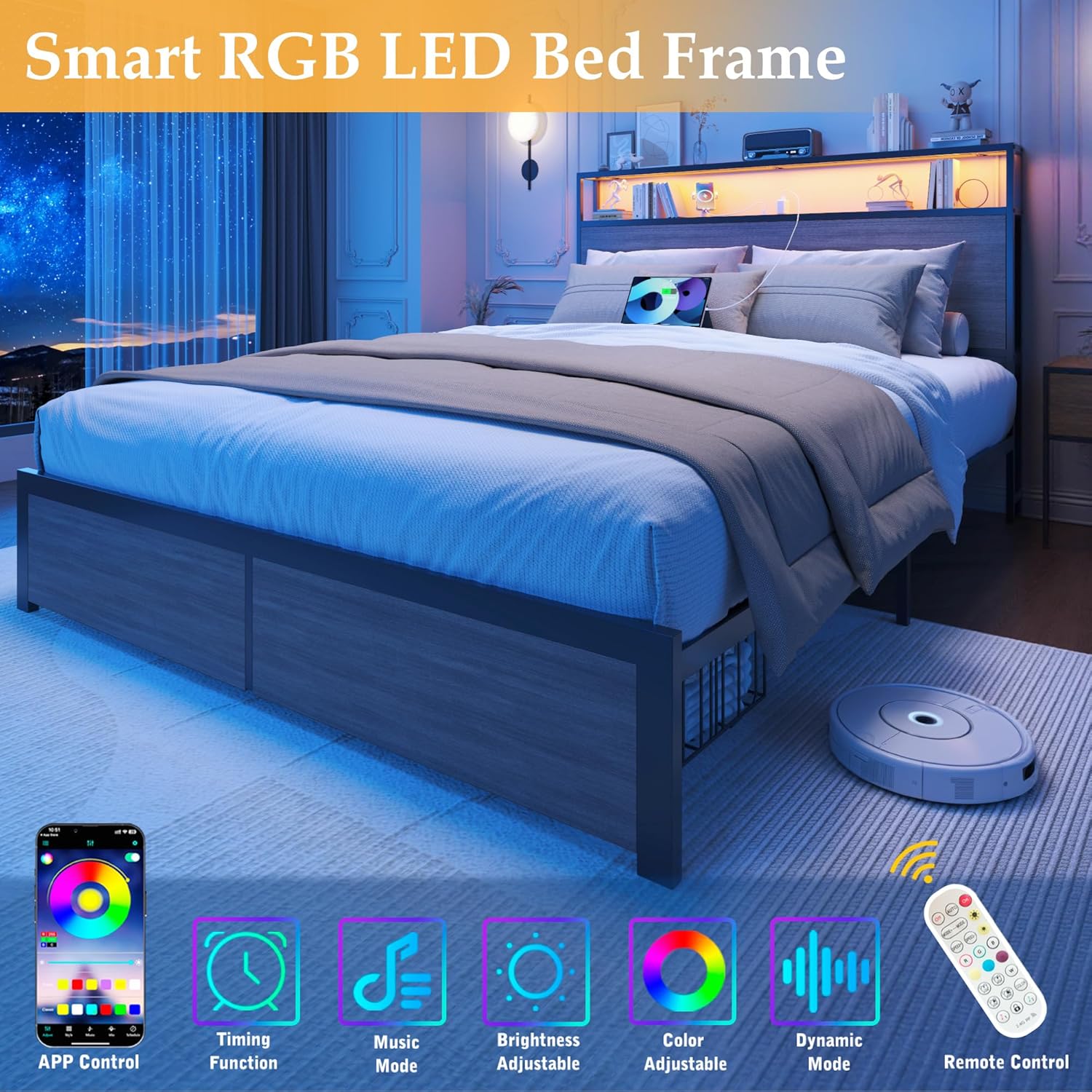
Image Description: A bedroom scene featuring the Lifezone Smart RGB LED Bed Frame with blue LED lights illuminating the headboard and under the bed. The image highlights features like APP Control, Timing Function, Music Mode, Brightness Adjustable, Color Adjustable, Dynamic Mode, and Remote Control.
4.2 Built-in Charging Station
The headboard features a built-in charging station with 2 AC outlets, 1 USB port, and 1 Type-C port. Simply plug your devices into the appropriate ports for convenient charging while in bed.

Image Description: A close-up view of the built-in charging station on the headboard, showing two AC power outlets, one USB-A port, and one USB-C port, designed for convenient device charging.
4.3 Storage Drawers
The bed frame includes four sliding drawers for additional storage. These drawers are designed to roll smoothly on wheels and can be used to store blankets, clothing, or other personal items, helping to keep your room organized and clutter-free.

Image Description: A view of the Lifezone Bed Frame from the side, showing two sliding storage drawers pulled out from underneath the bed, filled with folded clothes and other items. The drawers feature a lockable closure design.
5. Maintenance
To ensure the longevity and optimal performance of your Lifezone Full Bed Frame, follow these maintenance guidelines:
- Cleaning: Wipe down metal surfaces with a soft, damp cloth. For the upholstered headboard, use a fabric cleaner suitable for the material. Avoid harsh chemicals.
- Hardware Check: Periodically check all screws and bolts to ensure they remain tight. Re-tighten if necessary to maintain stability and prevent noise.
- Drawer Care: Keep the drawer tracks clean and free of debris to ensure smooth operation.
- LED Lights: If the LED strip becomes dirty, gently wipe it with a dry, soft cloth. Avoid getting moisture directly on the lights or electrical components.
6. Troubleshooting
If you encounter any issues with your bed frame, refer to the following common troubleshooting tips:
- Squeaking Noise: Check all frame connections and ensure screws are fully tightened. The rubber strips on the slats are designed to prevent noise; ensure they are properly installed.
- LED Lights Not Working: Verify that the power adapter is securely plugged into both the bed frame and a working wall outlet. Check the remote control battery.
- Charging Station Not Functioning: Ensure the bed frame's power cord is plugged into a live outlet. Test with different devices and cables to rule out device-specific issues.
- Drawers Sticking: Check for any obstructions in the drawer tracks. Ensure the drawers are properly aligned on their wheels.
If problems persist after troubleshooting, please contact Lifezone customer support.
7. Specifications
| Feature | Specification |
|---|---|
| Model Number | V554A |
| Size | Full |
| Product Dimensions | 81.5"L x 52.4"W x 40.2"H |
| Color | Rustic Grey |
| Material | Engineered Wood, Metal |
| Item Weight | 75 pounds |
| Special Features | Charging Station, No Box Spring Needed, Space Saving, Squeak Resistant, Storage Drawer |
| Assembly Required | Yes |
| Compatible Mattress Size | Full |
8. Warranty and Support
8.1 Returns Policy
This product is eligible for 90-day easy returns. Please refer to the retailer's return policy for specific details and procedures.
8.2 Customer Support
For any questions, assistance, or to report missing/damaged parts, please contact Lifezone customer support through the retailer's platform or visit the official Lifezone store for contact information.
You may also consider purchasing extended protection plans for your product:
- 2-Year Protection Plan
- 3-Year Protection Plan
- Complete Protect (monthly plan covering eligible purchases)