
1. Introduction
This manual provides essential instructions for the safe and efficient operation of your KBBYT SG901 MAX GPS Drone. The SG901 MAX is an advanced drone featuring an 8K camera for high-resolution aerial photography and FPV (First-Person View) capabilities. It is equipped with brushless motors for stable flight and obstacle avoidance sensors for enhanced safety. Please read this manual thoroughly before operating the drone.
Key Features:
- 8K Camera for high-definition photo and video capture.
- FPV technology for real-time aerial viewing.
- Brushless motors for powerful and stable flight.
- Obstacle avoidance system for safer navigation.
- GPS positioning for precise hovering and return-to-home functions.
2. Setup
2.1 Unboxing and Component Check
Carefully unpack all components from the box. Ensure all items are present and undamaged. The package should include the SG901 MAX drone, remote controller, battery, charger, and a set of 16 propeller parts (SG901PRO compatible).
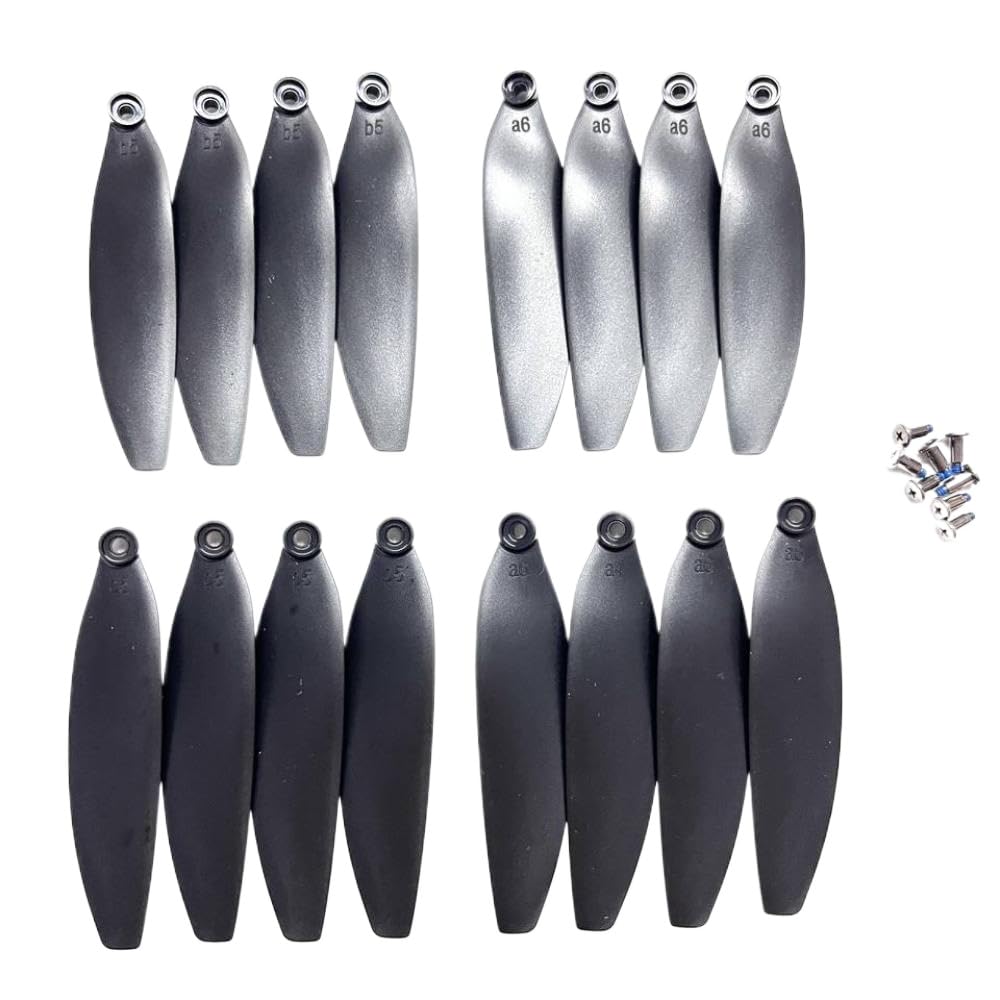
Image: The KBBYT SG901 MAX GPS Drone, showcasing its main body, propellers, and the remote controller. This image illustrates the primary components included in the product package.
2.2 Battery Charging and Installation
- Connect the drone battery to the provided charger.
- Plug the charger into a power outlet. The indicator light on the charger will show the charging status (e.g., red for charging, green for fully charged).
- Once fully charged, disconnect the battery from the charger.
- Insert the charged battery into the drone's battery compartment, ensuring it clicks securely into place.
- For the remote controller, install the required Alkaline batteries (not included, refer to specifications for type).
2.3 Propeller Installation
The SG901 MAX comes with 16 propeller parts. Ensure correct installation for stable flight.
- Identify the 'A' and 'B' marked propellers and their corresponding motor arms.
- Attach each propeller to its designated motor shaft.
- Secure the propellers using the provided screws or quick-release mechanism, ensuring they are firmly attached but not overtightened.
2.4 Remote Controller and App Pairing
- Power on the remote controller.
- Power on the drone.
- Follow the instructions in the drone's companion app (downloadable from your device's app store) to pair the drone with your smartphone and the remote controller. This typically involves connecting to the drone's Wi-Fi network.
3. Operation
3.1 Pre-Flight Checklist
- Ensure drone and controller batteries are fully charged.
- Check that propellers are correctly installed and free from damage.
- Verify that the camera lens is clean.
- Choose an open, clear area for flight, away from obstacles, people, and restricted airspace.
- Check weather conditions; avoid flying in strong winds or rain.
3.2 Take-off and Landing
- Place the drone on a flat, level surface.
- Perform GPS calibration as prompted by the app or controller.
- To take off, press the auto take-off button on the controller or app, or manually push both joysticks down and out to arm the motors, then slowly push the left joystick up.
- To land, press the auto-landing button or slowly pull the left joystick down until the drone lands gently.
3.3 Flight Controls
The remote controller typically uses a standard mode (e.g., Mode 2):
- Left Joystick: Up/Down for altitude (throttle), Left/Right for rotation (yaw).
- Right Joystick: Up/Down for forward/backward movement (pitch), Left/Right for sideways movement (roll).
- Refer to the app for specific button functions related to camera, GPS modes, and obstacle avoidance.
3.4 Camera and FPV Functionality
- The 8K camera captures high-resolution photos and videos. Use the dedicated buttons on the remote controller or the app interface to start/stop recording or take photos.
- The FPV feature streams live video from the drone's camera to your connected smartphone, providing a real-time view of the flight. Ensure a strong Wi-Fi connection for optimal FPV performance.
3.5 Obstacle Avoidance
The SG901 MAX is equipped with sensors to detect obstacles. When an obstacle is detected within a certain range, the drone will automatically slow down or stop to prevent collision. This feature is designed to assist in safer flight but should not replace careful piloting.
3.6 GPS Functions
The integrated GPS module allows for stable hovering, precise positioning, and intelligent flight modes such as Return-to-Home (RTH). In RTH mode, the drone will automatically fly back to its take-off point if the signal is lost or the battery is low.
4. Maintenance
4.1 Cleaning
- After each flight, gently wipe the drone body with a soft, dry cloth to remove dust and debris.
- Use a specialized lens cleaning cloth for the camera to avoid scratches.
- Do not use harsh chemicals or solvents.
4.2 Propeller Replacement
Inspect propellers regularly for cracks, bends, or chips. Damaged propellers can affect flight stability and safety. Replace them immediately using the provided SG901PRO compatible propeller parts (16PCS).
- Unscrew the damaged propeller from its motor shaft.
- Ensure the new propeller matches the 'A' or 'B' marking of the one being replaced.
- Attach the new propeller and secure it with the appropriate screw, ensuring it is firm but not overtightened.
4.3 Battery Care
- Store batteries in a cool, dry place, away from direct sunlight and extreme temperatures.
- Do not overcharge or over-discharge batteries.
- If storing for extended periods, charge batteries to approximately 50-60% capacity.
4.4 Firmware Updates
Periodically check the official KBBYT website or the drone's companion app for available firmware updates. Keeping the firmware updated ensures optimal performance, new features, and bug fixes.
5. Troubleshooting
| Problem | Possible Cause | Solution |
|---|---|---|
| Drone does not power on | Battery not charged or incorrectly installed | Ensure battery is fully charged and correctly inserted. |
| No FPV video feed | Weak Wi-Fi connection; App not connected | Reconnect to the drone's Wi-Fi. Ensure the app is open and connected. Move closer to the drone. |
| Unstable flight | Damaged propellers; Incorrect calibration; Strong winds | Replace damaged propellers. Recalibrate the drone. Avoid flying in strong winds. |
| Obstacle avoidance not working | Sensors blocked or dirty; Feature disabled | Clean sensors. Ensure obstacle avoidance is enabled in the app. |
| Drone does not respond to controller | Controller not paired; Low controller battery | Re-pair the controller with the drone. Replace or charge controller batteries. |
6. Specifications
- Brand: KBBYT
- Model Name: SG901 MAX (KBBYT564)
- Model Number: KBBYT126
- Connectivity Technology: Bluetooth (for controller, Wi-Fi for FPV)
- Item Weight: 2 Grams (referring to propeller parts, drone weight not specified)
- Battery Capacity: 2 Amp Hours (drone battery)
- Battery Cell Composition: Alkaline (for remote controller)
- Product Dimensions: 0.39"L x 0.39"W x 0.39"H (referring to propeller parts, drone dimensions not specified)
- Camera: 8K Resolution
- Motor Type: Brushless
- Features: GPS, FPV, Obstacle Avoidance
7. Warranty and Support
7.1 Warranty Information
Please refer to the product packaging or the official KBBYT website for detailed warranty terms and conditions. The warranty typically covers manufacturing defects for a specified period from the date of purchase. Keep your proof of purchase for warranty claims.
7.2 Customer Support
For technical assistance, troubleshooting beyond this manual, or warranty inquiries, please contact KBBYT customer support. Contact details can usually be found on the product packaging, the official KBBYT website, or through your retailer.
Online Resources:
- Official KBBYT Website: www.kbbyt.com (Note: This is a placeholder URL, please refer to actual product documentation for correct website.)
- Product Support Page: Check the website for specific support pages for the SG901 MAX model.