
MAST TATTOO Flip4 Pro
MAST TATTOO Flip4 Pro Wireless Tattoo Gun Machine Instruction Manual
Model: Flip4 Pro
Introduction
Thank you for choosing the MAST TATTOO Flip4 Pro Wireless Tattoo Gun Machine. This manual provides essential information for the safe and effective operation, maintenance, and troubleshooting of your new device. Please read it thoroughly before use and retain it for future reference.
Product Overview
The MAST TATTOO Flip4 Pro is a versatile wireless tattoo machine designed for professional artists. It features an adjustable stroke length, a powerful Mcore-C1.1 motor, and a long-lasting battery for extended use. Its ergonomic design ensures comfortable operation with minimal vibration and noise.
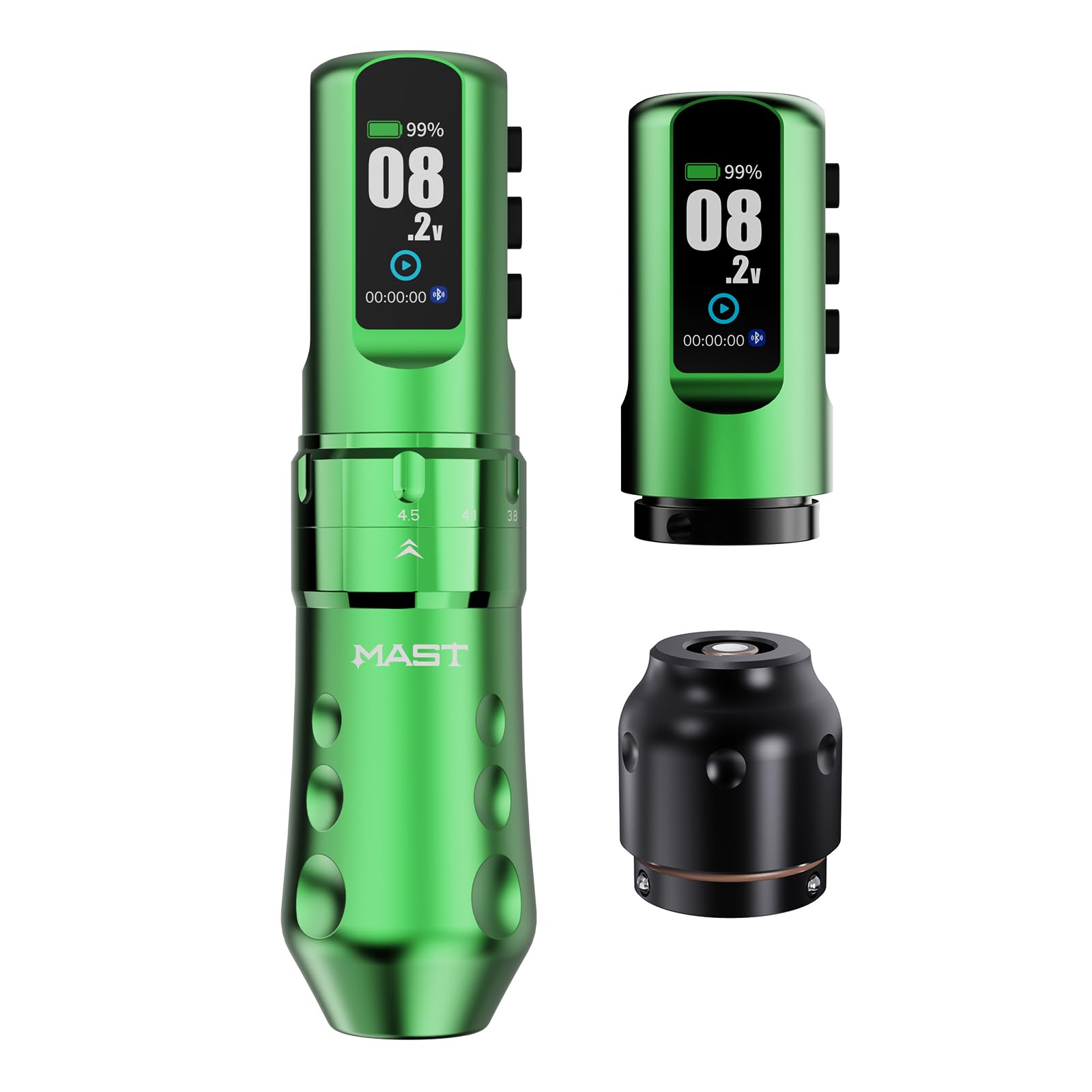
Image: The MAST TATTOO Flip4 Pro Wireless Tattoo Gun Machine in green, showcasing its sleek design and digital display.
Setup
- Unboxing: Carefully remove all components from the packaging. Verify that all parts listed in the packing list are present.
- Battery Installation: Ensure the battery is fully charged before first use. To install, align the battery with the main body of the machine and twist gently until securely connected. The machine comes with two batteries for extended operation.
- Needle Cartridge Attachment: Insert your desired needle cartridge into the machine's tip. Twist to secure it in place. Ensure the needle is properly seated and stable.
- Stroke Length Adjustment: The Flip4 Pro offers 7 adjustable stroke lengths (2.5, 2.9, 3.2, 3.5, 3.8, 4.1, 4.5mm). Rotate the grip to select the desired stroke length. A visual indicator will confirm your selection.
- Power On: Press and hold the power button on the OLED display to turn on the machine. The display will show battery life, voltage, and operating time.

Image: Close-up of the MAST TATTOO Flip4 Pro showing the adjustable stroke length mechanism, ranging from 2.5mm to 4.5mm.

Image: The OLED display of the MAST TATTOO Flip4 Pro, showing battery percentage, voltage, and timer.
Operating Instructions
- Voltage Adjustment: Use the '+' and '-' buttons on the machine to adjust the voltage in 0.1V increments. The recommended working voltage is 4-12V.
- Start/Pause: Press the power button briefly to start or pause the machine during operation.
- Stroke Selection: Choose the appropriate stroke length for your tattooing style:
- 2.5mm: Ideal for fine lining and single-pass detail work.
- 2.9mm: Suitable for detail shading and blackwork.
- 3.2-3.5mm: All-purpose, bold lining, and light shading.
- 3.8mm: Soft shading and color blending.
- 4.1mm: Color packing and large area shading.
- 4.5mm: Maximum softness and large area color packing.
- Battery Life: A fully charged 2000mAh battery provides approximately 7 hours of continuous operation at 8V output. Charging takes approximately 1.5 hours.
- Corded Use: The machine can also be used with a standard RCA adapter (included) for corded operation, bypassing the battery.
Video: Demonstrates the adjustable stroke lengths of the Mast Flip4 Pro, showing transitions from 2.5mm to 4.5mm and their application for various tattooing styles like dotwork and lining.
Video: An overview of the Mast Flip4 Cordless Tattoo Gun, highlighting its features and cordless operation.
Maintenance
- Cleaning: After each use, wipe down the machine with a suitable disinfectant. Ensure no liquids enter the motor housing or battery compartment.
- Sterilization: The machine body is not autoclavable. Only disposable needle cartridges should be used and disposed of properly after each client.
- Battery Care: Store batteries in a cool, dry place. Avoid overcharging or completely draining the battery to prolong its lifespan.
- Lubrication: The internal motor is maintenance-free. Do not attempt to lubricate internal components.
Troubleshooting
| Problem | Possible Cause | Solution |
|---|---|---|
| Machine does not turn on. | Low battery or battery not properly connected. | Charge the battery or ensure it is securely attached. |
| Inconsistent needle movement. | Faulty needle cartridge or incorrect stroke setting. | Replace the needle cartridge. Verify the stroke length is appropriate for the task. |
| Machine stops unexpectedly. | Battery depleted or overheating. | Replace with a charged battery or allow the machine to cool down. |
| OLED display not working. | Battery issue or internal fault. | Ensure battery is charged and connected. If problem persists, contact customer support. |
Specifications
- Model: YZHBD (Flip4 Pro)
- Weight: 228g (8.04oz)
- Diameter: 38.5mm (1.52in)
- Length: 146mm (5.75in)
- Stroke Lengths: 2.5, 2.9, 3.2, 3.5, 3.8, 4.1, 4.5mm (7 adjustable settings)
- Motor: Coreless Mcore-C1.1 Tattoo Motor
- Battery Capacity: 2000mAh
- Working Voltage: 4-12V
- Speed: 12V/9500RPM
- Charging Time: Approximately 1.5 hours
- Runtime: Up to 7 hours at 8V output
- Manufacturer: MAST TATTOO
Warranty and Support
For warranty information, product support, or service inquiries, please refer to the official MAST TATTOO website or contact your authorized dealer. Keep your purchase receipt as proof of purchase for any warranty claims.
Contact: Visit the MAST TATTOO Store for more information.
Ask a question about this manual
Ask about setup, troubleshooting, compatibility, parts, safety, or missing instructions. Manuals+ will review the question and use this page’s manual context to help answer it.