
1. Introduction
Thank you for purchasing the RUIMATECH Party Bluetooth Speaker DF720. This manual provides essential information for setting up, operating, and maintaining your speaker. Please read it carefully before use and retain it for future reference.

Figure 1: RUIMATECH Party Bluetooth Speaker DF720
2. What's in the Box
Carefully unpack your speaker and ensure all items are present:
- 1 x Bluetooth Speaker
- 1 x Type-C Charging Cable
- 1 x 3.5mm AUX Cable
- 1 x User Manual (this document)

Figure 2: Package Contents
3. Product Overview
Familiarize yourself with the speaker's controls and ports:
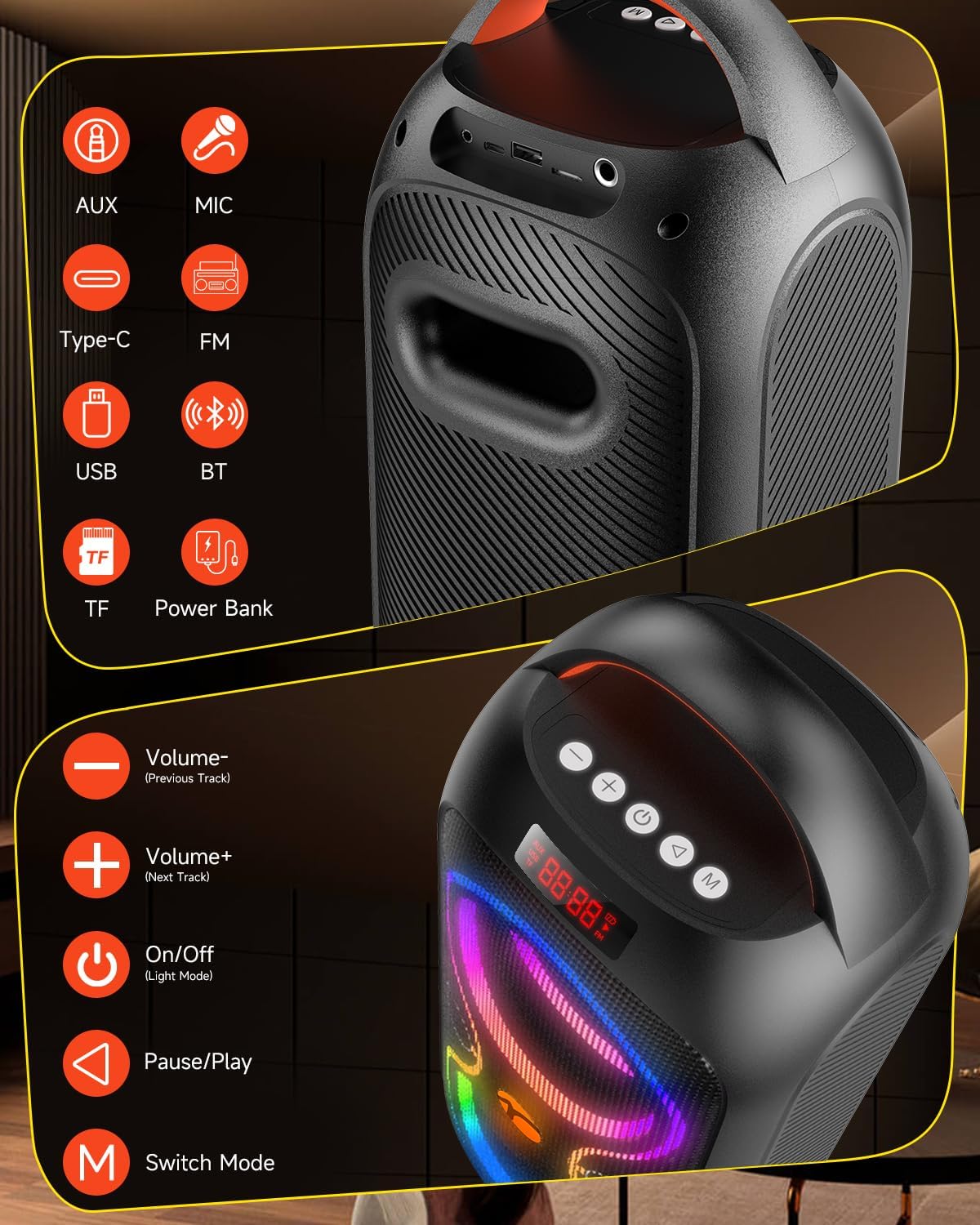
Figure 3: Control Panel and Ports
Control Buttons:
- Volume - (Previous Track): Decrease volume or go to the previous track.
- Volume + (Next Track): Increase volume or go to the next track.
- On/Off (Light Mode): Power the speaker on/off. Short press to cycle through light modes.
- Pause/Play: Play or pause audio playback.
- Switch Mode (M): Cycle through input modes (Bluetooth, TF card, USB, AUX, FM Radio).
Input Ports:
- AUX: 3.5mm auxiliary input for wired audio devices.
- Type-C: Charging port for the speaker.
- USB: USB port for playing audio from USB drives or charging external devices (power bank function).
- TF: TF card slot for playing audio from a TF card.
- MIC: 6.35mm microphone input for external microphones.
4. Setup
4.1 Charging the Speaker
Before first use, fully charge the speaker. Connect the provided Type-C charging cable to the speaker's Type-C port and a compatible USB power adapter (not included). The charging indicator will show the charging status. A full charge typically takes 4-5 hours.

Figure 4: Charging the Speaker
4.2 Powering On/Off
Press and hold the On/Off button to power the speaker on or off.
4.3 Bluetooth Pairing
- Power on the speaker. It will automatically enter Bluetooth pairing mode, indicated by a flashing 'BLUE' on the display.
- On your device (smartphone, tablet, etc.), enable Bluetooth and search for available devices.
- Select "DF720" from the list of devices.
- Once connected, the speaker will emit a confirmation sound, and 'BLUE' will stop flashing.
Video 1: Demonstrating Bluetooth pairing and light modes.
4.4 True Wireless Stereo (TWS) Pairing
To achieve stereo sound, you can pair two DF720 speakers together:
- Ensure both speakers are powered on and not connected to any Bluetooth device.
- On one speaker (this will be the primary speaker), press and hold the Switch Mode (M) button until you hear a pairing tone.
- The two speakers will automatically connect to each other. Once connected, you will hear a confirmation sound.
- Now, connect your device via Bluetooth to the primary speaker as described in section 4.3. Audio will play in stereo through both speakers.

Figure 5: True Wireless Stereo (TWS) Setup
5. Operating Instructions
5.1 Selecting Playback Modes
Press the Switch Mode (M) button to cycle through the available input modes: Bluetooth, TF card, USB, AUX, and FM Radio.

Figure 6: Available Connectivity Options
5.2 Adjusting Volume and Tracks
- Volume: Short press the Volume + or Volume - buttons to adjust the volume level.
- Previous/Next Track: Long press the Volume - button for the previous track, and long press the Volume + button for the next track (in Bluetooth, TF, or USB modes).
- Play/Pause: Short press the Pause/Play button to play or pause the current audio.
5.3 Light Modes
The speaker features dynamic RGB lighting. Short press the On/Off (Light Mode) button to cycle through 5 different lighting modes and 8 colors. The lights can be turned off by cycling through all modes.
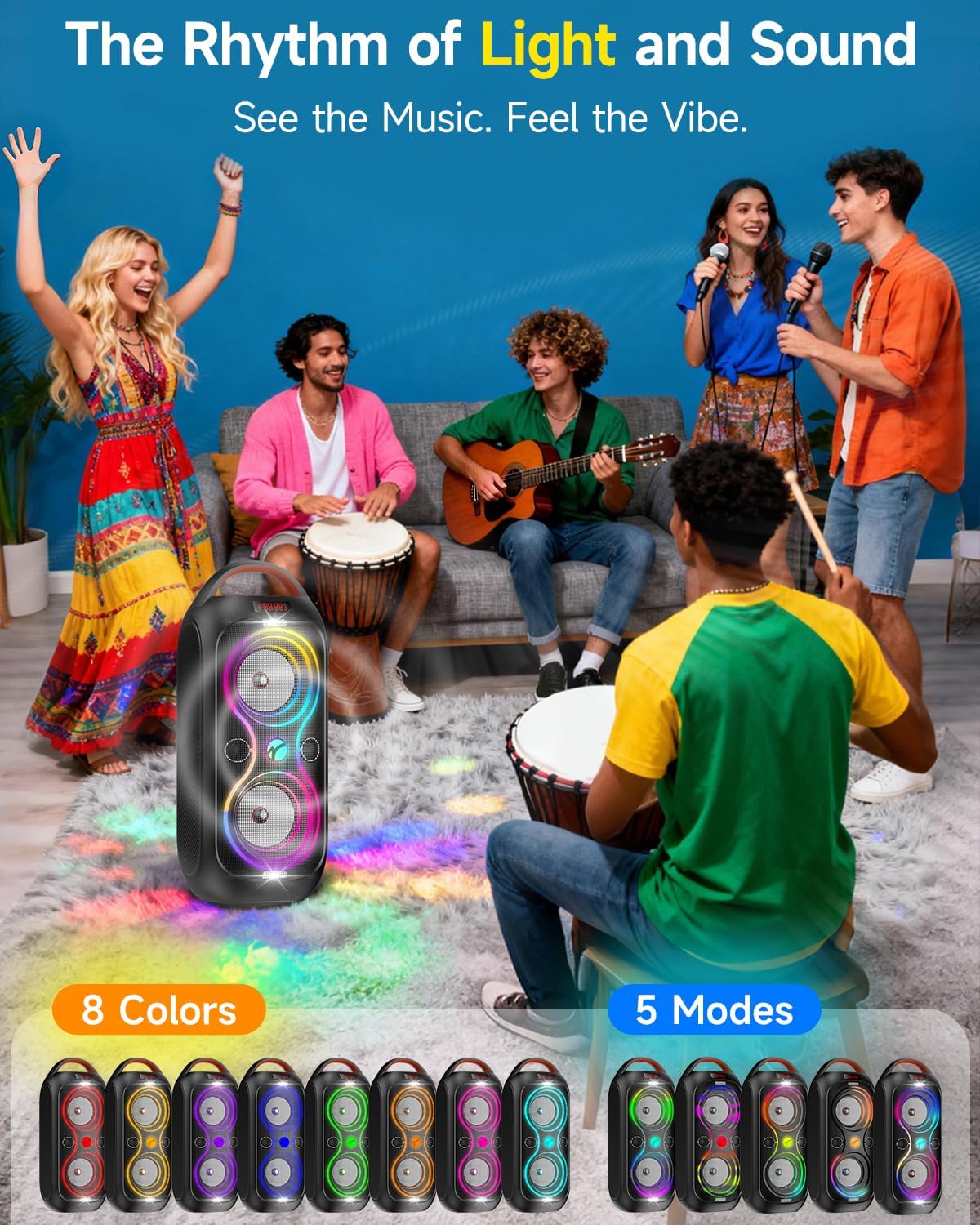
Figure 7: Dynamic Light Modes
5.4 Microphone Input
Connect an external microphone (not included) to the MIC input port for karaoke or public speaking. Adjust microphone volume via the connected microphone's controls or the speaker's main volume.
5.5 FM Radio
In FM Radio mode, the speaker will automatically scan and save available stations. Use the Volume + and Volume - buttons to navigate between saved stations.
6. Maintenance
6.1 Cleaning
Wipe the speaker with a soft, dry cloth. Do not use abrasive cleaners or solvents, as they may damage the surface.
6.2 Battery Care
- To prolong battery life, avoid fully discharging the speaker frequently.
- Charge the speaker regularly, even if not in use, to maintain battery health.
- Store the speaker in a cool, dry place when not in use for extended periods.
6.3 Water Resistance
This speaker is NOT waterproof. Avoid exposure to water, rain, or excessive moisture to prevent damage.
7. Troubleshooting
If you encounter issues with your speaker, refer to the following common problems and solutions:
- No Power:
Ensure the speaker is charged. Connect the Type-C charging cable and allow it to charge for at least 30 minutes before attempting to power on. - No Sound:
Check the volume level on both the speaker and your connected device. Ensure the correct input mode is selected. If using Bluetooth, verify the device is properly paired. If using AUX, ensure the cable is fully inserted. - Bluetooth Disconnection:
Ensure your device is within the 33-foot Bluetooth range. Disconnect and re-pair the speaker with your device. Avoid obstacles between the speaker and your device. - USB/TF Card Not Playing:
Ensure the USB drive or TF card is inserted correctly and contains compatible audio files (e.g., MP3). Try a different USB drive or TF card. - TWS Pairing Failure:
Ensure both speakers are powered on and not connected to any other Bluetooth device before initiating TWS pairing. Try resetting both speakers and repeating the TWS pairing steps. - Lights Not Working:
Short press the On/Off (Light Mode) button to cycle through light modes. If the issue persists, power cycle the speaker.
If the problem persists after trying these solutions, please contact customer support.
8. Specifications
| Brand | RUIMATECH |
| Model Number | DF720 |
| Speaker Maximum Output Power | 60 Watts (Peak) |
| Frequency Response | 150Hz-15KHz |
| Connectivity Technology | Bluetooth 5.3, Auxiliary, TF card, USB |
| Audio Output Mode | Stereo |
| Speaker Type | Portable Bluetooth Speaker |
| Additional Features | Bass Boost, Built-In Powerbank, Display, LED Light, USB Port, FM Radio, MIC Input |
| Color | Black |
| Is Waterproof | False (Not Water Resistant) |
| Bluetooth Range | 33 Feet |
| Control Method | Buttons |
| Speaker Size | Dual 4 Inches |
| Battery Average Life | 12 Hours |
| Battery Charge Time | 4-5 Hours |
| Battery Capacity | 4400 mAh |
| Item Dimensions (D x W x H) | 6.69"D x 6.89"W x 16.9"H |
| Item Weight | 4.7 Pounds |
| Power Source | Battery Powered |
| Input Voltage | 5 Volts |
9. Warranty and Support
9.1 Warranty Information
This RUIMATECH Party Bluetooth Speaker DF720 comes with a 1-year limited warranty from the date of purchase. This warranty covers manufacturing defects and workmanship under normal use. It does not cover damage caused by misuse, accidents, unauthorized modifications, or exposure to water.
9.2 Customer Support
For any questions, technical assistance, or warranty claims, please contact RUIMATECH customer support through the retailer where you purchased the product or visit the official RUIMATECH website for contact information.