
MASXODRK ST
MASXODRK ST Electric Scooter User Manual
Model: ST (1200W15.6AH)
1. Safety Information
Before operating your MASXODRK ST Electric Scooter, please read and understand all safety instructions. Failure to follow these instructions may result in serious injury or damage to the scooter.
General Safety Guidelines
- Always wear a helmet and appropriate safety gear (knee pads, elbow pads) when riding.
- Do not ride in wet conditions, heavy rain, or through standing water deeper than 1 inch. The scooter has an IP56 rating for dust and water resistance, suitable for light splashes, but not submersion.
- Ensure all bolts and fasteners are tightened before each ride.
- Adhere to local traffic laws and regulations.
- Do not perform stunts or sudden maneuvers.
- Maintain a safe distance from other vehicles and pedestrians.
- The maximum weight limit for this scooter is 264 pounds.
- This product is designed for adults and youth.
UL Certification
The MASXODRK ST Electric Scooter is UL-certified, ensuring it meets high safety and reliability standards. This certification covers the battery system, electrical components, and structural integrity.

Image: The scooter is UL 2272 approved, indicating compliance with safety standards for electrical systems and battery management.
2. Product Overview
The MASXODRK ST Electric Scooter is designed for efficient commuting and off-road adventures, featuring a powerful motor, long-range battery, and robust construction.
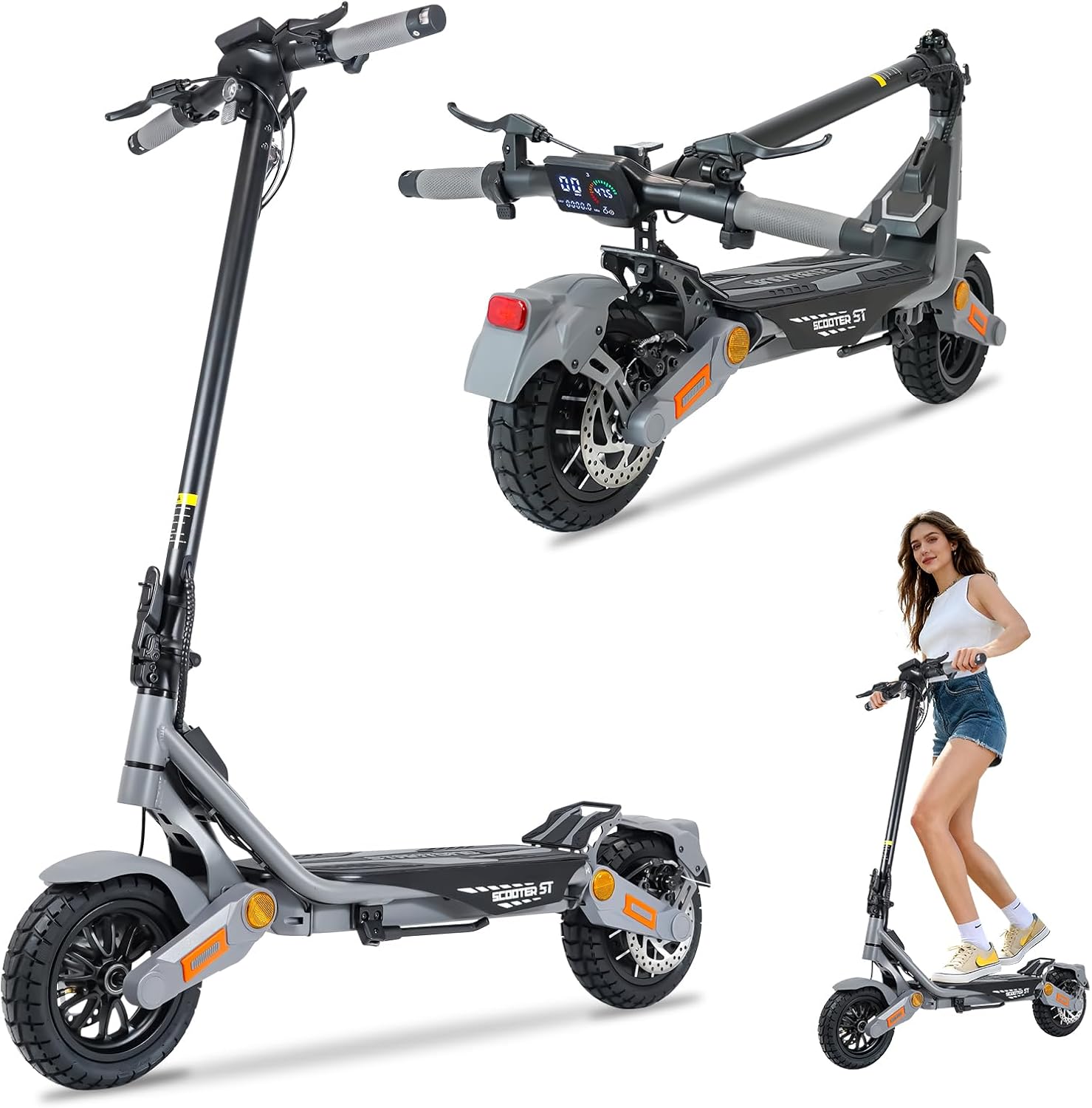
Image: The MASXODRK ST Electric Scooter shown in its full form, folded, and in use.
Key Features
- Powerful Motor: Equipped with a 1200W brushless motor for robust torque and acceleration, capable of conquering 35% slopes and reaching speeds up to 35 MPH.
- High-Capacity Battery: UL-certified 48V 15.6Ah (648Wh) battery providing up to 35 miles of range per charge.
- Smooth Ride: Dual front/rear suspension and 10-inch off-road tires absorb shocks for comfort on various terrains.
- Reliable Safety: Features front/rear disc brakes and a 360° lighting system including headlight, turn signals, brake light, and ambient light.
- Clear LED Display: Large, easy-to-read LED display shows speed, battery level, mileage, riding mode, and real-time voltage.
- Foldable Design: One-step quick folding system for easy portability and storage.
Components
- Handlebar: Straight handlebar with ergonomic grips.
- Wheels: 10-inch pneumatic off-road tires.
- Brakes: Front and rear disc brakes.
- Suspension: Dual suspension system.
- Frame: Durable aluminum frame.

Image: Illustration of the 1200W brushless motor, highlighting its power and speed capabilities.

Image: Visual representation of the scooter's 48V 15.6Ah high-capacity lithium battery and its 35-mile range.

Image: The 10-inch all-terrain off-road tires are suitable for various surfaces, including sand, paved roads, mountain trails, and snow.
3. Setup
Unboxing and Initial Assembly
The MASXODRK ST Electric Scooter arrives approximately 85% pre-assembled. The remaining assembly typically takes about 15 minutes.
- Carefully remove the scooter and all components from the packaging.
- Install the handlebar by aligning it with the stem and securing it with the provided fasteners.
- Attach the front wheel, ensuring it is properly aligned and tightened.
- Install any additional lights or accessories as per the included quick start guide.
- Perform a thorough check of all connections and moving parts to ensure they are secure.
Initial Charge
Before your first ride, fully charge the scooter's battery. The charging time is approximately 6-8 hours.
- Connect the charger to the scooter's charging port.
- Plug the charger into a standard wall outlet.
- The charging indicator on the charger will change (e.g., from red to green) when charging is complete.
- Disconnect the charger once the battery is fully charged.
4. Operating Instructions
Powering On/Off
- To power on, press and hold the power button on the display.
- To power off, press and hold the power button again until the display turns off.
- For newer models with NFC cards, tap the NFC card to the designated area to activate the scooter.
Riding Modes
The scooter features multiple speed modes to suit different riding conditions and preferences. Use the mode selection button on the display to switch between them.
- Comfort (ECO) Mode: Approximately 10 MPH (16 KM/H) for extended range and relaxed riding.
- Normal Mode: Approximately 12 MPH (19 KM/H) for balanced performance.
- Sport Mode: Up to 35 MPH (56 KM/H) for maximum speed and acceleration.

Image: Overview of the three available speed modes for the scooter.
Display and Controls
The large LED display provides real-time information and access to controls.

Image: Detailed view of the scooter's handlebar controls and LED display.
- Speedometer: Displays current riding speed.
- Battery Level Indicator: Shows remaining battery charge.
- Mileage: Tracks distance traveled.
- Riding Mode: Indicates the currently selected speed mode.
- Voltage Monitoring: Provides real-time battery voltage.
- Headlight Control: Activates the front headlight.
- Turn Signals: Engages left or right turn indicators.
- Brake Lever: Activates the disc brakes.
- Accelerator Shift: Controls speed.
Folding Mechanism
The scooter features a quick one-step folding system for convenient storage and transport.
- Hold the front bar and tilt it forward.
- Lock the lever on the folding bar.
- Move the handle section backward towards the rear of the scooter.
- Locate the catch on the rear fender and secure the handlebar to it.

Image: The scooter's foldable design allows for easy storage in a car trunk.

Image: Step-by-step guide on how to fold the scooter for storage.
5. Maintenance
Regular maintenance ensures the longevity and safe operation of your MASXODRK ST Electric Scooter.
Battery Care
- Charge the battery fully after each use, especially if storing for an extended period.
- Avoid completely draining the battery.
- Store the scooter in a cool, dry place away from direct sunlight and extreme temperatures.
Tire Maintenance
- Regularly check tire pressure and inflate to the recommended PSI.
- Inspect tires for wear, punctures, or damage before each ride.
- Replace worn tires promptly to maintain optimal grip and safety.
General Cleaning and Inspection
- Clean the scooter with a damp cloth. Avoid using high-pressure water jets.
- Regularly check all bolts, screws, and connections for tightness.
- Inspect brake components for wear and ensure proper function.
- Ensure all lights (headlight, tail light, turn signals) are working correctly.
6. Troubleshooting
This section addresses common issues you might encounter with your scooter.
Common Issues and Solutions
| Problem | Possible Cause | Solution |
|---|---|---|
| Scooter does not power on | Low battery; Power button not pressed correctly; NFC card not used (if applicable) | Charge battery; Press and hold power button; Tap NFC card to activate |
| Reduced range or speed | Low tire pressure; Overload; Battery degradation; Riding uphill frequently | Check and inflate tires; Ensure rider weight is within limits; Charge fully; Adjust riding style |
| Brakes feel weak | Brake pads worn; Cable loose; Disc dirty | Inspect and replace brake pads; Adjust brake cable tension; Clean disc with appropriate cleaner |
| Unusual noises | Loose components; Debris in wheels; Worn bearings | Inspect and tighten all fasteners; Clear debris; Contact support for inspection |
If you encounter an issue not listed here or if the suggested solutions do not resolve the problem, please contact customer support.
7. Specifications
Detailed technical specifications for the MASXODRK ST Electric Scooter (1200W15.6AH model).
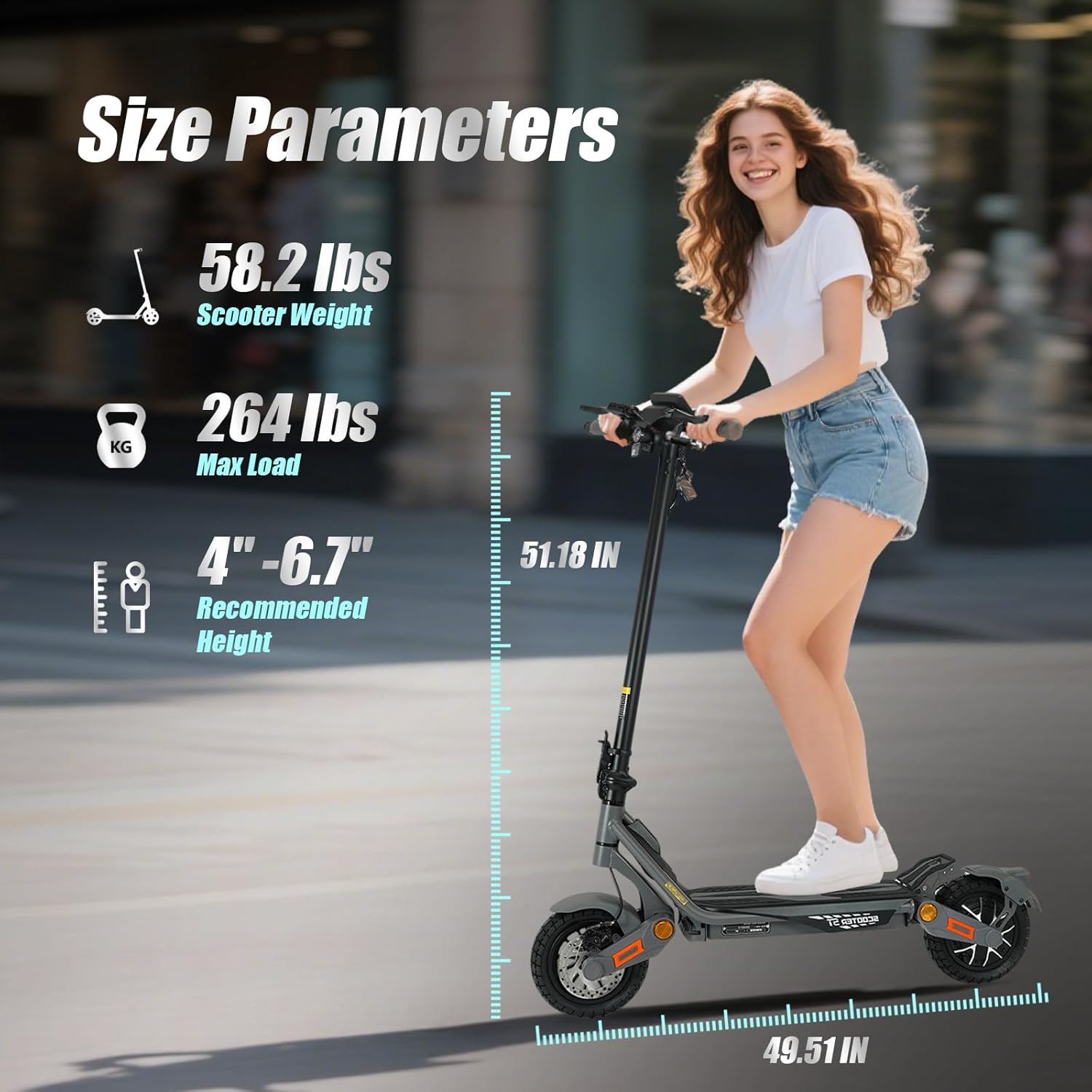
Image: Key size parameters and weight specifications for the scooter.
| Feature | Specification |
|---|---|
| Model Name | ST |
| Motor Power | 1200W Brushless |
| Battery Capacity | 48V 15.6Ah (648Wh) |
| Max Speed | 35 MPH |
| Max Range | 35 Miles |
| Charging Time | 6-8 Hours |
| Weight Limit | 264 Pounds |
| Scooter Weight | 56 Pounds |
| Product Dimensions (LxWxH) | 49.51" x 22.83" x 51.18" |
| Wheel Size | 10 Inches |
| Tire Type | Pneumatic Off-Road |
| Brake Style | Front and Rear Disc Brakes |
| Suspension Type | Dual Suspension |
| Frame Material | Aluminum |
| Special Features | Digital Display, Foldable, Non-Slip Deck, Rechargeable, Wide Platform, 360° Lighting System |
| Certifications | UL Certified |
8. Warranty and Support
MASXODRK is committed to providing reliable after-sales support for your electric scooter.
Warranty Information
All MASXODRK scooters come with a limited warranty. Specific warranty periods for different parts are as follows:
- Main Components (Battery, Motor, Charger, Controller, Voltage Lock): 12 months free replacement for quality problems.
- Other parts may have a 3-month warranty. Please refer to your purchase documentation for full details.
The warranty covers manufacturing defects and quality issues. It does not cover damage caused by misuse, accidents, or normal wear and tear.
Customer Support
For any questions, concerns, replacement parts, or warranty claims, please contact our dedicated support team.
- Contact Method: Please reach out via Amazon email.
- Response Time: Our customer service team aims to respond within 7*24 hours.

Image: MASXODRK customer support information, highlighting warranty and service availability.
Ask a question about this manual
Ask about setup, troubleshooting, compatibility, parts, safety, or missing instructions. Manuals+ will review the question and use this page’s manual context to help answer it.