
1. Introduction
The AYMDKI FM2118 Smart Wireless Meat Thermometer is designed to provide precise temperature monitoring for various cooking methods. This device features an ultra-thin probe, a digital display base, and Bluetooth connectivity for real-time monitoring via a mobile application. It is suitable for use with BBQs, grills, smokers, ovens, air fryers, stovetops, and sous-vide cooking.
2. Safety Information
- Always insert the probe into the thickest part of the meat, ensuring the notch and tip are fully covered by the meat for accurate readings.
- If wrapping meat in aluminum foil, ensure the probe needs to be exposed outside the foil. Otherwise, the signal may be blocked, causing the probe to disconnect.
- Place the dock (repeater) at least 1 foot (30 cm) away from the cooking grill or oven to avoid potential damage from excessive heat.
- The distance between the probe and the base needs to be less than 3 feet (1 meter) when the lid of the grill or oven is closed to prevent disconnection.
- The probe is high-temperature resistant, supporting grilling and high-heat baking. Probes withstand up to 707°F for 2 minutes, and 572°F for up to 20 minutes.
- Keep the device and its components out of reach of children.
3. Package Contents
The AYMDKI FM2118 Smart Wireless Meat Thermometer package includes:
- 1 x Smart Wireless Meat Thermometer Probe
- 1 x Charging Base / Repeater Unit
- 1 x USB-C Charging Cable
- 1 x Instruction Manual
4. Setup
4.1. Charging the Device
Before first use, ensure both the probe and the charging base are fully charged. The probe charges when inserted into the base. The base itself is charged via the provided USB-C cable. A full charge for the base takes approximately 2 hours, providing up to 100 hours of use. The probe charges in about 25 minutes for 19 hours of use.

Image: The charging base with the probe inserted, connected via USB-C for power. The display shows battery levels and temperature readings.
4.2. Downloading and Connecting to the App
The thermometer can be controlled and monitored via a dedicated mobile application. Download the 'PROBE PLUS' app from your smartphone's app store. Follow the in-app instructions to pair your device via Bluetooth 5.4. The app allows for advanced settings and real-time monitoring.

Image: Visual representation of the Bluetooth 5.4 connection between the probe, the base unit, and the smartphone app for data security and stable connection.
4.3. Initial Settings
Within the app's settings, you can adjust the temperature unit between Fahrenheit (°F) and Celsius (°C). You can also customize alarm sounds, vibration settings, and the duration of alarms.
5. Operating Instructions
5.1. Inserting the Probe
Carefully insert the ultra-thin probe into the thickest part of the meat. Ensure the probe is inserted up to the white line or notch on the probe shaft. This ensures accurate internal temperature readings and protects the internal components of the probe from excessive heat.

Image: The probe inserted into a roast, illustrating the placement for accurate internal temperature measurement using its six sensors.
5.2. Using the Smart Base Display
The innovative Smart Base features a bright LCD display that shows real-time internal and ambient temperatures. You can set target temperatures and make adjustments directly from the base using the control buttons, eliminating the need for a smartphone during cooking.
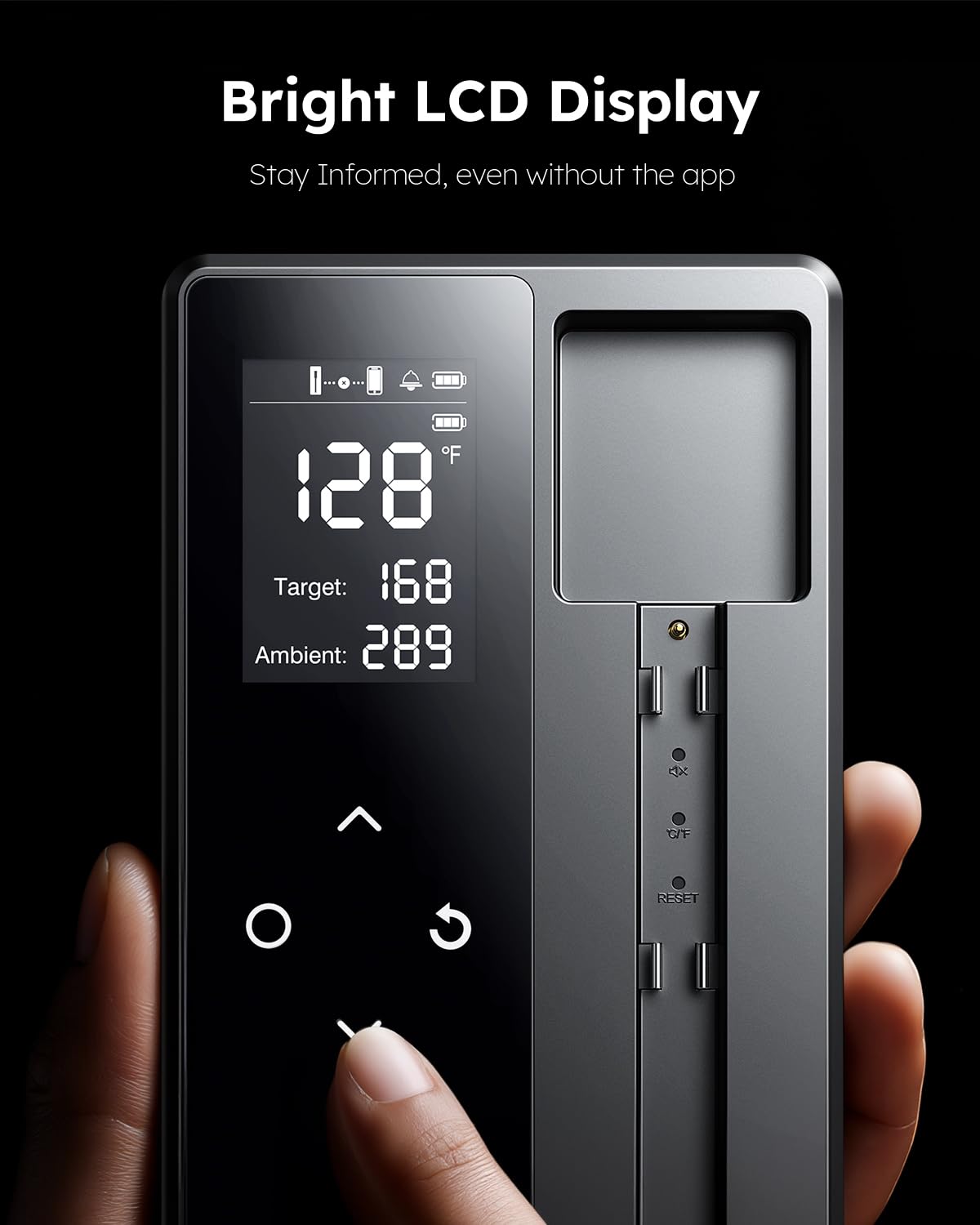
Image: The bright LCD display of the smart base, showing current temperature, target temperature, and ambient temperature, along with navigation buttons for direct control.
5.3. Using the Mobile App
The 'PROBE PLUS' app offers a guided cook system with chef-approved presets for various meat types (beef, poultry, pork, lamb, seafood) and desired doneness levels (e.g., medium-rare, well-done). Select your meat type and doneness, and the app will provide recommended target temperatures and real-time alerts. The app also displays internal temperature trends and battery levels for both the probe and the base.

Image: The mobile app interface displaying options for selecting meat type and doneness, with corresponding temperature recommendations.
5.4. Cooking Methods
The AYMDKI FM2118 is versatile and compatible with a wide range of cooking methods, both indoors and outdoors. This includes BBQ, smoker, oven, stovetop, sous-vide, rotisserie, air fryer, campfire, and griddle. Its 600FT Bluetooth range allows for real-time monitoring and smart alerts, ensuring you don't miss a moment of cooking.

Image: Examples of the thermometer in use for both outdoor cooking (rotisserie, smoker, grill) and indoor cooking (air fryer, oven, pan).
6. Maintenance
6.1. Cleaning
The probe is fully waterproof and dishwasher safe, making cleanup effortless. After each use, clean the probe thoroughly to maintain hygiene and performance. The base unit should be wiped clean with a damp cloth; do not immerse it in water.

Image: The probe shown underwater, highlighting its 100% waterproof and oil-resistant design for easy cleaning.
6.2. Storage
Store the probe securely in its charging base when not in use. This protects the probe and ensures it remains charged for your next cooking session.
7. Troubleshooting
- Probe Disconnection: Ensure the base unit is within 3 feet (1 meter) of the probe when the oven/grill lid is closed. Avoid wrapping the probe in aluminum foil. Check battery levels of both the probe and base.
- Inaccurate Readings: Verify the probe is inserted correctly into the thickest part of the meat, past the notch. Ensure the probe is clean and free from debris.
- App Not Connecting: Confirm Bluetooth is enabled on your smartphone and the 'PROBE PLUS' app has necessary permissions. Restart the app and/or your phone if issues persist.
- No Display on Base: Check if the base unit is charged. If the probe is removed, the display should activate.
8. Specifications
| Model Number | FM2118 |
| Brand | AYMDKI |
| Connectivity Technology | Bluetooth 5.4 |
| Display Type | Digital LCD |
| Probe Temperature Range | -58°F to 572°F (-50°C to 300°C) |
| Probe High-Heat Resistance | Up to 707°F (2 min), 572°F (20 min) |
| Battery Life (Base) | Up to 100 hours (2-hour charge) |
| Battery Life (Probe) | Up to 19 hours (25-minute charge) |
| Wireless Range | Up to 600 feet (180 meters) |
| Waterproof Rating | Probe: Fully Waterproof & Dishwasher Safe |
| Material | Acrylonitrile Butadiene Styrene (ABS) |
| Special Features | App Companion, Fast Reading System, High Accuracy, Large Display, Ultra Clear Screen, Magnetic Base |
9. Warranty and Support
For any questions or support regarding your AYMDKI FM2118 Smart Wireless Meat Thermometer, please refer to the included Instruction Manual or contact AYMDKI customer service. Keep your purchase receipt for warranty claims.