
1. Product Overview
The SUNER POWER 10 Amp 12V 24V Solar Charge Controller is a waterproof 10A solar panel regulator designed for various battery types, including Lead-Acid, AGM, Gel, Flooded, and Lithium LiFePO4 batteries. It features a dust-to-dawn load setting and an improved 3-stage charging algorithm to optimize battery life and performance. This controller ensures efficient and safe charging for your solar power system.
2. Safety Information
Please read all safety instructions carefully before installation and operation. Failure to follow these instructions may result in damage to the controller, battery, or solar panels, and could lead to personal injury.
- Ensure all connections are correct and secure before applying power.
- Do not disassemble or attempt to repair the controller yourself. Contact qualified personnel for service.
- Install the controller in a well-ventilated area, away from flammable materials.
- The controller is designed for 12V/24V systems. Verify your system voltage before connection.
- Built-in multiple protections include over-charge, over-voltage, over-current, short circuit, reverse polarity, and over-temperature.
- The device is waterproof and spark-proof, rated IP65 for protection against dust and water jets.

Figure 1: Intelligent Solar Charge Controller with Built-in Protection System
3. Product Features
- Improved 3-Stage Charging Algorithm: Bulk, Absorption, and Float stages for effective 12-volt battery charging, ensuring safety and extending battery life.
- Comprehensive Safety Protections: Includes over-charge, over-voltage, over-current, short circuit, reverse polarity, and over-temperature protection.
- IP65 Waterproof Design: Fully protected against dust ingress and water jets, suitable for various weather conditions.
- Versatile Load Modes: Three customizable load settings: continuous ON, dusk-to-dawn control, or dusk-to-dawn with a customizable timer.
- Wide Battery Compatibility: Supports Lead-Acid, AGM, Gel, Flooded, and Lithium LiFePO4 batteries.
- PV Input: 15-35V, Max 120W at 12Volt.
4. Setup and Installation
Follow these steps for proper installation of your solar charge controller. Ensure all power sources are disconnected before making any connections.
4.1 Component Identification

Figure 2: Controller Component Diagram
- Solar Panel Input: Connect your solar panel array here.
- Battery Connection: Connect to your battery bank.
- Load Output: Connect your DC loads (e.g., lights).
- Solar Panel Indicator: Shows solar panel activity.
- Battery Indicator: Shows battery charge status.
- Load Indicator: Shows load output status.
- Mode Setting: DIP switches for load control.
- Mount Holes: For securing the controller.
4.2 Wiring Connections
Connect the components in the following order to prevent damage:
- Connect the Battery: First, connect the battery to the charge controller. Ensure correct polarity (+ to + and - to -). The controller will detect the system voltage (12V or 24V) automatically.
- Connect the Solar Panel: Next, connect the solar panel to the charge controller. Ensure correct polarity.
- Connect the Load: Finally, connect the DC load to the charge controller. Ensure correct polarity.

Figure 3: Wiring Polarity Diagram
Important: Always connect the battery first and disconnect the solar panel first when disassembling the system.
4.3 Mounting
Mount the controller using the provided mount holes (8) in a location that is protected from direct sunlight and excessive heat, but allows for adequate ventilation. Despite its waterproof rating, avoiding direct exposure to extreme elements can prolong its lifespan.
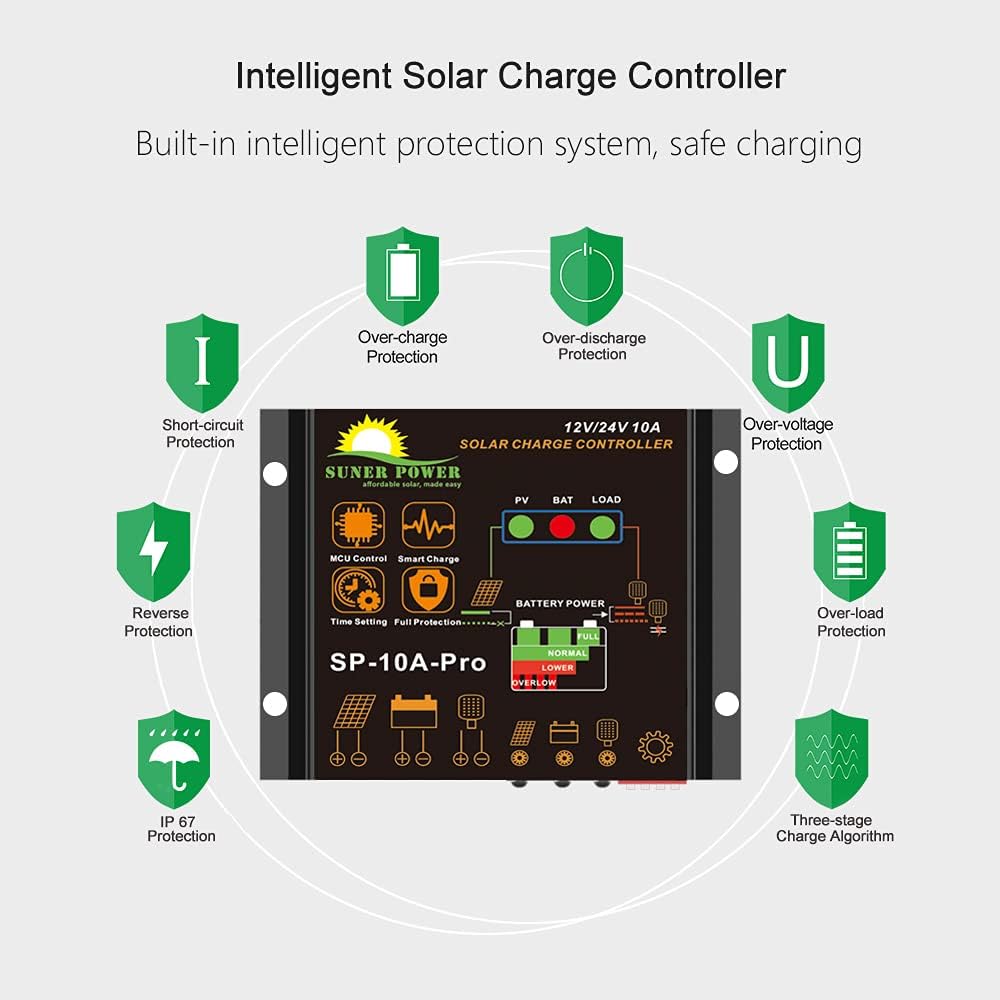
Figure 4: IP65 Waterproof Design
5. Operating Instructions
The controller features a "Dust to Dawn Intelligent Controller" with three load working modes, configurable via DIP switches.
5.1 Load Working Mode Setting
The controller's load output can be customized using the DIP switches (Mode setting, item 7 in Figure 2). Refer to the diagram below for specific settings.
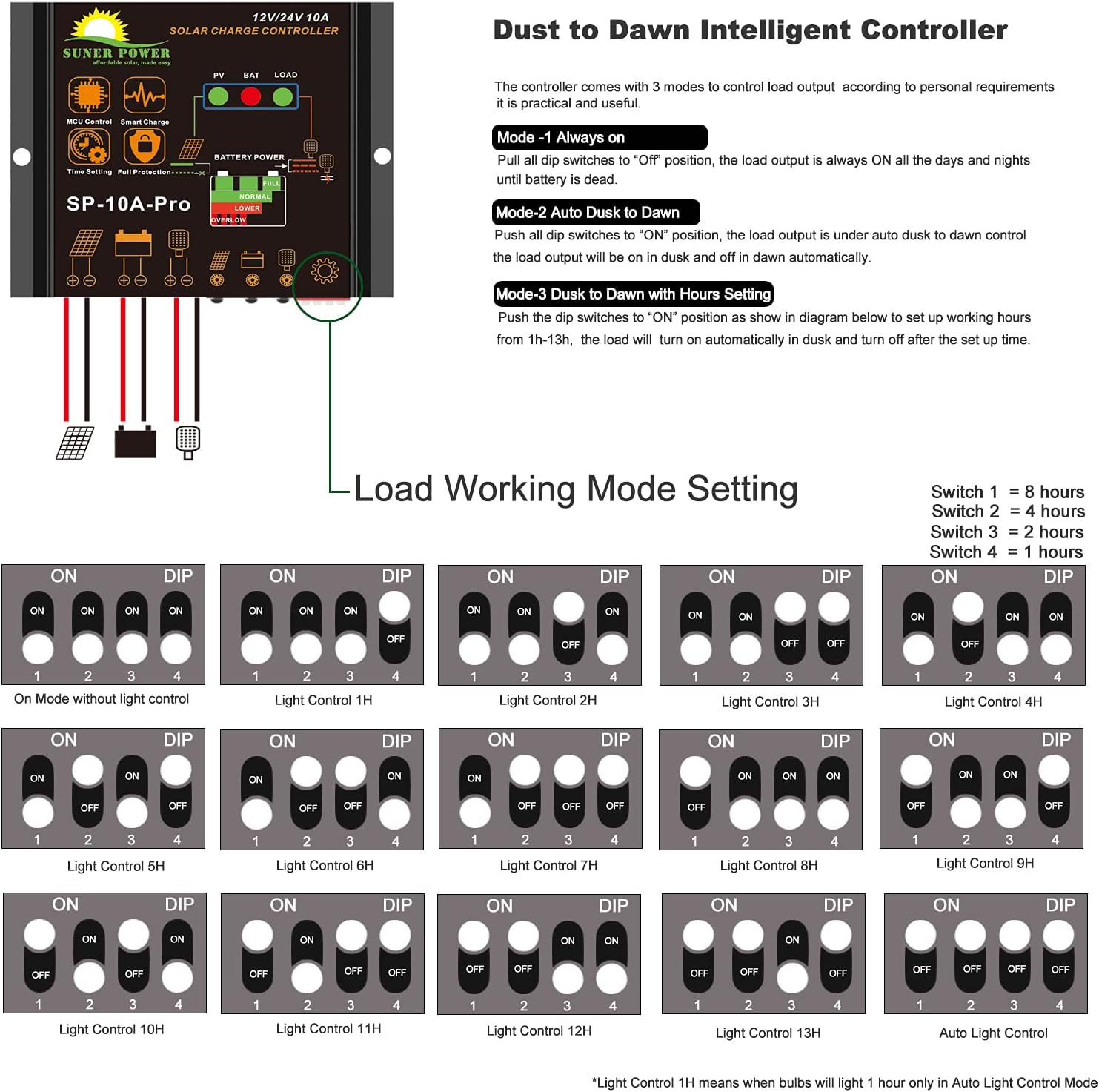
Figure 5: Load Working Mode DIP Switch Settings
- Mode 1: Always On
Pull all DIP switches to the "OFF" position. The load output will remain ON 24 hours a day, provided the battery has sufficient charge. - Mode 2: Auto Dusk to Dawn
Push all DIP switches to the "ON" position. The load output will automatically turn ON at dusk and turn OFF at dawn. - Mode 3: Dusk to Dawn with Hours Setting
Push the DIP switches to the "ON" position as shown in the diagram (Figure 5) to set up working hours from 1 hour to 14 hours. The load will turn ON automatically at dusk and turn OFF after the set time duration. For example, "Light Control 1H" means the lights will be on for 1 hour only in Auto Light Control Mode.
5.2 Indicators
The controller features LED indicators to display the status of your solar system (refer to Figure 2 for locations):
- Solar Panel Indicator (4): Indicates solar panel activity and charging status.
- Battery Indicator (5): Shows the current charge level of the battery (e.g., FULL, NORMAL, LOWER, OVERLOW).
- Load Indicator (6): Indicates whether the load output is active.
6. Maintenance
The SUNER POWER solar charge controller is designed for minimal maintenance. However, periodic checks can ensure optimal performance and longevity.
- Inspect Connections: Periodically check all wiring connections for tightness and corrosion. Loose connections can cause voltage drops and overheating.
- Clean Controller: Although waterproof, keep the controller's exterior clean from dust and debris. Use a soft, dry cloth. Do not use harsh chemicals or abrasive cleaners.
- Check Indicators: Regularly observe the LED indicators to ensure the system is operating as expected.
- Battery Health: Monitor your battery's health and charge level. Ensure it is compatible with the controller's charging parameters.
7. Troubleshooting
If you encounter issues with your solar charge controller, refer to the following common problems and solutions:
| Problem | Possible Cause | Solution |
|---|---|---|
| No power to load |
|
|
| Battery not charging |
|
|
| Controller not turning on |
|
|
If the problem persists after attempting these solutions, please contact SUNER POWER customer support.
8. Specifications
| Model | SP-PWM-10A |
| Brand | SUNER POWER |
| Rated Current | 10 Amp |
| System Voltage | 12V / 24V Auto-sensing |
| PV Input Voltage Range | 15-35V |
| Max PV Input Power | 120W (at 12V system) |
| Battery Types Supported | Lead-Acid (AGM, Gel, Flooded), Lithium (LiFePO4) |
| Charging Algorithm | 3-Stage (Bulk, Absorption, Float) |
| Load Modes | Continuous ON, Dusk-to-Dawn, Dusk-to-Dawn with Timer |
| Protection | Over-charge, Over-voltage, Over-current, Short Circuit, Reverse Polarity, Over-temperature |
| Waterproof Rating | IP65 |
| Material | Plastic |
| Item Weight | 0.14 Kilograms |
| Indicators | LED (Solar Panel, Battery, Load Status) |
9. Warranty and Support
The SUNER POWER 10 Amp 12V 24V PWM Solar Charge Controller comes with a 1-Year Warranty from the date of purchase, covering defects in materials and workmanship.
For technical support, warranty claims, or any questions regarding your product, please contact SUNER POWER customer service. Refer to your purchase documentation or the SUNER POWER official website for contact details.
Manufacturer: SUNER POWER


