
1. Introduction and Overview
The Catchallway VD02 4K Mini Body Camera is a compact, wearable device designed for capturing high-quality audio and video. Its thumb-sized design and versatile mounting options make it suitable for various activities, including daily recording, travel, outdoor sports, and vlogging. The camera features 4K Ultra HD video recording, expandable storage with an included 128GB micro SD card, and a portable charging case for extended battery life. It also supports Wi-Fi connectivity for instant preview and sharing via a dedicated mobile application.
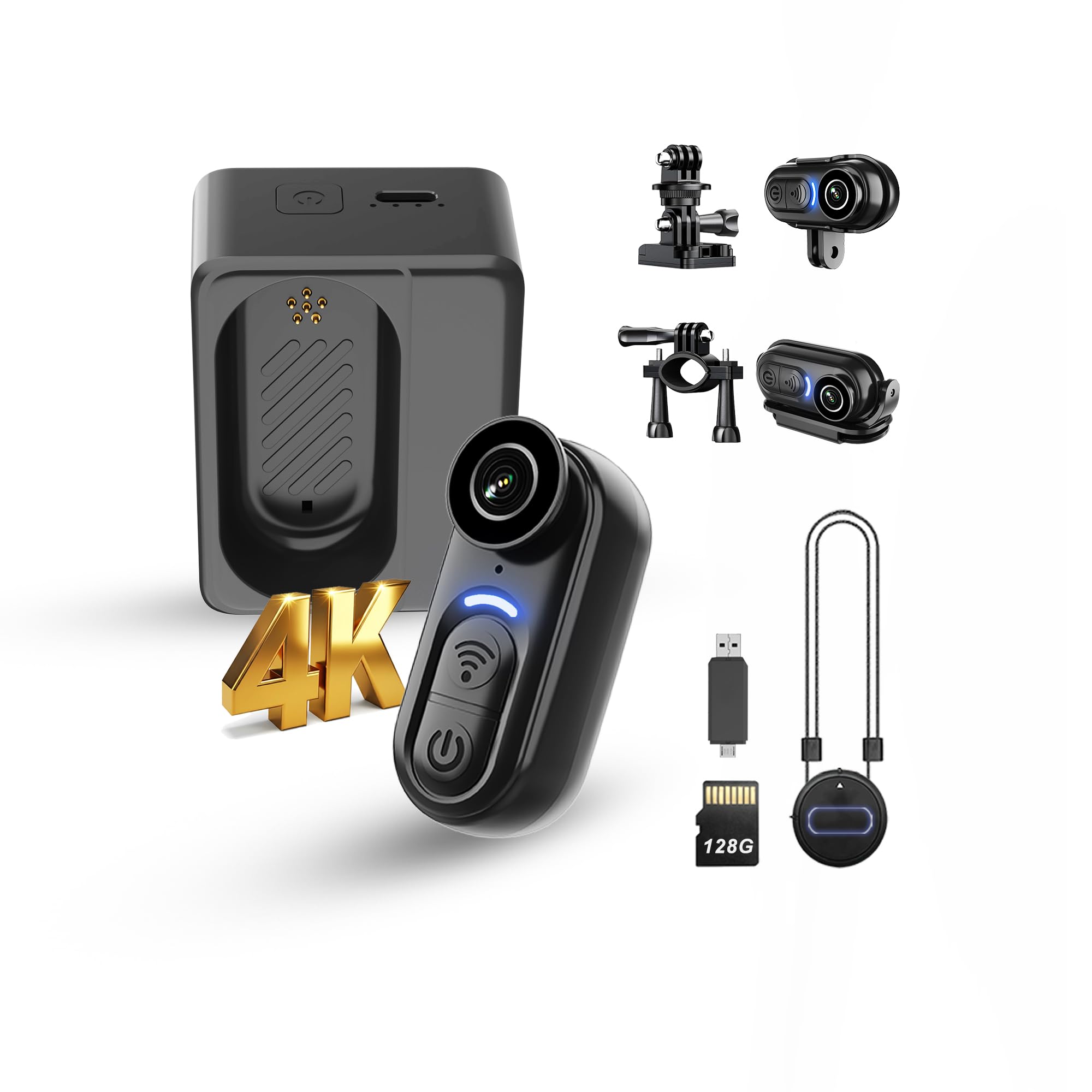
Figure 1: The Catchallway VD02 4K Mini Body Camera, a compact device for versatile recording.
2. What's in the Box
- 128G 4K Body Camera x1
- Charging Case x1
- Bike mount / Magnet lanyard / Helmet mount / Screws mount x1
- Type-C USB 2-in-1 card reader x1
- 1-Year Guarantee (gogoing6868@gmail.com)

Figure 2: All accessories included with the Catchallway VD02 4K Mini Body Camera, neatly arranged in the packaging.
3. Setup
3.1 Initial Charging
Before first use, ensure the camera and charging case are fully charged. Connect the charging case to a power source using the provided Type-C USB cable.
3.2 Inserting the Micro SD Card
The camera comes with a built-in 128GB micro SD card. No additional card insertion is typically required unless replacing the existing one.
3.3 Mounting Options
The camera offers versatile mounting for hands-free use:
- Magnetic Lanyard: For discreet, hands-free recording, place the magnetic disc under your clothing and attach the camera to the outside.
- Hat Clip: Securely attach the camera to the brim of a hat for a first-person perspective.
- Bike Mount: Attach to bicycle handlebars for cycling footage.
- Helmet Mount: Secure to a helmet for action sports or other activities.
- Screws Mount: For more permanent or specific attachments.

Figure 3: The magnetic lanyard allows for secure and discreet attachment of the camera to clothing.

Figure 4: The hat clip provides a convenient way to mount the camera for a point-of-view perspective.
3.4 Wi-Fi Connection
To connect the camera to your smartphone via Wi-Fi:
- Long-press the power button on the camera to turn it on (Blue LED Flash).
- Press the "Wi-Fi button" once to turn on Wi-Fi mode (Green LED Flash).
- Go to your phone's Wi-Fi settings and connect to the camera's Wi-Fi network (e.g., VD02PRO-xxx). The default password is 12345678.
- After successful connection, the Green LED will be bright.
- Open the dedicated app (Viidure) to view live preview, record, and manage settings.
Video 1: Quick Guide on connecting the 4K Mini Body Camera to a smartphone via Wi-Fi for live viewing and control.
4. Operating Instructions
4.1 Power On/Off
- Power On: Long-press the power button. The Blue LED will be solid.
- Power Off: Long-press the power button. The Blue LED will turn off. Wi-Fi mode will also turn off automatically.
4.2 Recording Video and Taking Photos
Once connected to the app, the camera will automatically start recording. You can also manually control recording and take photos within the app. The camera's timestamp will be automatically corrected according to your phone's time.

Figure 5: Live preview of the camera feed on a smartphone, allowing for real-time monitoring and control.
4.3 App Settings
Within the app settings, you can adjust various parameters:
- Video Resolution: Switch between 4K, 2K, 1080P60, and 1080P30.
- Exposure Compensation: Adjust exposure levels.
- Loop Recording: Set the duration for loop recording (e.g., 3, 5, 10 minutes).
- Time Stamp: Enable or disable the time stamp overlay on recordings.
Video 2: Demonstrates camera usage experience and various settings available through the mobile application.
5. Maintenance
5.1 Formatting the SD Card
To clear all recordings and free up storage space, you can format the micro SD card through the camera settings in the mobile application. This will erase all contents on the card.
5.2 Cleaning
Use a soft, dry cloth to clean the camera lens and body. Avoid using harsh chemicals or abrasive materials.
6. Troubleshooting
- Wi-Fi Disconnection Issues: If your phone frequently disconnects from the camera's Wi-Fi, it is recommended to re-download the app. Ensure the camera's hot-spot mode is active and connect to its Wi-Fi. Note that the camera's Wi-Fi does not provide internet access; this is normal behavior.
- Noise Issue with Wi-Fi: When the camera's Wi-Fi is enabled, it may experience electromagnetic interference causing noise. This is normal behavior. Simply turning off the Wi-Fi will resolve the noise issue.
- Recordings cannot be replayed (or without image or audio): Download the KMPlayer for replaying.
- Camera not recognized by phone/computer: Use the Type-C data cable to connect the charge case (with the camera inside) to your phone/computer, or use Wi-Fi mode, or the 2-in-1 card reader.

Figure 6: Common questions and solutions for the camera's operation and connectivity.
7. Specifications
| Feature | Specification |
|---|---|
| Brand | Catchallway |
| Model Number | VD02 |
| Video Capture Resolution | 2K, 4K |
| Effective Still Resolution | 8 MP |
| Flash Memory Installed Size | 128 GB |
| Connectivity Technology | USB, Wi-Fi |
| Battery Average Life | 5 Hours (camera only), 6.5 Hours (with charging case) |
| Viewing Angle | 120 Degrees |
| Form Factor | Ultra Compact |
| Item Dimensions D x W x H | 2.6"D x 2"W x 1.1"H |
| Item Weight | 0.36 Kilograms |
| Water Resistance Level | Not Water Resistant |
8. Warranty and Support
The Catchallway VD02 4K Mini Body Camera comes with a 1-Year Guarantee. For support or warranty claims, please contact gogoing6868@gmail.com.


