
1. Introduction
This manual provides detailed instructions for the installation, operation, and maintenance of your Himarine Jecod Jebao DMP-45 Smart App Control Cordless Aquarium Wavemaker Pump. This device is designed to create optimal water circulation in both freshwater and saltwater aquariums, enhancing the health and environment for your aquatic life. Please read this manual thoroughly before use to ensure proper function and safety.
2. Safety Instructions
Observe the following safety precautions to prevent injury or damage to the product and your aquarium:
- Ensure the power supply is disconnected before performing any maintenance or installation.
- This device is designed for indoor aquarium use only. Do not use it for any other purpose.
- Do not operate the pump if the power cord or plug is damaged.
- Keep the controller and power adapter dry. Do not immerse them in water.
- Ensure the pump is securely mounted to the aquarium glass before operation.
- Do not allow children to operate this device without adult supervision.
- The pump features 4-fold self-test protection against current, overheating, blocking, and voltage issues. However, always monitor the device for unusual behavior.

Image: The wavemaker pump includes 4-fold self-test protection for current, overheating, blocking, and voltage, ensuring safe operation.
3. Product Features
The Himarine Jecod Jebao DMP-45 Wavemaker Pump offers advanced features for optimal aquarium water movement:
- Cordless Design: Eliminates wires inside the aquarium, providing a clean aesthetic and reducing electrical discharge risks.
- Powerful Performance: Generates a flow rate of up to 22,000 L/H with 35W power consumption, suitable for tanks 120-180cm in length.
- Compact Size: Measures 90x65mm, allowing for discreet placement and effective water movement.
- Versatile Mounting: Compatible with glass thickness from 8-21mm for secure and stable attachment.
- Smart App Control: Allows precise adjustment of water flow patterns and wave-making settings via a dedicated application.
- External Motor: The motor is external to the pump head, preventing heat transfer to the water and ensuring fish safety.
- Quiet Operation: Features a 4-level silent motor with sine wave frequency conversion for minimal noise.

Image: The cordless design ensures no wires are present inside the aquarium, enhancing safety and aesthetics.

Image: The pump operates with minimal noise, designed to be almost silent during operation.

Image: A comparison illustrating the benefits of the Jecod DMP, such as its external motor and app control, compared to conventional wave pumps.
4. Setup and Installation
Follow these steps to install your wavemaker pump:
- Prepare the Aquarium: Ensure the aquarium glass is clean and free of algae or debris where the pump will be mounted.
- Position the Pump: Place the internal part of the wavemaker pump inside the aquarium. The pump head should be submerged in water.
- Attach the External Magnet: Align the external magnet on the outside of the aquarium glass, directly opposite the internal pump unit. The strong magnets will hold the pump securely in place. Ensure the glass thickness is between 8-21mm for proper attachment.
- Connect the Controller: Connect the pump to the external controller. The controller should be placed in a dry location, away from water splashes.
- Power On: Plug the power adapter into a suitable electrical outlet. The pump is now ready for operation and app configuration.

Image: The wavemaker pump installed in an aquarium, demonstrating the external motor and controller setup.
Video: This video demonstrates the installation process and shows the Jebao DMP wave pump in operation within an aquarium.
5. Operation and App Control
The DMP-45 wavemaker pump is controlled via a smart application. Follow these general steps:
- Download the App: Search for the "Jecod" or "Jebao" app in your smartphone's app store (iOS or Android).
- Pair the Device: Follow the in-app instructions to pair your smartphone with the wavemaker controller via Bluetooth or Wi-Fi (depending on model features).
- Select Operating Mode: The app provides various wave modes to simulate natural ocean currents. Common modes include:
- Constant Mode: Runs at a constant speed.
- Classic Mode: Runs at uniform high and low patterns.
- Sine Mode: Generates changing flow movement.
- Random Mode: Creates unpredictable flow patterns.
- Feed Mode: Temporarily pauses the pump for feeding.
- Program Schedules: Use the app to set custom schedules and intensity levels for different times of the day.
- Adjust Flow: Fine-tune the flow rate and wave intensity directly from the app interface.

Image: The mobile application interface, displaying options for selecting various wave modes and programming custom schedules.
6. Maintenance
Regular maintenance ensures the longevity and optimal performance of your wavemaker pump:
- Disconnect Power: Always unplug the pump from the power source before cleaning or performing any maintenance.
- Disassembly: The pump is designed for tool-free disassembly. Gently twist and pull apart the components as shown in the diagram.
- Clean Impeller and Housing: Remove any algae, debris, or calcium buildup from the impeller, impeller shaft, and pump housing. Use a soft brush and warm water. For stubborn calcium deposits, a mild vinegar solution can be used, followed by thorough rinsing.
- Inspect Components: Check all parts for wear or damage. Replace any worn components if necessary.
- Reassembly: Carefully reassemble the pump, ensuring all parts fit correctly and are securely fastened.
- Reinstall: Mount the cleaned pump back into the aquarium and reconnect the power.
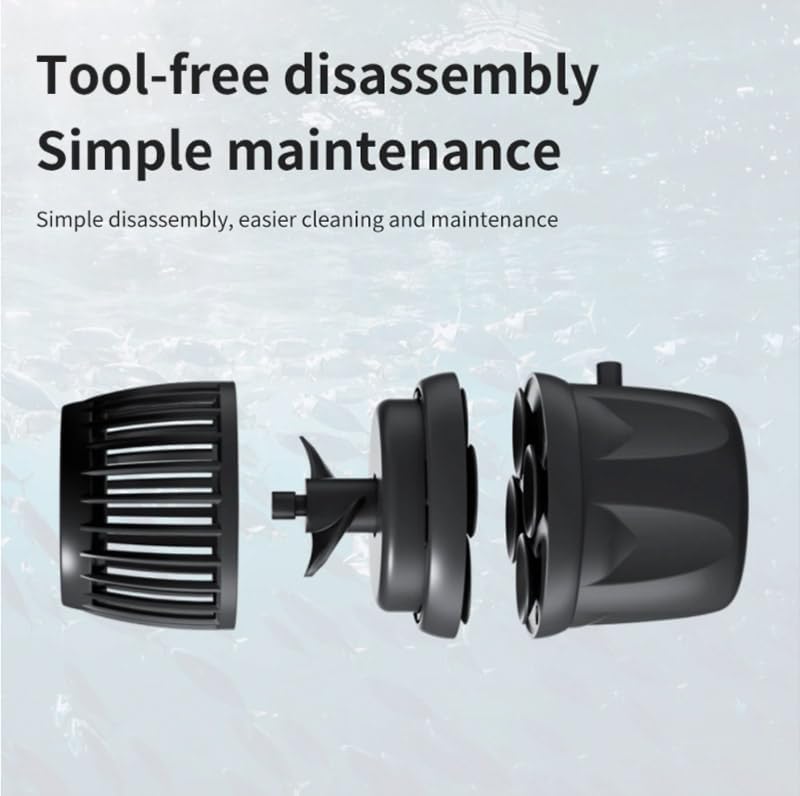
Image: An exploded view of the wavemaker pump, demonstrating its tool-free disassembly for easy cleaning and maintenance.
7. Troubleshooting
If you encounter issues with your wavemaker pump, refer to the following common problems and solutions:
- Pump Not Starting or Weak Flow:
- Check power connection to the controller and wall outlet.
- Ensure the impeller is not blocked by debris or algae. Clean the impeller and housing.
- Verify the pump is fully submerged in water.
- Check app settings for flow rate and mode.
- Unusual Noise:
- Inspect the impeller for damage or foreign objects.
- Ensure the pump is securely mounted and not vibrating against the glass.
- Clean the pump thoroughly to remove any debris causing friction.
- App Connectivity Issues:
- Ensure Bluetooth/Wi-Fi is enabled on your smartphone.
- Restart the app and the wavemaker controller.
- Ensure your smartphone is within range of the controller.
- Check for app updates.
- Pump Not Holding Securely to Glass:
- Verify your aquarium glass thickness is within the specified 8-21mm range.
- Ensure both the internal and external magnets are clean and free of obstructions.
- The magnetic force may be insufficient for glass thicker than 21mm.
8. Specifications
Key technical specifications for the Himarine Jecod Jebao DMP-45 Wavemaker Pump:
| Feature | Specification |
|---|---|
| Model Number | DMP-45 |
| Brand | Himarine (Jecod Jebao) |
| Power | 35W |
| Voltage | DC 24V |
| Maximum Flow Rate (Qmax) | 22000 L/H |
| Dimensions (L x W x H) | 90mm x 65mm (Pump Head) / 3.5"L x 3.5"W x 2.5"H (Overall Product) |
| Recommended Tank Size | 120-180 cm |
| Compatible Glass Thickness | 8-21 mm |
| Material | Plastic |
| Item Weight | 5.4 Pounds |
| Control Method | Smart App Control |

Image: A visual representation of the DMP-45 wavemaker pump with its key technical specifications listed.
9. Warranty and Support
Warranty Information: Specific warranty details for the Himarine Jecod Jebao DMP-45 Wavemaker Pump are not provided in this manual. Please refer to the product packaging or contact the retailer/manufacturer for warranty terms and conditions.
Customer Support: For technical assistance, troubleshooting beyond this guide, or inquiries regarding parts and service, please contact Himarine customer support through their official website or the contact information provided with your purchase.