
1. Product Overview
The KISSAIR 12,000 BTU Mini Split Air Conditioner and Heat Pump (Model A7201S-12K) is designed to provide efficient heating and cooling for spaces up to 750 sq. ft. This system features inverter technology for energy efficiency, ultra-quiet operation, and multiple modes for year-round comfort. It includes a self-cleaning function and an installation kit for professional setup.

Image 1: Overview of the KISSAIR Mini Split system, showing the indoor unit, outdoor unit, remote control, and installation accessories.
2. Safety Information
- Read all instructions carefully before installation and operation.
- This appliance must be installed by qualified personnel in accordance with national wiring regulations.
- Ensure the power supply matches the unit's specifications.
- Do not insert fingers or objects into the air inlet/outlet.
- Keep the remote control away from children.
- Disconnect power before cleaning or maintenance.
3. Setup and Installation
Professional installation is highly recommended for the KISSAIR Mini Split Air Conditioner and Heat Pump to ensure optimal performance and safety. A complete installation kit is provided with the unit to assist your technician.
3.1 Components Included
- Indoor Unit
- Outdoor Unit (Compressor)
- Remote Control
- Installation Kit (includes necessary piping, wiring, and accessories)
3.2 Installation Guidelines
- Refer to the separate detailed installation manual provided with your unit for specific instructions.
- Ensure proper ventilation for the outdoor unit.
- Verify correct electrical connections and grounding.
- Check for refrigerant leaks after installation.
4. Operating Instructions
The KISSAIR Mini Split system offers versatile operation through its remote control.
4.1 Remote Control Functions
Use the included remote control to manage all functions of your unit. The remote allows you to set schedules, select operating modes, and adjust temperatures.

Image 2: Illustration of the unit's precise temperature control, maintaining comfort within ±0.1°C.
4.2 Operating Modes
- Cooling Mode: For reducing room temperature. Adjustable from 60°F to 90°F.
- Heating Mode: For increasing room temperature. Adjustable from 60°F to 90°F.
- Fan Mode: Circulates air without heating or cooling. Choose from 6 fan speeds.
- Dehumidification Mode: Reduces humidity in the air.
- Auto Mode: Automatically selects cooling or heating based on the set temperature and ambient conditions.

Image 3: The unit provides both quick heating (60s) and quick cooling (30s) for year-round comfort in areas up to 750 sq. ft.
4.3 Special Features
- Smart ECO Mode: Optimizes energy consumption for reduced electricity bills.
- Sleep Mode: Operates at a whisper-quiet 28dB and gradually adjusts temperature for undisturbed rest.
- Vertical Swing: The 90° vertical swing feature ensures even air distribution throughout the room.

Image 4: The unit operates quietly, with noise levels as low as 28dB in Sleep Mode, ensuring a peaceful environment.
5. Maintenance
Regular maintenance ensures the longevity and efficient operation of your KISSAIR Mini Split system.
5.1 Air Filter Cleaning
The air filter is designed for easy removal and cleaning. It features silver-ion technology for sterilization and anti-fungus properties.
- Dismantle the filter from the top of the indoor unit.
- Clean the filter with water and mild detergent.
- Allow the filter to dry completely before reinserting.
- Regular cleaning helps maintain air quality and unit efficiency.
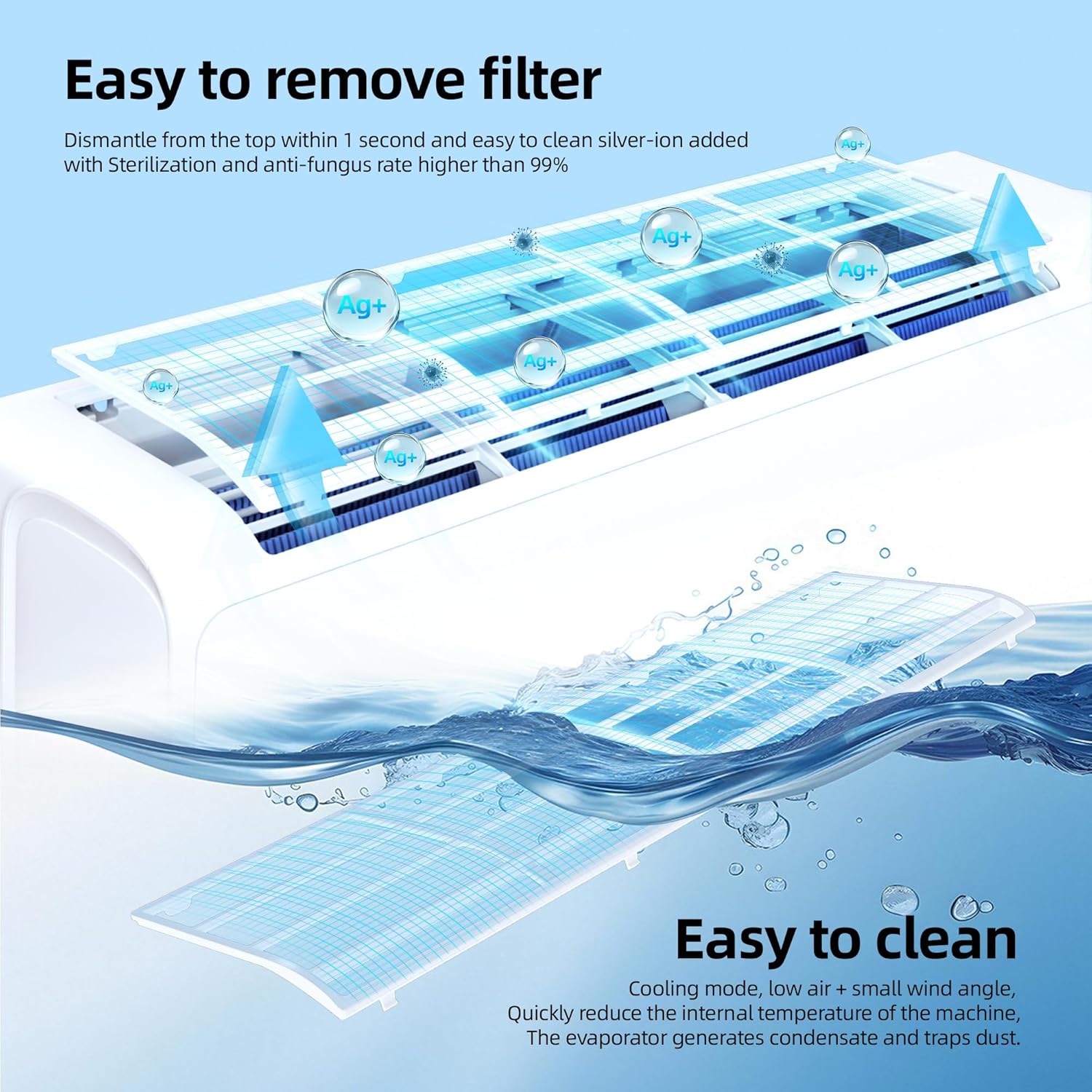
Image 5: The air filter can be easily removed from the top of the indoor unit for cleaning, featuring silver-ion for enhanced hygiene.
5.2 Self-Cleaning Function
The unit features a Smart ECO and Self-Cleaning function to maintain fresh, healthy air and optimize performance.
- Activate the Self-Cleaning function via the remote control.
- The unit performs a comprehensive six-step automatic washing process for both indoor and outdoor units.
- This process includes high-temperature sterilization at 135°F to eliminate bacteria and mold.

Image 6: The unit's Fifth Generation Automatic Washing system performs a thorough six-step cleaning, including 135°F high-temperature sterilization.
6. Troubleshooting
If you encounter issues with your KISSAIR Mini Split system, please refer to the following basic troubleshooting steps:
- Unit Not Turning On: Check if the unit is properly plugged into a power outlet and if the circuit breaker has tripped. Ensure the remote control batteries are functional.
- Insufficient Cooling/Heating: Verify that the correct mode is selected and the temperature setting is appropriate. Check if air filters are clean and not obstructed. Ensure no objects are blocking the indoor or outdoor unit's airflow.
- Unusual Noises: Minor operational noises are normal. If you hear loud or unusual sounds, power off the unit and contact a qualified technician.
- Water Leakage: Check if the drainage hose is properly installed and not blocked.
For persistent issues or complex problems, it is recommended to contact a professional HVAC technician or KISSAIR customer support.
7. Specifications
| Feature | Specification |
|---|---|
| Brand | KISSAIR |
| Model Number | A7201S-12K |
| Cooling/Heating Capacity | 12,000 BTU |
| Coverage Area | Up to 750 sq. ft. |
| SEER2 Rating | 22 |
| Noise Level (Sleep Mode) | 28 dB |
| Noise Level (Normal Operation) | 41 dB |
| Voltage | 115V |
| Wattage | 690 watts |
| Product Dimensions (Indoor Unit) | 8.94"D x 31.5"W x 13.39"H |
| Item Weight | 63.8 pounds |
| Special Features | Heating & Cooling, Self-Cleaning, Eco Mode, Inverter Technology, 90° Vertical Swing |
8. Warranty and Support
For warranty information, please refer to the documentation included with your purchase or visit the official KISSAIR website. For technical support, service inquiries, or to report any issues, please contact KISSAIR customer service through the contact information provided in your product packaging or on the manufacturer's website.