1. Introduction
This manual provides essential information for the installation, features, and maintenance of your LIKENDWB compatible main board. This component is designed as a replacement part for specific Samsung 40-inch television models. Please read these instructions carefully before proceeding with installation or use.
Important Safety Notice:
Television repair and component replacement should only be performed by qualified technicians. Working with electronic components, especially those connected to mains power, carries risks of electric shock and damage to the equipment. Always disconnect the television from the power supply before beginning any work.
2. Product Overview
The main board is the central processing unit of your television, responsible for managing all primary functions including video processing, audio output, input/output management, and network connectivity.
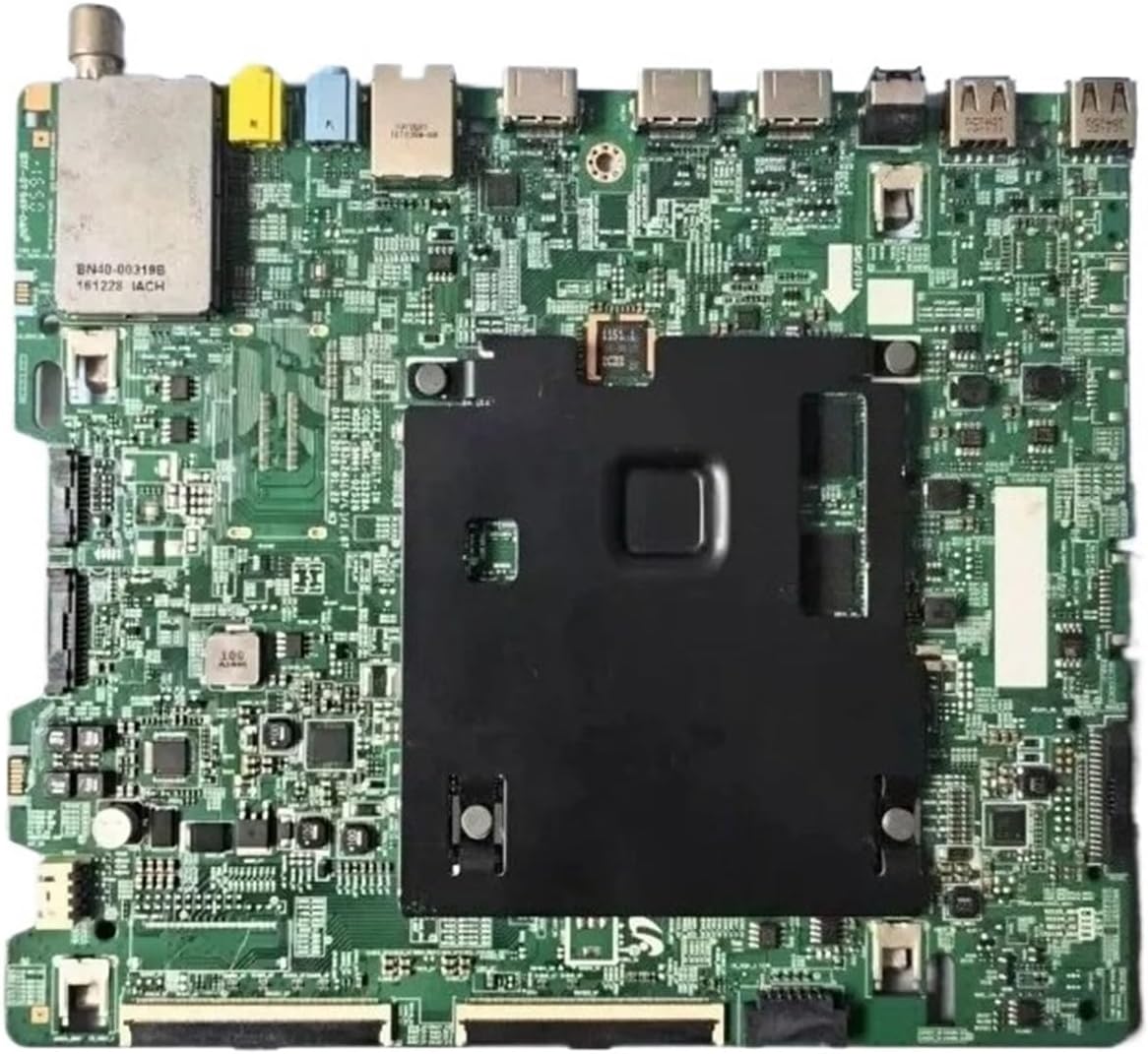
Figure 2.1: Top view of the LIKENDWB compatible Samsung TV main board, showing various integrated circuits, ports, and connectors.

Figure 2.2: Close-up view of various electronic components and integrated circuits on the main board, illustrating its complex design.
3. Key Features
- Enhanced Performance: Features an optimized processor and increased memory capacity for smoother operation, faster channel switching, quicker application loading, and seamless video playback.
- Extensive Connectivity: Supports multiple interfaces including HDMI, USB, and Ethernet. Also includes Bluetooth and network connections for diverse device integration.
- Smart TV Functionality: Enables network connectivity for access to major video streaming platforms and supports screen mirroring from compatible mobile phones or tablets to the TV display.
- Energy Efficiency: Constructed with energy-saving and environmentally friendly materials to reduce power consumption and minimize environmental impact without compromising performance.
4. Compatibility
This main board is compatible with the following Samsung 40-inch TV models and part numbers:
- Part Models: BN41-02528A, BN41-02528, BN94-10798A
- Compatible TV Models: UN40KU6300FXZA, UN40KU6000FXZX, UN40KU6290FXZC
Please verify the part number on your existing main board matches one of the compatible part models listed above before attempting replacement.

Figure 4.1: Close-up view of the main board, highlighting the printed model number "BN41-02528A" for verification.
5. Installation Instructions
Disclaimer: Installation of this component requires technical expertise. Improper installation can lead to electric shock, damage to the television, or personal injury. Professional installation by a certified technician is strongly recommended.
5.1. Safety Precautions
- Always disconnect the television from the main power outlet before starting any work.
- Wear anti-static wrist straps to prevent electrostatic discharge (ESD) damage to sensitive electronic components.
- Work in a clean, well-lit, and organized environment.
- Keep all removed screws and parts organized to ensure correct reassembly.
5.2. Tools Required
- Phillips head screwdriver
- Flathead screwdriver (for prying, if necessary)
- Anti-static wrist strap
- Small container for screws
5.3. Replacement Procedure (General Steps)
- Prepare the TV: Place the television face down on a soft, clean surface to protect the screen.
- Remove Back Cover: Unscrew and carefully remove the back cover of the television.
- Locate Main Board: Identify the existing main board. It is typically the largest circuit board with numerous ports (HDMI, USB, etc.).
- Disconnect Cables: Carefully disconnect all cables connected to the main board. Take photos or make notes of cable connections for accurate reassembly. This includes ribbon cables, power cables, and antenna/network cables.
- Remove Old Board: Unscrew the main board from the TV chassis and gently lift it out.
- Install New Board: Position the new LIKENDWB main board into place, ensuring all screw holes align. Secure it with the screws removed earlier.
- Reconnect Cables: Reconnect all cables to their correct ports on the new main board. Double-check all connections for security and proper orientation.
- Test (Optional but Recommended): Before replacing the back cover, temporarily connect the TV to power and perform a quick test to ensure basic functionality (e.g., power on, display, input recognition). Disconnect power again before proceeding.
- Reattach Back Cover: Carefully replace the back cover and secure it with all screws.
- Final Power On: Connect the TV to power and test all functions thoroughly.

Figure 5.1: Angled view of the main board, illustrating the arrangement of USB and HDMI ports, crucial for correct cable reconnection.

Figure 5.2: Rear view of the main board, displaying the circuit traces and solder points. This side typically faces the TV chassis.
6. Operation
Once the main board is correctly installed, the television's operation will resume as normal. The main board facilitates all standard TV functions, including:
- Displaying video and audio from various input sources (HDMI, USB, network).
- Accessing smart TV features and applications via network connection.
- Controlling TV settings and menu navigation.
- Supporting screen mirroring functionality.
Refer to your Samsung television's original user manual for detailed instructions on operating your specific TV model's features and settings.
7. Maintenance
The main board itself requires no routine maintenance. To ensure its longevity and optimal performance, consider the following general television maintenance tips:
- Keep the television in a well-ventilated area to prevent overheating.
- Avoid exposing the TV to extreme temperatures or humidity.
- Keep the TV free from dust by gently wiping the exterior with a soft, dry cloth. Do not spray cleaners directly onto the screen or components.
- Ensure stable power supply to prevent damage from power surges. Consider using a surge protector.
8. Troubleshooting
If you encounter issues after installing the main board, consider the following troubleshooting steps:
| Problem | Possible Cause | Solution |
|---|---|---|
| TV does not power on. | Loose power cable connection, faulty power supply unit (PSU), incorrect main board installation. | Check all power connections. Ensure the main board is seated correctly and all cables are firmly attached. Verify PSU functionality if possible. |
| No picture or distorted picture. | Loose ribbon cables to the T-Con board or panel, incorrect input selection, main board issue. | Ensure all ribbon cables are securely connected. Check TV input settings. If problem persists, professional diagnosis may be required. |
| No sound. | Loose audio cables, incorrect audio settings, main board audio circuit issue. | Verify external audio connections. Check TV audio settings. |
| Network/Smart features not working. | Loose Ethernet cable, incorrect Wi-Fi settings, network configuration issue. | Check Ethernet cable connection. Reconfigure Wi-Fi settings. Ensure your home network is functioning correctly. |
If these steps do not resolve the issue, it is recommended to seek assistance from a qualified television repair technician.
9. Specifications
| Feature | Detail |
|---|---|
| Product Name | TV Motherboard |
| Part Model | BN41-02528A |
| Compatible Part Models | BN41-02528, BN94-10798A |
| Compatible TV Size | 40 INCH |
| Compatible TV Models | UN40KU6300FXZA, UN40KU6000FXZX, UN40KU6290FXZC |
| Menu Language Support | Most languages (as supported by the TV's firmware) |
| HDMI Function Support | Yes |
| AV Function Support | Yes |
| USB Function Support | Yes |
| Network Function Support | Yes |
| Tuner Function Support | No (Tuner functionality is typically integrated into the TV, not solely dependent on the main board) |
| Technical Support | Available from seller |
| Compatible Equipment Style | Display Equipment |
| Item Weight | 1.76 ounces (approx. 50 grams) |
| Package Dimensions | 0.39 x 0.39 x 0.39 inches (approx. 1 x 1 x 1 cm) - Note: These dimensions appear to be placeholder values and may not reflect the actual product size. |
10. Support and Contact Information
For technical assistance, compatibility inquiries, or further questions regarding this product, please contact the seller directly through the platform where the purchase was made.
The seller, LIKENDWB, is committed to providing support for their products.