
1. Introduction
The Sovol SH03 Filament Dryer is designed to remove moisture from 3D printer filaments, improving print quality and preventing common issues such as clogging, bubbling, and poor layer adhesion. This device features dual independent heating chambers, a maximum temperature of 85°C, and an auto dehumidification system. It supports up to four 1KG spools simultaneously and is compatible with various filament types including PLA, PETG, ABS, TPU, ASA, PC, and PA.

Figure 1: Sovol SH03 Filament Dryer main unit.
2. Safety Information
Please read all safety instructions before operating the device to prevent injury or damage. Keep this manual for future reference.
- Electrical Safety: Ensure the power supply voltage matches the device requirements. Do not operate with damaged power cords or plugs. Disconnect power before cleaning or maintenance.
- Heat Safety: The device operates at high temperatures. Avoid direct contact with internal heating elements during operation. Allow the device to cool down before handling internal components.
- Ventilation: Ensure adequate ventilation around the device during operation. Do not block air vents.
- Placement: Place the dryer on a stable, heat-resistant surface. Keep away from flammable materials and water.
- Children and Pets: Keep the device out of reach of children and pets.
3. Product Overview
The Sovol SH03 features a robust design with two independent heating chambers, each capable of holding two 1KG filament spools. The control panel provides real-time monitoring and easy adjustment of drying parameters.
3.1 Components
- Main Drying Unit with Dual Chambers
- Transparent Lids
- Control Panel with Display
- Power Adapter
- PTFE Tubes (for 1.75mm filament feeding)

Figure 2: Sovol SH03 with dual independent heating chambers, showing different temperature settings for PLA and PC.
4. Setup
- Unpack: Carefully remove the Sovol SH03 from its packaging. Inspect for any damage.
- Placement: Place the dryer on a flat, stable, and heat-resistant surface with adequate space for ventilation.
- Power Connection: Connect the power adapter to the device and then plug it into a suitable power outlet.
- Loading Filament: Open the transparent lids. Place up to two 1KG filament spools in each chamber. Ensure the spools rotate freely on the rollers.
- Filament Feeding (Optional): If printing directly from the dryer, feed the filament through the designated holes on the lid. For 1.75mm filament, use the provided PTFE tubes for smoother feeding and better sealing.

Figure 3: Sovol SH03 demonstrating compatibility with various spool sizes and filament diameters (1.75mm with PTFE tube, 2.85mm without).
5. Operation
5.1 Control Panel Overview
The control panel allows you to manage drying settings for each chamber independently.

Figure 4: Control panel displaying target temperature, real-time temperature, real-time humidity, and set drying time.

Figure 5: Detailed explanation of control panel buttons and display indicators.
- Relative Humidity: Displays current humidity.
- Materials: Indicates selected filament type.
- Auto Mode Icon: Shows if Auto Mode is active.
- Chamber Switching/Copy Key: Short press to switch between Chamber 1, Chamber 2, or dual-chamber simultaneous working mode. Long press (2 seconds) to copy parameters from one chamber to another.
- Setting Selection Key/Auto Mode: Short press to switch parameters. Long press (2 seconds) to enter/leave Auto Mode.
- Up/Down Buttons: Adjust values for temperature and time.
- Start/End Button: Initiates or terminates the drying process.
- Current Temperature: Displays the actual temperature inside the chamber.
- Setting Temperature: Displays the target temperature.
- Time: Displays the remaining drying time.
- Fan, Heating Module Working Status Icon: Indicates active components.
5.2 Drying Process
- Power On: Press the power button to turn on the device.
- Select Chamber: Short press the Chamber Switching/Copy Key to select Chamber 1, Chamber 2, or both.
- Set Filament Type: Use the Setting Selection Key to navigate to the filament type setting. Use the Up/Down buttons to select the appropriate filament (e.g., PLA, PETG, ABS). The device has pre-set temperatures and times for 10 different filament types.
- Adjust Temperature/Time (Optional): If needed, use the Setting Selection Key to navigate to temperature or time settings and adjust with the Up/Down buttons. Refer to the recommended drying temperatures table below.
- Start Drying: Press the Start/End button to begin the drying process. The display will show real-time temperature and humidity.
- Auto Dehumidification: When the internal temperature reaches the preset target, the moisture vent will automatically open to discharge humidity.
- End Drying: The device will automatically stop after the set time. You can manually stop the process by pressing the Start/End button.
5.3 Auto Mode
In Auto Mode, the device monitors humidity and automatically starts or stops drying.
- If the current humidity exceeds the set threshold, the chamber will automatically start the drying function.
- If the humidity falls below the set threshold, the chamber will enter storage mode after drying for 2 hours.
- To activate/deactivate Auto Mode, long press the Setting Selection Key for 2 seconds.

Figure 6: Explanation of the Auto Mode functionality.
5.4 Recommended Filament Drying Temperatures and Times
The following table provides general guidelines. Optimal settings may vary based on filament brand and environmental conditions.
| Filament Type | Drying Temperature | Drying Time |
|---|---|---|
| PLA | 50°C | 4-12h |
| PETG | 65°C | 4-8h |
| TPU | 70°C | 4-8h |
| ABS | 80°C | 8-12h |
| PVA | 50°C | 4-8h |
| ASA | 80°C | 8-12h |
| PA | 80°C | ≥12h |
| PP | 55°C | 4-8h |
| PC | 80°C | 8-12h |
| PET | 80°C | 8-12h |
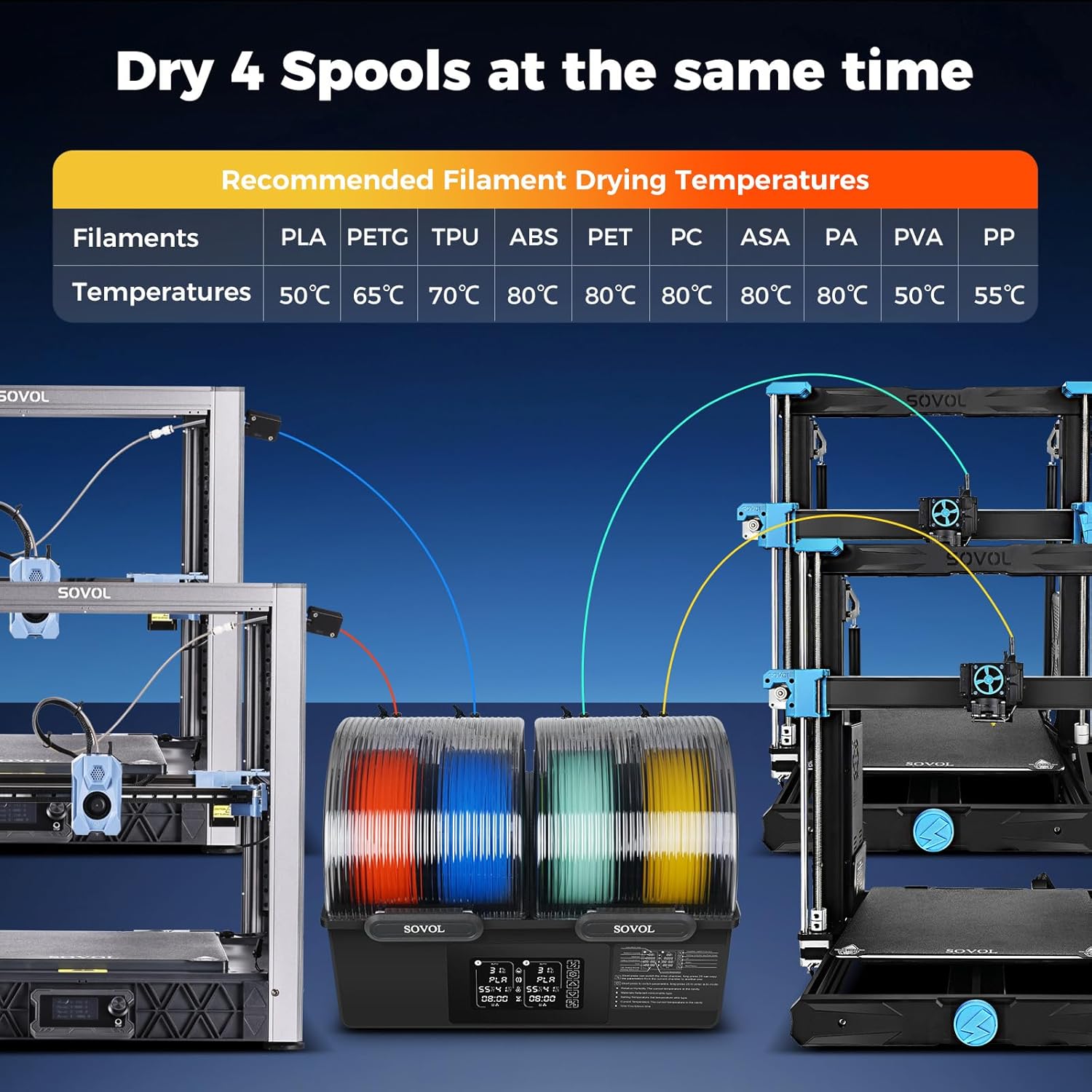
Figure 7: Sovol SH03 drying four spools at once, illustrating the recommended filament drying temperatures.

Figure 8: Illustration of the 360° circulating hot air system for even drying.

Figure 9: The Auto Dehumidification System actively discharges moisture from the chamber via steam holes.
6. Maintenance
Regular maintenance ensures optimal performance and longevity of your Sovol SH03 Filament Dryer.
- Cleaning: Ensure the device is unplugged and cooled before cleaning. Wipe the exterior with a soft, dry cloth. Do not use abrasive cleaners or solvents.
- Internal Cleaning: Periodically check the interior for any filament debris. Remove carefully if present.
- Desiccant (Optional): For enhanced moisture absorption during storage, desiccant packets can be placed in the designated cavity within the chambers.
- Storage: When not in use for extended periods, store the dryer in a dry, dust-free environment.
7. Troubleshooting
This section addresses common issues you might encounter with your Sovol SH03 Filament Dryer.
| Problem | Possible Cause | Solution |
|---|---|---|
| Device does not power on | Power cable not connected; Power outlet faulty | Check power cable connection; Try a different power outlet. |
| Filament not drying effectively | Incorrect temperature/time settings; Lids not properly sealed; Overloaded chambers | Adjust settings according to filament type; Ensure lids are securely closed; Do not exceed maximum capacity. |
| Display shows error message | Internal sensor issue; Overheating protection triggered | Power cycle the device. If error persists, contact support. The device has thermal runaway protection that disconnects heating if temperature exceeds 130°C and resumes below 90°C. |
| Unusual noise during operation | Fan obstruction; Loose component | Ensure no foreign objects are obstructing the fan. If noise persists, contact support. The operating noise level is typically below 50dB. |
8. Specifications
| Feature | Specification |
|---|---|
| Input Voltage | US Regulations: 100-120V 60Hz; European Standard: 200-240V 50Hz |
| Rated Power | 400W (Dual 200W PTC heaters) |
| Filament Diameter | 1.75mm / 2.85mm |
| Maximum Consumable Capacity | Four rolls of consumables ≤70mm (width) or Two rolls of consumables ≤150mm (width) |
| Display Humidity Range | 0-99% |
| Display Temperature Range | 0-99°C |
| Work Temperature Range | 45°C-85°C |
| Machine Size (L*W*H) | 372mm * 288mm * 263mm |
| Equipment Weight | 3.4 kg |
| Environmental Parameters | 5°C-40°C |
| Applicable Filament | PLA, ABS, PETG, TPU, PVA, ASA, PA, PP, PC, PET |

Figure 10: Detailed product specifications for the Sovol SH03 Filament Dryer.
9. Warranty and Support
The Sovol SH03 Filament Dryer comes with a 1-Year Manufacturer Warranty.
For technical support, troubleshooting assistance, or warranty claims, please contact Sovol customer service through their official website or the platform where the product was purchased. Please have your model number (SH03) and purchase information ready when contacting support.


