
1. Product Overview
The Parrot Uncle BBF3006 is a 20-inch Bohemian flush mount ceiling fan with integrated lighting, designed for rooms up to 225 sq. ft. It features a quiet and energy-efficient DC motor, 6-speed operation, and reversible airflow for year-round comfort. Control options include an infrared remote and the 'FanLamp Pro' mobile application.
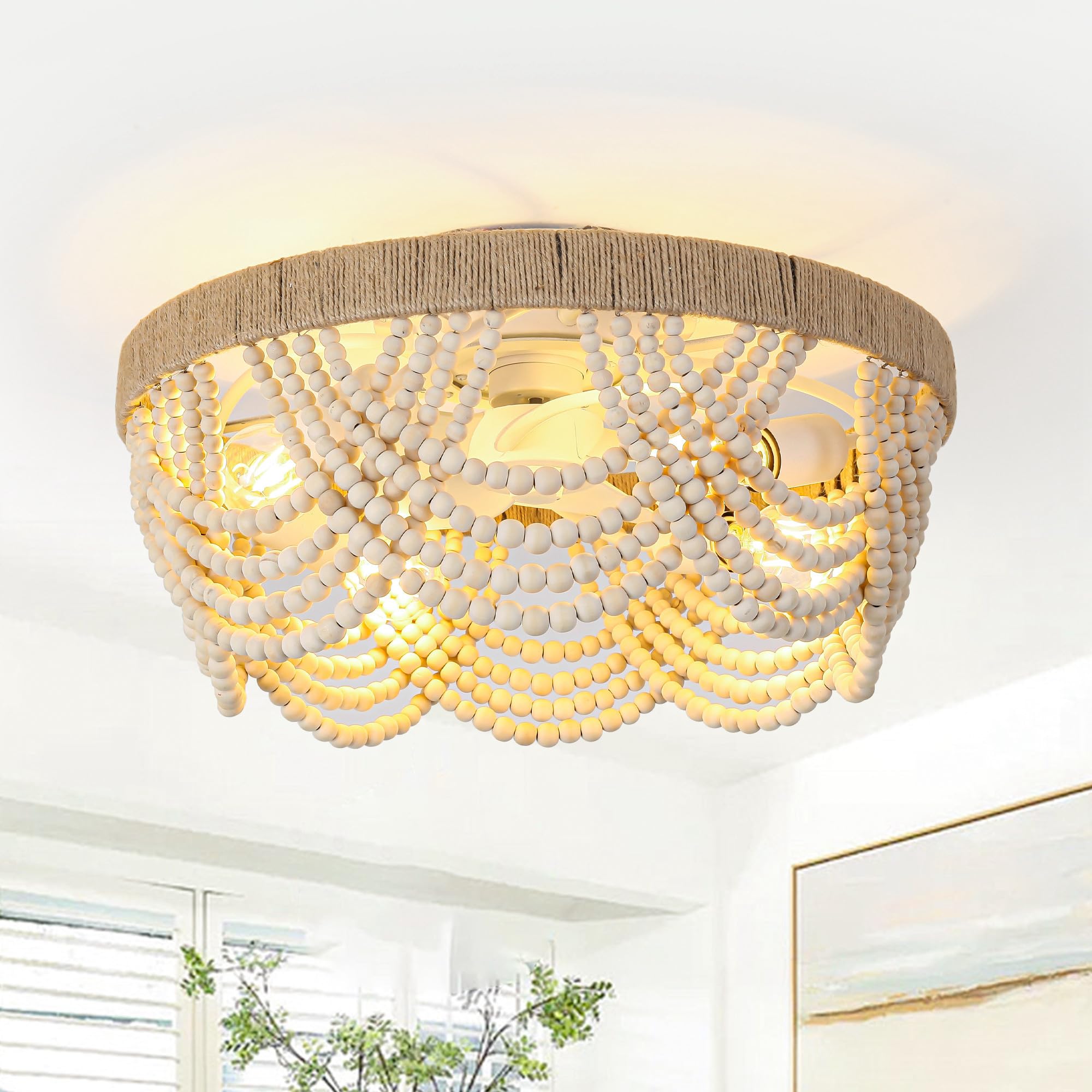
Image 1.1: The Parrot Uncle BBF3006 ceiling fan, showcasing its Bohemian design with wooden beads and rope accents.
2. Safety Information
Please read and understand all instructions before beginning installation. Improper installation can lead to electric shock, fire, or personal injury.
- Ensure the power is disconnected at the circuit breaker before installation or maintenance.
- All electrical connections must be in accordance with local codes, ordinances, and the National Electrical Code (NEC).
- Consult a qualified electrician if you are unfamiliar with electrical wiring.
- The mounting structure must be capable of supporting a minimum of 35 lbs (15.9 kg).
- Do not bend fan blade holders during installation or cleaning.
- Keep children away from the fan during operation.
3. Package Contents
Verify that all components are present before beginning installation:
- Ceiling Fan Unit (with integrated DC motor and light sockets)
- Remote Control
- Mounting Hardware Kit
- Instruction Manual
Note: E26 base bulbs (max 40W each) are not included and must be purchased separately.
4. Setup and Installation
This ceiling fan is designed for flush mount installation. It is recommended that two people perform the installation due to the weight and size of the unit.
4.1 Pre-Installation
- Turn off power at the circuit breaker.
- Remove existing fixture and disconnect wiring.
- Ensure the junction box is securely mounted and capable of supporting the fan's weight.
4.2 Mounting the Fan
- Attach the mounting bracket to the ceiling junction box using the provided screws.
- Carefully lift the fan unit and connect the electrical wires (Live, Neutral, Ground) according to standard wiring practices.
- Secure the fan unit to the mounting bracket.
- Install four E26 base bulbs (not included) into the light sockets.

Image 4.1: Underside view of the fan, illustrating the central fan blades and the four E26 light bulb sockets.
4.3 Remote Control Pairing
After installation, restore power. Within 30 seconds of restoring power, press and hold the 'ON' button on the remote control for 5 seconds until you hear a beep, indicating successful pairing.
5. Operating Instructions
The fan can be controlled via the included remote control or the 'FanLamp Pro' mobile application.
5.1 Remote Control Functions

Image 5.1: The included remote control for the ceiling fan.
- ON/OFF: Turns the fan on or off.
- Light Button: Toggles the light on/off.
- Fan Speed (1-6): Adjusts fan speed from 1 (lowest) to 6 (highest).
- Reverse Button: Changes the direction of fan rotation (clockwise for winter, counter-clockwise for summer).
- Timer (1h, 2h, 4h, 8h): Sets the fan to turn off automatically after the selected duration.
- Memory Function: The fan retains the last used settings (speed, light, direction) after power cycles.
5.2 Mobile App Control
Download the 'FanLamp Pro' application from the iOS App Store or Android Play Store. Follow the in-app instructions to connect and control your fan. The app provides comprehensive smart control, including all remote functions and additional features.
6. Maintenance
Regular maintenance ensures optimal performance and longevity of your ceiling fan.
- Cleaning: Use a soft, damp cloth to clean the fan's exterior. Do not use abrasive cleaners or solvents. Ensure power is off before cleaning.
- Bulb Replacement: Turn off power before replacing bulbs. Allow bulbs to cool completely. Replace with E26 base bulbs (max 40W each).
- Tighten Fasteners: Periodically check and tighten all screws and fasteners to ensure secure operation.
7. Troubleshooting
If you experience issues with your fan, refer to the following common problems and solutions:
| Problem | Possible Cause | Solution |
|---|---|---|
| Fan does not start | No power, loose wiring, remote not paired | Check circuit breaker. Verify wiring connections. Re-pair remote control (see Section 4.3). |
| Light does not work | Bulb faulty, loose wiring | Replace bulbs. Check light wiring connections. |
| Fan makes noise | Loose screws, unbalanced blades | Tighten all mounting screws. Ensure fan blades are securely attached. |
| Remote control not responding | Dead batteries, remote not paired | Replace remote batteries. Re-pair remote control (see Section 4.3). |
8. Specifications
| Brand | Parrot Uncle |
| Model Name | Low Profile Ceiling Fan with Light (BBF3006) |
| Size | 20 Inch |
| Color | White |
| Material | Iron, Wood |
| Style | Bohemian |
| Installation Type | Flush Mount |
| Power Source | AC/DC |
| Voltage | 120 Volts |
| Wattage | 20 watts (max) |
| Control Method | App, Remote |
| Included Components | Light Kit, Remote Control |
| Item Weight | 7 Pounds |
| Recommended Room Size | Up to 225 sq. ft. |
| Airflow (CFM) | 1420 CFM |
| Noise Level | 28 dB |
9. Warranty and Support
For warranty information, technical support, or replacement parts, please contact Parrot Uncle customer service or refer to the retailer's website where the product was purchased. Specific warranty details are not provided in this manual.
You can visit the Parrot Uncle Store on Amazon for more information.


