
1. Introduction
This manual provides detailed instructions for the Pyle 11-inch ATV/UTV Sound Bar, model PWPSB1103. This rugged, high-powered speaker system is designed for off-road environments, offering superior audio performance with its built-in Class D amplifier, 2-way speaker system, and vibrant LED lighting. Its waterproof design ensures durability in various outdoor conditions.
Key features include:
- 80 Watts Peak Power with Class D Amplifier
- Dual 3.5-inch Mid-Bass Drivers and 1-inch Dome Tweeters
- Bluetooth 5.0 for Wireless Audio Streaming
- IPX6 Marine-Rated Waterproof Construction
- Customizable LED Lighting (Red, Blue, Purple)
- 3.5mm AUX Input and RCA Output for System Expansion
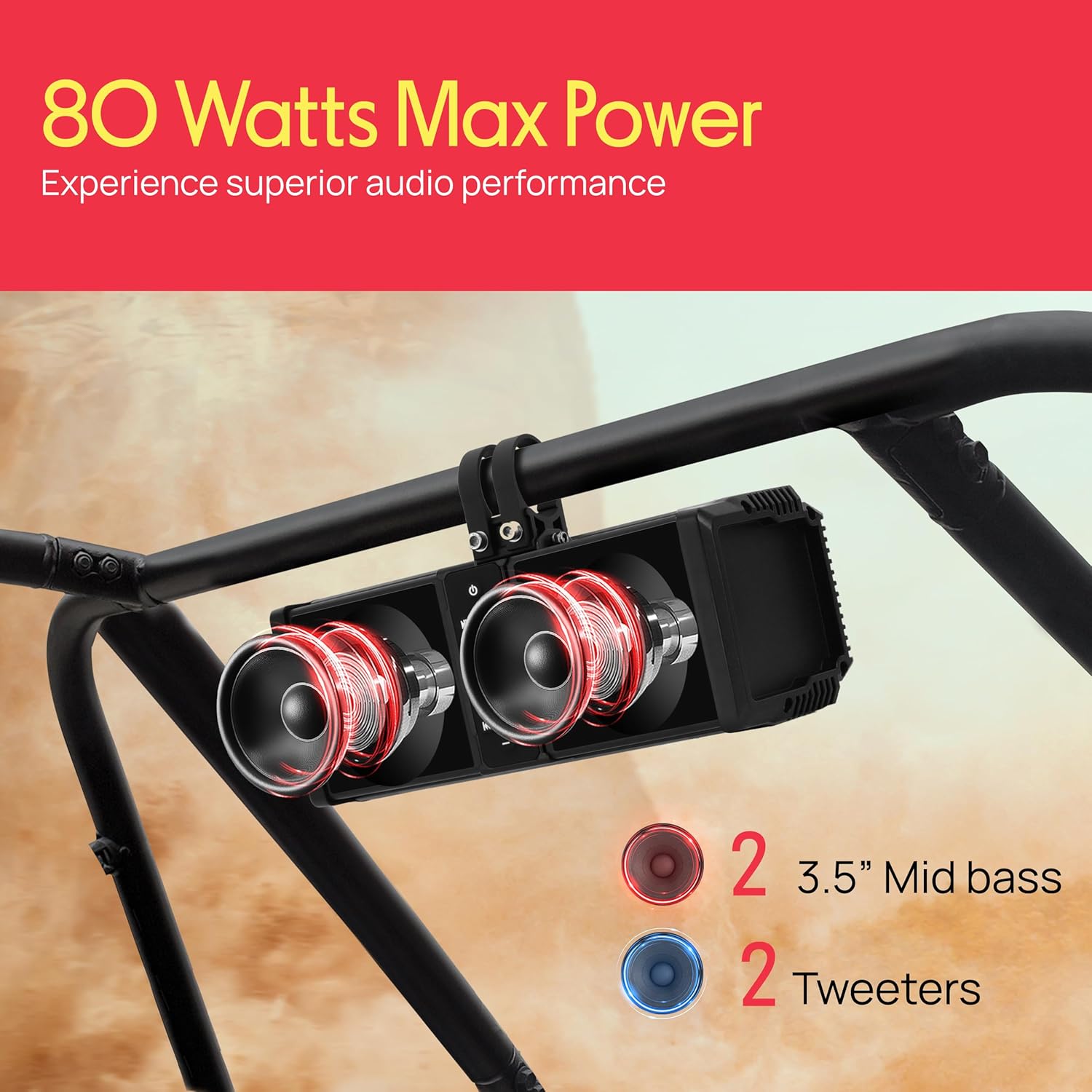
Image: The Pyle 11-inch ATV/UTV Sound Bar highlighting its 80 Watts Max Power, featuring two 3.5-inch mid-bass drivers and two tweeters for a 2-way speaker system.
2. Safety Information
WARNING:
- Read all instructions carefully before installation and operation.
- Ensure proper wiring and connections to avoid electrical hazards.
- Do not attempt to disassemble or modify the unit. This may void the warranty and cause damage.
- Keep the unit away from extreme temperatures, direct sunlight for prolonged periods, and corrosive chemicals.
- Always secure the sound bar properly during installation to prevent it from dislodging during vehicle operation.
- Consult a professional for installation if you are unsure about any steps.
3. What's in the Box?
Please check the contents of the package to ensure all items are present and undamaged:
- 11-inch Powered Soundbar
- 3.5mm Audio Connection Cable
- Aluminum Rings (for mounting)
- Non-slip Rubber Pads
- Aluminum Clamp Bases
- Stainless Steel Bolts
- Aluminum Buckles

Image: All components included in the Pyle 11-inch ATV/UTV Sound Bar package, such as the soundbar unit, 3.5mm audio cable, aluminum rings, non-slip rubber pads, clamp bases, stainless steel bolts, and aluminum buckles.
4. Setup and Installation
Follow these steps for proper installation of your Pyle ATV/UTV Sound Bar:
4.1 Mounting the Sound Bar
- Unbolt Bracket: Loosen and remove the bolts from the aluminum clamp bases.
- Slide on Buckle: Position the non-slip rubber pads around your vehicle's roll bar or mounting surface. Place the aluminum buckles over the rubber pads.
- Attach Sound Bar: Align the sound bar's mounting points with the aluminum clamp bases.
- Tighten Screws: Securely fasten the aluminum clamp bases with the stainless steel bolts, ensuring the sound bar is firmly mounted. Do not overtighten.
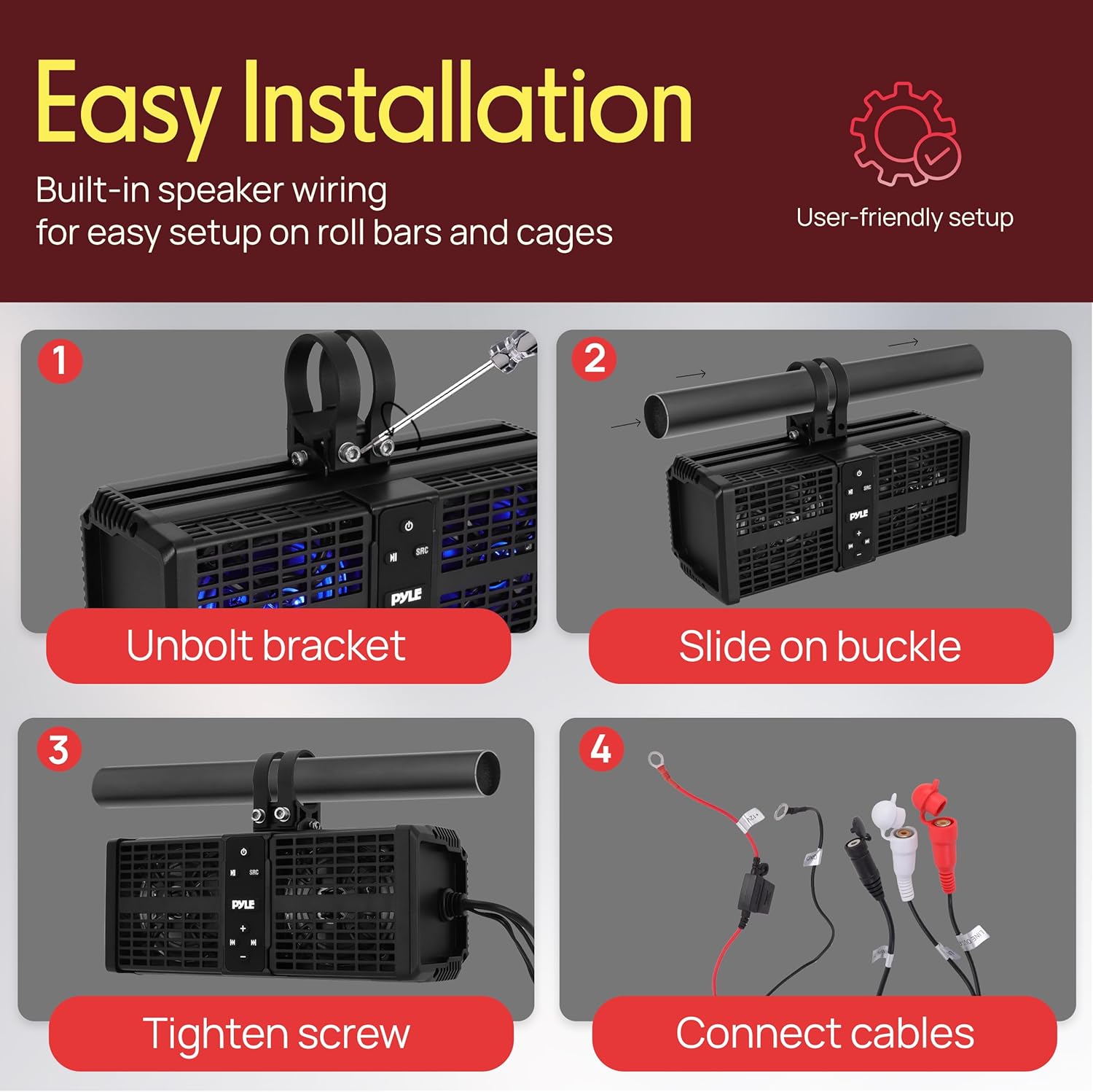
Image: A four-step visual guide demonstrating the easy installation process: unbolting the bracket, sliding on the buckle, tightening the screw, and connecting the cables.
4.2 Wiring Connections
Ensure your vehicle's power is off before making any electrical connections.
- Power Connection: Connect the red power wire to a 12V DC positive (+) power source (e.g., vehicle battery). It is recommended to use an inline fuse (not included) for protection.
- Ground Connection: Connect the black ground wire to a secure chassis ground point on your vehicle.
- Remote Turn-On (if applicable): If your vehicle has a remote turn-on lead, connect it to the sound bar's remote input (if available). Otherwise, the sound bar will power on/off with the main power switch.
- RCA Output (Optional): If connecting to an external amplifier or powered subwoofer, use the RCA output cables.
- AUX Input (Optional): For wired audio input, connect your device using the supplied 3.5mm audio connection cable.
5. Operating Instructions
5.1 Power On/Off
Press the Power button on the sound bar to turn the unit on or off.
5.2 Bluetooth Pairing
- Ensure the sound bar is powered on and in Bluetooth mode. The LED indicator will typically flash, indicating it's ready for pairing.
- On your mobile device, enable Bluetooth and search for available devices.
- Select "Pyle Audio" or a similar name from the list of devices.
- Once paired, the LED indicator will stop flashing and remain solid. You can now stream audio wirelessly.

Image: The Pyle ATV/UTV Sound Bar demonstrating its multi-source audio access, including RCA output for expansion, a source button to switch between Bluetooth and AUX In modes, and a Bluetooth range of 30+ feet.
5.3 AUX Input
To use the 3.5mm AUX input:
- Connect your audio device (e.g., smartphone, MP3 player) to the sound bar's AUX input using the supplied 3.5mm audio cable.
- Press the SRC (Source) button on the sound bar to switch to AUX input mode.
- Adjust the volume on both your device and the sound bar.
5.4 LED Lighting Control
The sound bar features customizable LED lights:
- Press the LED button (if available) or cycle through modes using the Mode button.
- Available colors typically include Red, Blue, and Purple.
- Modes may include solid color or pulsating effects.

Image: Three UTVs equipped with the Pyle Sound Bar, showcasing the customizable LED lighting effects in red, blue, and purple, illuminating the night.
5.5 Volume Control
Use the Volume Up (+) and Volume Down (-) buttons on the sound bar to adjust the audio level.
6. Maintenance
To ensure the longevity and optimal performance of your Pyle ATV/UTV Sound Bar, follow these maintenance guidelines:
- Cleaning: Use a soft, damp cloth to wipe the exterior of the sound bar. Avoid using harsh chemicals, solvents, or abrasive cleaners.
- Water Exposure: While the unit is IPX6 waterproof, it is not designed for submersion. After exposure to water, wipe the unit dry.
- Connection Checks: Periodically inspect all wiring connections to ensure they are secure and free from corrosion.
- Storage: If storing the vehicle or sound bar for an extended period, ensure it is clean and dry. Store in a cool, dry place away from direct sunlight.

Image: The Pyle ATV/UTV Sound Bar shown in a rainy environment, illustrating its IPX6 waterproofing and suitability for all-weather conditions, ideal for ATV, UTV, 4x4, Jeep, and marine watercraft use.
7. Troubleshooting
If you encounter issues with your sound bar, refer to the following common problems and solutions:
| Problem | Possible Cause | Solution |
|---|---|---|
| No Power | Loose power connection; Blown fuse; Vehicle battery low. | Check power and ground wires; Replace fuse if blown; Charge vehicle battery. |
| No Sound | Volume too low; Incorrect source selected; Device not playing audio; Muted. | Increase volume on sound bar and device; Press SRC button to select correct input; Ensure device is playing audio; Check if sound bar is muted. |
| Bluetooth Not Connecting | Sound bar not in pairing mode; Device Bluetooth off; Device too far; Interference. | Ensure sound bar is in Bluetooth pairing mode; Turn device Bluetooth on/off; Move device closer to sound bar; Avoid sources of strong electromagnetic interference. |
| Distorted Sound | Volume too high; Poor audio source quality; Loose connections. | Reduce volume; Try a different audio source; Check all wiring connections. |
8. Specifications
| Feature | Detail |
|---|---|
| Brand | Pyle |
| Model Number | PWPSB1103 |
| Speaker Type | Soundbar |
| Speaker Size | 11 Inches |
| Maximum Output Power | 80 Watts |
| Connectivity Technology | Bluetooth 5.0 |
| Mounting Type | Handlebar Mount, Ceiling Mount |
| Material | Butyl Rubber Surround, Polypropylene Mica Cone |
| Waterproof Rating | IPX6 |
| Item Dimensions (D x W x H) | 23.4" x 4.6" x 4.57" |
| UPC | 842893177595 |
9. Warranty Information
This Pyle ATV/UTV Sound Bar (Model PWPSB1103) comes with a 1-Year Warranty from the date of purchase. This warranty covers manufacturing defects and workmanship under normal use. It does not cover damage caused by misuse, accident, unauthorized modification, or improper installation.
Please retain your proof of purchase for warranty claims.
10. Customer Support
For technical assistance, troubleshooting beyond this manual, or warranty inquiries, please contact Pyle customer support.
Refer to the official Pyle website or your purchase documentation for the most current contact information.


