
Introduction
The TrysGame Mini Hand Operated Drone is a gesture-controlled flying toy designed for interactive play. Featuring omnidirectional obstacle avoidance and dynamic LED lights, this durable drone offers an engaging experience for users aged 6 and up. This manual provides essential information for safe setup, operation, and maintenance.
Safety Information
- Avoid direct impact with eyes.
- Ensure the play area is clear of obstructions and hazards.
- Do not operate near water or in wet conditions.
- Keep fingers and hair away from rotating propellers. The fully enclosed mesh-like shell provides protection, but caution is advised.
- Supervise young children during operation.
Package Contents
- TrysGame Mini Hand Operated Drone
- USB Charging Cable
- User Manual
Setup
1. Charging the Drone
The drone is equipped with a rechargeable battery. Before first use, or when the drone's lights blink red, fully charge the device.
- Connect the provided USB charging cable to the drone's charging port.
- Plug the other end of the USB cable into a compatible USB power source (e.g., computer, power adapter, car charger, portable battery).
- The indicator light will show charging status. It typically takes 35-45 minutes for a full charge.
- Once fully charged, the indicator light will change (e.g., turn green or turn off) to indicate completion.

Image: The drone connected to a USB cable for charging, illustrating the 'Fast And Hassle-free' charging feature.
2. Powering On/Off
- To power on: Locate the small power button on the drone and press it. The LED lights will illuminate.
- To power off: Gently catch the drone in your hand and flip it upside down. The propellers will stop, and the lights will turn off.
3. Calibration (Optional)
If the drone exhibits unstable flight, recalibration may be necessary:
- With the drone powered on, gently shake it horizontally 5 times until the lights blink.
- Place the drone on a flat, stable surface. The lights will stop blinking and turn solid blue, indicating successful calibration.
Operating Instructions
1. Taking Flight
- Simply power on the drone and gently toss it into the air. The propellers will automatically start spinning, and the drone will begin to hover.
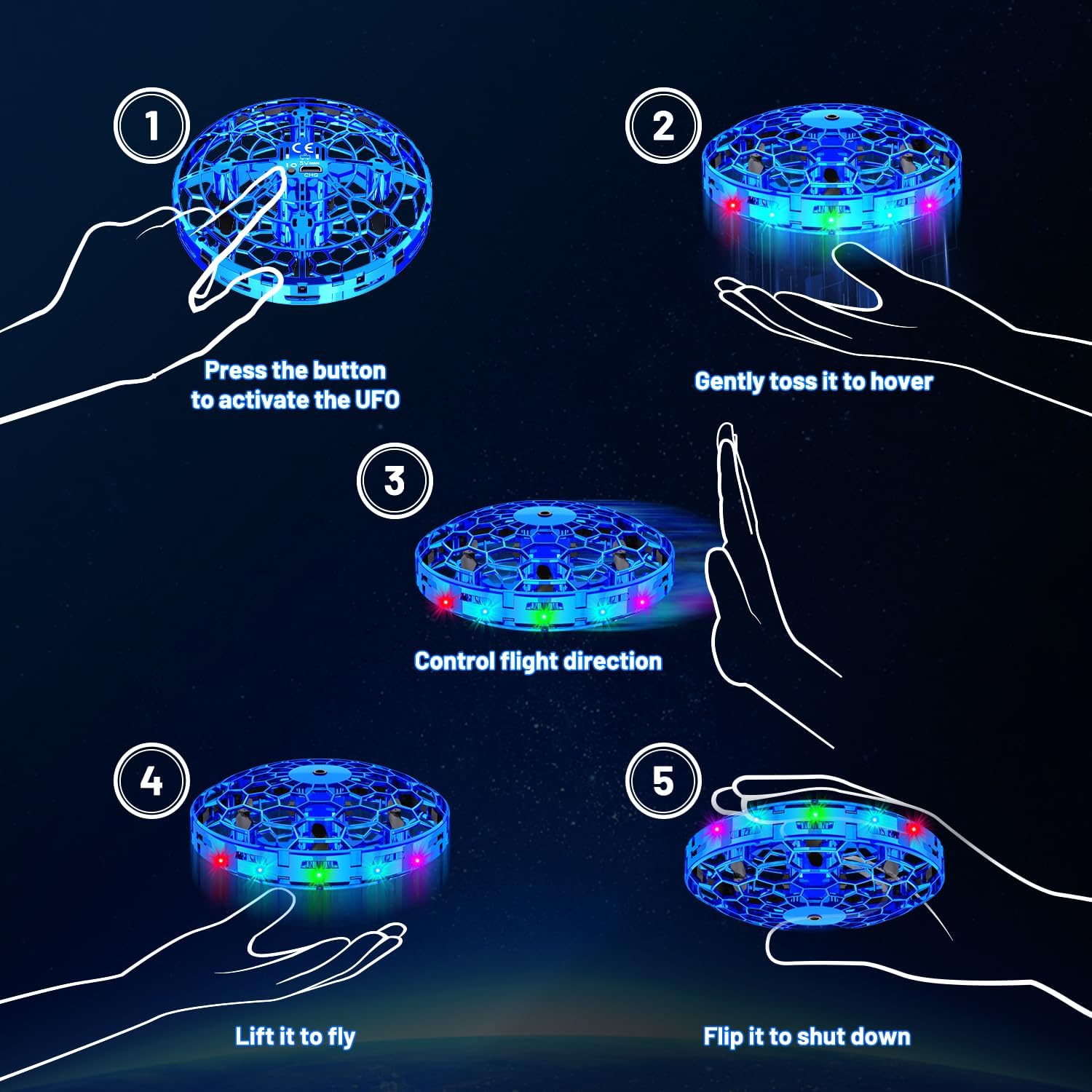
Image: A visual guide demonstrating the five steps of drone operation, from activation to stopping flight.
2. Obstacle Avoidance
- The drone features a six-sided omnidirectional obstacle avoidance system. It will intelligently detect and steer clear of nearby objects, including walls and hands.

Image: The drone demonstrating automatic obstacle avoidance, safely navigating around furniture.
3. Gesture Control
- You can guide the drone's flight direction by placing your hand near it. The drone will sense your hand and move in the opposite direction.

Image: A hand gently pushing the drone upwards, illustrating the 'Easy To Pick Up' feature.
4. 360° Flip Stunt
- To perform a 360° flip, draw a half-circle from top to bottom with your hand near the drone. The drone will execute the stunt.

Image: The drone executing a '360° Tumbling' stunt, showcasing its acrobatic capabilities.
5. Stopping Flight
- To stop the drone, gently catch it in your hand and flip it upside down. The propellers will immediately cease rotation.

Image: A hand demonstrating how to perform a 'Flip Stop' to safely land the drone.
Official Product Videos
Maintenance
- Cleaning: Use a soft, dry cloth to clean the drone. Avoid using harsh chemicals or liquids.
- Propeller Replacement: The drone comes with extra propellers. If a propeller is damaged, carefully remove the screws holding the protective mesh, replace the damaged propeller, and reassemble.
Troubleshooting
- Drone not flying: Ensure the drone is fully charged and powered on. Give it a gentle toss into the air to initiate flight.
- Unstable flight: Perform the calibration steps outlined in the Setup section.
- Blinking red lights: This indicates a low battery. Recharge the drone using the provided USB cable.
- Drone not responding to gestures: Ensure your hand is close enough to the drone for the sensors to detect it.
Product Specifications
| Feature | Specification |
|---|---|
| Brand | TrysGame |
| Model Name | TSM005-B |
| Special Feature | Obstacle Avoidance, Gesture Control |
| Age Range | 6 years and up |
| Color | Blue |
| Control Type | Gesture Control |
| Material | Acrylonitrile Butadiene Styrene (PP material for shell) |
| Rechargeable Battery Included | Yes (1 Nonstandard Battery required) |
| Product Dimensions | 3.7"L x 3.7"W x 1.5"H |
| Item Weight | 3.52 ounces |
Warranty and Support
For warranty information or product support, please refer to the contact details provided with your purchase or visit the official TrysGame website. Keep your proof of purchase for any warranty claims.