
1. Introduction
Thank you for choosing the OKANEN VC6243+ Digital Handheld Capacitance and Inductance Meter. This device is designed for precise measurement of capacitance (C), inductance (L), and resistance (R) in electronic components. It features a digital display for clear readings, automatic range selection, and data management capabilities. Please read this manual thoroughly before operation to ensure safe and correct usage.

Image 1.1: Front view of the OKANEN VC6243+ meter. This image displays the meter's digital screen, power button, adjustment knob, range selection dial, and input sockets.
2. Safety Information
To ensure safe operation and to avoid damage to the meter or injury to yourself, please observe the following safety precautions:
- Always inspect the meter and test leads for any damage before use. Do not use if damaged.
- Do not apply voltage to the input terminals. This meter is designed for measuring passive components (capacitance, inductance, resistance) and is not intended for live circuit testing.
- Ensure all capacitors are fully discharged before testing. The meter features an automatic discharge function, but manual discharge is recommended for high-voltage or large capacitors.
- Do not operate the meter in explosive atmospheres or in the presence of flammable gases or dust.
- Replace batteries promptly when the low battery indicator appears to maintain measurement accuracy.
- Keep the meter dry and clean.
3. Product Overview
3.1 Key Features
- Precision Measurement: Offers high accuracy in measuring inductance (L), capacitance (C), and resistance (R).
- Frequency Flexibility: Allows measurements at various frequencies to assess component performance.
- Digital Readout: Equipped with a clear digital display for easy viewing of measurements.
- Smart Range Selection: Features automatic range adjustment for user convenience.
- Data Management: Includes options for data storage and retrieval of measurement results.
- Automatic Discharge: Safely discharges capacitors before measurement.
- Automatic Power Off: Conserves battery life.
3.2 Meter Components

Image 3.1: Labeled diagram of the OKANEN VC6243+ meter. Key components include the LCD screen, Power Switch, Zero Knob, Range Selection Switch, Input Sockets, Hanging Hole, Sheath, Support Frame, and Battery Compartment.
The meter includes a protective sheath and a support frame for convenience. The input sockets are designed for connecting test leads.

Image 3.2: Various views of the OKANEN VC6243+ meter, including front, side, and back, along with its dimensions (185mm height, 93mm width, 35mm depth).
4. Setup
4.1 Battery Installation
- Ensure the meter is powered off.
- Locate the battery compartment on the back of the meter (refer to Image 3.1).
- Open the battery compartment cover.
- Insert the required batteries, observing correct polarity (+/-).
- Close the battery compartment cover securely.
4.2 Connecting Test Leads

Image 4.1: The OKANEN VC6243+ meter shown with the TL-13 test leads, which include red and black alligator clips.

Image 4.2: Illustration of different test lead options, including TL13-90 (approx. 70cm middle line length) and TL-13 (approx. 12cm middle line length), showing their respective clip sizes.
- Insert the red test lead into the positive (+) input socket.
- Insert the black test lead into the negative (-) input socket.
- Ensure the connections are firm.
5. Operating Instructions
5.1 Powering On/Off
- To power on the meter, press the 'POWER' button.
- To power off, press the 'POWER' button again. The meter also features an automatic power-off function to conserve battery life after a period of inactivity.
5.2 Selecting Measurement Mode and Range
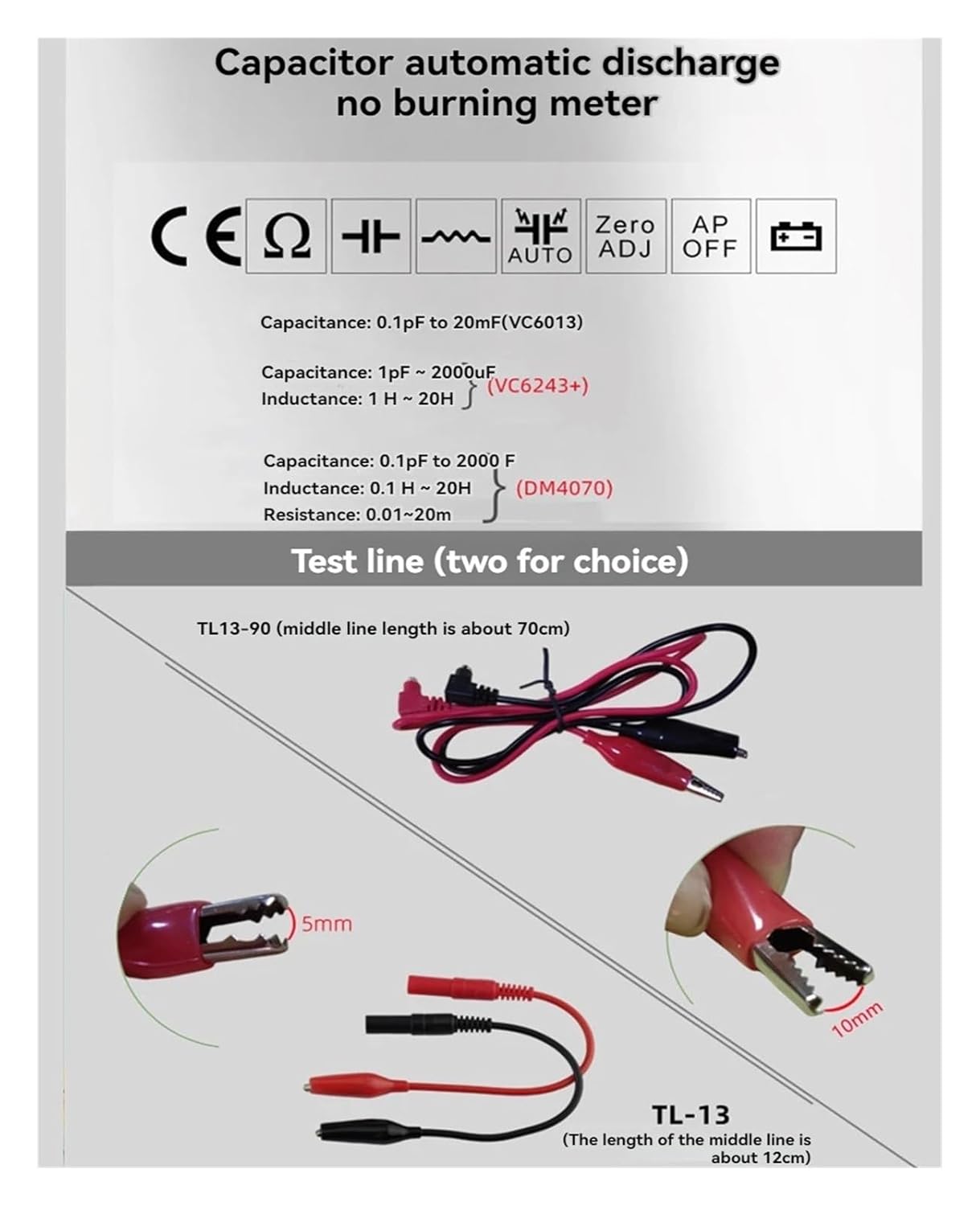
Image 5.1: The meter's display showing the measurement ranges for capacitance (1pF ~ 2000uF) and inductance (1uH ~ 20H).
- Turn the central rotary switch to select the desired measurement function: Capacitance (C) or Inductance (L).
- The meter features automatic range selection. For manual range adjustment, if available, refer to the 'ADJ' knob or specific instructions for your model.
- The meter supports capacitance measurements from 1pF to 2000uF and inductance measurements from 1uH to 20H.
5.3 Zero Adjustment
- Before making a measurement, especially for small values, perform a zero adjustment.
- Ensure the test leads are not connected to any component.
- Turn the 'ADJ' knob until the display reads '000' or as close to zero as possible. This compensates for any residual capacitance or inductance in the test leads.
5.4 Performing Measurements

Image 5.2: The meter's display and features, emphasizing automatic discharge, automatic zeroing, and automatic power off.
- Select the appropriate measurement mode (C or L).
- Perform zero adjustment if necessary.
- Connect the test leads to the component you wish to measure. For capacitors, ensure they are discharged before connecting. The meter has an automatic discharge function.
- Read the value displayed on the LCD screen.
- Disconnect the test leads from the component after measurement.
6. Maintenance
6.1 Cleaning
- Wipe the meter's casing with a soft, damp cloth. Do not use abrasive cleaners or solvents.
- Ensure no moisture enters the meter's internal components.
6.2 Battery Replacement
- When the low battery indicator appears on the display, replace the batteries as described in Section 4.1.
- Dispose of old batteries according to local regulations.
7. Troubleshooting
- Meter does not power on: Check battery installation and ensure batteries are not depleted.
- Inaccurate readings: Perform zero adjustment. Ensure test leads are properly connected and not damaged. Verify the component is correctly connected.
- No reading/"OL" display: The component value might be outside the meter's measurement range, or there might be an open circuit.
- Meter freezes: Try powering off and on again. If the issue persists, replace batteries.
8. Specifications
| Specification | Detail |
|---|---|
| Type | Digital LCR Bridge |
| Model Number | VC6243+ |
| Capacitance Range | 1pF to 2000uF |
| Inductance Range | 1uH to 20H |
| Power Source | Battery Powered |
| Manufacturer | OKANEN |
| Specification Met | UL |
| Package Dimensions | 0.39 x 0.39 x 0.39 inches |
| Item Weight | 1.76 ounces |
9. Warranty and Support
For warranty information or technical support, please refer to the documentation provided with your purchase or contact OKANEN customer service through their official website or the retailer where the product was purchased. Please have your model number (VC6243+) and purchase details ready when contacting support.