
Introduction
The BIELMEIER Handheld Pool Vacuum CPV-2040 is designed for efficient and convenient cleaning of various pool types, including in-ground pools, above-ground pools, spas, and hot tubs. This cordless unit features powerful suction, an extended battery life, and a versatile design for comprehensive debris removal.
It is equipped with a robust motor providing a flow rate of 19 gallons per minute, capable of collecting debris such as acorns, twigs, leaves, dirt, and sand. The vacuum is not intended for floating algae. Its enhanced waterproof design ensures durability and reliability.
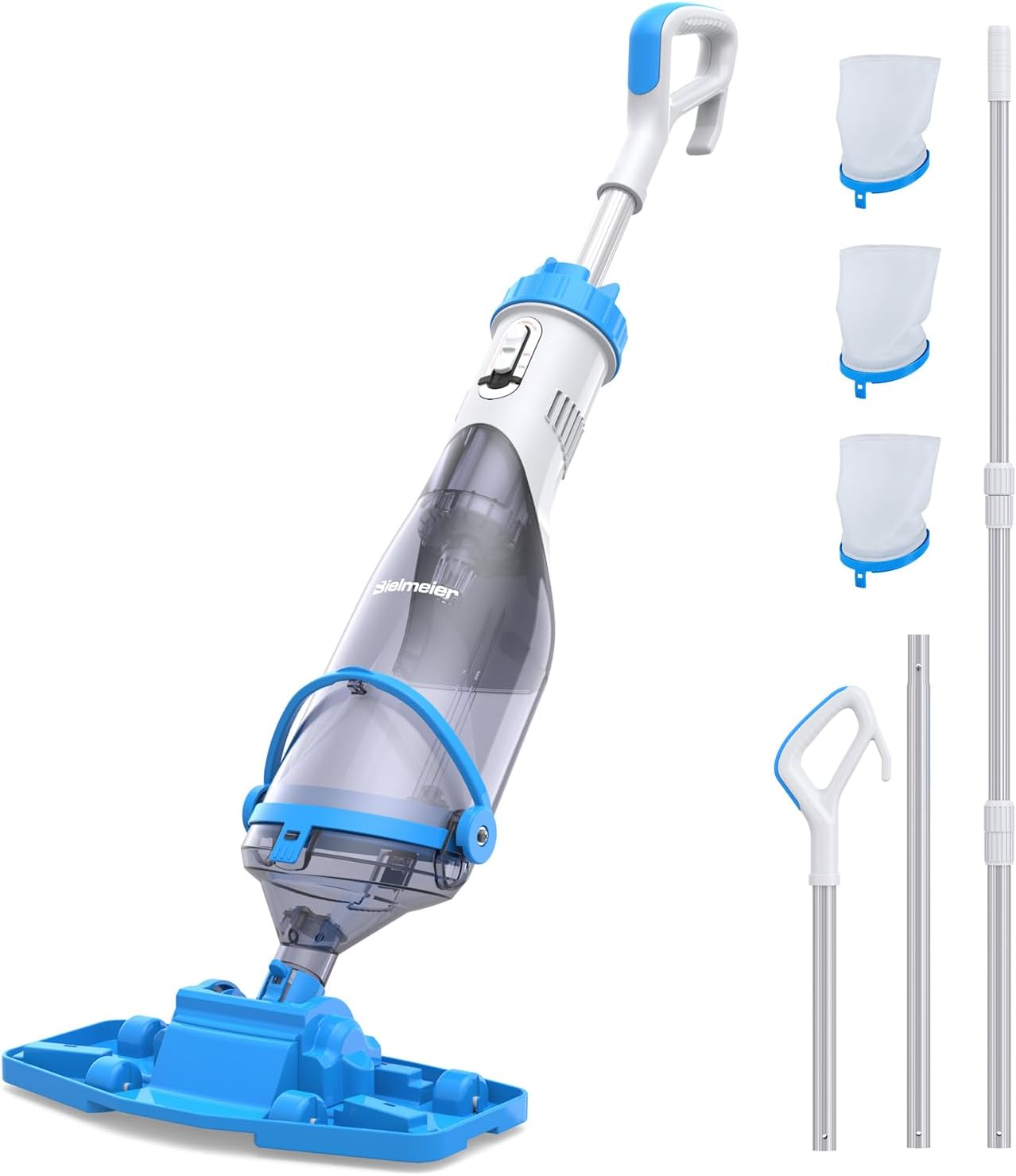
Image: The BIELMEIER Handheld Pool Vacuum with its telescopic pole attached, ready for use.
Package Contents
Verify that all components are present in the package:
- Main Vacuum Unit
- Telescopic Pole (extendable from 3 to 9 ft)
- Handheld Handle
- Standard Vacuum Head
- Detachable Nozzle for tight corners
- Three Filter Nets (180µm, 300µm, 500µm)
- Charger
- User Manual

Image: All components of the BIELMEIER Handheld Pool Vacuum laid out, including the main unit, poles, and filter bags.
Setup Instructions
- Charge the Battery: Before first use, fully charge the integrated 2600mAh lithium battery. Connect the charger to the vacuum unit and a power outlet. The charging indicator will show the charging status. A full charge provides up to 75 minutes of cleaning time.
- Assemble the Filter: Select the appropriate filter net (180µm for fine particles, 300µm for general debris, 500µm for large leaves). Insert the chosen filter net into the filter compartment of the main vacuum unit. Ensure it is securely seated.
- Attach Handle or Pole: Choose between the handheld handle for close-up cleaning or the telescopic pole for extended reach. Securely attach your chosen handle or pole to the main vacuum unit. The telescopic pole can extend from 3 to 9 feet.
- Attach Vacuum Head: Connect the standard vacuum head for wide cleaning areas or the detachable nozzle for corners and tight spots to the end of the vacuum unit. Ensure a secure connection.

Image: An exploded view showing the various components of the pool vacuum, illustrating how they fit together during assembly.
Video: An overview of the BIELMEIER Cordless Pool Vacuum, demonstrating its features and basic assembly. (Source: GJ Trade)
Operating Instructions
- Power On: Press the power button on the main unit to turn on the vacuum.
- Submerge: Carefully submerge the vacuum unit into the water, ensuring the water outlet is fully immersed. This allows water to flow through the unit and initiate suction.
- Begin Cleaning: Move the vacuum head slowly and steadily across the pool or spa surfaces, similar to vacuuming a floor. The powerful suction will draw in debris.
- Targeted Cleaning: For hard-to-reach areas, switch to the detachable nozzle. For larger open areas, use the standard wide brush head.
- Monitor Filter: If suction power decreases, the filter net may be full and require cleaning.
- Power Off: Once cleaning is complete, remove the vacuum from the water and press the power button to turn it off.
Important Note: This vacuum is designed for submerged cleaning of debris. It is not effective for removing floating algae or surface debris.

Image: The BIELMEIER Handheld Pool Vacuum being used with its telescopic pole to clean the bottom of a pool.

Image: The BIELMEIER Handheld Pool Vacuum being operated in handheld mode for cleaning steps or smaller areas.
Maintenance
Filter Cleaning
Regular cleaning of the filter net is crucial for maintaining optimal suction performance.
- Remove Filter: After each use, or when suction decreases, detach the filter compartment from the main unit. Carefully remove the filter net.
- Rinse: Rinse the filter net thoroughly under running water to remove all collected debris. Ensure no particles remain trapped in the mesh.
- Reinstall: Once clean, allow the filter net to dry completely before reinstalling it into the vacuum unit. Ensure it is properly seated before reattaching the compartment.

Image: A hand removing the filter from the BIELMEIER Pool Vacuum for cleaning.
Video: A demonstration on how to replace the filter in the BIELMEIER Handheld Pool Vacuum. (Source: Aote US)
Battery Care
- Always ensure the charging port is dry before connecting the charger.
- Store the vacuum in a cool, dry place when not in use, especially during off-season.
- Avoid fully depleting the battery before recharging to prolong its lifespan.

Image: Close-up of the BIELMEIER Pool Vacuum's charging port, showing the protective rubber cover.
Troubleshooting
| Problem | Possible Cause | Solution |
|---|---|---|
| Reduced Suction Power |
|
|
| Vacuum Does Not Turn On |
|
|
| Debris Escapes Back into Pool |
|
|
Specifications
- Brand: BIELMEIER
- Model Name: CPV-2040
- Model Number: CPV-20401
- Material: Plastic
- Color: Blue
- Power Source: Battery Powered (Lithium-Ion)
- Battery Capacity: 2600mAh (approx. 5 watt-hours)
- Operating Time: Up to 75 minutes (fully charged)
- Suction Flow Rate: 19 Gallons per Minute (GPM)
- Hose Length (Telescopic Pole): 3 to 9 feet
- Filter Net Gauges: 180µm, 300µm, 500µm
- Control Method: Touch
- Installation Type: Manual
Warranty Information
For detailed warranty information regarding your BIELMEIER Handheld Pool Vacuum CPV-2040, please refer to the official warranty documentation included with your purchase or visit the BIELMEIER official website. Warranty terms and conditions may vary by region and retailer.
Customer Support
Should you require technical assistance, have questions about product operation, or need to report an issue, please contact BIELMEIER customer service. Contact information can typically be found on the product packaging, the BIELMEIER official website, or through your retailer.