
1. Product Overview
The TEMIRUP CM87B is a True-RMS 6000 count digital clamp meter designed for accurate measurement of various electrical parameters. It features an auto-ranging function and a D-shaped jaw for convenient clamping on cables. This device is suitable for troubleshooting household, automotive, and industrial electrical systems.
1.1 Key Features
- True-RMS 6000 Count Display
- Measures AC Current, AC/DC Voltage, Temperature, NCV, Capacitance, Resistance, Frequency, Continuity, and Diode
- D-Shaped Jaw with 1.18-inch opening for various cables
- Variable Frequency Drive Filtering (VFD) for higher accuracy
- Non-Contact Voltage (NCV) detection
- Data Hold, Automatic Range, Max/Min functions
- Auto Shut-off and Low Battery Indicator
- Audible and Visual Alarm
- LCD Backlit Screen and Flashlight for visibility
- Full range Overload Protection (600V)
1.2 Package Contents
- TEMIRUP CM87B Digital Clamp Multimeter
- Test Leads (Red and Black)
- K-type Thermocouple
- Screwdriver
- Multimeter Hard Case
- 2 x 1.5V AAA Batteries
- User Manual

Image 1.1: The TEMIRUP CM87B Digital Clamp Meter shown with its included accessories: test leads, thermocouple, screwdriver, hard case, and batteries.
2. Safety Information
To ensure safe operation and avoid damage to the meter, please read and follow all safety instructions carefully. This meter complies with IEC 61010-1, CAT III 600V overvoltage standards.
- Always inspect the meter and test leads for any damage before use.
- Do not apply more than the rated voltage, as marked on the meter, between terminals or between any terminal and earth ground.
- Use caution when working with voltages above 30V AC RMS, 42V peak, or 60V DC. These voltages pose a shock hazard.
- Always disconnect the circuit power and discharge all high-voltage capacitors before performing resistance, continuity, or diode tests.
- Do not operate the meter with the battery cover removed or loosened.
- Replace batteries as soon as the low battery indicator appears to ensure accurate readings.
- Ensure the function knob is set to the correct range before making measurements.
3. Setup
3.1 Battery Installation
The TEMIRUP CM87B requires two 1.5V AAA batteries (included). To install or replace batteries:
- Ensure the meter is powered off.
- Locate the battery compartment on the back of the meter.
- Use the included screwdriver to loosen the screw on the battery cover.
- Remove the battery cover.
- Insert the two AAA batteries, observing the correct polarity (+ and -).
- Replace the battery cover and tighten the screw.

Image 3.1: The internal view of the TEMIRUP CM87B, illustrating the battery compartment and internal circuitry.
3.2 Connecting Test Leads and Thermocouple
For voltage, resistance, capacitance, continuity, and diode measurements, connect the test leads to the input jacks:
- Insert the black test lead into the COM (common) jack.
- Insert the red test lead into the INPUT jack.
For temperature measurements, connect the K-type thermocouple:
- Insert the thermocouple's black plug into the COM jack.
- Insert the thermocouple's red plug into the INPUT jack.

Image 3.2: The TEMIRUP CM87B with the red and black test leads properly connected to the COM and INPUT jacks.
4. Operating Instructions
4.1 Power On/Off
To power on the meter, rotate the function knob from the OFF position to any desired measurement function. To power off, rotate the function knob back to the OFF position. The meter features an auto-shutoff function after approximately 15 minutes of inactivity to conserve battery life.
4.2 Function Selection
Rotate the function knob to select the primary measurement category. Use the SEL button to cycle through sub-functions within a category (e.g., AC Voltage / DC Voltage, Resistance / Continuity / Diode).
- AC Current (A~): Measure alternating current using the clamp jaw.
- AC/DC Voltage (V~/V-): Measure alternating or direct current voltage using test leads.
- Resistance (Ω): Measure electrical resistance using test leads.
- Capacitance (F): Measure capacitance using test leads.
- Continuity ( ))): Test for circuit continuity using test leads. An audible beep indicates continuity.
- Diode (→|): Test diode functionality using test leads.
- Temperature (°C/°F): Measure temperature using the thermocouple. Press SEL to switch between Celsius and Fahrenheit.
- Non-Contact Voltage (NCV): Detect AC voltage without physical contact.
- Variable Frequency Drive (VFD): Measure AC parameters in variable frequency environments.

Image 4.1: The TEMIRUP CM87B displaying various measurement functions and their corresponding symbols.
4.3 AC Current Measurement (Clamp Function)
To measure AC current:
- Rotate the function knob to the AC Current (A~) position.
- Press the trigger to open the D-shaped jaw.
- Place the jaw around a single conductor (not a bundle of wires) through which the current is flowing. Ensure the conductor is centered within the jaw for accuracy.
- Release the trigger to close the jaw. The current reading will be displayed on the screen.

Image 4.2: The TEMIRUP CM87B clamp meter actively measuring AC current by clamping around a single electrical cable.
4.4 Non-Contact Voltage (NCV) Testing
To detect AC voltage without contact:
- Rotate the function knob to the NCV position or press the NCV button.
- Move the NCV sensing area (top of the clamp jaw) close to the conductor or electrical outlet.
- The meter will indicate voltage presence with an audible beep and visual alerts on the screen: "--L" for weak AC signal and "--H" for strong AC signal, accompanied by a red backlight.

Image 4.3: The TEMIRUP CM87B demonstrating Non-Contact Voltage (NCV) detection, showing indicators for both low and high voltage presence.
4.5 Temperature Measurement
To measure temperature:
- Connect the K-type thermocouple to the COM and INPUT jacks as described in Section 3.2.
- Rotate the function knob to the Temperature (°C/°F) position.
- Place the thermocouple probe on or in the object whose temperature you wish to measure.
- The temperature reading will be displayed. Press the SEL button to switch between Celsius and Fahrenheit.

Image 4.4: The TEMIRUP CM87B actively measuring the temperature of a liquid using the included K-type thermocouple.
4.6 VFD Mode
The VFD (Variable Frequency Drive) mode is designed to provide accurate voltage and frequency measurements in environments with variable frequency drives, such as motor controls. To activate VFD mode, rotate the function knob to the VFD position. This mode filters out high-frequency noise, ensuring more stable and reliable readings.
4.7 Data Hold, Max/Min, Backlight, and Flashlight
- Data Hold: Press the HOLD button to freeze the current reading on the display. Press again to release.
- Max/Min: Press the MAX/MIN button to record the maximum or minimum measured value. Press again to cycle through MAX, MIN, and current readings.
- Backlight: The LCD screen features a backlight for improved visibility in dimly lit areas. It activates automatically or can be toggled.
- Flashlight: The built-in flashlight illuminates the work area. It can be activated by a dedicated button or by holding the HOLD button.
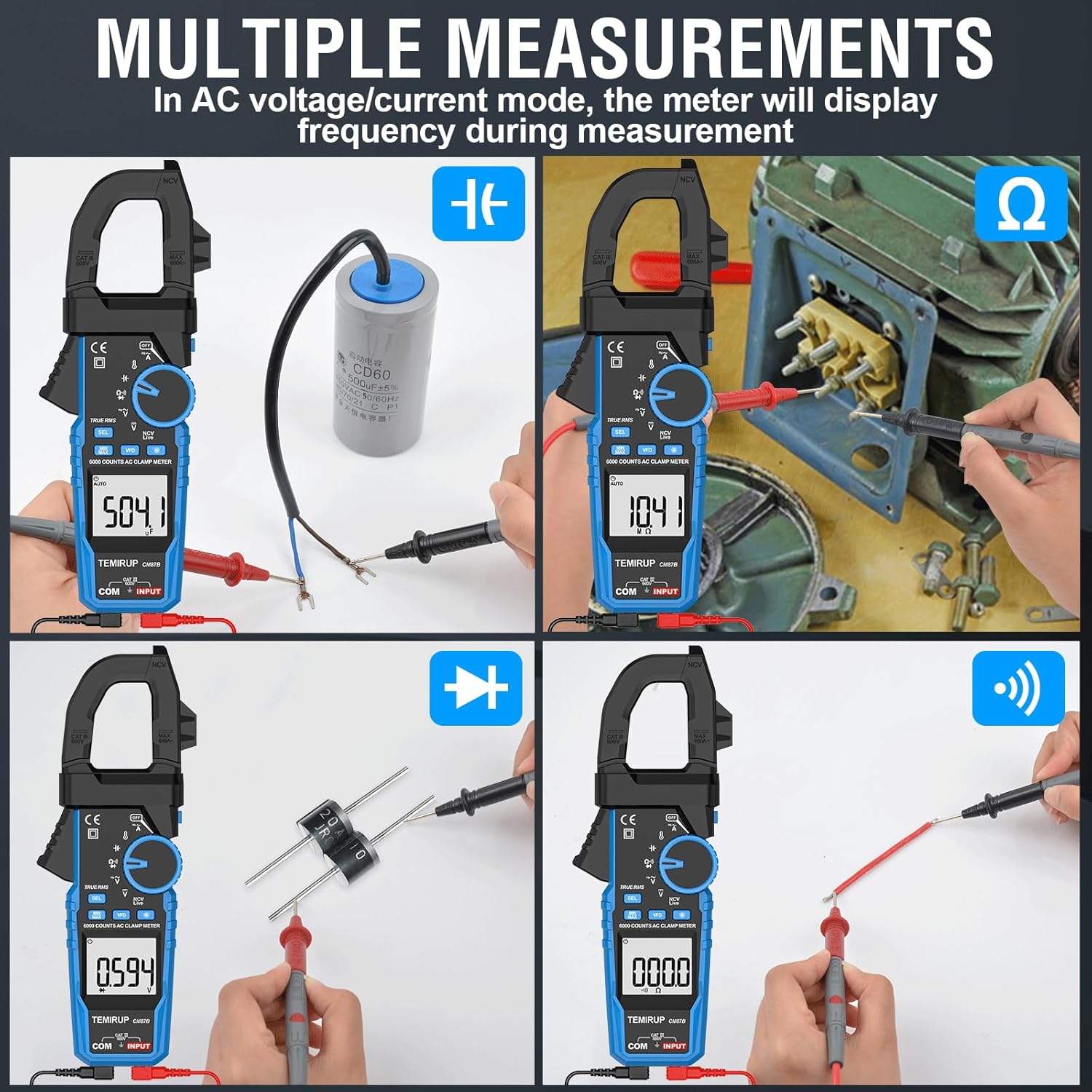
Image 4.5: The TEMIRUP CM87B demonstrating its backlight and flashlight features, enhancing visibility in low-light conditions.
5. Maintenance
Proper maintenance ensures the longevity and accuracy of your TEMIRUP CM87B Digital Clamp Meter.
- Cleaning: Wipe the meter's casing with a damp cloth and mild detergent. Do not use abrasives or solvents. Keep the display and input jacks clean and dry.
- Storage: When not in use for extended periods, remove the batteries to prevent leakage. Store the meter in its hard case in a cool, dry environment, away from direct sunlight and extreme temperatures.
- Battery Replacement: Replace batteries promptly when the low battery indicator appears. Refer to Section 3.1 for battery installation instructions.
- Test Lead Inspection: Regularly inspect test leads for any signs of damage, such as cracked insulation or exposed metal. Replace damaged leads immediately.
6. Troubleshooting
If you encounter issues with your TEMIRUP CM87B, refer to the following common troubleshooting steps:
- No Display or Faint Display: Check battery installation and replace batteries if necessary. Ensure the meter is powered on.
- Inaccurate Readings: Verify that the test leads are correctly connected and undamaged. Ensure the function knob is set to the appropriate measurement mode and range. Check for external interference.
- Continuity Test Not Working: Ensure the circuit is de-energized before testing. Check the test leads for proper connection and integrity.
- NCV Not Detecting: Ensure the NCV sensing area is close enough to the AC voltage source. Check battery level.
- Meter Does Not Respond: Try turning the meter off and then on again. If the issue persists, remove and reinsert the batteries.
7. Specifications
Detailed technical specifications for the TEMIRUP CM87B Digital Clamp Meter:
| Measurement | Range | Accuracy |
|---|---|---|
| AC Current | 6A/60A/600A | ±(3.0% reading + 8 digits) |
| DC Voltage | 600mV/6V/60V/600V | ±(1.0% reading + 3 digits) |
| AC Voltage | 6V/60V/600V | ±(1.0% reading + 3 digits) |
| Capacitance | 6nF/60nF/600nF/6µF/60µF/600µF/6mF/60mF | ±(5.0% reading + 10 digits) |
| Resistance | 600Ω/6kΩ/60kΩ/600kΩ/6MΩ/60MΩ | ±(2.0% reading + 5 digits) |
| Diode Test | 0-4V | Open circuit voltage: ~4V |
| Continuity Test | 600Ω | Open circuit voltage: ~2V |
| Frequency | 6Hz/60Hz/600Hz/6kHz/60kHz/600kHz/10MHz | ±(1.0% reading + 3 digits) |
| Temperature | -50~1000°C (-58~1832°F) | ±(2.0% reading + 4 digits) |
General Specifications:
- Automatic Measuring Range: Yes
- Overload Protection Voltage: 600V
- Maximum Input Voltage: AC/DC 600V
- Display: LCD
- Maximum Display Value: 5999
- Over-range Display: OL or -OL
- Sampling Time: About 3 times/second
- Auto-shutdown Time: About 15 minutes
- Backlight Auto-off: About 3 minutes
- Flashlight Auto-off: About 5 minutes
- Power Supply: 2 x 1.5V AAA batteries
- Dimension: 218mm x 75mm x 39mm (8.58 x 2.95 x 1.54 inches)
- Weight: About 240g (Without battery)

Image 7.1: A detailed diagram illustrating the dimensions and key components of the TEMIRUP CM87B Digital Clamp Meter.
8. Warranty and Support
TEMIRUP provides 24 months of after-sale service and technical support for your CM87B Digital Clamp Meter. If the clamp meter is damaged within 24 months of purchase, please contact our customer service team for assistance. Our 7/24 customer service is available to help with any inquiries or issues you may have.