
VEVOR 9449
VEVOR Electronic Dart Board Model 9449 Instruction Manual
Comprehensive guide for setup, operation, and maintenance.
1. Introduction
Thank you for choosing the VEVOR Electronic Dart Board Model 9449. This LED-illuminated dartboard offers a versatile darting experience with 48 preloaded game modes and over 500 gameplay variations, supporting up to 8 players. Designed for both beginners and enthusiasts, it features a honeycomb target surface to minimize bounce-outs and an LCD screen for clear score tracking. This manual provides essential information for safe and effective use of your dartboard.
2. Package Contents
Before installation, please verify that all components listed below are included in your package:
- 1 x VEVOR Electronic Dart Board
- 6 x Dart Shafts with Flights (3 red, 3 blue)
- 50 x Replacement Soft Dart Tips
- 1 x USB Power Cable
- 2 x Plastic Expansion Anchors
- 2 x Mounting Screws
- 1 x User Manual (this document)

3. Product Features
The VEVOR Electronic Dart Board is designed with several features to enhance your darting experience:
- Versatile Gameplay: Preloaded with 48 distinct game modes and over 500 variations, including popular games like Cricket and Count-Up. Supports up to 8 players.
- LED Illumination: Built-in LED lighting on the target surface ensures accurate aiming and visibility, even in low-light conditions.
- Reduced Bounce-Outs: Features a honeycomb target design with finely partitioned edges to improve dart retention and minimize darts bouncing off the board.
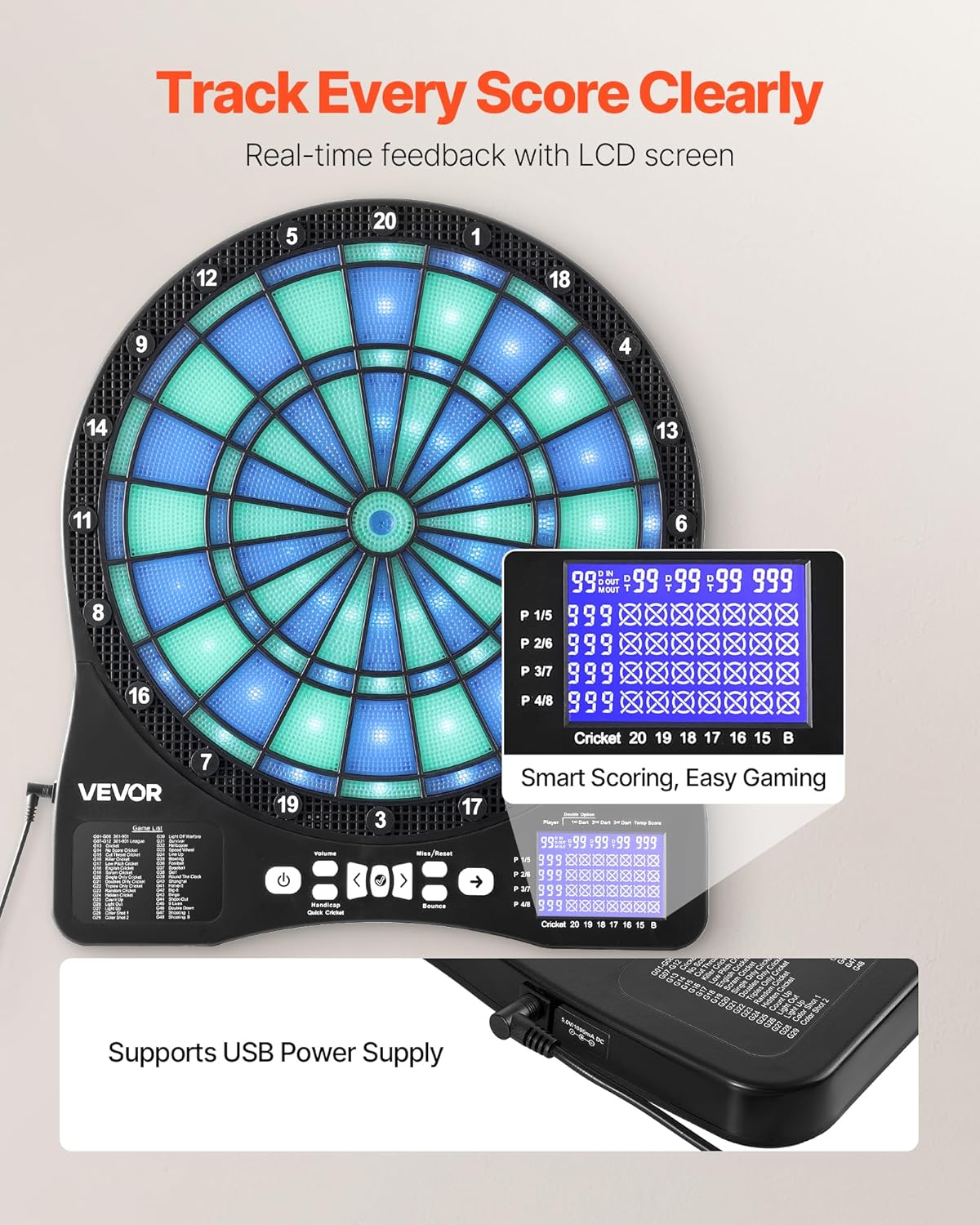
- Clear Score Tracking: An integrated LCD screen displays real-time scores and round progress. Includes miss dart detection and options for single/double bullseye and in-out.
- Player-vs-Computer Mode: Offers an engaging mode to play against a virtual opponent, enhancing challenge and practice.
- Durable Construction: Made from high-strength PP + ABS plastic, providing a stable and long-lasting surface resistant to wear and tear.
- Soft Tip Darts: Comes with soft-tip darts and replacement tips for safe play, preventing damage to walls and surfaces.

4. Setup and Installation
Follow these steps to properly install your VEVOR Electronic Dart Board:
- Choose a Suitable Location: Select a wall space that is clear of obstructions and provides enough room for players to stand at the regulation throwing distance (typically 7 feet 9.25 inches from the face of the board to the throwing line). Ensure there is adequate space around the board for safety.
- Determine Mounting Height: The center of the bullseye should be 5 feet 8 inches (1.73 meters) from the floor. Mark this height on your chosen wall.
- Install Mounting Hardware:
- Hold the dartboard against the wall at the desired height and mark the positions for the mounting screws through the keyhole slots on the back of the dartboard.
- Drill pilot holes at the marked positions. If mounting into drywall, insert the plastic expansion anchors before screwing in the mounting screws.
- Insert the screws into the anchors/wall, leaving a small gap (approximately 1/8 inch or 3mm) between the screw head and the wall.
- Mount the Dart Board: Carefully align the keyhole slots on the back of the dartboard with the installed screws. Slide the dartboard down to secure it firmly in place. Ensure the board is stable and level.
- Connect Power: Plug the USB power cable into the dartboard's power port and connect the other end to a compatible USB power adapter (not included) or a USB port.

5. Operating Instructions
Familiarize yourself with the control panel and basic operations:

5.1 Control Panel Overview
- Power Button (⏻): Turns the dartboard ON or OFF.
- Volume Buttons (- / +): Adjusts the sound volume.
- Game Select Buttons (< / >): Navigates through the available game modes.
- Player Select Button: Used to select the number of players.
- Start/Pause Button: Begins a game or pauses an ongoing game.
- Miss/Reset Button: Registers a missed dart or resets the current game.
5.2 Basic Operation
- Power On: Press the Power button (⏻) to turn on the dartboard. The LCD screen will illuminate.
- Select Game: Use the Game Select buttons (< / >) to browse through the 48 available game modes. The game name will be displayed on the LCD screen.
- Select Players: Press the Player Select button repeatedly to choose the number of players (1-8). The selected number of players will be shown on the LCD.
- Start Game: Once the game and player count are selected, press the Start/Pause button to begin the game.
- Throwing Darts: Throw the soft-tip darts at the target area. The dartboard will automatically register hits and display scores on the LCD.
- Missed Darts: If a dart misses the board or does not register, press the Miss/Reset button to advance to the next player or turn.
- Game End: The game will automatically end when the winning conditions are met. The winner will be displayed on the screen.
- Power Off: After playing, press and hold the Power button (⏻) to turn off the dartboard. It is recommended to unplug the dartboard when not in use to prevent potential issues.
5.3 Game Modes and Variations
The dartboard includes 48 main game modes with over 500 variations. Refer to the detailed game list provided on the dartboard's face for specific game rules and options. Common games include:
- Cricket: A strategic game focusing on closing out specific numbers (15-20 and bullseye).
- Count-Up: Players aim to reach a target score by accumulating points.
- 301/501/701 (X01 Games): Players start with a set score and subtract points until they reach exactly zero, often requiring a double to finish.
- Player-vs-Computer: Play against an AI opponent with adjustable difficulty levels.
Many games offer customizable options such as single/double bullseye, single/double in-out, and different scoring rules. Consult the on-board game list for full details.
6. Maintenance
Proper maintenance ensures the longevity and optimal performance of your dartboard:
- Cleaning: Wipe the dartboard surface and LCD screen with a soft, dry, or slightly damp cloth. Do not use abrasive cleaners, solvents, or excessive moisture, as these can damage the electronic components.
- Dart Tips: Regularly inspect the soft dart tips for wear or damage. Replace worn tips with the provided spares to maintain optimal performance and prevent damage to the board.
- Storage: When not in use for extended periods, unplug the dartboard and store it in a dry, cool place away from direct sunlight and extreme temperatures.
- Power Connection: Always ensure the USB power cable is securely connected. Avoid bending or kinking the cable.
7. Troubleshooting
If you encounter issues with your dartboard, refer to the following common problems and solutions:
| Problem | Possible Cause | Solution |
|---|---|---|
| Dartboard does not power on. | No power, loose connection, faulty power cable/adapter. | Ensure the USB power cable is securely plugged into both the dartboard and a working USB power source. Try a different USB adapter or port. |
| Darts are not registering scores. | Worn dart tips, dart not fully penetrating segment, segment malfunction. | Check dart tips and replace if worn. Ensure darts are thrown with sufficient force to fully enter the segment. If a specific segment consistently fails, contact support. |
| Darts bounce out frequently. | Worn dart tips, improper throwing technique, damaged segment. | Replace worn dart tips. Ensure darts are thrown straight and with appropriate force. The honeycomb design is intended to minimize bounce-outs. |
| LCD screen is blank or flickering. | Power issue, internal connection problem. | Check power connection. Try unplugging and re-plugging the dartboard. If the issue persists, contact support. |
| Dartboard freezes or behaves erratically. | Software glitch, power fluctuation. | Turn off the dartboard, unplug it for a few minutes, then plug it back in and restart. |
Important Note: As noted by user experience, it is recommended to unplug the dartboard when not in use for extended periods to prevent potential issues with the electronics.
8. Specifications
Detailed technical specifications for the VEVOR Electronic Dart Board Model 9449:
| Model Name: | Electronic Dart Board |
| Item Model Number: | 9449 |
| Brand: | VEVOR |
| Material: | Acrylonitrile Butadiene Styrene (ABS), Polypropylene (PP) |
| Color: | Blue, Green (LED illumination) |
| Product Dimensions (W x H): | 15.63" x 17.72" (397 mm x 450 mm) |
| Target Area Diameter: | 13.5 inches |
| Item Weight: | 3.09 Pounds (1.4 kg) |
| Display: | LCD Backlit Screen |
| Voltage/Current: | 5V / 1A (USB Power) |
| UPC: | 197988160939 |

9. Safety Information
Please read and adhere to the following safety guidelines:
- Adult Supervision: This dartboard is suitable for children over 10 years old under adult supervision.
- Soft Tip Darts Only: Use only soft-tip darts with this electronic dartboard. Do not use steel-tip darts, as they can damage the board and pose a safety hazard.
- Clear Playing Area: Ensure the playing area is clear of people, pets, and fragile objects before throwing darts.
- Power Supply: Use only the provided USB power cable and a compatible 5V/1A USB power adapter. Do not use damaged cables or adapters.
- Unplug When Not in Use: Always unplug the dartboard from the power source when not in use or during cleaning and maintenance.
- Avoid Water: Keep the dartboard away from water or other liquids to prevent electric shock or damage to electronic components.
- Mount Securely: Ensure the dartboard is securely mounted to the wall to prevent it from falling during play.
10. Warranty and Support
For warranty information or technical support, please refer to the contact details provided with your purchase or visit the official VEVOR website. Keep your purchase receipt as proof of purchase for any warranty claims.
Ask a question about this manual
Ask about setup, troubleshooting, compatibility, parts, safety, or missing instructions. Manuals+ will review the question and use this page’s manual context to help answer it.