
1. Introduction
The Bushnell Spot On 22MP 1080p HD Trail Camera (Model 66063CCW) is designed for capturing high-resolution images and videos of wildlife and outdoor activities. Featuring a durable, weather-resistant design and advanced imaging capabilities, this camera is suitable for various outdoor monitoring needs. Its compact size and treebark camouflage pattern allow for discreet placement in natural environments.
2. Package Contents
Verify that all items listed below are included in your package:
- Bushnell Spot On 22MP 1080p HD Trail Camera
- 16GB SD Card
- AA Batteries (Quantity: 8)
- Mounting Strap

Figure 2.1: Included accessories with the Bushnell Spot On Trail Camera. This image shows the trail camera, a 16GB SD card, eight AA batteries, and a mounting strap, all essential for immediate use.
3. Key Features
- High-Resolution Images: Captures 22 MP still images for clear and detailed photos.
- Full HD Video: Records 1080p HD video footage.
- Advanced Auto Exposure: Prevents overexposed or "white out" images, ensuring better clarity.
- Fast Trigger Speed: A rapid 0.4-second trigger speed minimizes missed shots of fast-moving subjects.
- Low Glow IR Night Vision: Features 80-foot (24.4 meters) Low Glow Infrared illumination for discreet night-time recording without startling wildlife.
- Compact and Discreet Design: Slim construction with a treebark camouflage pattern for easy concealment.
- Weather Resistance: Durable construction designed to withstand various outdoor elements and conditions.
4. Setup
4.1. Battery Installation
- Open the camera housing latch located on the side of the unit.
- Locate the battery compartment. Insert eight (8) AA batteries, ensuring correct polarity (+/-) as indicated inside the compartment.
- Close the battery compartment cover securely.
4.2. SD Card Insertion
- With the camera housing open, locate the SD card slot.
- Insert the provided 16GB SD card into the slot with the label facing up, until it clicks into place.
- To remove the SD card, gently push it in until it clicks, then release, and it will eject.
4.3. Mounting the Camera
The camera can be mounted using the included mounting strap or a tripod (not included).
- Using the Mounting Strap: Thread the strap through the slots on the back of the camera. Secure the camera to a tree or post at the desired height and angle. Ensure the camera is stable and pointed towards the area you wish to monitor.
- Using a Tripod: The camera features a standard 1/4"-20 tripod mount on the bottom for alternative mounting options.

Figure 4.1: Rear view of the Bushnell Spot On Trail Camera. This image highlights the mounting strap slots and the product information label, which includes the model number and regulatory marks.
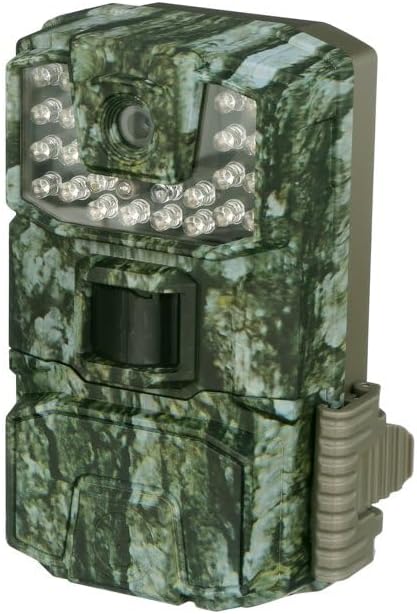
Figure 4.2: Front view of the Bushnell Spot On Trail Camera. This image displays the camera lens, the motion sensor, and the array of Low Glow IR LEDs for night vision.
5. Operating the Camera
5.1. Powering On/Off
To power on the camera, slide the power switch to the "ON" position. To power off, slide the switch to "OFF".
5.2. Mode Selection
The camera typically features different operating modes, such as Photo, Video, and Setup. Use the internal controls (buttons and display) to navigate and select your desired mode.
5.3. Setting Date and Time
Access the "Setup" mode to configure the current date and time. This ensures accurate timestamps on your captured images and videos.
5.4. Capturing Images and Videos
Once configured and placed, the camera will automatically capture images or videos based on motion detection and your selected settings. The 0.4-second trigger speed ensures quick capture.
5.5. Viewing Captured Media
To view images and videos, remove the SD card from the camera and insert it into a compatible device (e.g., computer, card reader). Alternatively, some models may feature an internal display for review.
6. Maintenance
- Cleaning: Use a soft, dry cloth to clean the camera lens and IR sensors. Avoid abrasive materials or harsh chemicals.
- Battery Care: Replace all batteries simultaneously with new ones. Do not mix old and new batteries or different battery types. Remove batteries if the camera will be stored for extended periods to prevent leakage.
- SD Card Management: Regularly format your SD card to maintain optimal performance and prevent data corruption. Back up important files before formatting.
- Storage: Store the camera in a cool, dry place when not in use.
7. Troubleshooting
| Problem | Possible Cause | Solution |
|---|---|---|
| Camera not powering on. | Low or dead batteries; incorrect battery polarity. | Replace all batteries with fresh AA batteries, ensuring correct polarity. |
| No images/videos captured. | SD card full or corrupted; incorrect settings; motion sensor blocked. | Format the SD card; check camera settings (e.g., mode, sensitivity); ensure clear line of sight for the motion sensor. |
| Poor image/video quality. | Dirty lens; low light conditions; subject too far or too close. | Clean the camera lens; adjust camera placement for optimal lighting and distance. |
| Night vision not working. | IR sensors blocked or dirty; insufficient power. | Clean IR sensors; ensure batteries are fully charged. |
8. Specifications
| Model Name | Spot On |
| Model Number | 66063CCW |
| Image Resolution | 22 MP |
| Video Resolution | 1080p HD |
| Trigger Speed | 0.4 seconds |
| Night Vision Range | 80 feet (Low Glow IR) |
| Power Source | 8x AA Batteries |
| Memory | SDHC Card (up to 32GB, 16GB included) |
| Connectivity Technology | SDHC |
| Indoor/Outdoor Usage | Outdoor |
| Mounting Type | Tree Mount |
| Water Resistance Level | Water Resistant |
| Item Dimensions (L x W x H) | 14 x 10.2 x 7.6 Centimetres |
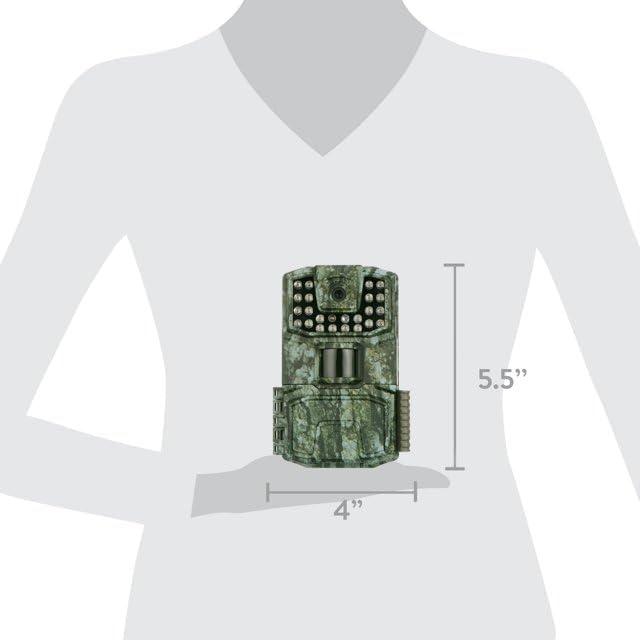
Figure 8.1: Dimensions of the Bushnell Spot On Trail Camera. The diagram indicates a height of 5.5 inches and a width of 4 inches, providing a visual reference for its compact size.
9. Warranty Information
The Bushnell Spot On 22MP 1080p HD Trail Camera is covered by a 1-year manufacturer's warranty from the date of purchase. This warranty covers defects in materials and workmanship under normal use. For specific terms, conditions, and claim procedures, please refer to the official Bushnell website or contact customer support.
10. Customer Support
For technical assistance, troubleshooting beyond this manual, or warranty claims, please contact Bushnell Customer Support:
- Website: Visit the official Bushnell website for FAQs, product registration, and support resources.
- Contact Information: Refer to the Bushnell website for current phone numbers and email addresses for your region.
When contacting support, please have your product model number (66063CCW) and proof of purchase readily available.


